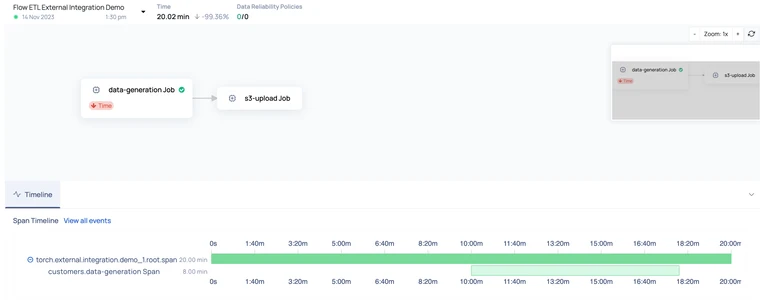
In scenarios where direct pipeline instrumentation encounters challenges, our updated capabilities offer a flexible approach. While real-time tracking traditionally assumes instant span creation, this may not align with cases involving pipeline execution details sourced from databases or APIs.
To address this, we have optimized our API or SDK to efficiently load pipeline monitoring metadata independently of the platform's ongoing activity.
Prerequisites
Supported by the acceldata_sdk version, commencing from acceldata-sdk.2.12.0.
Note The Control Plane must also be on version >= 2.12.0.
No Real-Time Alerts: Real-time alerts are triggered only for current activities. Historical loads will not trigger the following real-time alerts.
Pipeline Alerts
Pipeline Duration: Set alerts based on user-defined thresholds.
Pipeline Start Time: Configure alerts based on user-defined thresholds.
Pipeline End Time: Establish alerts based on user-defined thresholds.
Job Alerts
Job Duration: Set alerts based on user-defined thresholds.
Job Start Time: Configure alerts based on user-defined thresholds.
Job End Time: Establish alerts based on user-defined thresholds.
Span Alerts
Span Duration: Set alerts based on user-defined thresholds.
Span Start Time: Configure alerts based on user-defined thresholds.
Span End Time: Establish alerts based on user-defined thresholds.
Event Based Alerts: Evaluated as soon as the span events are received.
Post-Processing Alerts: Avoid configuring post-processing alerts for historical loads; allocate them for upcoming data flows. The following are the post-processing alerts:
Pipeline Alerts
Pipeline Duration: Set alerts based on previous executions.
Pipeline Start Time: Configure alerts based on previous executions.
Pipeline End Time: Establish alerts based on previous executions.
Job Alerts
Job Duration: Set alerts based on previous executions.
Job Start Time: Configure alerts based on previous executions.
Job End Time : Establish alerts based on previous executions.
Span Alerts
Span Duration: Set alerts based on previous executions.
Span Start Time: Configure alerts based on previous executions.
Span End Time: Establish alerts based on previous executions.
Event Based Alerts: Evaluated as soon as the span events are received, making it applicable for historical processing.
Creating a Historical Pipeline
Creating a pipeline with explicit times: While creating a pipeline for historical load, the
createdAtfield specifying the pipeline creation time needs to be passed.
Updating a pipeline with explicit times: When updating any details of the pipeline for historical load, the
updatedAtfield needs to be passed.
Creating Pipeline run with explicit times: The
startedAtparameter needs to be set with the historical pipeline run creation time.
Creating spans to support sending span events with explicit times: In order to enable start span events to consume the historical time the flag
with_explicit_timeparameter needs to be set toTruewhile span creation. If this parameter is not set, spans will be created and the span start event will be sent with the current time.
Sending span events with explicit times: The historical span event start/end/failed/abort times can be passed using the
created_atparameter.
Creating jobs bound by span with explicit times: When jobs bound by span are created, ensure that the bounded span supports explicit times. To enable the span start event corresponding to the bounded span with the job, the
with_explicit_timeparameter needs to be set, else the span will be bound and start with the current time.
Updating pipeline run with explicit times: To end the pipeline run with historical time, the
finishedAtparameter needs to be set, otherwise the span will end with the current time.
Here is a snapshot of the pipeline reconstructed back in time using the above code: