
Troubleshooting ODP
This section helps you with solving and configuring common issues related to component installation in ODP.
Configure /tmp
If /tmp is required to be mounted as exec but compliance issues necessitate mounting it as noexec, follow the steps below on every node to create an alternative tmp directory:
- Create an alternative tmp directory:
sudo mkdir -p /hadoop/tmp
sudo chown root:hadoop /hadoop/tmp
sudo chmod 1770 /hadoop/tmp
- Update Ambari configuration for respective services:
- For HBase, YARN-HBase (Timeline Reader), and Ambari Metrics (AMS): In Ambari, update the configurations YARN
yarn-hbase-envams-hbase-envhbase-env
export HBASE_OPTS="$HBASE_OPTS -Dorg.apache.hbase.thirdparty.io.netty.native.workdir=/hadoop/tmp"
- For Knox: Directly update
gateway.shknoxcli.sh
-Djava.io.tmpdir=/hadoop/tmp -D*jna*.tmpdir=/hadoop/tmp
- For HDFS/YARN/MR: Override
HADOOP_OPTS
-Djava.io.tmpdir=/hadoop/tmp
The above adjustments ensure compatibility and functionality despite the noexec mount constraint.
Impala
- Update/add these configurations respectively for smooth impala installation
Pre-installation > Update in impala-env, if not set :
is_coordinator = true
[INLINE_CODE]is_executor = true[/INLINE_CODE]
Post-installation > Add custom properties in hadoop core-site :
hadoop.proxyuser.impala.groups=*
[INLINE_CODE]hadoop.proxyuser.impala.hosts=*[/INLINE_CODE]
- Impala service failed to register ranger authorization :
E0524 21:09:47.710661 104717 catalog.cc:87] InternalException: Unable to instantiate authorization provider: org.apache.impala.authorization.ranger.RangerAuthorizationFactory
CAUSED BY: InvocationTargetException: null
CAUSED BY: IllegalArgumentException: bound must be positive
Ensure ranger is enabled in impala configs. If issue issue still persists, current workaround requires handlers to manage and update hive clients and ranger policies.
- Created dir /etc/ranger/<cluster_name>_hive/policycache and copied respective files from HiveServer2 to impala components
- Copied files /etc/hive/3.2.2.0-2/0/ranger-hive-audit.xml, ranger-hive-security.xml from HS2 to impala components
Ranger
- If KMS ranger policy fails to create. Perform the following steps:
- Remove the empty KMS policy folder from CLI
- Restart Ranger from Ambari UI
- Then, Restart Ranger KMS from Ambari UI 2. If service repo creation fails with missing rangerlookup user, create rangerlookup user manually from Ranger UI.
Spark2
Note
During the installation of Spark2, if the user interface displays "installing Livy3" instead of "Livy2," it is a typographical error on the UI front and can be disregarded.
MySQL 8.x
- If service setup or start fails with the error "Host 'host' is blocked because of many connection errors; unblock with 'mysqladmin flush-hosts'", follow these steps:
# Check and increase max connections
# MySQL shell
SET GLOBAL max_connect_errors=100000;
- If MySQL connection fails with the error "SQLException: SQL state: 08001 java.sql.SQLNonTransientConnectionException: Public Key Retrieval is not allowed ErrorCode: 0", this is caused by the default authentication plugin change from
mysql_native_passwordcaching_sha2_password
To fix this issue, add ?allowPublicKeyRetrieval=true&useSSL=false"jdbc:mysql://hostname:3306/ranger?allowPublicKeyRetrieval=true&useSSL=false"
Ozone
- Ozone service check fails when Ranger is enabled. To resolve this issue, add a new policy granting
ambari-qaambarismokevolume
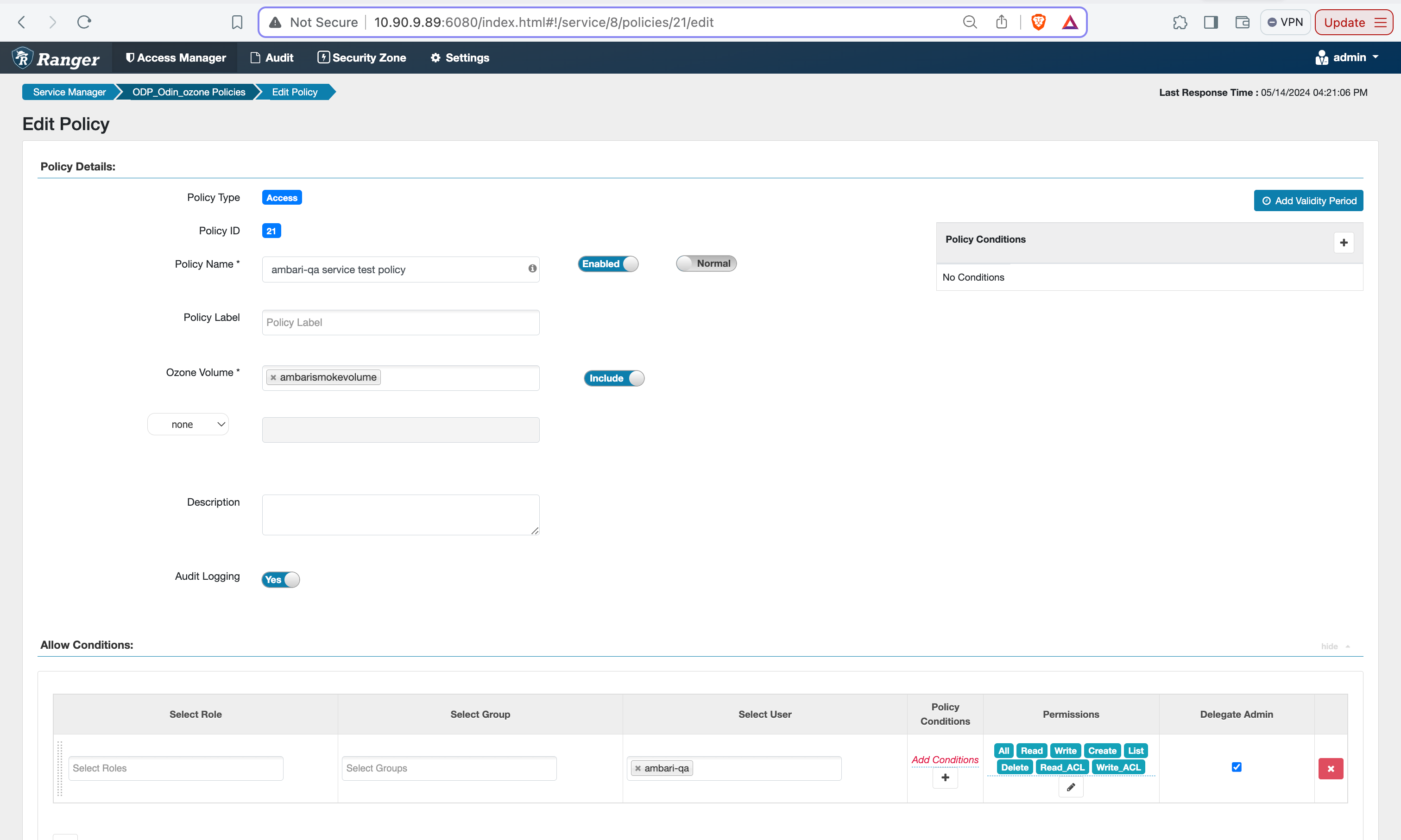
Service check is unsuccessful:
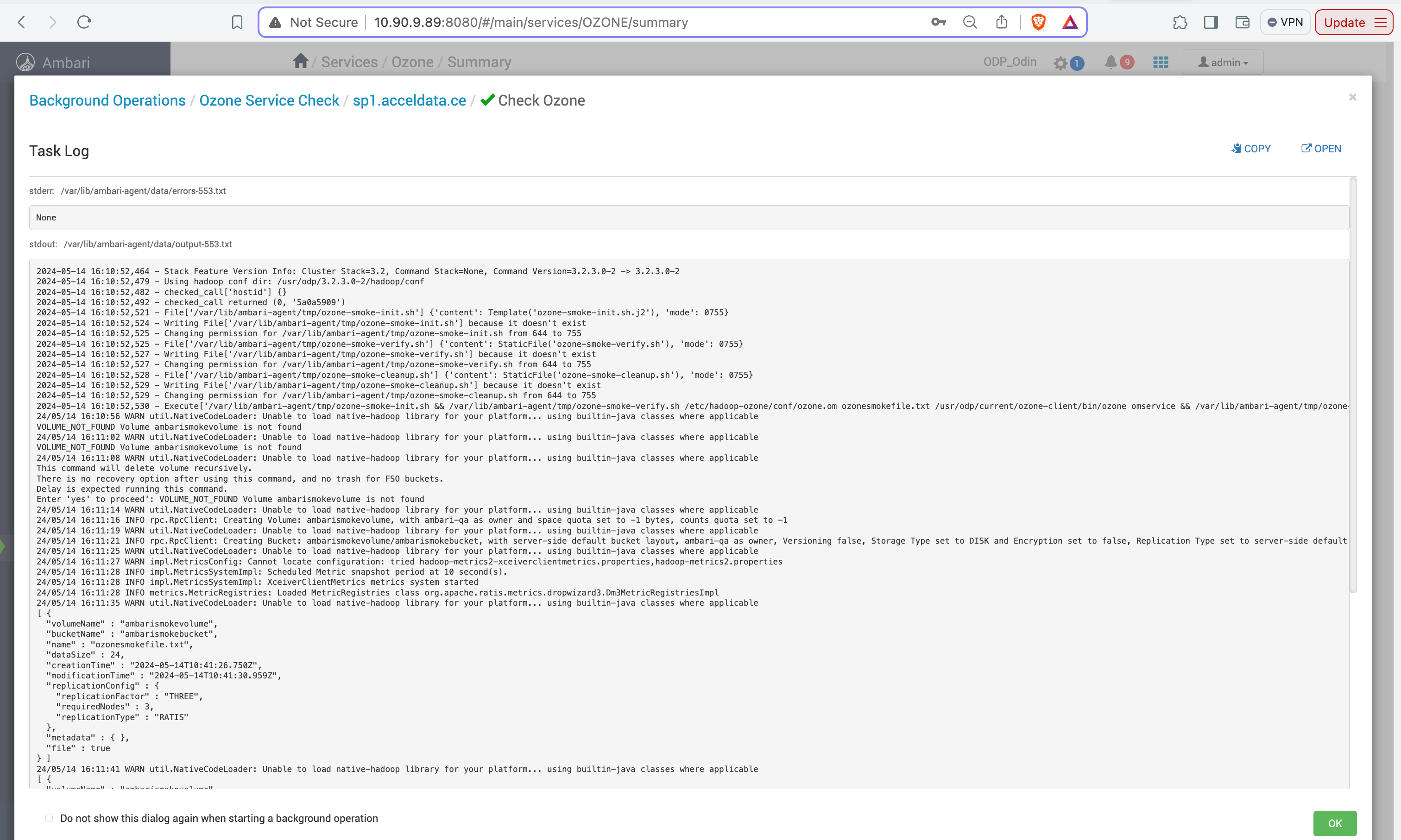
- Ozone Manager start fails with process cannot set priority:
- Check Ozone Manager Java Heap size and re-configure the value according to the available heap memory through the Ambari UI.
- Restart the Ozone Manager service after making these changes.
- If queries fail with the following error due to restrictions when using end-user permissions in Hive: "org.apache.hadoop.security.authorize.AuthorizationException: User: hive is not allowed to impersonate ..."
You can resolve this issue by following these steps:
- Access the Ambari UI.
- Navigate to Ozone > Configurations.
- Locate Custom Core-site configurations.
- Add the following settings:
- hadoop.proxyuser.hive.groups=*
- hadoop.proxyuser.hive.hosts=*
- hadoop.proxyuser.hive.users=*
- Restart the affected services after applying these configurations.
Have a suggestion?