
ODP Rolling upgrade
Follow the below steps for ODP rolling upgrade.
Pre-requisite
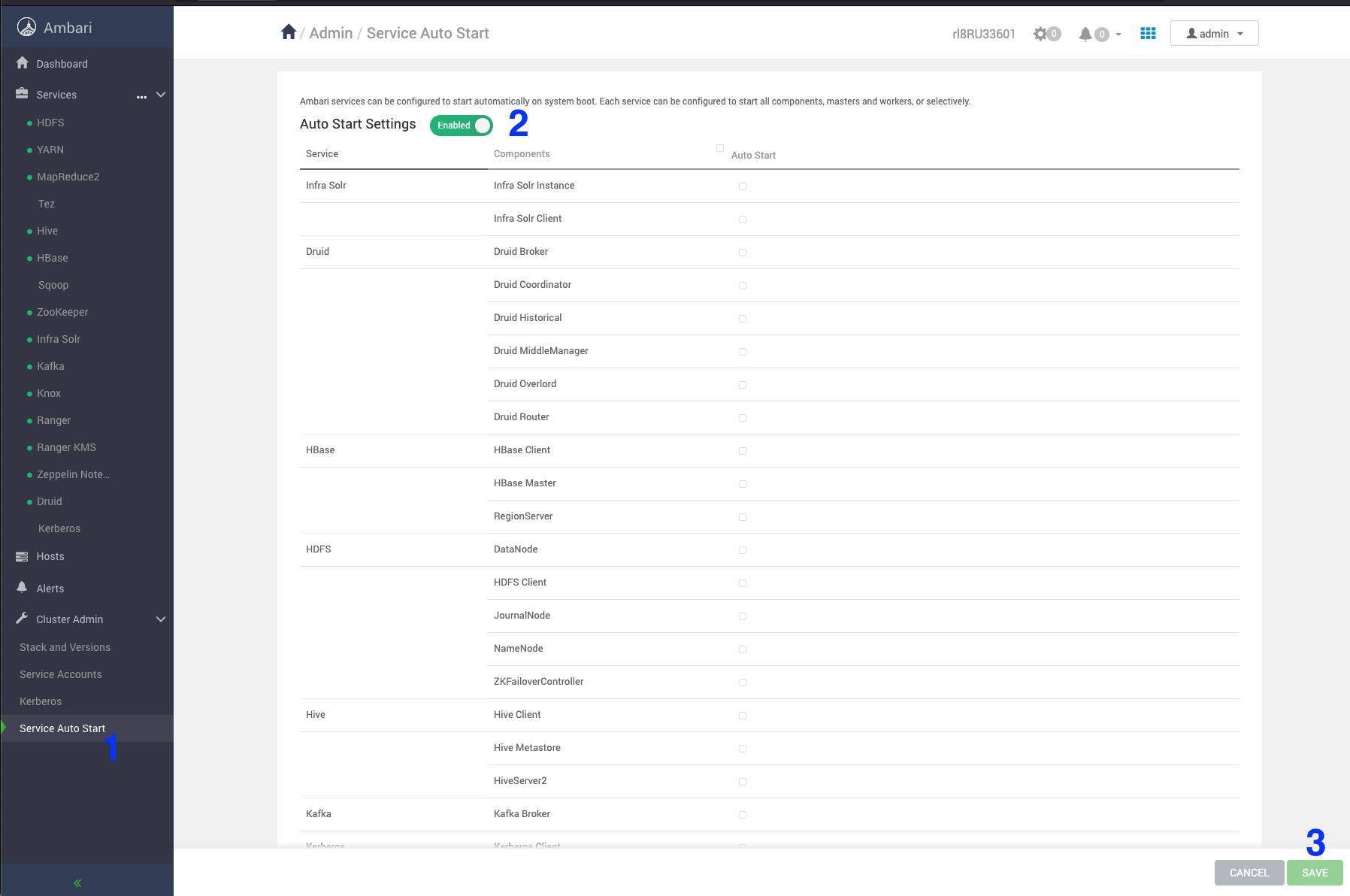
Stop the service auto restart
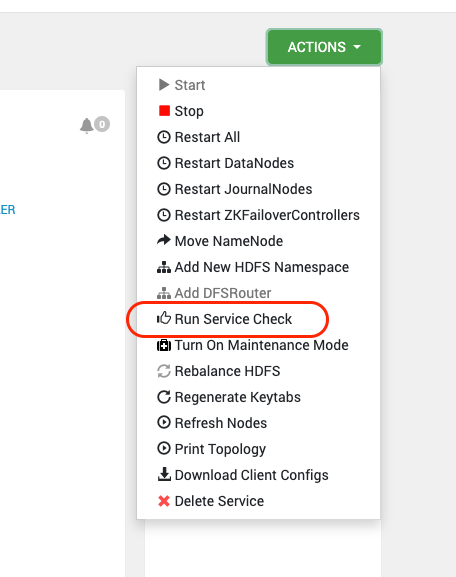
Perform Service check for all the installed services

In case of Zookeeper service check failure, perform the following workaround.
16:06:04,811 |-ERROR in ch.qos.logback.core.FileAppender[TRACEFILE] - openFile(/var/log/zookeeper/zookeeper_trace.log,true) call failed. java.io.FileNotFoundException: /var/log/zookeeper/zookeeper_trace.log (Permission denied) at java.io.FileNotFoundException: /var/log/zookeeper/zookeeper_trace.log (Permission denied) 16:06:04,813 |-ERROR in ch.qos.logback.core.rolling.RollingFileAppender[RFAAUDIT] - openFile(/var/log/zookeeper/zookeeper_audit.log,true) call failed. java.io.FileNotFoundException: /var/log/zookeeper/zookeeper_audit.log (Permission denied) at java.io.FileNotFoundException: /var/log/zookeeper/zookeeper_audit.log (Permission denied) 16:06:05,789 |-ERROR in ch.qos.logback.core.FileAppender[TRACEFILE] - openFile(/var/log/zookeeper/zookeeper_trace.log,true) call failed. java.io.FileNotFoundException: /var/log/zookeeper/zookeeper_trace.log (Permission denied) at java.io.FileNotFoundException: /var/log/zookeeper/zookeeper_trace.log (Permission denied) 16:06:05,791 |-ERROR in ch.qos.logback.core.rolling.RollingFileAppender[RFAAUDIT] - openFile(/var/log/zookeeper/zookeeper_audit.log,true) call failed. java.io.FileNotFoundException: /var/log/zookeeper/zookeeper_audit.log (Permission denied) at java.io.FileNotFoundException: /var/log/zookeeper/zookeeper_audit.log (Permission denied)
Workaround
File Location zookeeper → configs → Advanced zookeeper-logback
Comment out the TRACEFILERFAAUDIT
<!--
 <property name="zookeeper.tracelog.dir" value="{{zk_log_dir}}" />
 <property name="zookeeper.tracelog.file" value="zookeeper_trace.log" />
 <appender name="TRACEFILE" class="ch.qos.logback.core.FileAppender">
 <File>${zookeeper.log.dir}/${zookeeper.tracelog.file}</File>
 <encoder>
 <pattern>%d{ISO8601} - %-5p [%t:%C{1}@%L] - %m%n</pattern>
 </encoder>
 <filter class="ch.qos.logback.classic.filter.ThresholdFilter">
 <level>TRACE</level>
 </filter>
 </appender>
 <property name="zookeeper.auditlog.file" value="zookeeper_audit.log" />
 <property name="zookeeper.auditlog.threshold" value="INFO" />
 <property name="audit.logger" value="INFO, RFAAUDIT" />
 <appender name="RFAAUDIT" class="ch.qos.logback.core.rolling.RollingFileAppender">
 <File>${zookeeper.log.dir}/${zookeeper.auditlog.file}</File>
 <encoder>
 <pattern>%d{ISO8601} %p %c{2}: %m%n</pattern>
 </encoder>
 <filter class="ch.qos.logback.classic.filter.ThresholdFilter">
 <level>${zookeeper.auditlog.threshold}</level>
 </filter>
 <rollingPolicy class="ch.qos.logback.core.rolling.FixedWindowRollingPolicy">
 <maxIndex>${zookeeper.log.maxbackupindex}</maxIndex>
 <FileNamePattern>${zookeeper.log.dir}/${zookeeper.auditlog.file}.%i.%i</FileNamePattern>
 </rollingPolicy>
 <triggeringPolicy class="ch.qos.logback.core.rolling.SizeBasedTriggeringPolicy">
 <MaxFileSize>${zookeeper.log.maxfilesize}</MaxFileSize>
 </triggeringPolicy>
 </appender>
 <logger name="org.apache.zookeeper.audit.Slf4jAuditLogger" additivity="false" level="${audit.logger}">
 <appender-ref ref="RFAAUDIT" />
 </logger>
-->
Restart Zookeeper and verify the service check.
Install the Upgrade Packages and Register the VDF file
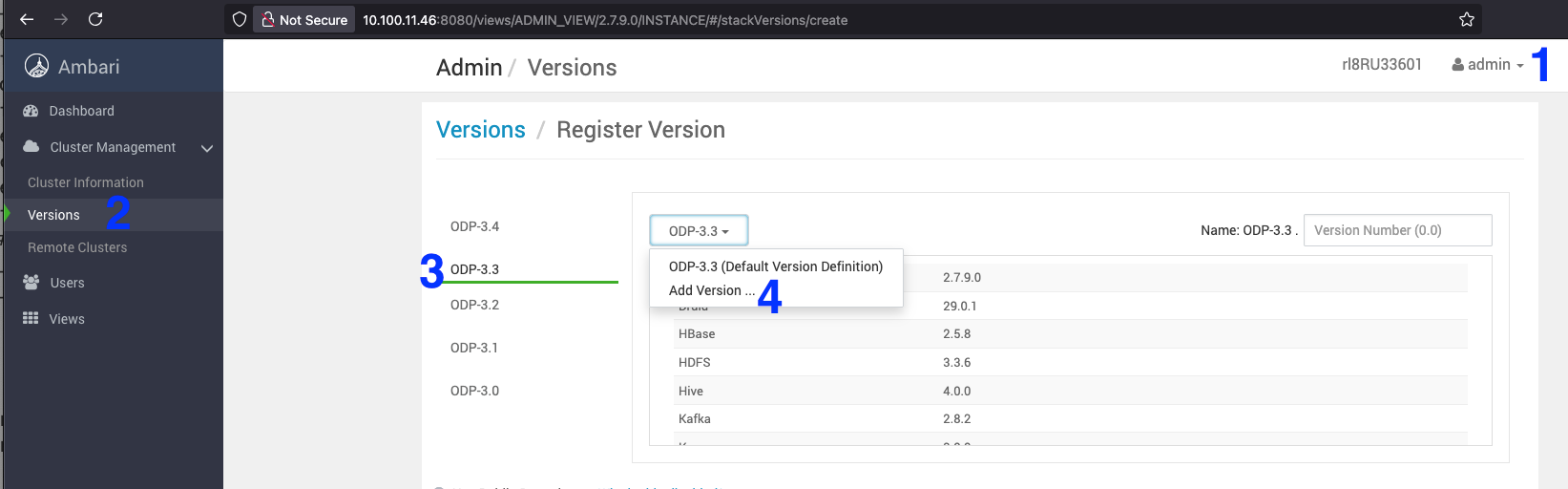
- On the Ambari UI, navigate to Admin > Manage Ambari > Versions > select ODP 3-3.
- Click ODP 3-3 and select the Add Version from the drop-down.
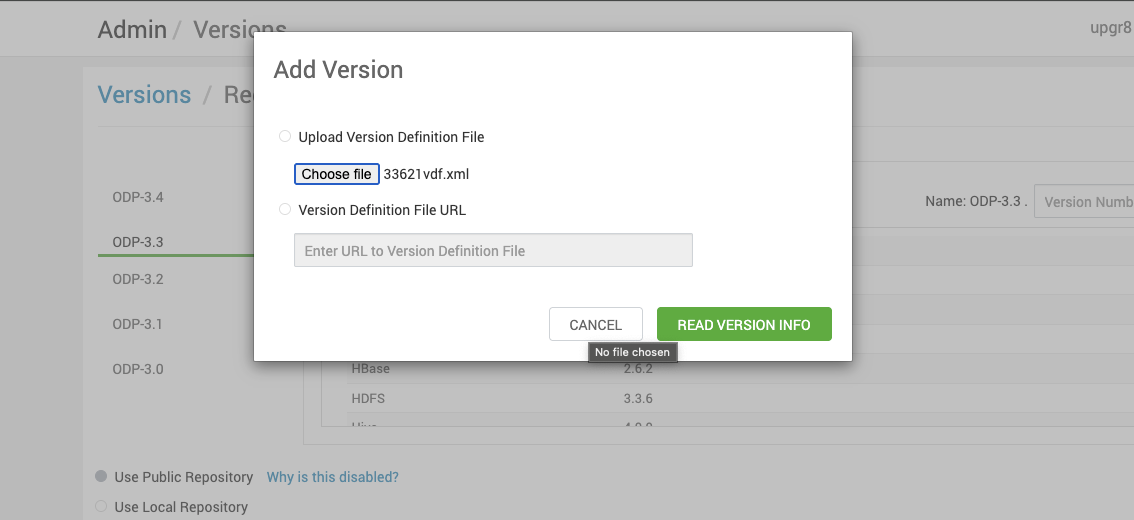
- Upload the 3.3.6.2-1 VDF ODP file and click Read Version Info.
Sample VDF file
Refer the sample VDF file and copy it to a local machine to proceed further.
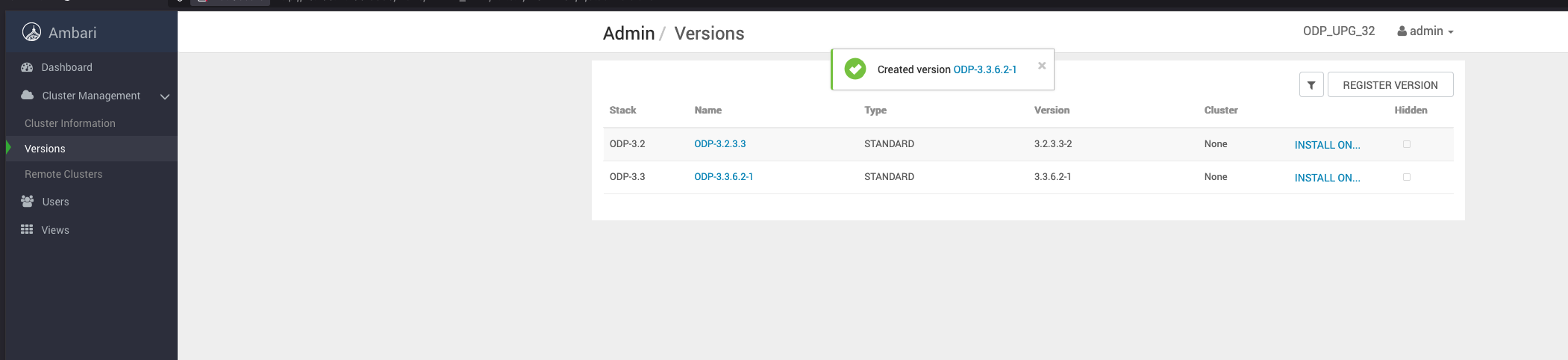
- Save the ODP-3.3.6.2-1 details appearing on the screen. Once you save the details, you can see the screen as shown below.
Install the 3.3.6.2-1 packages
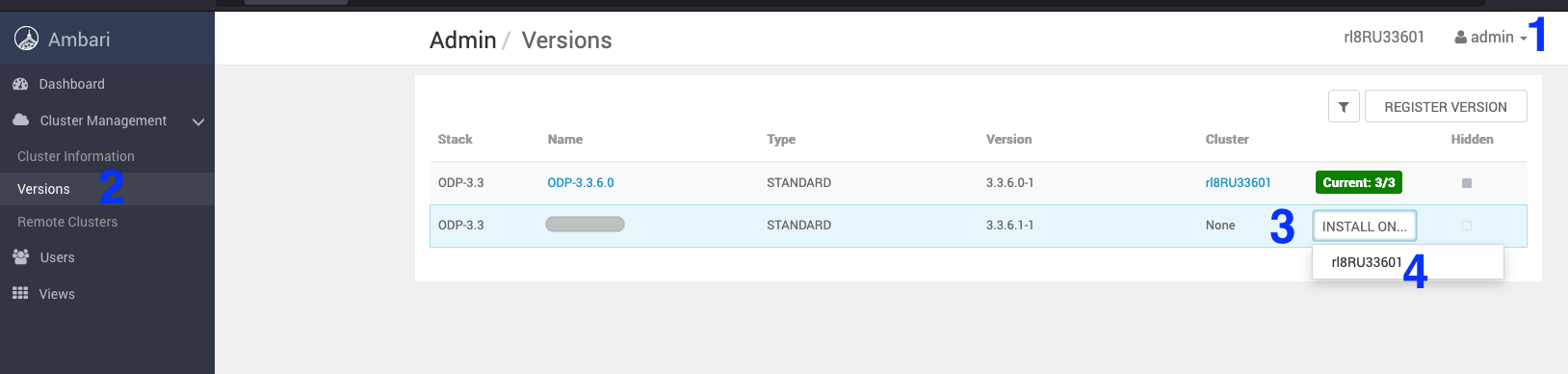
- Navigate to Admin > Versions. On the Versions page, click install for ODP-3.3.6.2-1 to download the latest packages on the cluster.
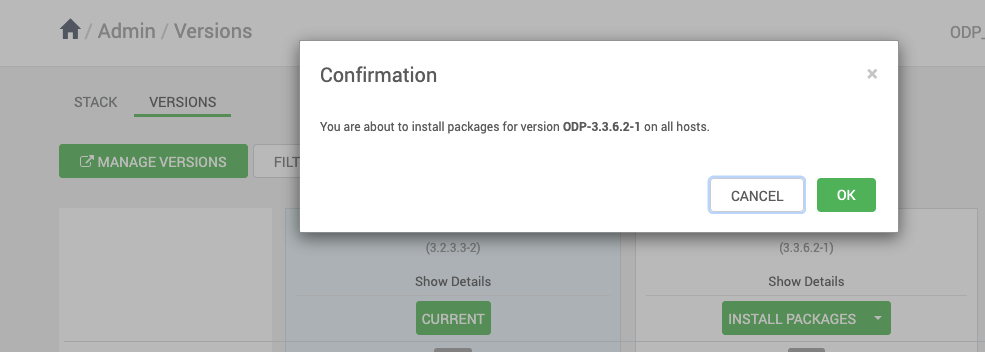
- On the Versions page, click Install Packages for the version 3.3.6.2-1.
- Click OK and confirm the installation package.
The screen below shows that the ODP-3.3.6.2-1 installation is in progress.
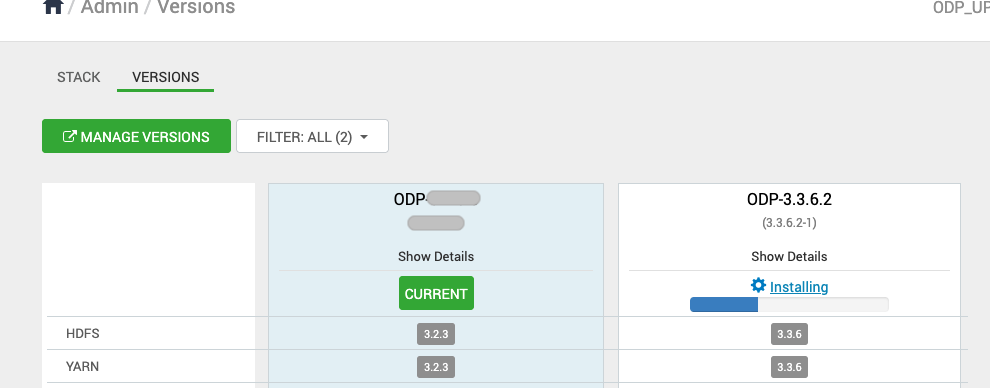
The screen below shows that the ODP-3.3.6.2-1 installation is in progress for the following hosts.

Once the installation of the ODP-3.3.6.2-1 package is complete, proceed with the upgrade process.
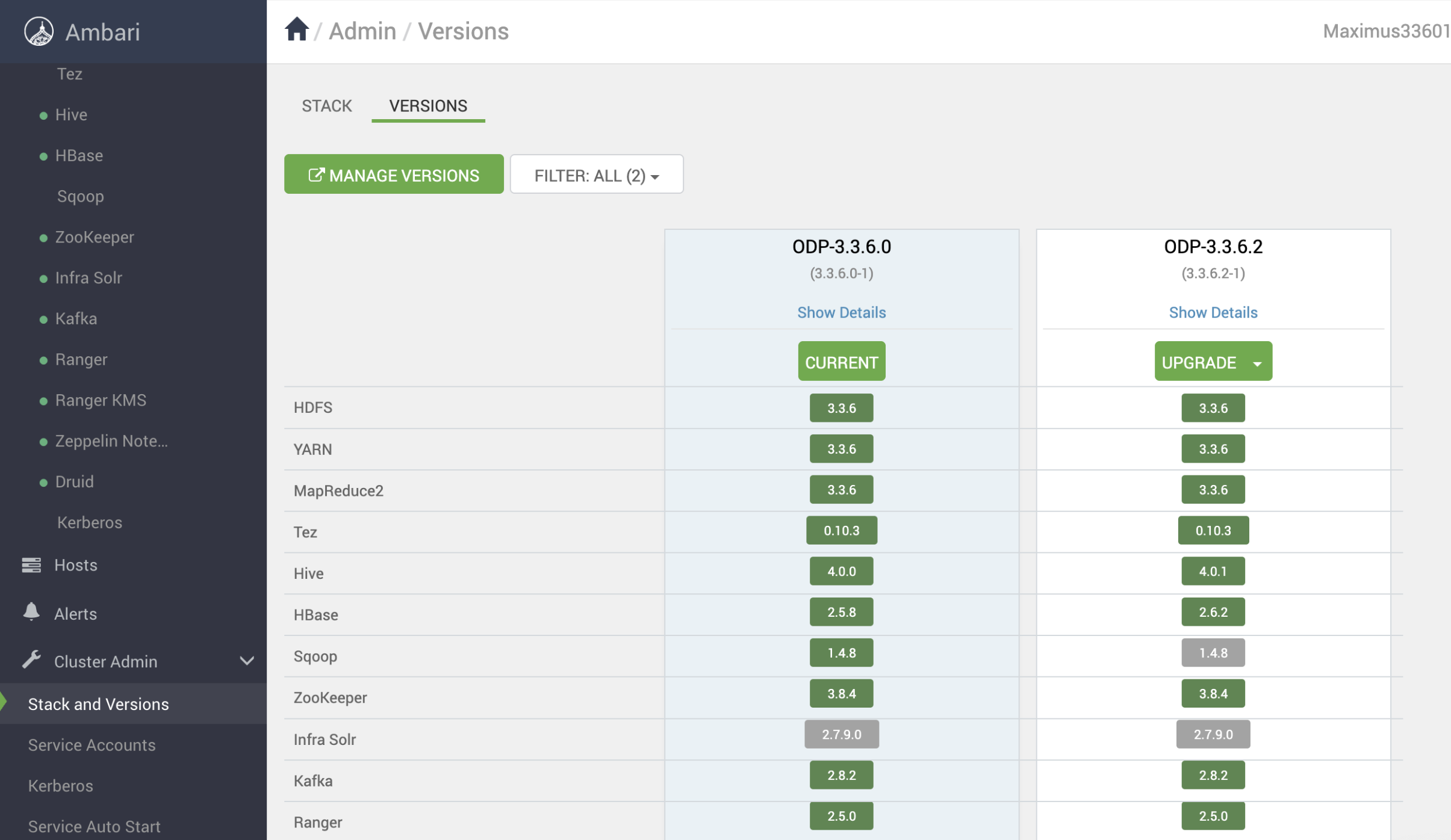
- After the installation packages step is completed, you can see the Upgrade option. Click Upgrade to proceed further.
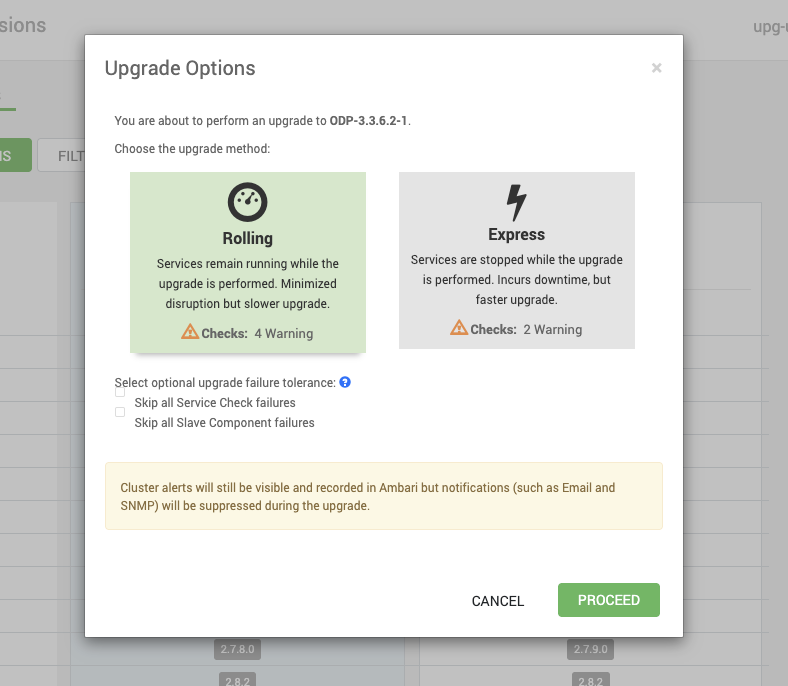
- Upon clicking on Upgrade, you can see the two upgrade options: Rolling and Express. Choose the Rolling Upgrade option to continue with the upgrade process.
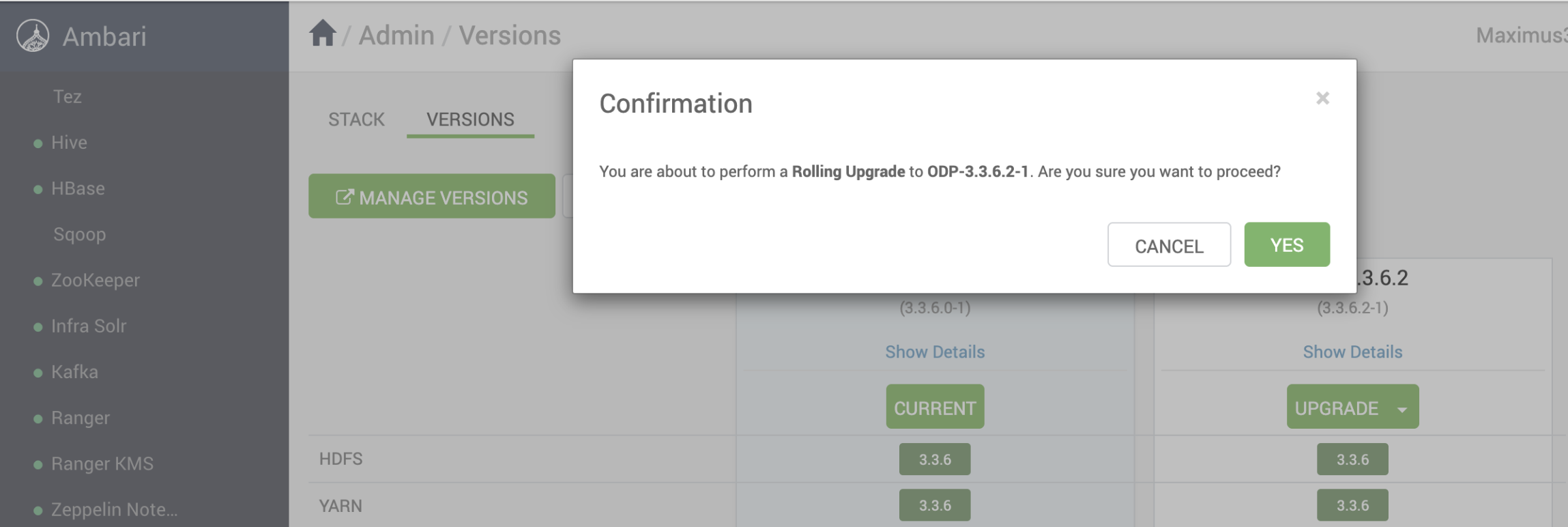
- Select YES to confirm the Rolling Upgrade to ODP-3.3.6.2-1.
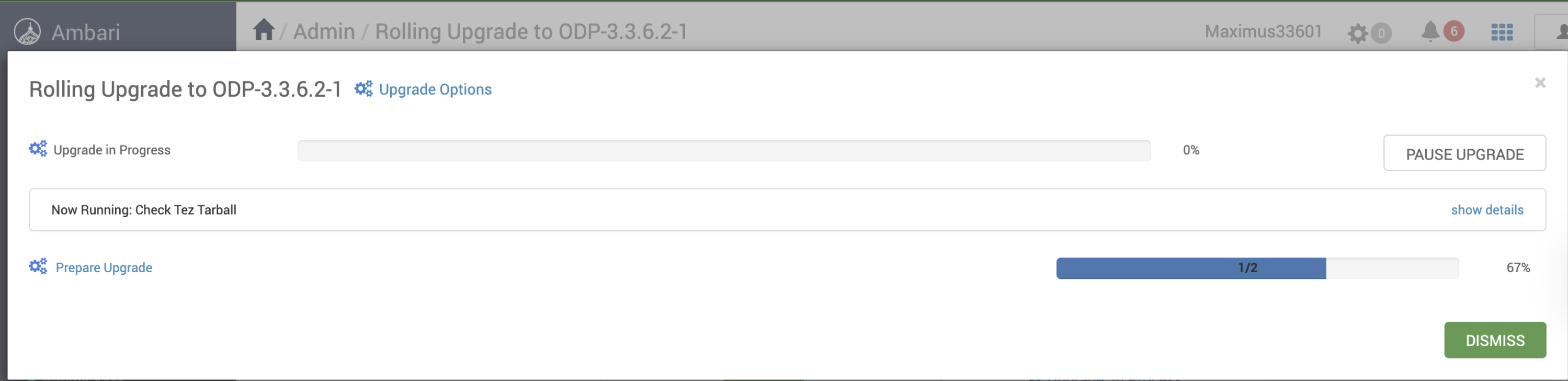
The screenshots below show the progress of the Rolling Upgrade.
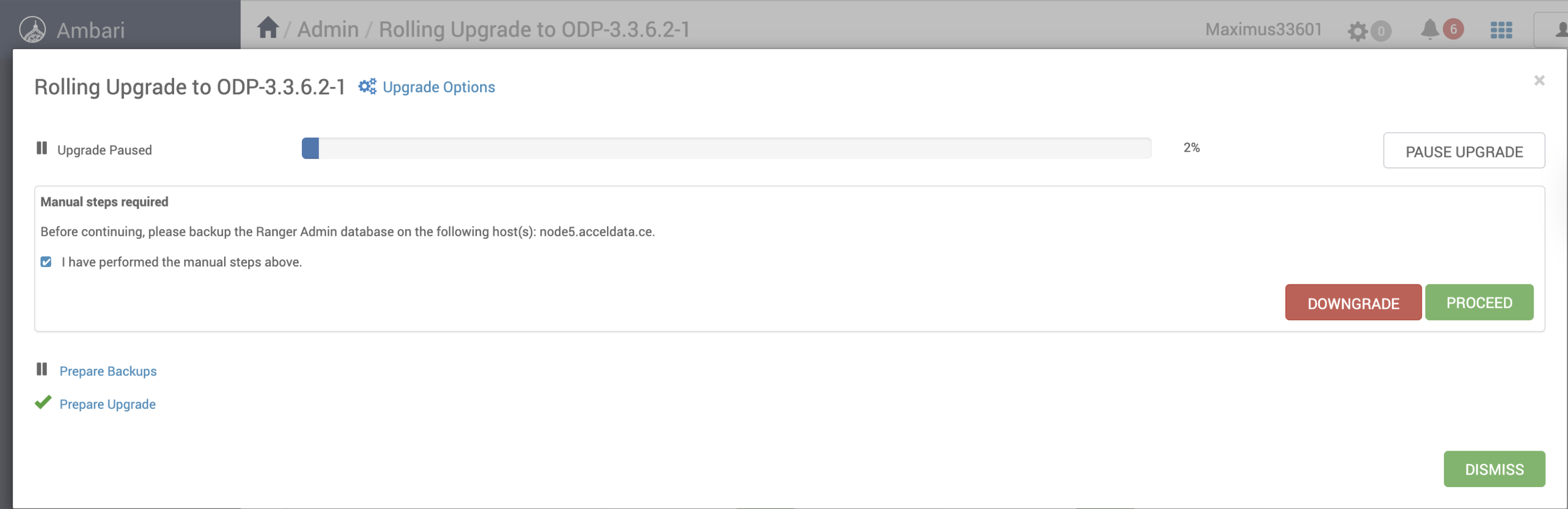
Info
If required, pause the upgrade, restart the Zeppelin manually, and resume the upgrade.
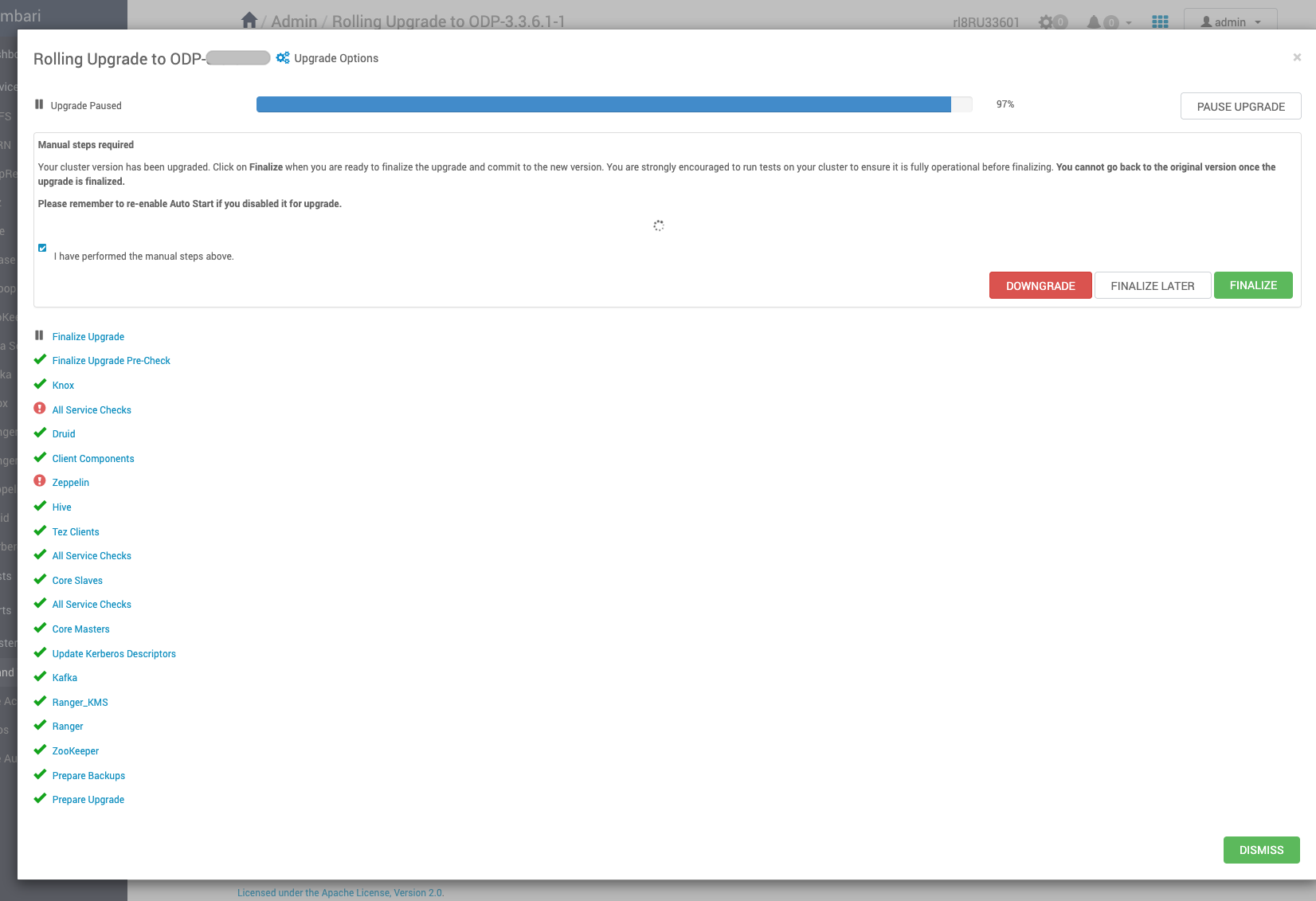
- Resume the upgrade (if paused), complete, and finalize it.
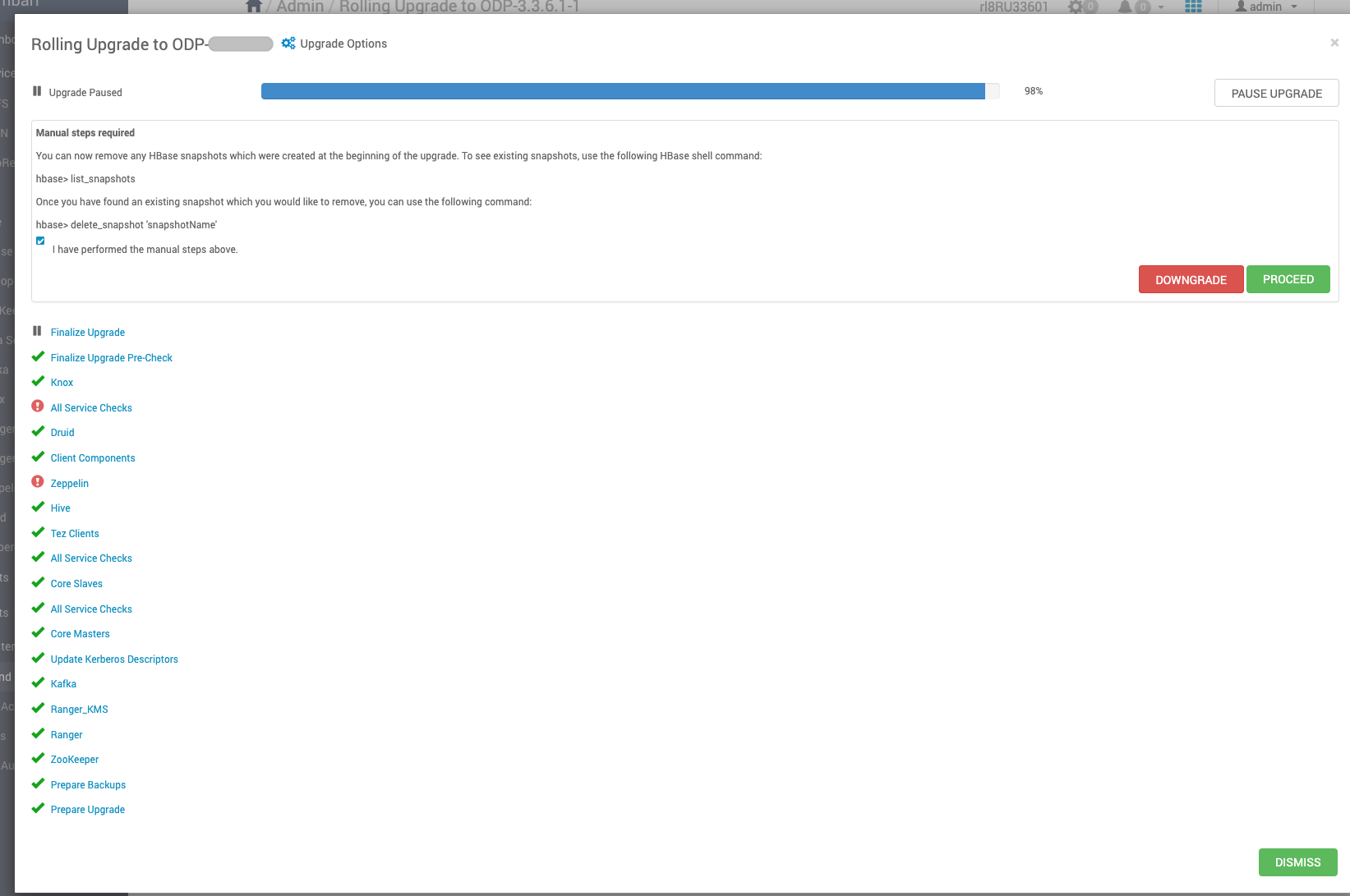
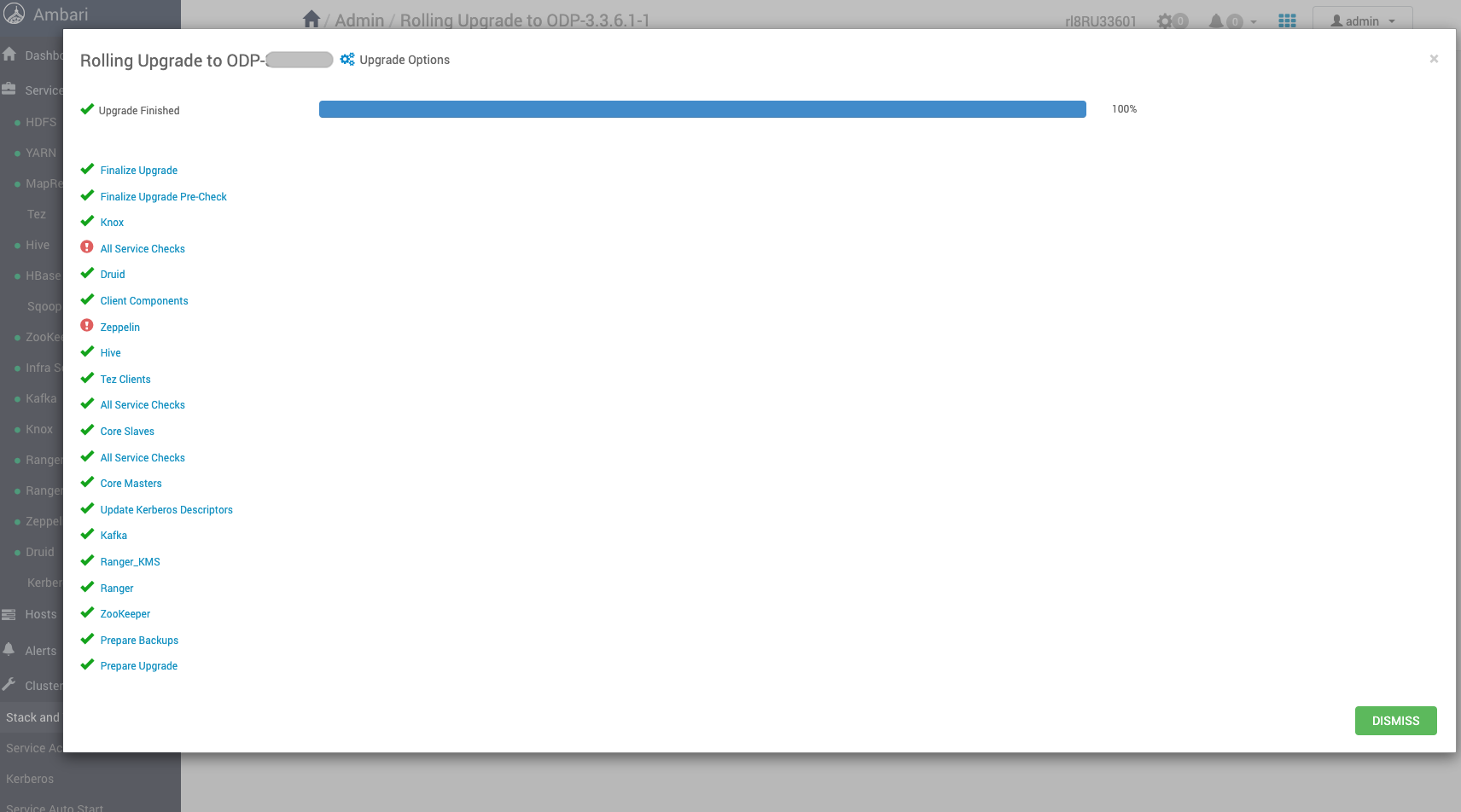
The screenshot below confirms the successful completion of the rolling upgrade to ODP version 3.3.6.2-1.
The screenshot below displays the current version of ODP, which is ODP-3.3.6.2-1.
Mpacks Restore
Perform the following steps to restore Mpacks.
- Install Mpacks on Ambari Server node.
ambari-server install-mpack --mpack=ambari-mpacks-airflow-2.8.3.tar.gz
ambari-server install-mpack --mpack=ambari-mpacks-impala-4.4.1.tar.gz
ambari-server install-mpack --mpack=ambari-mpacks-ozone-1.4.1.tar.gz
ambari-server install-mpack --mpack=ambari-mpacks-spark3-3.5.5.tar.gz
- Install the services from Ambari.
- Stop the Mpack services from ambari UI.
- Restore the config at mysql DB.
Now restore the configuration backups for the mpacks that were taken during the upgrade prerequisites phase. For details, see Upgrade Prerequisites.
mysql> use ambari
Reading table information for completion of table and column names
You can turn off this feature to get a quicker startup with -A
Database changed
Restore Airflow Config
Run the following script.
mysql>
update clusterconfig a set config_data = (select config_data from service_conf_bck.configs_prior_patch b where a.type_name = b.type_name and version = (SELECT MAX(version) FROM service_conf_bck.configs_prior_patch WHERE service_name = 'AIRFLOW') and service_name = 'AIRFLOW'),
 config_attributes = (select config_attributes from service_conf_bck.configs_prior_patch b where a.type_name = b.type_name and version = (SELECT MAX(version) FROM serviceconfig WHERE service_name = 'AIRFLOW') and service_name = 'AIRFLOW')
 where config_id in (select config_id from serviceconfigmapping where service_config_id in (select service_config_id from serviceconfig where service_name = 'AIRFLOW' and version =
 (select max(version) from serviceconfig where service_name = 'AIRFLOW')) );
Response:
Query OK, 3 rows affected (0.06 sec)
Rows matched: 27 Changed: 3 Warnings: 0
Restore Ozone Configs
Run the following script.
update clusterconfig a set config_data = (select config_data from service_conf_bck.configs_prior_patch b where a.type_name = b.type_name and version = (SELECT MAX(version) FROM service_conf_bck.configs_prior_patch WHERE service_name = 'OZONE') and service_name = 'OZONE'),
 config_attributes = (select config_attributes from service_conf_bck.configs_prior_patch b where a.type_name = b.type_name and version = (SELECT MAX(version) FROM serviceconfig WHERE service_name = 'OZONE') and service_name = 'OZONE')
 where config_id in (select config_id from serviceconfigmapping where service_config_id in (select service_config_id from serviceconfig where service_name = 'OZONE' and version =
 (select max(version) from serviceconfig where service_name = 'OZONE')) );
Response:
Query OK, 16 rows affected (0.06 sec)
Rows matched: 24 Changed: 16 Warnings: 0
Restore Impala Configs
Run the following script.
update clusterconfig a set config_data = (select config_data from service_conf_bck.configs_prior_patch b where a.type_name = b.type_name and version = (SELECT MAX(version) FROM service_conf_bck.configs_prior_patch WHERE service_name = 'IMPALA') and service_name = 'IMPALA'),
 config_attributes = (select config_attributes from service_conf_bck.configs_prior_patch b where a.type_name = b.type_name and version = (SELECT MAX(version) FROM serviceconfig WHERE service_name = 'IMPALA') and service_name = 'IMPALA')
 where config_id in (select config_id from serviceconfigmapping where service_config_id in (select service_config_id from serviceconfig where service_name = 'IMPALA' and version =
 (select max(version) from serviceconfig where service_name = 'IMPALA')) );
Response:
Query OK, 1 row affected (0.04 sec)
Rows matched: 4 Changed: 1 Warnings: 0
Restore Kudu Configs
Run the following script.
update clusterconfig a set config_data = (select config_data from service_conf_bck.configs_prior_patch b where a.type_name = b.type_name and version = (SELECT MAX(version) FROM service_conf_bck.configs_prior_patch WHERE service_name = 'KUDU') and service_name = 'KUDU'),
 config_attributes = (select config_attributes from service_conf_bck.configs_prior_patch b where a.type_name = b.type_name and version = (SELECT MAX(version) FROM serviceconfig WHERE service_name = 'KUDU') and service_name = 'KUDU')
 where config_id in (select config_id from serviceconfigmapping where service_config_id in (select service_config_id from serviceconfig where service_name = 'KUDU' and version =
 (select max(version) from serviceconfig where service_name = 'KUDU')) );
Response:
Query OK, 1 row affected (0.03 sec)
Rows matched: 10 Changed: 1 Warnings: 0
Restore Spark3 Configs
Run the following script.
update clusterconfig a set config_data = (select config_data from service_conf_bck.configs_prior_patch b where a.type_name = b.type_name and version = (SELECT MAX(version) FROM service_conf_bck.configs_prior_patch WHERE service_name = 'SPARK3') and service_name = 'SPARK3'),
 config_attributes = (select config_attributes from service_conf_bck.configs_prior_patch b where a.type_name = b.type_name and version = (SELECT MAX(version) FROM serviceconfig WHERE service_name = 'SPARK3') and service_name = 'SPARK3')
 where config_id in (select config_id from serviceconfigmapping where service_config_id in (select service_config_id from serviceconfig where service_name = 'SPARK3' and version =
 (select max(version) from serviceconfig where service_name = 'SPARK3')) );
Response:
Query OK, 1 row affected (0.03 sec)
Rows matched: 12 Changed: 1 Warnings: 0
Have a suggestion?