
Installing a Default Database
MySQL
Before you begin
Determine the appropriate database version and obtain the release drivers and .jar file.
On the Ambari Server host, Download the MySQL Connector/JDBC driver from MySQL
Install the respective driver jar package.
Note Here is a sample installation guide for the MySQL 8.x database and the respective connector jar.
CentOS :
Ubuntu:
After ensuring that the prerequisites have been met, proceed by following the provided steps below:
Configure and start the database service
Edit binding-address from 127.0.0.1 to the host of database service, in
/etc/mysql/mysql.conf.d/mysqld.cnf.Start mysql using
service mysql start.Confirm that .jar is in the Java share directory. For example:
ls /usr/share/java/mysql- connector-java.jarMake sure the .jar file has the appropriate permissions - 644. For example :
chmod 644 /usr/share/java/mysql-connector-j-8.0.32.jar
Create a user for your service and grant it permissions, using the MySQL database admin utility
Postgres SQL
Before you begin
Determine the appropriate database version and obtain the release drivers and .jar file.
On the Ambari server host, Download the PostgreSQL JDBC Driver from PostgreSQL.
Install the respective driver jar package.
Note Here is a sample installation for the Postgres 12.17 database, Postgres 15.5 database, and the respective connector jar.
RHEL 8
Note You can also get the PostgreSQL JDBC jar from https://jdbc.postgresql.org/download/postgresql-42.7.1.jar using the command wgethttps://jdbc.postgresql.org/download/postgresql-42.7.1.jar and then by moving the jar to /usr/share/java/.
After ensuring that the prerequisites have been met, proceed by following the provided steps below:
Configure and start the database service
Edit/var/lib/pgsql/12/data/postgresql.conf to include
Note Additionally, in version 12.17, it is necessary to modify the authentication method from "indent" to "md5" in the configuration file located at /var/lib/pgsql/12/data/pg_hba.conf. This change switches the authentication method to use a password.
Start the service
Create a user for your service and grant it the necessary permissions
Edit
/var/lib/pgsql/12/data/pg_hba.confto include new service users
Here is an example:
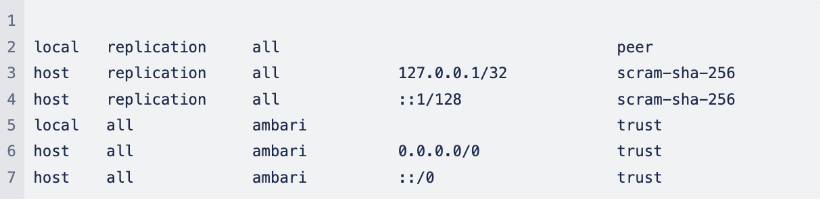
Note:Restart the PostgreSQL service every time after editing file /var/lib/pgsql/12/data/pg_hba.conf .
Maria DB
Before you begin
Determine the appropriate database version and obtain the release drivers and .jar file.
Install the respective driver jar package.
Note:Here is a sample installation guide for the MariaDB database.
Cent OS
RHEL 8
Note All MySQL connectors work unchanged with MariaDB. Hence refer to the MySQL section to install jdbc connector jar and provide the necessary permissions.
After the necessary permissions are given, create a user for your service and grant it the necessary permissions as shown below:
OracleDB
Before you begin
Determine the appropriate database version and obtain the release drivers and .jar file.
On the Ambari server host, download the Oracle JDBC (OJDBC) Driver from Oracle.
Note Here is a sample installation and setup guide for the OracleDB database and the respective connector jar.
After you perform the above action, configure and start the database. Following this, create a user for your service and grant it the respective permissions as shown below:
Example: Install MariaDB for Use with Multiple Components
Before deploying an Ambari-managed cluster, set up a secure MariaDB database and db users for each component with sufficient permissions.
Before you begin
Determine the appropriate database version and obtain the release drivers and .jar file.
Note This example is specific to CentOS/RHEL 7 OS systems. For production setups, please consider installing the database instance on a dedicated host and configuring master-slave replication.
Procedure
After you meet the prerequisites, perform the following steps:
On a dedicated host, download the MySQL Connector/JDBC driver from MySQL.
Install MySQL packages and configure them to start on boot, as shown below:
Secure the installation. /usr/bin/mysql_secure_installation
Create a database and users as shown below. Here, "%" signifies any host on your domain. Add localhost permissions explicitly.
Install the driver on the Ambari host.
Using an Existing Database with Services
Ambari
Other than the embedded PostgreSQL database instance that Ambari Server uses by default, Ambari Server can be set up with externally installed databases.
Note Refer to the respective instructions for databases like MySQL, PostgreSQL, MariaDB, and OracleDB to perform the following steps.
Validate if the database service is installed and up.
On the Ambari Server host, stage the appropriate JDBC driver file.
Run
ambari-server setup --jdbc-db=<database> --jdbc-driver=/path/to/jdbc-driver.jarwhere <database> is ‘oracle’, ‘mysql’, or ‘postgres’.Create an Ambari service user and database, where [USERNAME] is the Ambari user name, [PASSWORD] is the Ambari user password, and [DATABASE_NAME] is the Ambari user database.
Load the Ambari Server database schema.
You must pre-load the Ambari database schema into your MySQL/MariaDB database using the schema script. Run the script in the same location where you find the Ambari-DDL-MySQL-CREATE.sql file. You should find the Ambari-DDL-MySQL-CREATE.sql file in the /var/lib/ambari-server/resources/ directory of the Ambari Server host, after you install Ambari Server.
MySQL/MariaDB
PostgreSQL
Oracle
Now, start the Ambari server using ambari-server start.
Hive
Note Refer to the respective instructions for databases like MySQL, PostgreSQL, MariaDB, and OracleDB to carry out the following steps:
Validate if the database service is installed and up.
On the Ambari Server host, stage the appropriate JDBC driver file.
Create a Hive service user and database, where [USERNAME] is the hiveuser name, [PASSWORD] is the hive user password, and [DATABASE_NAME] is the Hive user database.
NiFi Registry
Note Refer to the respective instructions for databases like MySQL, PostgreSQL, MariaDB, and OracleDB to carry out the following steps:
Validate if the database service is installed and up.
On the Ambari Server host, stage the appropriate JDBC driver file.
Create a registry service user and database, where [USERNAME] is the registry user name, [PASSWORD] is the registry user password, and [DATABASE_NAME] is the registry user database.
Oozie
Note Refer to the respective instructions for databases like MySQL, PostgreSQL, MariaDB, and OracleDB to carry out the following steps:
Validate if the database service is installed and up.
On the Ambari Server host, stage the appropriate JDBC driver file.
Create an Oozie service user and database, where [USERNAME] is the oozie user name, [PASSWORD] is the oozie user password, and [DATABASE_NAME] is the Oozie user database.
Ranger
Note Refer to the respective instructions for databases like MySQL, PostgreSQL, MariaDB, and OracleDB to carry out the following steps:
Validate if the database service is installed and up.
On the Ambari Server host, stage the appropriate JDBC driver file.
Create a Ranger service user and database, where [USERNAME] is the Ranger user name, [PASSWORD] is the ranger user password, and [DATABASE_NAME] is the ranger user database.
Ranger KMS
Note Refer to the respective instructions for databases like MySQL, PostgreSQL, MariaDB, and OracleDB to carry out the following steps:
Validate if the database service is installed and up.
On the Ambari Server host, stage the appropriate JDBC driver file.
Create a Ranger KMS service user and database, where [USERNAME] is the ranger user name, [PASSWORD] is the rangerkms user password, and [DATABASE_NAME] is the Ranger KMS user database.