
Upgrade Known Limitations

This page describes the list of issues and workarounds encountered during the upgrade process.


Oozie

Issue: After the Ambari upgrade, Oozie may require a restart and could fail with the following error:

Traceback (most recent call last): File "/var/lib/ambari-agent/cache/stacks/ODP/3.0/services/OOZIE/package/scripts/oozie_client.py", line 74, in <module> OozieClient().execute() File "/usr/lib/ambari-agent/lib/resource_management/libraries/script/script.py", line 352, in execute method(env) File "/usr/lib/ambari-agent/lib/resource_management/libraries/script/script.py", line 970, in restart self.install(env) File "/var/lib/ambari-agent/cache/stacks/ODP/3.0/services/OOZIE/package/scripts/oozie_client.py", line 37, in install self.configure(env) File "/var/lib/ambari-agent/cache/stacks/ODP/3.0/services/OOZIE/package/scripts/oozie_client.py", line 41, in configure import params File "/var/lib/ambari-agent/cache/stacks/ODP/3.0/services/OOZIE/package/scripts/params.py", line 28, in <module> from params_linux import * File "/var/lib/ambari-agent/cache/stacks/ODP/3.0/services/OOZIE/package/scripts/params_linux.py", line 247, in <module> if enable_https and https_port is not None: File "/usr/lib/ambari-agent/lib/resource_management/libraries/script/config_dictionary.py", line 73, in __getattr__ raise Fail("Configuration parameter '" + self.name + "' was not found in configurations dictionary!") resource_management.core.exceptions.Fail: Configuration parameter 'oozie.https.enabled' was not found in configurations dictionary!

Workaround:

  1. In Oozie custom oozie-site configurations, add the following properties:

oozie.https.enabled=false oozie.https.port=11443 oozie.https.keystore.file=/etc/security/certificates/keystore.jks oozie.https.keystore.pass=changeit oozie.https.truststore.file=/etc/security/certificates/truststore.jks oozie.https.truststore.pass=changeit
  1. After adding these properties, restart the Oozie service. The restart should complete successfully.


Druid

Issue: If Druid fails to start after the upgrade, you may see the following error in the logs:

org.apache.druid.metadata.storage.mysql.MySQLConnector - Loading MySQL metadata connector driver com.mysql.jdbc.Driver 2025-11-04T12:06:51,820 WARN [main] org.apache.druid.metadata.storage.mysql.MySQLConnector - Could not find com.mysql.jdbc.exceptions.MySQLTransientException on the classpath. Caused by: java.lang.IllegalArgumentException: Cannot resolve variable 'env:DRUID_METADATA_STORAGE_CONNECTOR_PASSWORD' (enableSubstitutionInVariables=true).

Workaround:

In Druid’s druid-env file, add the following line and restart the Druid service:

export DRUID_METADATA_STORAGE_CONNECTOR_PASSWORD=`{{password_command}} -a "druid.metadata.storage.connector.password"`

After adding the variable, restart Druid or resume the upgrade. The service should start successfully.


Kafka

Issue: If the Kafka broker starts failing because of MirrorMaker2 Jinja template changes.

Traceback (most recent call last): File "/var/lib/ambari-agent/cache/stacks/ODP/3.0/services/KAFKA/package/scripts/kafka_broker.py", line 145, in <module> KafkaBroker().execute() File "/usr/lib/ambari-agent/lib/resource_management/libraries/script/script.py", line 352, in execute method(env) File "/var/lib/ambari-agent/cache/stacks/ODP/3.0/services/KAFKA/package/scripts/kafka_broker.py", line 73, in start self.configure(env, upgrade_type=upgrade_type) File "/var/lib/ambari-agent/cache/stacks/ODP/3.0/services/KAFKA/package/scripts/kafka_broker.py", line 45, in configure kafka(upgrade_type=upgrade_type) File "/var/lib/ambari-agent/cache/stacks/ODP/3.0/services/KAFKA/package/scripts/kafka.py", line 249, in kafka content=InlineTemplate(params.kafka_mirrormaker2) File "/usr/lib/ambari-agent/lib/resource_management/core/source.py", line 150, in __init__ super(InlineTemplate, self).__init__(name, extra_imports, **kwargs) File "/usr/lib/ambari-agent/lib/resource_management/core/source.py", line 137, in __init__ self.template = self.template_env.get_template(self.name) File "/usr/lib/ambari-agent/lib/ambari_jinja2/environment.py", line 716, in get_template return self._load_template(name, self.make_globals(globals)) File "/usr/lib/ambari-agent/lib/ambari_jinja2/environment.py", line 690, in _load_template template = self.loader.load(self, name, globals) File "/usr/lib/ambari-agent/lib/ambari_jinja2/loaders.py", line 115, in load source, filename, uptodate = self.get_source(environment, name) File "/usr/lib/ambari-agent/lib/ambari_jinja2/loaders.py", line 309, in get_source raise TemplateNotFound(template) ambari_jinja2.exceptions.TemplateNotFound: <exception str() failed>

Workaround:

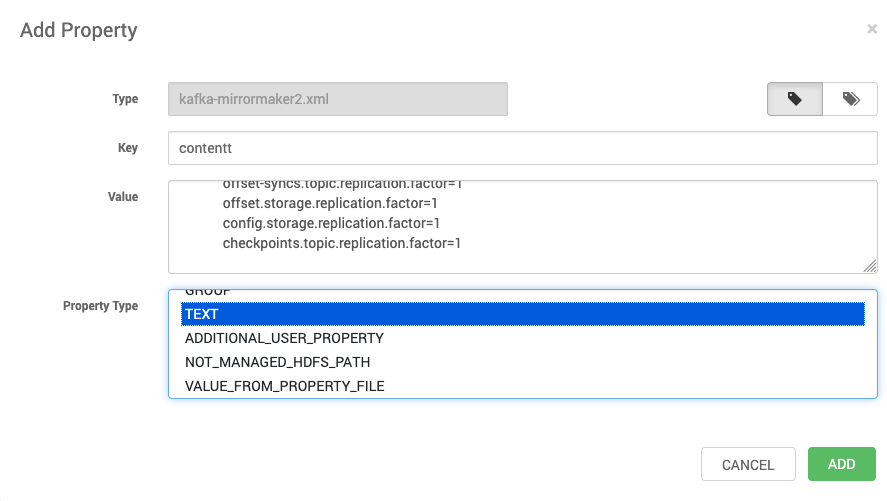
  1. In the Ambari UI, go to Kafka > Configs > Custom kafka-mirrormaker2.

  2. Add the following property:

    • Key: content

    • Value:

clusters=source,dest source->dest.enabled=true source->dest.topics=.* source.bootstrap.servers=localhost:6667 source.java.security.auth.login.config=/usr/odp/current/kafka-broker/config/kafka_jaas.conf source.java.security.krb5.kdc= source.java.security.krb5.realm= source.javax.security.auth.useSubjectCredsOnly= source.replication.enabled=true source.sasl.enabled.mechanisms=GSSAPI source.sasl.kerberos.service.name=kafka source.security.protocol=PLAINTEXT source.ssl.key.password= source.ssl.keystore.location= source.ssl.keystore.password= source.ssl.truststore.location= source.ssl.truststore.password= source.sun.security.krb5.debug=true source.topics.whitelist=.* dest->source.enabled=false dest->source.topics=.* dest.bootstrap.servers=localhost:6667 dest.destination.cluster.name=dest dest.java.security.auth.login.config=/usr/odp/current/kafka-broker/config/kafka_jaas.conf dest.java.security.krb5.kdc= dest.java.security.krb5.realm= dest.javax.security.auth.useSubjectCredsOnly= dest.replication.enabled=false dest.sasl.enabled.mechanisms=GSSAPI dest.sasl.kerberos.service.name=kafka dest.security.protocol=PLAINTEXT dest.ssl.key.password= dest.ssl.keystore.location= dest.ssl.keystore.password= dest.ssl.truststore.location= dest.ssl.truststore.password= dest.sun.security.krb5.debug=true dest.topics.whitelist=.* refresh.topics.enabled=true refresh.topics.interval.seconds=5 replication.factor=1 status.storage.replication.factor=1 heartbeats.topic.replication.factor=1 offset-syncs.topic.replication.factor=1 offset.storage.replication.factor=1 config.storage.replication.factor=1 checkpoints.topic.replication.factor=1
  1. Set Property Type to TEXT.

  2. Save the configuration and resume the upgrade.

  1. Restart the Kafka service. It should start successfully.

DataNode Fail to Restart

  • Update the ports below:

dfs.datanode.address = 0.0.0.0:50010 dfs.datanode.http.address = 0.0.0.0:50075 dfs.datanode.https.address = 0.0.0.0:50475

Tez Service Check Failure

  • Remove the property for tez.history.logging.service.class


  Last updated