
Search
This page helps you create and update the VDF file.
Create a local VDF file (odp-33621.xml)
Use the following command to create the file with the specified content (update the links to the latest repository URLs as needed):
<!--
Licensed to the Apache Software Foundation (ASF) under one or more
contributor license agreements. See the NOTICE file distributed with
this work for additional information regarding copyright ownership.
The ASF licenses this file to You under the Apache License, Version 2.0
(the "License"); you may not use this file except in compliance with
the License. You may obtain a copy of the License at
http://www.apache.org/licenses/LICENSE-2.0
Unless required by applicable law or agreed to in writing, software
distributed under the License is distributed on an "AS IS" BASIS,
WITHOUT WARRANTIES OR CONDITIONS OF ANY KIND, either express or implied.
See the License for the specific language governing permissions and
limitations under the License.
-->
<repository-version xmlns:xsi="http://www.w3.org/2001/XMLSchema-instance" xsi:noNamespaceSchemaLocation="version_definition.xsd">
<release>
<type>STANDARD</type>
<stack-id>ODP-3.3</stack-id>
<version>3.3.6.2</version>
<build>1</build>
<compatible-with>3.3.6.[0-9]</compatible-with>
<release-notes>https://docs.acceldata.io/odp/odp-3.3.6.2-1/documentation</release-notes>
</release>
<manifest>
<service id="HDFS-336" name="HDFS" version="3.3.6" version-id="1"/>
<service id="YARN-336" name="YARN" version="3.3.6" version-id="1"/>
<service id="MAPREDUCE2-336" name="MAPREDUCE2" version="3.3.6" version-id="1"/>
<service id="TEZ-0104" name="TEZ" version="0.10.3" version-id="1"/>
<service id="HIVE-401" name="HIVE" version="4.0.1" version-id="1"/>
<service id="HBASE-262" name="HBASE" version="2.6.2" version-id="1"/>
<service id="ZOOKEEPER-384" name="ZOOKEEPER" version="3.8.4" version-id="1"/>
<service id="KAFKA-282" name="KAFKA" version="2.8.2" version-id="1"/>
<service id="DRUID-2901" name="DRUID" version="29.0.1" version-id="1"/>
<service id="RANGER-250" name="RANGER" version="2.5.0" version-id="1"/>
<service id="RANGER_KMS-250" name="RANGER_KMS" version="2.5.0" version-id="1"/>
<service id="SPARK3-355" name="SPARK3" version="3.5.5" version-id="1"/>
<service id="KNOX-200" name="KNOX" version="2.0.0" version-id="1"/>
<service id="OOZIE-521" name="OOZIE" version="5.2.1" version-id="2"/>
<service id="ZEPPELIN-0120" name="ZEPPELIN" version="0.12.0" version-id="1"/>
</manifest>
<available-services>
<service idref="HDFS-336"/>
<service idref="YARN-336"/>
<service idref="MAPREDUCE2-336"/>
<service idref="TEZ-0104"/>
<service idref="HIVE-401"/>
<service idref="HBASE-262"/>
<service idref="ZOOKEEPER-384"/>
<service idref="KAFKA-282"/>
<service idref="DRUID-2901"/>
<service idref="RANGER-250"/>
<service idref="RANGER_KMS-250"/>
<service idref="SPARK3-355"/>
<service idref="KNOX-200"/>
<service idref="OOZIE-521"/>
<service idref="ZEPPELIN-0120"/>
</available-services>
<repository-info>
<os family="redhat8">
<repo>
<baseurl>https://mirror.odp.acceldata.dev/staging/ODP-3.3.6.2-1-FINAL-STAGING/v2/odp/python3/jdk11/3.3.6.2-1/releases/rhel8/</baseurl>
<repoid>ODP-3.3</repoid>
<reponame>ODP</reponame>
<unique>true</unique>
</repo>
<repo>
<baseurl>https://mirror.odp.acceldata.dev/staging/ODP-3.3.6.2-1-FINAL-STAGING/v2/odp-utils/rhel8/</baseurl>
<repoid>ODP-UTILS-1.1.0.22-repo-1</repoid>
<reponame>ODP-UTILS</reponame>
<unique>false</unique>
</repo>
</os>
</repository-info>
</repository-version>
Update the VDF file from Ambari UI
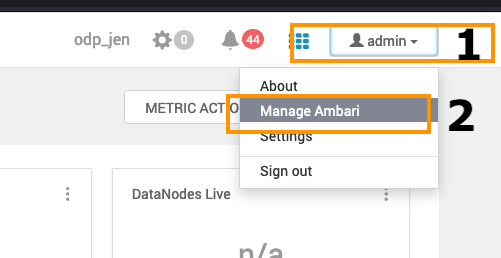
Add the VDF file: Go to the Admin section on the top right and click on the Manage Ambari option in the menu.
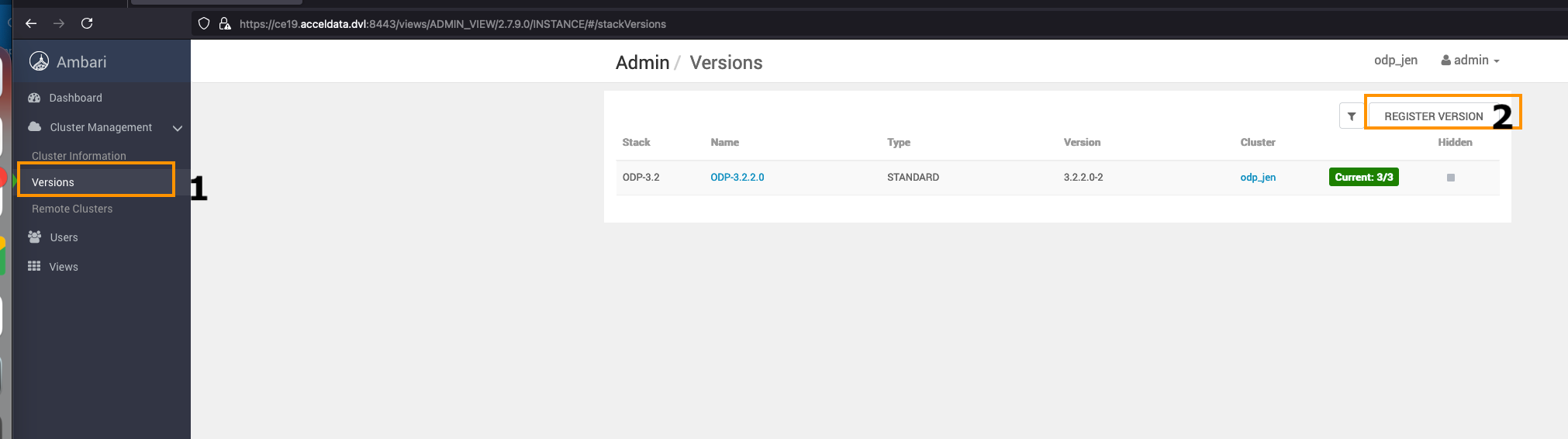
Navigate to the Versions option on the left side and click REGISTER VERSION to add a new ODP Release.
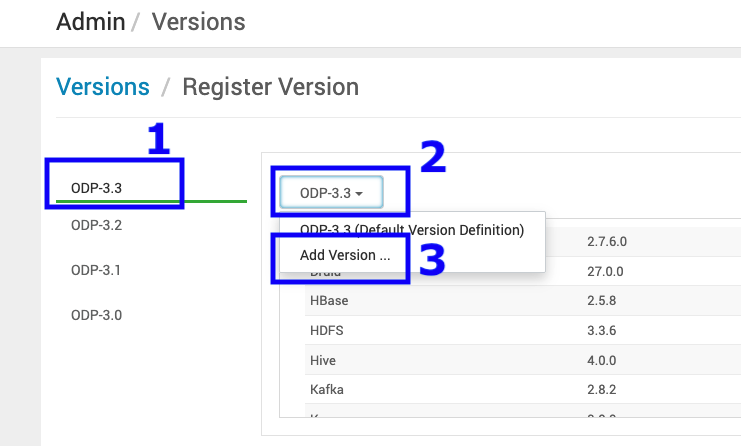
Add a new ODP version.
Sample VDF file
Refer to the sample VDF file and copy it to a local machine to proceed further.
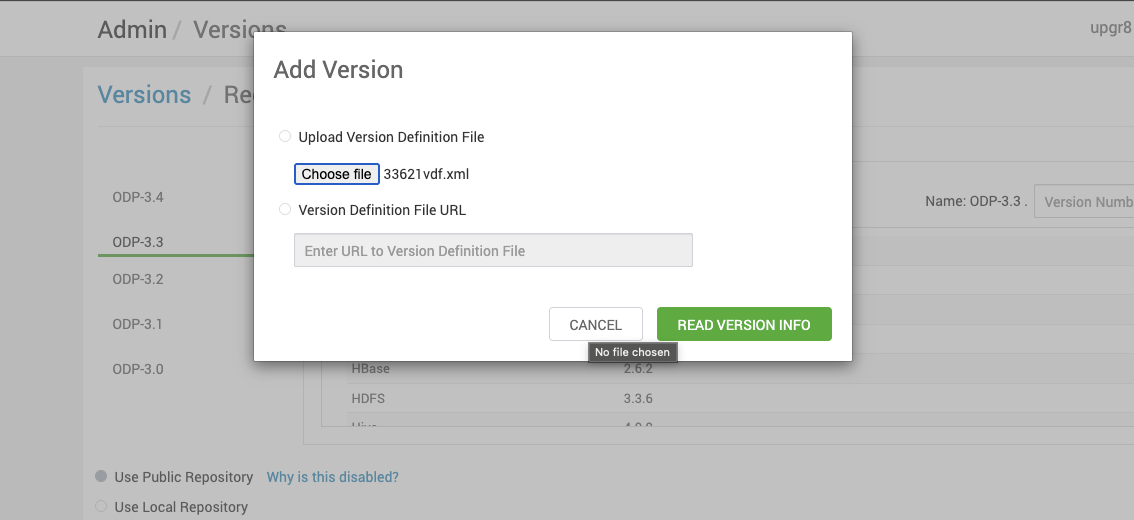
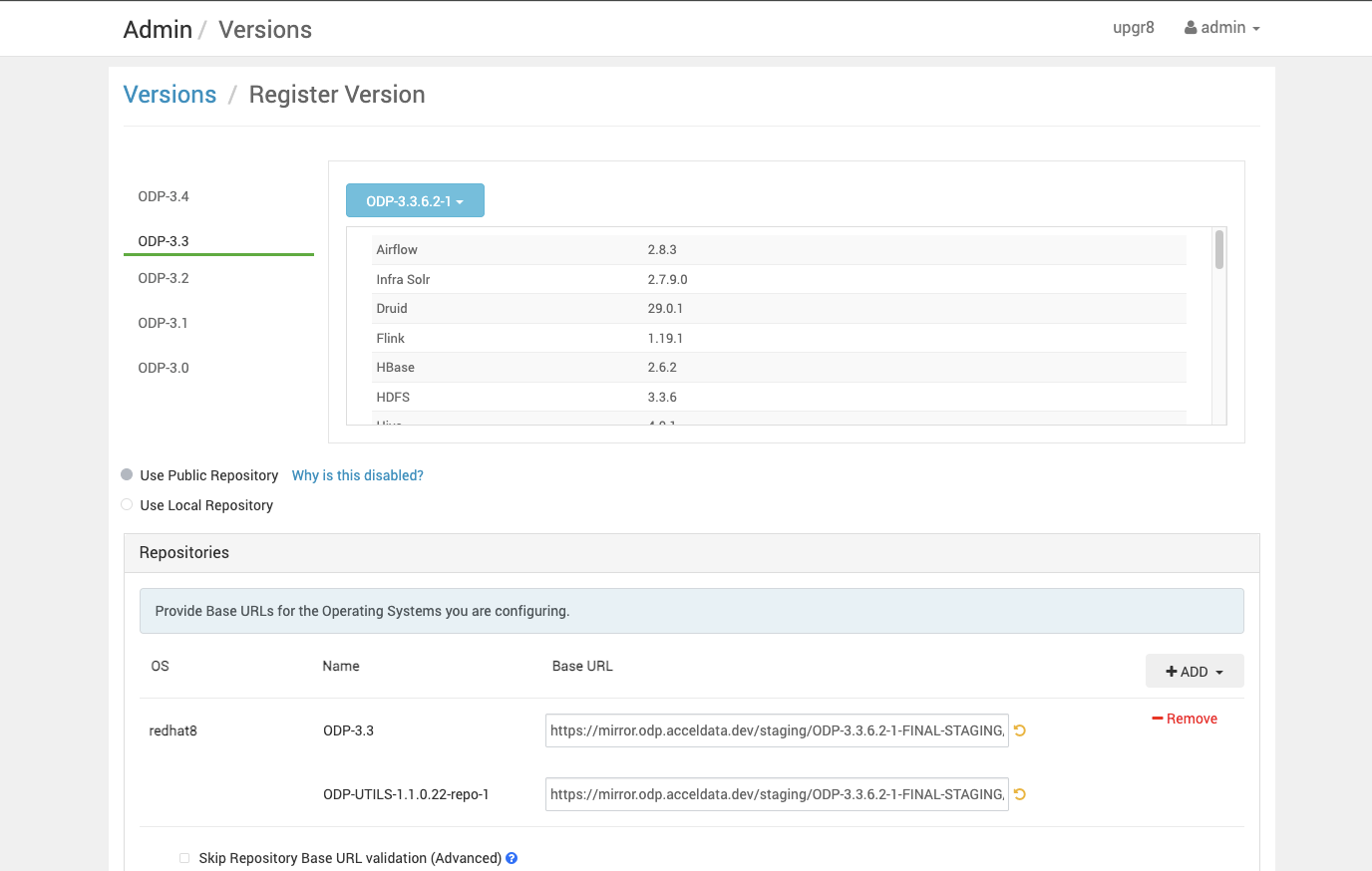
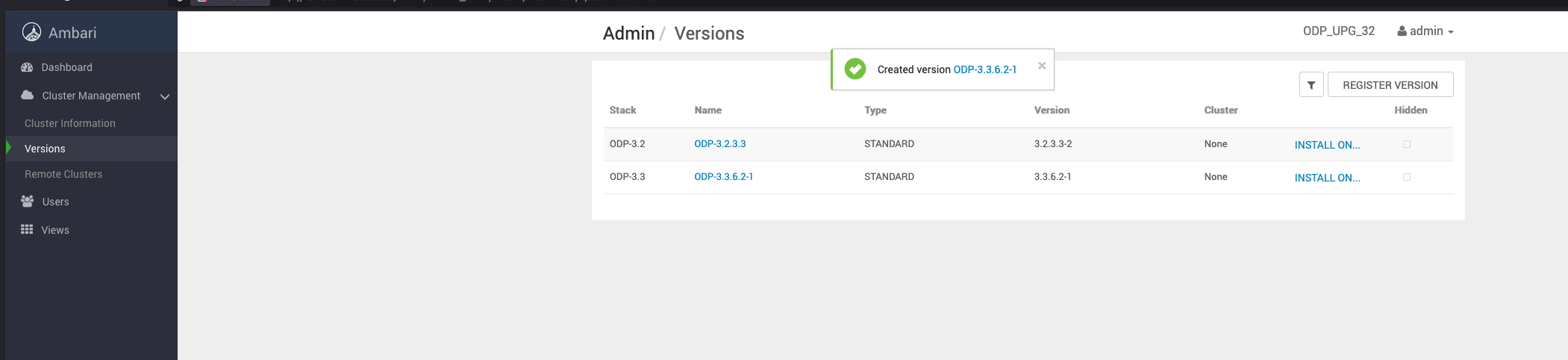
Save the ODP-3.3.6.2-1 details appearing on the screen. Once you save the details, you can see the screen as shown below.
Was this page helpful?