
Documentation
ODP 3.3.6.2-1
Release Notes
What is ODP
Installation
Component User guide and Installation Instructions
Upgrade Instructions
Downgrade Instructions
Reference Guide
Security Guide
Troubleshooting Guide
Uninstall ODP
Title
Message
Create new category
What is the title of your new category?
Edit page index title
What is the title of the page index?
Edit category
What is the new title of your category?
Edit link
What is the new title and URL of your link?
Enable Encryption at Rest for Kudu
Summarize Page
Copy Markdown
Open in ChatGPT
Open in Claude
Connect to Cursor
Connect to VS Code
This page describes how to enable encryption at rest for Kudu. Kudu supports data encryption at rest using Ranger KMS.
Steps to Enable Encryption
- Enable the
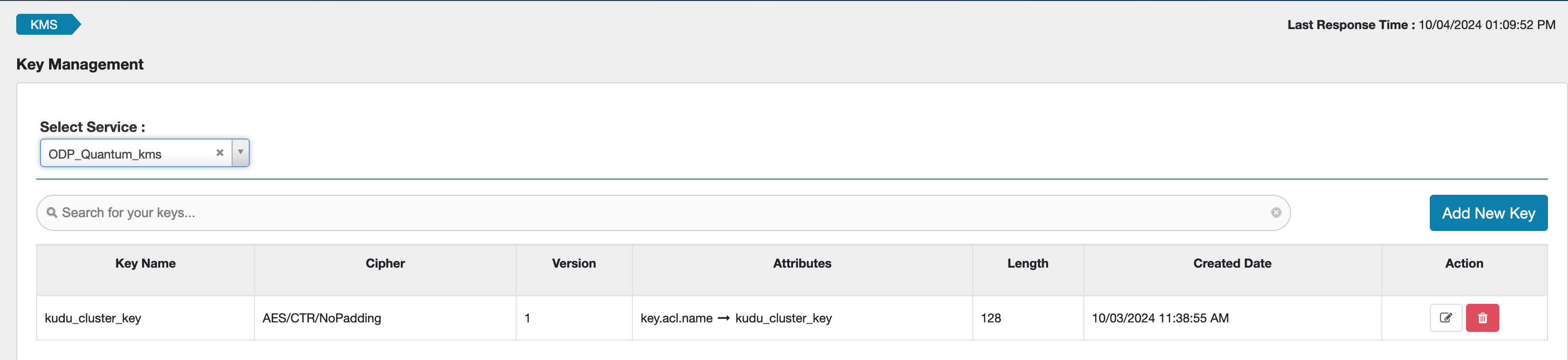
enable_kmsoption in the Kudu Mpack. - Create an encryption key in Ranger before installing the Kudu Mpack.
- Set
ranger_kms_key_nameto the name of the key you created in Ranger.

Example KMS key:
Additional Configuration
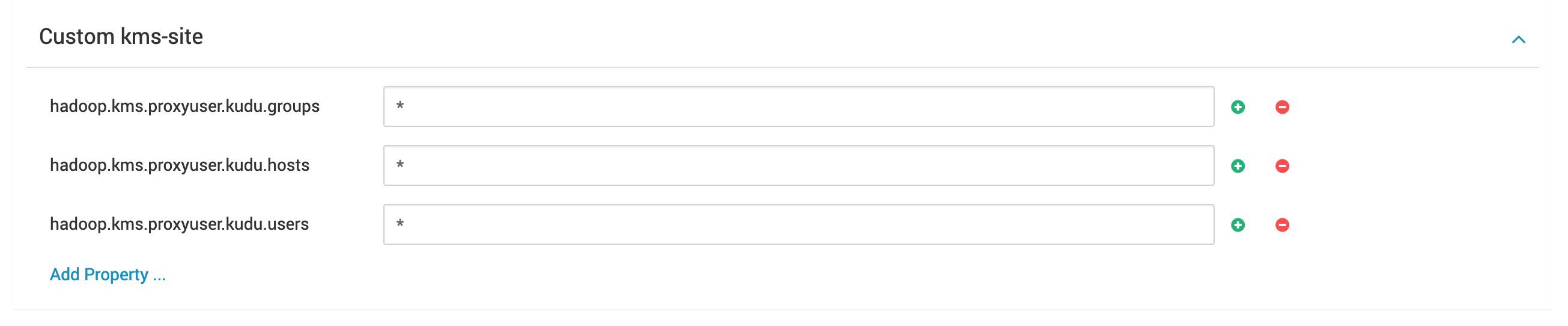
- Update the
kms-siteproperties in Ranger KMS to include settings required for Kudu. - Update or add a Ranger KMS policy to allow the
kuduuser access to the generated key.
Encryption in Motion
Data encryption in transit is supported through the rpc_encryption option, which is enabled by default when Kerberos is enabled.
Limitations
- Encryption at rest is only supported on newly created clusters.
- Enabling it on a cluster with existing data will cause Kudu servers to fail to start.
- Disabling encryption on an existing cluster is not supported.
Type to search, ESC to discard
Last updated on Sep 19, 2025
Was this page helpful?
Next to read:
Administer KuduDiscard Changes
Do you want to discard your current changes and overwrite with the template?
Archive Synced Block
Message
Create new Template
What is this template's title?
Delete Template
Message