Note
ODP currently does not support Ozone2 as the default file system. Yet ODP Ozone2 is configured to work independently of HDFS.
To enable ofs support with applications, configure applications to use necessary jars and ozone2-site.xml.
# hadoop-env
export HADOOP_CLASSPATH=$HADOOP_CLASSPATH:/usr/odp/current/ozone2-client/share/ozone/lib/ozone-filesystem-hadoop3-*.jar
<property>
<name>fs.ofs.impl</name
<value>org.apache.hadoop.fs.ozone.RootedOzoneFileSystem</value>
</property>
|
|
|---|
ozone.om.service.ids | omservice |
ozone.om.address.omservice.om0 | <om-node1-host>:9862 |
ozone.om.address.omservice.om1 | <om-node2-host>:9862 |
ozone.om.address.omservice.om2 | <om-node3-host>:9862 |
ozone.om.nodes.omservice | om0,om1,om2 |
ozone.om.kerberos.keytab.file | /etc/security/keytabs/ozone.om.service.keytab |
ozone.om.kerberos.principal | om/_HOST@ADSRE.COM |
Access hdfs dfs operations with ozone2 storage :
$ hdfs dfs [options] OFS_URI
Here are some examples :
$ hdfs dfs -ls ofs://omservice/
SLF4J: Class path contains multiple SLF4J bindings.
SLF4J: Found binding in [jar:file:/usr/odp/3.2.2.0-1/hadoop/lib/slf4j-reload4j-1.7.35.jar!/org/slf4j/impl/StaticLoggerBinder.class]
SLF4J: Found binding in [jar:file:/usr/odp/3.2.2.0-1/hadoop-hdfs/lib/slf4j-reload4j-1.7.35.jar!/org/slf4j/impl/StaticLoggerBinder.class]
SLF4J: See http://www.slf4j.org/codes.html#multiple_bindings for an explanation.
SLF4J: Actual binding is of type [org.slf4j.impl.Reload4jLoggerFactory]
24/03/20 16:15:08 INFO client.ClientTrustManager: Loading certificates for client.
Found 2 items
drwxrwxrwx - hdfs hadoop 0 2024-03-20 17:58 ofs://omservice/s3v
drwxrwxrwx - hdfs hadoop 0 2024-03-20 18:37 ofs://omservice/testvol
$ hdfs dfs -mkdir ofs://omservice/testvol/testbucket
SLF4J: Class path contains multiple SLF4J bindings.
SLF4J: Found binding in [jar:file:/usr/odp/3.3.0.0-1/hadoop/lib/slf4j-reload4j-1.7.35.jar!/org/slf4j/impl/StaticLoggerBinder.class]
SLF4J: Found binding in [jar:file:/usr/odp/3.3.0.0-1/hadoop-hdfs/lib/slf4j-reload4j-1.7.35.jar!/org/slf4j/impl/StaticLoggerBinder.class]
SLF4J: Found binding in [jar:file:/usr/odp/3.3.0.0-1/tez/lib/slf4j-reload4j-1.7.35.jar!/org/slf4j/impl/StaticLoggerBinder.class]
SLF4J: See http://www.slf4j.org/codes.html#multiple_bindings for an explanation.
SLF4J: Actual binding is of type [org.slf4j.impl.Reload4jLoggerFactory]
24/05/02 13:18:57 INFO client.ClientTrustManager: Loading certificates for client.
24/05/02 13:18:58 INFO rpc.RpcClient: Creating Bucket: testvol/testbucket, with bucket layout FILE_SYSTEM_OPTIMIZED, ambari-qa as owner, Versioning false, Storage Type set to DISK and Encryption set to false, Replication Type set to server-side default replication type, Namespace Quota set to -1, Space Quota set to -1
$ vi /tmp/README.md
hi,
this is README.md
$ hdfs dfs -put /tmp/README.md ofs://omservice/testvol/testbucket/
$ hdfs dfs -ls ofs://omservice/testvol/testbucket/
Found 1 items
-rw-rw-rw- 3 ambari-qa ambari-qa 22 2024-04-30 13:31 ofs://omservice/testvol/testbucket/README.md
$ hdfs dfs -cat ofs://omservice/testvol/testbucket/README.md
24/05/02 13:37:40 INFO client.ClientTrustManager: Loading certificates for client.
24/05/02 13:37:40 INFO impl.MetricsConfig: Loaded properties from hadoop-metrics2.properties
24/05/02 13:37:40 INFO impl.MetricsSystemImpl: Scheduled Metric snapshot period at 10 second(s).
24/05/02 13:37:40 INFO impl.MetricsSystemImpl: XceiverClientMetrics metrics system started
hi,
this is README.md
Note
retry.RetryInvocationHandler: com.google.protobuf.ServiceException: INFO logs may be ignored as client hits all OM hosts one by one to identify leader OM.
24/05/02 13:37:40 INFO retry.RetryInvocationHandler: com.google.protobuf.ServiceException: org.apache.hadoop.ipc.RemoteException(org.apache.hadoop.ozone.om.exceptions.OMNotLeaderException): OM:om1 is not the leader. Suggested leader is OM:om2[odp03.acceldata.dvl].
at org.apache.hadoop.ozone.protocolPB.OzoneManagerProtocolServerSideTranslatorPB.createNotLeaderException(OzoneManagerProtocolServerSideTranslatorPB.java:292)
at org.apache.hadoop.ozone.protocolPB.OzoneManagerProtocolServerSideTranslatorPB.createLeaderErrorException(OzoneManagerProtocolServerSideTranslatorPB.java:274)
at org.apache.hadoop.ozone.protocolPB.OzoneManagerProtocolServerSideTranslatorPB.submitReadRequestToOM(OzoneManagerProtocolServerSideTranslatorPB.java:267)
at org.apache.hadoop.ozone.protocolPB.OzoneManagerProtocolServerSideTranslatorPB.internalProcessRequest(OzoneManagerProtocolServerSideTranslatorPB.java:211)
at org.apache.hadoop.ozone.protocolPB.OzoneManagerProtocolServerSideTranslatorPB.processRequest(OzoneManagerProtocolServerSideTranslatorPB.java:171)
at org.apache.hadoop.hdds.server.OzoneProtocolMessageDispatcher.processRequest(OzoneProtocolMessageDispatcher.java:89)
at org.apache.hadoop.ozone.protocolPB.OzoneManagerProtocolServerSideTranslatorPB.submitRequest(OzoneManagerProtocolServerSideTranslatorPB.java:162)
at org.apache.hadoop.ozone.protocol.proto.OzoneManagerProtocolProtos$OzoneManagerService$2.callBlockingMethod(OzoneManagerProtocolProtos.java)
at org.apache.hadoop.ipc.ProtobufRpcEngine$Server.processCall(ProtobufRpcEngine.java:484)
at org.apache.hadoop.ipc.ProtobufRpcEngine2$Server$ProtoBufRpcInvoker.call(ProtobufRpcEngine2.java:595)
at org.apache.hadoop.ipc.ProtobufRpcEngine2$Server$ProtoBufRpcInvoker.call(ProtobufRpcEngine2.java:573)
at org.apache.hadoop.ipc.RPC$Server.call(RPC.java:1227)
at org.apache.hadoop.ipc.Server$RpcCall.run(Server.java:1094)
at org.apache.hadoop.ipc.Server$RpcCall.run(Server.java:1017)
at java.security.AccessController.doPrivileged(Native Method)
at javax.security.auth.Subject.doAs(Subject.java:422)
at org.apache.hadoop.security.UserGroupInformation.doAs(UserGroupInformation.java:1899)
at org.apache.hadoop.ipc.Server$Handler.run(Server.java:3048)
, while invoking $Proxy11.submitRequest over nodeId=om1,nodeAddress=odp02.acceldata.dvl:9862 after 1 failover attempts. Trying to failover immediately.
Yarn can be used to run jobs with jobs accessing data from or writing into ozone file system.
Add ozone-filesystem-hadoop3-1.4.0_.jar to _mapreduce.application.classpath* in mapred-site.xml .
If ranger authorization is enabled, provide necessary permissions to ofs buckets, hdfs path, yarn queues, to perform necessary operations as per job requirements.
Perform respective user kerberos authentication in case of secure cluster.
submit job
Here is a sample job, doing wordcount on data from file in ofs, and storing the output file with wordcount result in ofs.
# yarn jar /path/to/jar /path/to/inputfile /ath/to/output
$ yarn --config /etc/hadoop/conf jar /usr/odp/3.3.6.2-104/hadoop-mapreduce/hadoop-mapreduce-examples.jar wordcount ofs://omservice/testvol/testbucket/hdfsOzone.txt ofs://omservice/testvol/testbucket/wordcount_output
$ hdfs dfs -cat ofs://omservice/testvol/testbucket/wordcount_output/part-r-00000
24/05/03 11:06:36 INFO client.ClientTrustManager: Loading certificates for client.
24/05/03 11:06:37 INFO impl.MetricsConfig: Loaded properties from hadoop-metrics2.properties
24/05/03 11:06:37 INFO impl.MetricsSystemImpl: Scheduled Metric snapshot period at 10 second(s).
24/05/03 11:06:37 INFO impl.MetricsSystemImpl: XceiverClientMetrics metrics system started
HDFS. 1
Hello 2
Ozone. 1
from 1
Warning
Job failing with : INFO mapreduce.Job: Task Id : task-id , Status : FAILEDError: java.io.IOException: Cannot resolve OM host omservice in the URI``
Configure mapreduce job to use ozone-site.xml. Alternatively, you can pass configs during runtime:
yarn jar /usr/odp/3.3.0.0-1/hadoop-mapreduce/hadoop-mapreduce-examples.jar wordcount -Dozone.om.service.ids=omservice -Dozone.om.nodes.omservice=om0,om1,om2 -Dozone.om.address.omservice.om0=odp01.acceldata.dvl:9862 -Dozone.om.address.omservice.om1=odp02.acceldata.dvl:9862 -Dozone.om.address.omservice.om2=odp03.acceldata.dvl:9862 ofs://omservice/testvol/testbucket/hdfsOzone.txt ofs://omservice/testvol/testbucket/wordcount_output10
Although HIVE installation and operations use HDFS as default file system, ozone can be configured to be parallel file system for HIVE operations.
export HIVE_AUX_JARS_PATH=${HIVE_AUX_JARS_PATH}:/usr/odp/current/ozone2-client/share/ozone/lib/ozone-filesystem-hadoop3-2.1.0.3.3.6.2-104.jar
Restart Hive and Tez.
If Ranger authorization is enabled, grant the necessary permissions to OFS (Ozone File System) buckets, HDFS paths, and Hive URL to allow the required operations as per the job requirements.
Authenticate users with Kerberos credentials when operating in a secure cluster.
If queries are failing with below error when run queries as end user is enabled in hive org.apache.hadoop.security.authorize.AuthorizationException: User: hive is not allowed to impersonate ... https://issues.apache.org/jira/browse/HDDS-664
Ambari UI > Ozone > Configurations > Custom Core-site: add the following configs and restart services :
|
|
|---|
hadoop.proxyuser.hive.groups | |
hadoop.proxyuser.hive.hosts | |
hadoop.proxyuser.hive.users | |
To create tables in OFS add LOCATION '<OFS_URI> to CREATE TABLE command. This will make Hive tables reside at the specified location in ozone. All data changes her after will be in effect at table in given OFS_URI.
Here are sample hive operations with Hive accessing OFS :
Connect to Beeline
Create new table in ofs
0: jdbc:hive2://odp01.ha.ubuntu.ce:2181,odp02> CREATE EXTERNAL TABLE IF NOT EXISTS `employee`(
. . . . . . . . . . . . . . . . . . . . . . .> `id` bigint,
. . . . . . . . . . . . . . . . . . . . . . .> `name` string,
. . . . . . . . . . . . . . . . . . . . . . .> `age` smallint)
. . . . . . . . . . . . . . . . . . . . . . .> STORED AS parquet
. . . . . . . . . . . . . . . . . . . . . . .> LOCATION 'ofs://omservice/testvol/user/employee';
INFO : Compiling command(queryId=hive_20240313142803_8810af7b-f2f3-401f-ba40-5559e446d18e): CREATE EXTERNAL TABLE IF NOT EXISTS `employee`(
`id` bigint,
`name` string,
`age` smallint)
STORED AS parquet
LOCATION 'ofs://omservice/testvol/user/employee'
INFO : Semantic Analysis Completed (retrial = false)
INFO : Created Hive schema: Schema(fieldSchemas:null, properties:null)
INFO : Completed compiling command(queryId=hive_20240313142803_8810af7b-f2f3-401f-ba40-5559e446d18e); Time taken: 5.791 seconds
INFO : Operation CREATETABLE obtained 1 locks
INFO : Executing command(queryId=hive_20240313142803_8810af7b-f2f3-401f-ba40-5559e446d18e): CREATE EXTERNAL TABLE IF NOT EXISTS `employee`(
`id` bigint,
`name` string,
`age` smallint)
STORED AS parquet
LOCATION 'ofs://omservice/testvol/user/employee'
INFO : Starting task [Stage-0:DDL] in serial mode
INFO : Completed executing command(queryId=hive_20240313142803_8810af7b-f2f3-401f-ba40-5559e446d18e); Time taken: 2.497 seconds
No rows affected (8.958 seconds)
0: jdbc:hive2://odp01.ha.ubuntu.ce:2181,odp02> show tables;
INFO : Compiling command(queryId=hive_20240313143033_f33adeb6-bf59-45ac-bfb4-4e654c063ec1): show tables
INFO : Semantic Analysis Completed (retrial = false)
INFO : Created Hive schema: Schema(fieldSchemas:[FieldSchema(name:tab_name, type:string, comment:from deserializer)], properties:null)
INFO : Completed compiling command(queryId=hive_20240313143033_f33adeb6-bf59-45ac-bfb4-4e654c063ec1); Time taken: 0.269 seconds
INFO : Executing command(queryId=hive_20240313143033_f33adeb6-bf59-45ac-bfb4-4e654c063ec1): show tables
INFO : Starting task [Stage-0:DDL] in serial mode
INFO : Completed executing command(queryId=hive_20240313143033_f33adeb6-bf59-45ac-bfb4-4e654c063ec1); Time taken: 0.281 seconds
+-----------+
| tab_name |
+-----------+
| employee |
+-----------+
0: jdbc:hive2://odp01.ha.ubuntu.ce:2181,odp02> INSERT INTO employee(id, name, age) VALUES (1, "dora", 34) ;
0: jdbc:hive2://odp01.ha.ubuntu.ce:2181,odp02> select * from employee;
+--------------+----------------+---------------+
| employee.id | employee.name | employee.age |
+--------------+----------------+---------------+
| 1 | dora | 34 |
+--------------+----------------+---------------+
1 row selected (6.1 seconds)
Note
Although Ozone2 can work independently, current Ambari does not support Spark installation without HDFS.
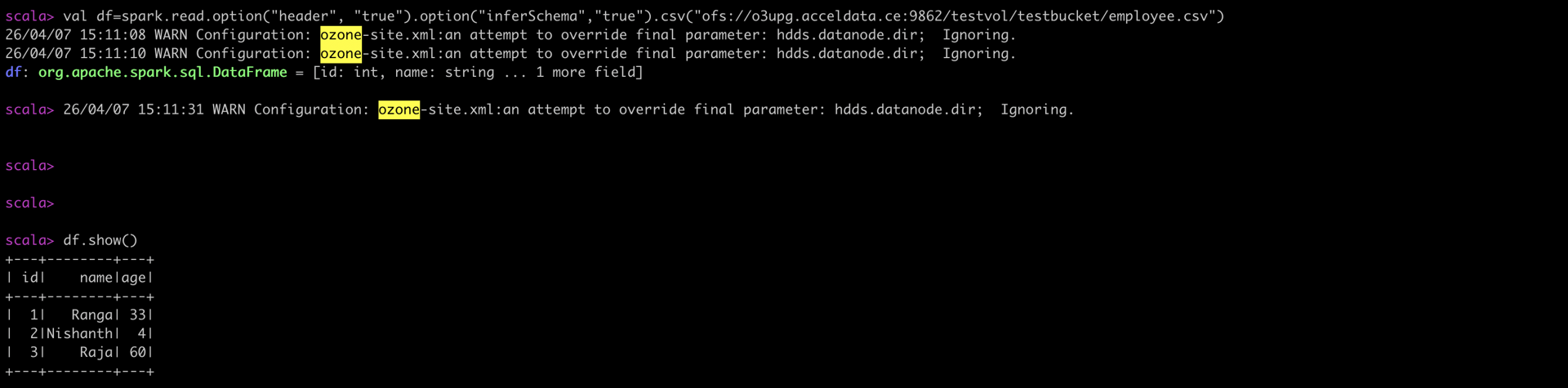
Apache Spark can access data from Apache Ozone2 and perform tasks. To access Apache Ozone2, configure spark :
$ vi /tmp/employee.csv
id,name,age
1,Ranga,33
2,Nishanth,4
3,Raja,60
$ ozone2 --config /etc/ozone2/conf/ozone.om sh key put /testvol/testbuck/employee.csv /tmp/employee.csv
Provide necessary permissions under ozone policies, for spark user to access respective bucket and file, if ranger authorization is enabled.
Allow spark user to submit yarn applications.
Launch spark-shell
spark-shell --keytab /etc/security/keytabs/spark.headless.keytab --principal <spark-principal> --conf spark.yarn.access.hadoopFileSystems=<OFS_URI> --jars=/usr/odp/current/ozone-client/share/ozone/lib/ozone-filesystem-hadoop3-client-2.1.0.3.3.6.2-104.jar
scala> val df=spark.read.option("header", "true").option("inferSchema","true").csv("ofs://omservice/testvol/testbuck/employee.csv")
To run spark job using ofs use following command:
spark-submit --conf spark.yarn.access.hadoopFileSystems=<OFS_URI> --jars=/usr/odp/current/ozone2-client/share/ozone/lib/ozone-filesystem-hadoop3-2.1.0.3.3.6.2-104.jar <SPARK_JOB> [parameteres-for-job-if-any]
For a secure cluster, add --keytab <keytab> --principal <principal> values to above command.
Here is a sample custom job that functions to access Ozone data with Apache Spark and write output to Ozone.
$ vi /tmp/PySparkSample.py
from pyspark.sql import SparkSession
from pyspark.sql.functions import col
spark = SparkSession.builder \
.appName("PySpark Example") \
.getOrCreate()
# Load data from input.txt
input_file_path = "ofs://omservice/testvol/testbuck/input.txt"
df = spark.read.text(input_file_path)
df_transformed = df.select((col("value").cast("int") * 2).cast("string").alias("transformed_data"))
#write the result data to output.txt
output_file_path = "ofs://omservice/testvol/testbuck/output.txt"
df_transformed.write.mode("overwrite").text(output_file_path)
spark.stop()
$ vi /tmp/input.txt
10
20
30
$ ozone2 --config /etc/ozone2/conf/ozone.om sh key put /testvol/testbuck/input.txt /tmp/input.txt
Provide necessary permissions to spark user to access respective bucket and key, in case of ranger authorization enabled.
Running PySpark app in secure cluster
spark-submit --keytab /etc/security/keytabs/spark.headless.keytab --principal <spark-principal> --conf spark.yarn.access.hadoopFileSystems=ofs://omservice/ --jars=/usr/odp/current/ozone2-client/share/ozone/lib/ozone-filesystem-hadoop3-2.1.0.3.3.6.2-104.jar /tmp/PySparkSample.py 10
$ hdfs dfs -ls ofs://omservice/testvol/testbuck/output.txt/
Found 2 items
-rw-rw-rw- 3 hdfs hdfs 0 2024-04-30 17:08 ofs://omservice/testvol/testbuck/output.txt/_SUCCESS
-rw-rw-rw- 3 hdfs hdfs 9 2024-04-30 17:08 ofs://omservice/testvol/testbuck/output.txt/part-00000-e9cc165a-b8cd-4a2b-9722-f9802053ea77-c000.txt
$ hdfs dfs -ls ofs://omservice/testvol/testbuck/output.txt/part-00000-e9cc165a-b8cd-4a2b-9722-f9802053ea77-c000.txt
20
40
60