In this document, we will guide you through the process of uninstalling Ambari, the robust platform for managing big data clusters, and completely uninstalling Acceldata's open-source data platform. Whether you are transitioning to a different solution or simply looking to clean up your environment, our step-by-step instructions will ensure a seamless removal process, allowing you to effectively manage your data infrastructure.
Stop all Services
To stop all services at once, perform the following:
Navigate to your Ambari console.
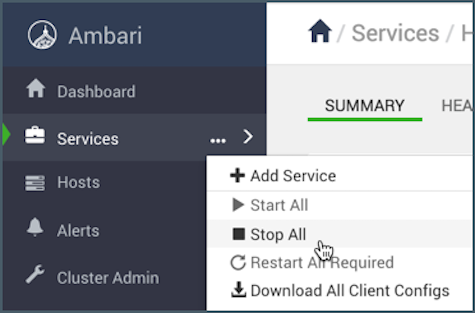
Click Services from the left navigation menu. A drop-down menu is displayed.
Click Stop All.
Note
If all the services are not stopped successfully, you need to manually kill all the processes on all nodes by using the following command to list and then kill them.
Host Clean-Up with HostCleanup.py
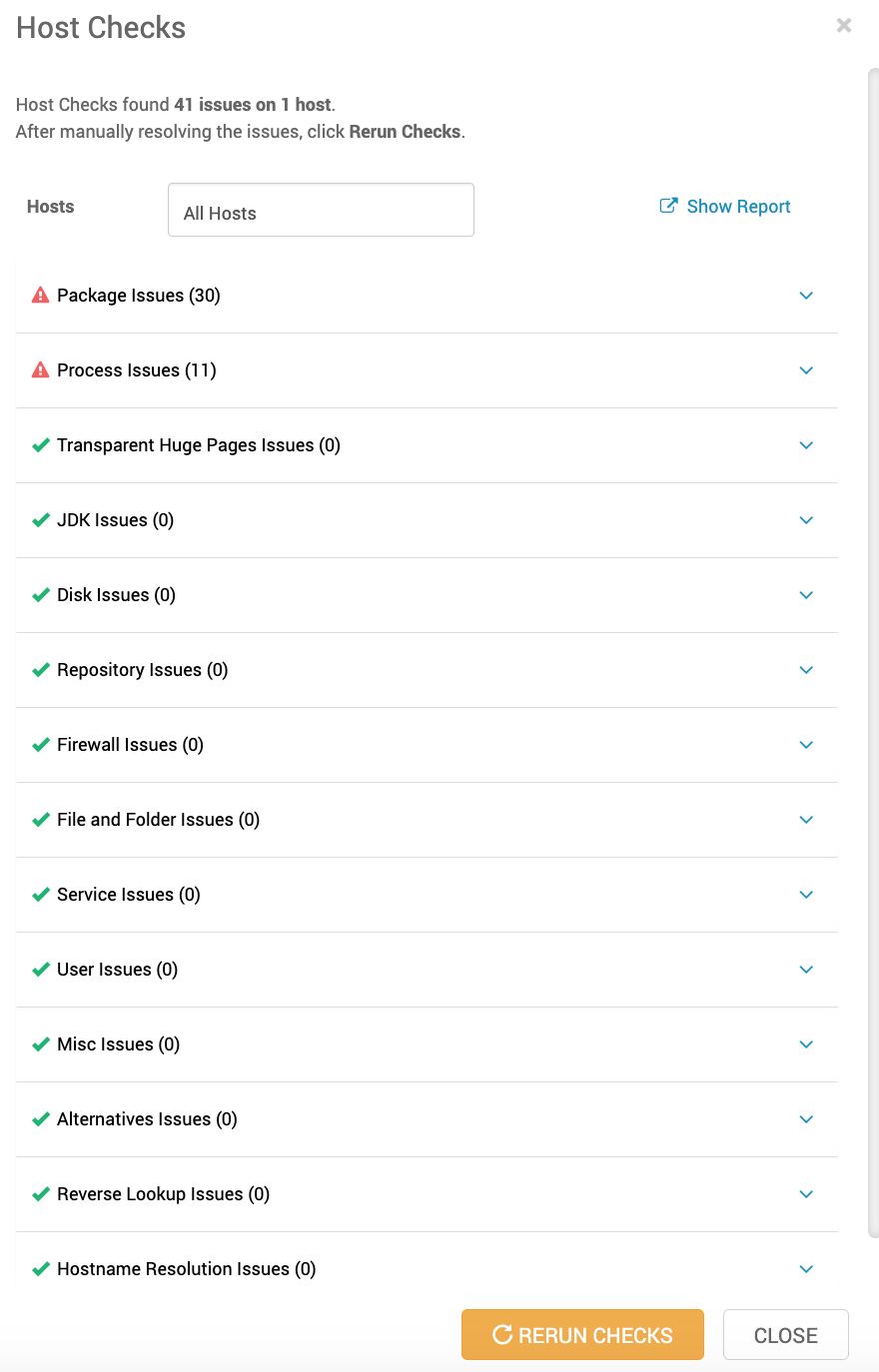
Ambari provides a HostCleanup.py script to automate the removal of packages, users, directories, repositories, processes, and alternatives based on a host-check report. Below is the combined, easy-to-follow usage for ODP uninstallation.
Locate the Host-Check Report
When you perform a host check, the report is saved at the below location.
Navigation: In the Ambari UI, navigate to Hosts → select hosts → Host Actions → Check Host.
/var/lib/ambari-agent/data/hostcheck_custom_actions.result
This JSON-like file lists all the ODP-related packages and files detected on the host.
Script Usage and Options
Usage: HostCleanup.py [options]
Options:
-h, --help Show help message and exit.
-v, --verbose Increase output verbosity.
-f FILE, --file=FILE Read host-check report from FILE.
-o FILE, --out=FILE Write detailed log to FILE.
-k SKIP, --skip=SKIP Comma-separated items to skip: packages,users,directories,repositories,processes,alternatives.
-s, --silent Accept default prompts without confirmation.
# By default, removes all items not listed in --skip.
Note The script doesn’t just uninstall ODP components—it removes all listed packages and any software that depends on them, including OS-level libraries or utilities. If you only want to clean up the ODP files and leave your system packages intact, add --skip=packages (or --skip=users,packages) to the command.
Example Commands
Cleanup everything except user accounts.
python /usr/lib/ambari-agent/lib/ambari_agent/HostCleanup.py --silent --skip=users
Skip both users and ODP packages along with their dependencies.
python /usr/lib/ambari-agent/lib/ambari_agent/HostCleanup.py --silent --skip=users,packages
Verbose log to a file.
python /usr/lib/ambari-agent/lib/ambari_agent/HostCleanup.py -v --silent
Info
If you have any other additional packages, you need to remove them manually.
Remove log folders on all nodes
To remove all log folders on all nodes, run the following commands:
rm -rf /var/log/hadoop
rm -rf /var/log/hbase
rm -rf /var/log/hadoop-mapreduce
rm -rf /var/log/hadoop-yarn
rm -rf /var/log/hive
rm -rf /var/log/hive-hcatalog
rm -rf /var/log/hive2
rm -rf /var/log/knox
rm -rf /var/log/solr
rm -rf /var/log/impala
rm -rf /var/log/zookeeper
rm -rf /var/log/spark
rm -rf /var/log/spark2
Remove Hadoop directories including HDFS data on all hosts
To remove Hadoop directories including HDFS data on all hosts, run the following commands:
rm -rf /hadoop
rm -rf /hdfs/hadoop
rm -rf /hdfs/lost+found
rm -rf /hdfs/var
rm -rf /tmp/hadoop
rm -rf /usr/bin/hadoop
rm -rf /usr/odp
rm -rf /var/hadoop
Remove configuration directories on all nodes
To remove the configuration directories on all nodes, run the following commands:
rm -rf /etc/hadoop
rm -rf /etc/hadoop-httpfs
rm -rf /etc/hbase
rm -rf /etc/hive2
rm -rf /etc/hive
rm -rf /etc/hive-hcatalog
rm -rf /etc/hive_llap
rm -rf /etc/impala
rm -rf /etc/knox
rm -rf /etc/livy*
rm -rf /etc/phoenix
rm -rf /etc/pig
rm -rf /etc/ranger-admin
rm -rf /etc/ranger-usersync
rm -rf /etc/spark2
rm -rf /etc/tez
rm -rf /etc/zookeeper
rm -rf /etc/tez*
unlink /etc/ranger/kms/conf
To delete ODP related repositories, run the following commands:
rm -rf /etc/yum.repos.d/odp.repo
rm -rf /etc/yum.repos.d/ambari-odp-1.repo
yum clean all
Remove all library folders on cluster Host
To remove all library folders on cluster Host, run the following commands:
rm -rf /var/lib/hadoop-hdfs
rm -rf /var/lib/hadoop-mapreduce
rm -rf /var/lib/hadoop-yarn
rm -rf /var/lib/hive*
rm -rf /var/lib/impala
rm -rf /var/lib/spark*
rm -rf /var/lib/knox
rm -rf /var/lib/livy3
rm -rf /var/lib/ambari-infra-solr-client
To clear out hue from usr/local , run the following command:
Remove PIDs on all Hosts
To remove PIDs on all hosts, run the following commands:
rm -rf /var/run/hadoop
rm -rf /var/run/hadoop-mapreduce
rm -rf /var/run/hadoop-yarn
rm -rf /var/run/hadoop-yarn-hbase
rm -rf /var/run/hbase
rm -rf /var/run/hive*
rm -rf /var/run/knox
rm -rf /var/run/impala
rm -rf /var/run/livy3
rm -rf /var/run/spark*
rm -rf /var/run/ranger*
rm -rf /var/run/zookeeper
Remove symlinks on all clusters' hosts (from /usr/bin)
To remove symlinks on all clusters hosts from /user/bin, run the following commands:
cd /usr/bin
rm -rf /usr/bin/odp-select
unlink hbase
unlink hdfs
unlink hive
unlink hiveserver2
unlink beeline
unlink kafka
unlink mapred
unlink ranger-admin
unlink ranger-admin-start
unlink ranger-admin-stop
unlink ranger-kms
unlink ranger-usersync
unlink ranger-usersync-start
unlink ranger-usersync-stop
unlink yarn
unlink zookeeper-client
unlink zookeeper-server
unlink zookeeper-server-cleanup
## use ls -l | grep odp to check for any undeleted symlinks
Remove symlinks on all clusters' hosts (from /usr/odp/current)
To remove symlinks on all clusters' hosts from /usr/odp/current, run the following commands:
cd /usr/odp/current
for file in hadoop*; do unlink "$file"; done
for file in hbase*; do unlink "$file"; done
for file in hive*; do unlink "$file"; done
for file in livy*; do unlink "$file"; done
for file in ranger*; do unlink "$file"; done
for file in yarn*; do unlink "$file"; done
for file in kafka*; do unlink "$file"; done
for file in knox*; do unlink "$file"; done
for file in spark*; do unlink "$file"; done
for file in tez*; do unlink "$file"; done
for file in zookeeper*; do unlink "$file"; done
Note If some files or directories are not deleted, you must remove them manually by using the following commands:
cd /usr/odp/3.3.6.1-1
rm -rf /usr/odp/3.3.6.1-1
rm -rf /usr/odp/
To clear out the security conf & keytabs for the ODP components, run the following commands:
rm -rf /etc/security/limits.d/*
rm -rf /etc/security/keytabs/
To delete users, run the following commands:
userdel -r hbase
userdel -r hcat
userdel -r hdfs
userdel -r hive2
userdel -r kafka
userdel -r knox
userdel -r mapred
userdel -r ranger
userdel -r spark
userdel -r sqoop
userdel -r tez
userdel -r yarn
userdel -r zookeeper
Remove Existing Files
To delete more existing files and directories manually, find them and run the following command:
find / -type f \( -name "*beeline*" -o -name "*hadoop*" -o -name "*hbase*" -o -name "*hdfs*" -o -name "*odp*" -o -name "*hive*" -o -name "*hiveserver2*" -o -name "*kafka*" -o -name "*mapred*" -o -name "*ranger*" -o -name "*sqoop*" -o -name "*yarn*" -o -name "*zookeeper*" \) | egrep -v "ambari|spool|jdk64|doc|share|repository|site-packages|locale|distutils"
On completion of the above steps, ODP undergoes a thorough uninstallation, and the Hadoop cluster is effectively cleaned up.
Retain Ambari
To retain Ambari and only erase DB and its data, run the following commands:
ambari server stop
ambari-server reset
## after this you'll have to recreate the ambari db in mysql
Set Up Fresh Ambari Database
To set up fresh Ambari database, run the following commands:
ambari-server setup
ambari-server start
Complete Uninstallation of Ambari
Stop and remove the ambari-server (on Ambari host) and ambari-agent (on all nodes), by running the following commands:
ambari-server stop
ambari-agent stop
yum erase ambari-server
yum erase ambari-agent
Remove log folders on all nodes, by running the following commands:
rm -rf /var/log/ambari-agent
rm -rf /var/log/ambari-server
Remove config folders on all nodes, by running the following commands:
rm -rf /etc/ambari-agent
rm -rf /etc/ambari-server
Delete Ambari related repos, by running the following commands:
rm -rf /etc/yum.repos.d/ambari.repo
yum clean all
Remove PIDs on all nodes, by running the following commands:
rm -rf /var/run/ambari-agent
rm -rf /var/run/ambari-server
Remove library folders on all nodes, by running the following commands:
rm -rf /usr/lib/ambari-agent
rm -rf /usr/lib/ambari-server-backups
rm -rf /var/lib/ambari-agent
rm -rf /var/lib/ambari-server
To delete users, run the following command:
Manually find and delete more existing files and directories, by running the following command: