
Docker is an open-source containerization platform that helps build, deploy, and manage containers. Currently Pulse is deployed using Docker containers in customer environments. It is cumbersome to manage the containers with resource constraints, hence having to shift the containers to different nodes to account for resources. Docker is highly dependent on third party tools like Docker compose for self healing capabilities.
With the Kubernetes based deployment, the entire load of orchestration, scaling, self-healing and load balancing is done by Kubernetes itself. It also reduces the manual steps involved in the deployment. Kubernetes decouples compute, storage and network making it easier to manage and scale them individually.
Prerequisites
Kubernetes Cluster
A minimum of 3 nodes is required to ensure high availability (HA) for the database.
You must provide a Kubernetes cluster of nodes/VMs that:
- Are reachable to each other.
- Can communicate with the customer’s clusters where agents will be installed.
If installing Kubernetes on bare metal:
- A minimum of 3 nodes with sufficient resources is needed to install:
- Kubernetes control plane services.
- Any extra plugins.
- Databases.
- Pulse microservices.
- A minimum of 3 nodes with sufficient resources is needed to install:
Hardware Requirements
Pulse resource requirements (some buffer added for k8s): Refer, Pulse Server Resource Calculator.
Rancher resource requirements: Refer, RKE2 Kubernetes.
Container Registry
You need to upload the images for our microservices and Kubernetes operator to your container registry and provide Acceldata with the credentials to pull from the registry. If you do not have a registry, Acceldata can set up a registry on one of the nodes.
Getting Started
To understand Acceldata's Pulse product, read the Pulse Overview documentation. The instructions are applicable to Kubernetes as well.
Architecture
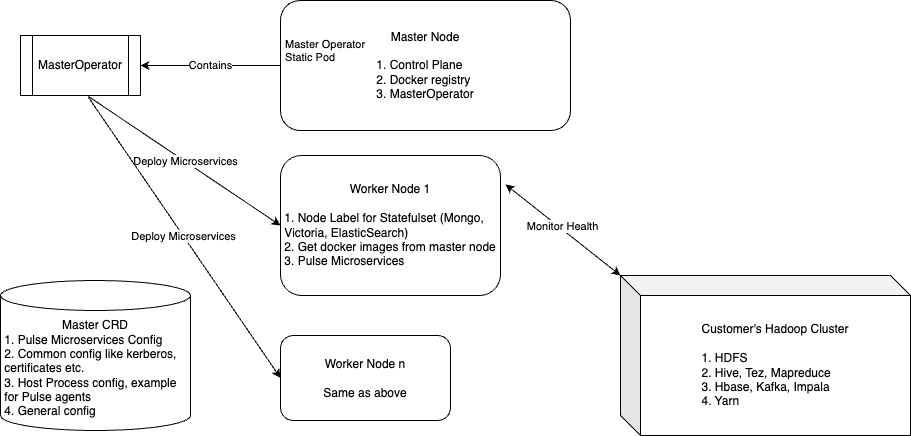
The architecture for Pulse remains the same, with only some port changes needed for Kubernetes deployment. For detailed instructions, refer to the Deployment and Configurations section on this page.
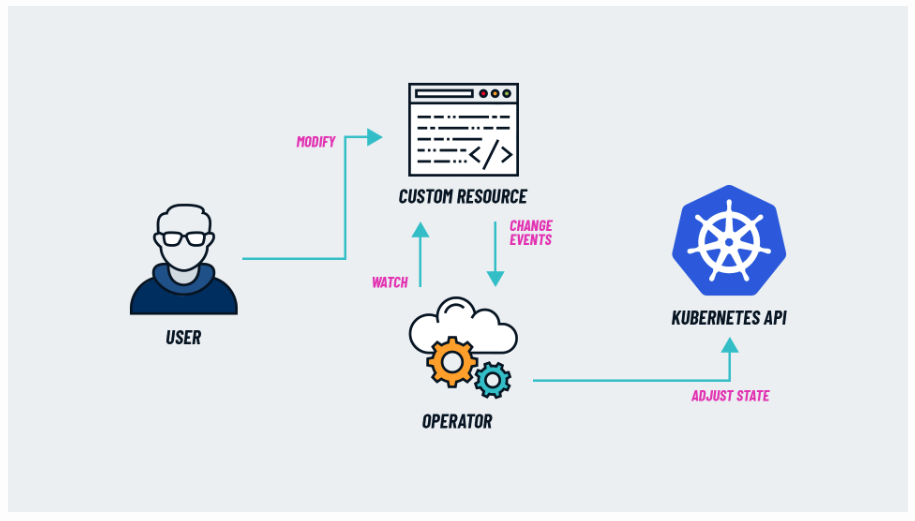
Pulse on Kubernetes uses the operator pattern for installation. An operator observes a resource, specifically the Pulse CRD, and ensures the cluster reaches the desired state. The CRD includes all necessary configurations for Pulse microservices and resources. Whenever a configuration change is required, the operator monitors the CRD for updates and reconciles to implement the changes.
The deployment also utilizes OSS operators for components like MongoDB, Elasticsearch, VictoriaMetrics, PostgreSQL, Linkerd, and Emissary installed on Kubernetes.
Deployment and Configurations
Pulse Configuration
Refer to the section on the curl command to create a CR for Pulse in the document below for the main CRD configuration.
For details about the cluster configuration fields in the CRD, contact support@acceldata.io.
The CR also includes the configuration for each microservice. You can modify replicas, resources, and environment variables using the Kubernetes Patch API.
xxxxxxxxxxenvironment_variables: ES_HOSTS: '"ad-elastic:9200"' IGNORE_OLDER_LOGS_DAYS: '5' IGNORE_OLDER_LOGS_ENABLE: 'true' INFORMATICA_ENABLED: 'false' MEMSQL_QUERY_DROP_EVENT_REGEX_KEY: query MEMSQL_QUERY_DROP_EVENT_REGEX_VALUE: ^(?i)SELECT\s*SQL_ MEMSQL_QUERY_HTTP_URL: http://ad-streaming:19005/batch MEMSQL_QUERY_OUTPUT_ENABLE: 'false' SYSLOG_PROG_REGEX_MATCH_ENABLE: 'true' SYSLOG_PROG_REGEX_MATCH_STRING_KEY: program SYSLOG_PROG_REGEX_MATCH_STRING_VALUE: ^kernel YARNAPP_LOGS_HTTP_FORMAT: json_batch YARNAPP_LOGS_HTTP_URL: http://ad-streaming:19005/batch image: ad-logstash labels: appName: ad-logstash appType: pulse_stateless name: ad-logstash ports: '19012': '5044' '19051': '19015' pulse_cluster: odp_odin replicas: 1 resources: limits: cpu: 1000m memory: 4Gi requests: cpu: 50m memory: 256Mi volumes: - container_path: /usr/local/openjdk-8/lib/security host_path: '' is_directory: true name: certs read_only: false - container_path: /ansible/work host_path: '' is_directory: true name: ansible read_only: true - container_path: /etc/acceldata/work host_path: '' is_directory: true name: etc-acceldata-work read_only: false - container_path: /krb host_path: '' is_directory: true name: krb read_only: false - container_path: /etc/fsanalytics host_path: '' is_directory: true name: opt-data read_only: false - container_path: /opt/docker/work host_path: '' is_directory: true name: opt-docker-work read_only: false - container_path: /tmp/acceldata/config/security host_path: '' is_directory: true name: tmp-acceldata-security read_only: false - container_path: /tmp/acceldata/config/users host_path: '' is_directory: true name: tmp-acceldata-users read_only: false - container_path: /etc/passwd host_path: '' is_directory: false name: tmp-acceldata-users-passwd read_only: false sub_path: passwd - container_path: /etc/group host_path: '' is_directory: false name: tmp-acceldata-users-group read_only: false sub_path: group - container_path: /tmp/acceldata/work host_path: '' is_directory: true name: tmp-acceldata-work read_only: false - container_path: /tmp/acceldata host_path: '' is_directory: true name: tmp-acceldata read_only: false - container_path: /vendor host_path: '' is_directory: true name: vendor read_only: false - container_path: /files/config host_path: '' is_directory: true name: work read_only: falseComponents Configurations
The application logs are currently accessible using the kubectl logs command. To retrieve logs for an application, run:
xxxxxxxxxxkubectl -n <namespace> logs -c <container> -f <pod>Currently, the logs are not aggregated in a centralized location like an ELK stack, and this release does not include monitoring and alerting capabilities for Kubernetes. These features are planned for future releases.
Scaling and High Availability
High Availability Mode in Databases
Databases can be horizontally and vertically scaled by updating their corresponding CR specifications. By default, HA mode is enabled for each database, and the operator ensures high availability by updating the databases one node at a time.
Pulse Microservices
Pulse microservices can be vertically scaled by increasing the resources specified in the CR (refer to the Pulse configuration section). Horizontal scaling is supported in the current version to enhance availability, but it does not provide load balancing (e.g., events are not distributed across pods, and each pod consumes the same event). Load balancing will be included in future releases.
Maintenance and Upgrades
Component Upgrade
Component upgrades are automatically managed by updating the operator and database images. The operator performs a rolling restart to upgrade each node in the database cluster individually. This approach also applies to increasing the resources for databases. Compute and storage resources can be increased by upgrading the CR for each database operator.
To upgrade the version of each component, we rely on the upgrades provided by the databases and must plan these upgrades within the Pulse release cycle. For example, if Pulse is on version 3.4.1, any database upgrades should be included in version 3.4.2 (if applicable).
Pulse Upgrade
For Docker-based deployments, Pulse upgrades are performed using the CLI. However, this process may differ if the upgrades involve changes to network policies or deployment structures (e.g., introducing multicluster database deployments, which differ in Kubernetes-based deployments).
Users can execute the upgrade commands by accessing the Accelo Manager pod and running the commands from within the pod.
xxxxxxxxxxkubectl exec -it <accelo-manager-pod> -n <namespace> -- /bin/bashUninstalling Pulse
To uninstall Pulse, perform the following steps and be aware that the following steps will delete everything including databases:
# Ad-vm we should set the finalizerskubectl -n <your-namespace> patch vmcluster ad-vm -p '{"metadata":{"finalizers":[]}}' --type=mergekubectl -n <your-namespace> delete vmcluster ad-vmkubectl -n <your-namespace> get deployments,service,statefulsets,serviceaccounts -l app.kubernetes.io/instance=ad-vm -o name | xargs -I{} kubectl patch -n <your-namespace> {} -p '{"metadata":{"finalizers":[]}}' --type=mergekubectl delete namespace <your-namespace>kubectl delete -f pulse_rbac.yamlkubectl delete -f pulse_crd.yaml #If linkerd is installedkubectl delete -f pulse_linkerd.yamlDeleting the namespace where Pulse is installed will remove everything, including the data inside the databases. To prevent data deletion, set the DeletePolicy of the PVC to Reclaim instead of Delete. This ensures that the PVC is not deleted, but the Kubernetes admin will need to manually release the PVC.
Conclusion
Kubernetes offers significant advantages over Docker, including ease of deployment, high availability, self-healing, scaling, and orchestration capabilities. This greatly simplifies the effort required to achieve these functionalities. Additionally, Kubernetes is widely adopted for various workload deployments across the industry, providing robust support for any issues and enhancements.