
As ODP clusters grow, it is common to add DataNodes with hardware configurations that differ from existing nodes. Differences may include:
Total storage capacity (for example, 8 TB and 3 TB nodes)
Number of disks per DataNode
Number of HDFS data directories (dfs.datanode.data.dir)
Disk partition layouts
A common question is whether ODP can maintain exactly the same storage utilization percentage across all DataNodes after cluster expansion.
This article explains how HDFS balancing works in ODP and what to expect when operating clusters with heterogeneous storage configurations.
How HDFS Balancing Works in ODP
ODP uses the native Apache Hadoop HDFS balancing mechanisms and does not introduce a proprietary balancing algorithm.
Two balancing components are available:
Component | Purpose |
|---|---|
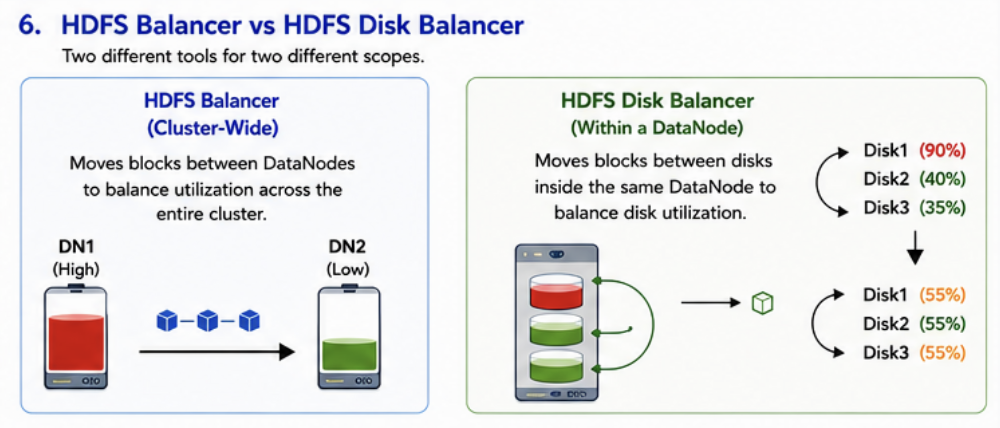
HDFS Balancer | Balances data across DataNodes in the cluster |
HDFS Disk Balancer | Balances data across disks within a single DataNode |
ODP provides cluster management, monitoring, and operational visibility while leveraging standard Hadoop balancing functionality.
HDFS Balancer
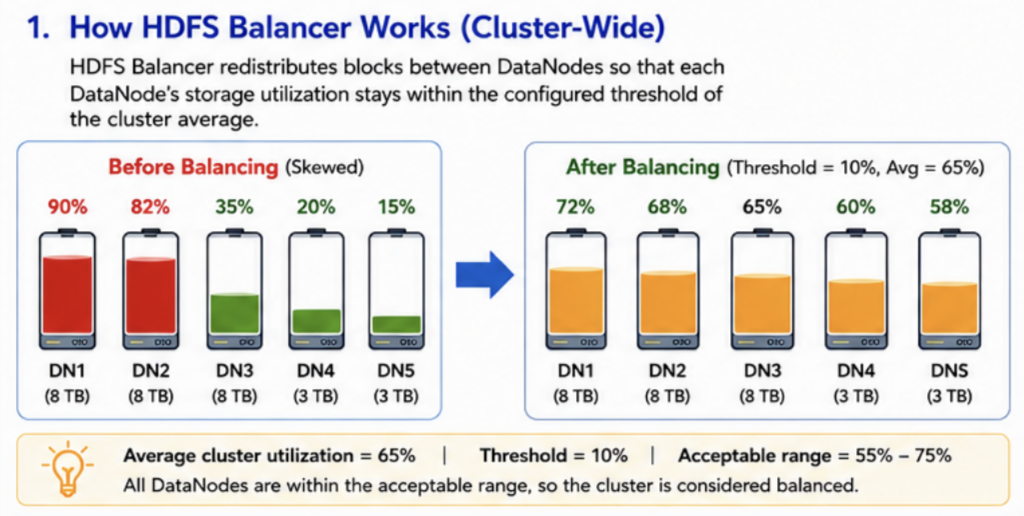
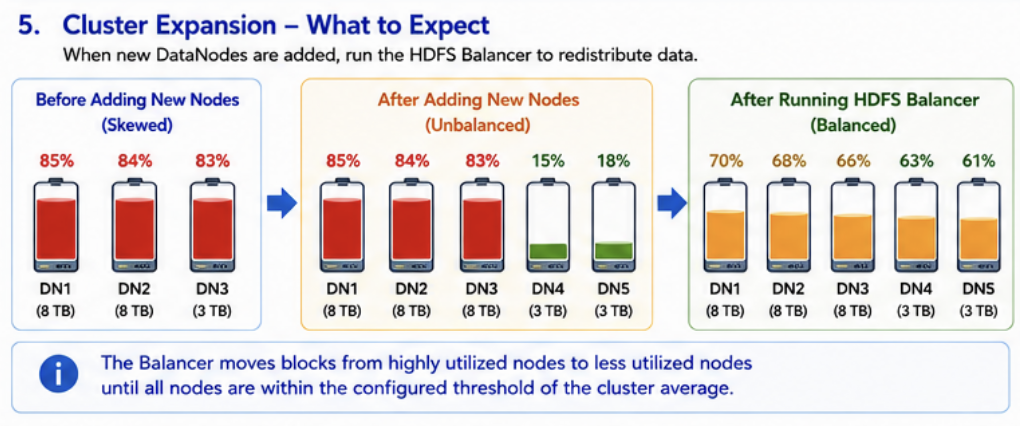
The HDFS Balancer redistributes HDFS blocks between DataNodes to reduce storage skew across the cluster.
What the Balancer Tries to Achieve
The HDFS Balancer attempts to keep DataNode utilization within a configurable threshold of the cluster-wide average utilization.
It does not guarantee identical utilization percentages across all DataNodes.
Example
Consider the following cluster:
DataNode | Capacity |
|---|---|
DN1 | 8 TB |
DN2 | 8 TB |
DN3 | 8 TB |
Assume:
Average cluster utilization = 65%
Balancer threshold = 10% (default)
Any node with utilization between 55% and 75% is considered balanced.
A valid balanced state could be:
DataNode | Utilization |
|---|---|
DN1 | 72% |
DN2 | 68% |
DN3 | 65% |
DN4 | 60% |
DN5 | 58% |
Although the utilization percentages differ, all nodes fall within the acceptable balancing range.
Does the Balancer Equalize Utilization Across Different-Capacity Nodes?
Not necessarily.
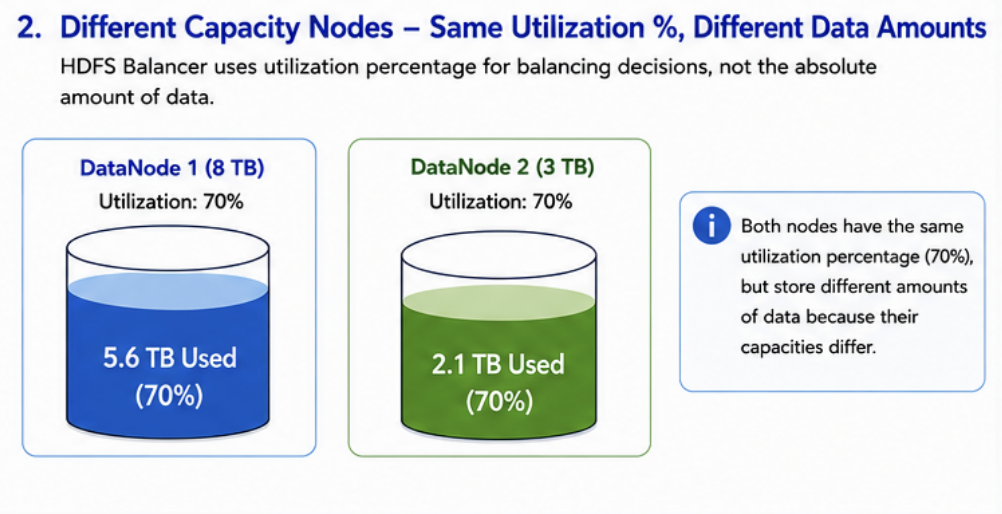
The HDFS Balancer makes decisions based on utilization percentages and balancing thresholds rather than equalizing the amount of data stored on each node.
For example:
DataNode | Capacity | Utilization | Data Stored |
|---|---|---|---|
DN1 | 8 TB | 70% | 5.6 TB |
DN2 | 3 TB | 70% | 2.1 TB |
Both nodes have the same utilization percentage, but store different amounts of data because their capacities differ.
Impact of Different Disk Counts or HDFS Data Directories
Differences in disk count, partition layout, or the number of configured HDFS data directories do not prevent HDFS Balancer from functioning.
Example:
Configuration | Existing Node | New Node |
|---|---|---|
Disks | 5 | 3 |
HDFS Data Directories | 5 | 3 |
Capacity | 8 TB | 3 TB |
The HDFS Balancer evaluates utilization at the DataNode level and balances data based on overall node utilization.
No additional ODP-specific configuration is required solely because DataNodes have different numbers of disks or HDFS data directories.
HDFS Disk Balancer
HDFS Disk Balancer addresses a different use case than the HDFS Balancer.
Purpose
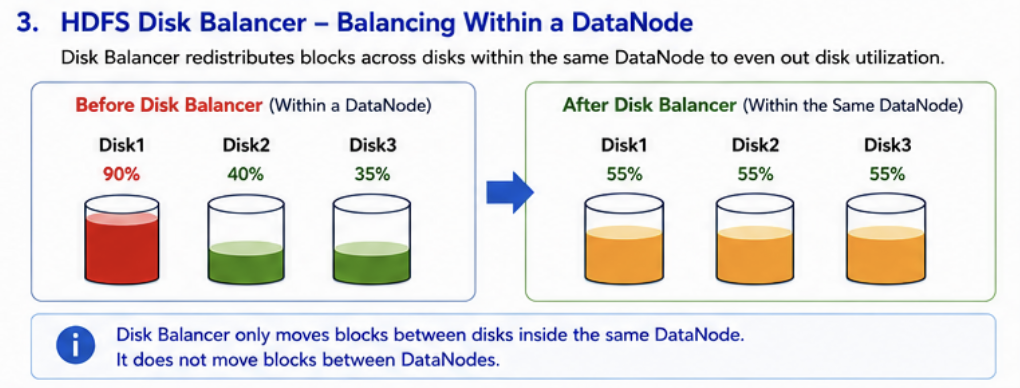
Disk Balancer redistributes data across disks within a single DataNode to improve utilization consistency.
Example
Before balancing:
Disk | Utilization |
|---|---|
Disk 1 | 90% |
Disk 2 | 40% |
Disk 3 | 35% |
After balancing:
Disk | Utilization |
|---|---|
Disk 1 | 55% |
Disk 2 | 55% |
Disk 3 | 55% |
Disk Balancer only operates within a DataNode and does not move blocks between DataNodes.
Typical Use Cases
Run Disk Balancer when:
New disks are added to an existing DataNode
Disk utilization becomes uneven
One or more disks become significantly more utilized than the others
Enabling Disk Balancer
Verify that the following property is configured in hdfs-site.xml:
If the property is not enabled, configure it before using Disk Balancer.
Disk Balancer Commands
**Generate a Plan **
Example:
Execute the Plan
Monitor Progress
HDFS Balancer Threshold
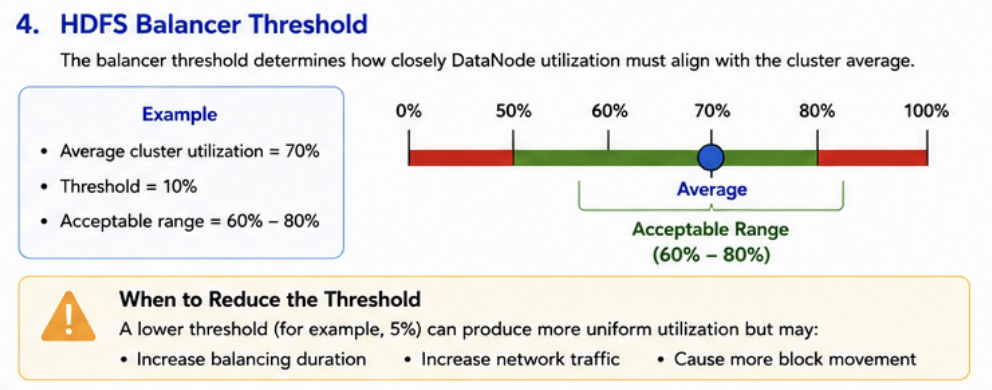
The balancer threshold determines how closely DataNode utilization must align with the cluster average.
Default configuration:
Example
If:
Average cluster utilization = 70%
Threshold = 10%
Then the acceptable utilization range is:
60% – 80%
Nodes within this range are considered balanced.
When to Reduce the Threshold
A lower threshold can produce more uniform utilization:
However, lower thresholds may:
Increase balancing duration
Increase network traffic
Cause more block movement across the cluster
Best Practices for Cluster Expansion
When Adding New DataNodes
Add and commission the new DataNodes.
Verify that HDFS recognizes the additional storage capacity.
Run the HDFS Balancer.
Monitor DataNode utilization.
Allow balancing to complete before evaluating storage distribution.
When Adding New Disks to Existing DataNodes
Add the new disks.
Update dfs.datanode.data.dir as required.
Restart the DataNode if necessary.
Run HDFS Disk Balancer.
Verify disk-level utilization.
Frequently Asked Questions
Does ODP provide a mechanism to force equal utilization across all DataNodes?
No. ODP relies on the standard Hadoop HDFS Balancer and does not provide a separate balancing algorithm.
Will existing nodes remain full while newly added nodes remain mostly empty? Not if the HDFS Balancer is allowed to run successfully. The Balancer moves blocks from highly utilized nodes to less utilized nodes until utilization falls within the configured threshold.
Does the number of disks affect HDFS Balancer? No. HDFS Balancer operates at the DataNode level. Differences in disk count do not require special balancing configuration.
When should Disk Balancer be used? Disk Balancer should be used when storage utilization is uneven across disks within the same DataNode, especially after adding new disks.
Summary
ODP supports cluster expansion with DataNodes that have different capacities, disk counts, and storage layouts without requiring special balancing configuration.
Key takeaways:
HDFS Balancer manages cluster-wide balancing across DataNodes.
HDFS Disk Balancer manages balancing within individual DataNodes.
Balancing is threshold-based, not equality-based.
Mixed-capacity DataNodes are fully supported.
Different disk counts and partition layouts are supported.
No additional ODP-specific balancing configuration is required for heterogeneous cluster expansion.
Actual balancing results depend on cluster utilization, replication policies, balancing thresholds, available network bandwidth, and the amount of data that can be safely moved during balancing operations.
Acceldata recommends running the balancer during off-peak hours whenever possible, since balancing consumes disk I/O and network bandwidth.