
Enable Ranger HDFS Audits
To enable HDFS auditing for the supported components in the ODP stack, the following properties must be validated in Ranger.
- Ensure Ranger is enabled for all components. The Ranger service must be created in the Ranger UI, the service test connection and policies are working.
- In the Ambari UI, navigate to
RangerConfigsRANGER AUDITAudit to HDFS
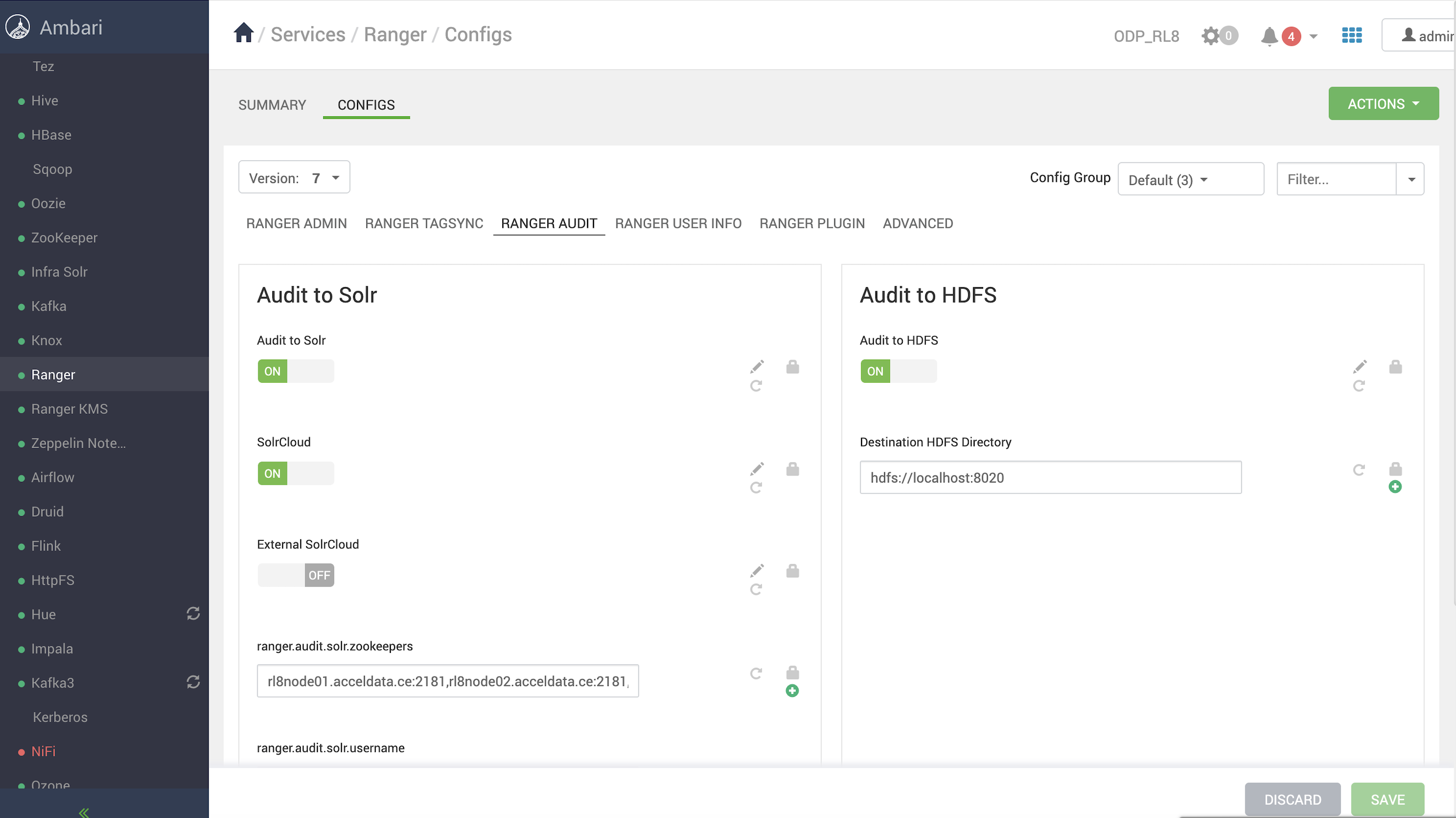
- Ensure that the destination HDFS directory is set to
hdfs://<nameservice><nameservice>fs.defaultFS
Refer to the following documentation pages to enable HDFS auditing for the components.
- HDFS—Audit to HDFS
- YARN—Audit to HDFS
- Hive—Audit to HDFS
- Impala—Audit to HDFS
- HBASE—Audit to HDFS
- Kafka—Audit to HDFS
- Kafka3—Audit to HDFS
- Ozone—Audit to HDFS
- RangerKMS—Audit to HDFS
- Kudu—Audit to HDFS
- Schema Registry—Audit to HDFS
- Knox—Audit to HDFS
- NiFi—Audit to HDFS
- NiFi Registry—Audit to HDFS
HDFS
- In the Ambari UI, navigate to
HDFSConfigsAdvanced ranger-hdfs-audit,Audit to HDFS - In
Advanced ranger-hdfs-audit
xasecure.audit.destination.hdfs.batch.filespool.dir=_var_log_hadoop_hdfs_audit_hdfs_spool
xasecure.audit.destination.hdfs.dir=hdfs:__<nameservice>_ranger_audit
YARN
- In the Ambari UI, navigate to
YARNConfigsAdvanced ranger-yarn-auditAudit to HDFS - In
Advanced ranger-yarn-audit
xasecure.audit.destination.hdfs.batch.filespool.dir=_var_log_hadoop_yarn_audit_hdfs_spool
xasecure.audit.destination.hdfs.dir=hdfs:__<nameservice>_ranger_audit
2025-05-08 17:24:33,646 ERROR utils.RangerJSONAuditWriter (RangerJSONAuditWriter.java:logJSON(117)) - Exception encountered while writing audits to HDFS!
org.apache.hadoop.security.AccessControlException: Permission denied: user=yarn, access=WRITE, inode="_":hdfs:hdfs:drwxr-xr-x
 at org.apache.hadoop.hdfs.server.namenode.FSPermissionChecker.check(FSPermissionChecker.java:506)
 at org.apache.hadoop.hdfs.server.namenode.FSPermissionChecker.checkPermission(FSPermissionChecker.java:346)
 at org.apache.ranger.authorization.hadoop.RangerHdfsAuthorizer$RangerAccessControlEnforcer.checkDefaultEnforcer(RangerHdfsAuthorizer.java:809)
 at org.apache.ranger.authorization.hadoop.RangerHdfsAuthorizer$RangerAccessControlEnforcer.checkRangerPermission(RangerHdfsAuthorizer.java:476)
 at org.apache.ranger.authorization.hadoop.RangerHdfsAuthorizer$RangerAccessControlEnforcer.checkPermissionWithContext(RangerHdfsAuthorizer.java:261)
 at org.apache.hadoop.hdfs.server.namenode.FSPermissionChecker.checkPermission(FSPermissionChecker.java:240)
 at org.apache.hadoop.hdfs.server.namenode.FSDirectory.checkPermission(FSDirectory.java:1943)
 at org.apache.hadoop.hdfs.server.namenode.FSDirectory.checkPermission(FSDirectory.java:1927)
 at org.apache.hadoop.hdfs.server.namenode.FSDirectory.checkAncestorAccess(FSDirectory.java:1886)
 at org.apache.hadoop.hdfs.server.namenode.FSDirMkdirOp.mkdirs(FSDirMkdirOp.java:60)
 at org.apache.hadoop.hdfs.server.namenode.FSNamesystem.mkdirs(FSNamesystem.java:3446)
 at org.apache.hadoop.hdfs.server.namenode.NameNodeRpcServer.mkdirs(NameNodeRpcServer.java:1167)
 at org.apache.hadoop.hdfs.protocolPB.ClientNamenodeProtocolServerSideTranslatorPB.mkdirs(ClientNamenodeProtocolServerSideTranslatorPB.java:742)
 at org.apache.hadoop.hdfs.protocol.proto.ClientNamenodeProtocolProtos$ClientNamenodeProtocol$2.callBlockingMethod(ClientNamenodeProtocolProtos.java)
 at org.apache.hadoop.ipc.ProtobufRpcEngine2$Server$ProtoBufRpcInvoker.call(ProtobufRpcEngine2.java:621)
 at org.apache.hadoop.ipc.ProtobufRpcEngine2$Server$ProtoBufRpcInvoker.call(ProtobufRpcEngine2.java:589)
 at org.apache.hadoop.ipc.ProtobufRpcEngine2$Server$ProtoBufRpcInvoker.call(ProtobufRpcEngine2.java:573)
 at org.apache.hadoop.ipc.RPC$Server.call(RPC.java:1227)
 at org.apache.hadoop.ipc.Server$RpcCall.run(Server.java:1094)
 at org.apache.hadoop.ipc.Server$RpcCall.run(Server.java:1017)
 at java.base_java.security.AccessController.doPrivileged(Native Method)
 at java.base_javax.security.auth.Subject.doAs(Subject.java:423)
 at org.apache.hadoop.security.UserGroupInformation.doAs(UserGroupInformation.java:1899)
 at org.apache.hadoop.ipc.Server$Handler.run(Server.java:3048)
Hive
- In the Ambari UI, navigate to
HiveConfigsAdvanced ranger-hive-auditAudit to HDFS - In
Advanced ranger-hive-audit
xasecure.audit.destination.hdfs.batch.filespool.dir=_var_log_hive_audit_hdfs_spool
xasecure.audit.destination.hdfs.dir=hdfs:__<nameservice>_ranger_audit
Impala
Impala — Audit to HDFS is enabled with Hive by default; no additional settings are required.
HBase
- In the Ambari UI, navigate to
HBaseConfigsAdvanced ranger-hbase-auditAudit to HDFS - In
Advanced ranger-hbase-audit
xasecure.audit.destination.hdfs.batch.filespool.dir=_var_log_hbase_audit_hdfs_spool
xasecure.audit.destination.hdfs.dir=hdfs:__<nameservice>_ranger_audit
Kafka
- In the Ambari UI, navigate to
KafkaConfigsAdvanced ranger-kafka-auditAudit to HDFS - In
Advanced ranger-kafka-audit
xasecure.audit.destination.hdfs.batch.filespool.dir=_var_log_hbase_audit_hdfs_spool
xasecure.audit.destination.hdfs.dir=hdfs:__<nameservice>_ranger_audit
Kafka3
- In the Ambari UI, navigate to
Kafka 3ConfigsAdvanced ranger-kafka3-auditAudit to HDFS - In
Advanced ranger-kafka3-audit
xasecure.audit.destination.hdfs.batch.filespool.dir=_var_log_kafka3_audit_hdfs_spool
xasecure.audit.destination.hdfs.dir=hdfs:__<nameservice>_ranger_audit
Ozone
- In the Ambari UI, navigate to
OzoneConfigsAdvanced ranger-ozone-auditAudit to HDFS - In
Advanced ranger-ozone-audit
xasecure.audit.destination.hdfs.batch.filespool.dir=_var_log_hadoop-ozone_audit_hdfs_spool (manual change in ambari)
xasecure.audit.destination.hdfs.dir=hdfs:__<nameservice>_ranger_audit (manual change)
RangerKMS
- In the Ambari UI, navigate to
RangerKMSConfigsAdvanced ranger-rangerkms-auditAudit to HDFS - In
Advanced ranger-kms-audit
xasecure.audit.destination.hdfs.batch.filespool.dir=_var_log_ranger_kms_audit_hdfs_spool
xasecure.audit.destination.hdfs.dir=hdfs:__<nameservice>_ranger_audit
Kudu
Before enabling Ranger HDFS audit for Kudu, ensure the required Ranger policies are in place as outlined in the documentation: Security. On this page, see Ranger.
- In the Ambari UI, navigate to
KuduConfigsAdvanced ranger-kudu-auditAudit to HDFS - In
Advanced ranger-kudu-audit
xasecure.audit.destination.hdfs=true
xasecure.audit.destination.hdfs.batch.filespool.dir=_var_log_kudu_audit_hdfs_spool
xasecure.audit.destination.hdfs.dir=hdfs:__<nameservice>_ranger_audit
Schema Registry
Before enabling Ranger HDFS audit for Schema Registry, ensure the required Ranger policies are in place as outlined in the documentation: Installation. On this page, see Ranger Configuration.
- In the Ambari UI, navigate to
Schema RegistryConfigsAdvanced ranger-schema-registry-auditAudit to HDFS - In
Advanced ranger-schema-registry-audit
xasecure.audit.destination.hdfs=true
xasecure.audit.destination.hdfs.batch.filespool.dir=_var_log_registry_audit_hdfs_spool
xasecure.audit.destination.hdfs.dir=hdfs:__<nameservice>_ranger_audit
xasecure.audit.destination.log4j=false
xasecure.audit.destination.log4j.logger=ranger_audit_logger
Knox
- In the Ambari UI, navigate to
KnoxConfigsAdvanced ranger-knox-auditAudit to HDFS - In
Advanced ranger-knox-audit
xasecure.audit.destination.hdfs.batch.filespool.dir=_var_log_knox_audit_hdfs_spool
xasecure.audit.destination.hdfs.dir=hdfs:__<nameservice>_ranger_audit
NiFi
Before enabling Solr audit for NiFi, ensure the required Ranger policies are in place as outlined in the documentation: NiFi Installation and SSL Enablement. On this page, see Ranger Configuration.
- Copy hdfs-site.xml and core-site.xml to the NiFi conf directory.
cp _etc_hadoop_conf_hdfs-site.xml _etc_nifi_conf_
cp _etc_hadoop_conf_core-site.xml _etc_nifi_conf_
Verify the following properties under Advanced ranger-nifi-audit.
xasecure.audit.destination.hdfs=true
xasecure.audit.destination.hdfs.batch.filespool.dir=_var_log_nifi_audit_hdfs_spool
xasecure.audit.destination.hdfs.dir=hdfs:__<nameservice>_ranger_audit
NiFi Registry
Before enabling Solr audit for NiF-Registry, ensure the required Ranger policies are in place as outlined in the documentation: Installing NiFi Registry. On this page, see see Ranger Configuration.
- Copy
hdfs-site.xmlcore-site.xmlconf
cp _etc_hadoop_conf_hdfs-site.xml _etc_nifi-registry_conf_
cp _etc_hadoop_conf_core-site.xml _etc_nifi-registry_conf_
- Verify the following properties under Advanced ranger-nifi-audit.
xasecure.audit.destination.hdfs=true
xasecure.audit.destination.hdfs.batch.filespool.dir=_var_log_nifi_audit_hdfs_spool
xasecure.audit.destination.hdfs.dir=hdfs:__<nameservice>_ranger_audit
- Restart NiFi Registry, and you must be able to view HDFS audits at
/ranger/audit/nifi-registry/
Have a suggestion?