
FAQs About Upgrade
Sometimes, even after deleting mpacks, residual corrupted references may remain. As a result, stack versions might not appear during upgrades from versions 3.2.2.x, 3.2.3.0-x, 3.2.3.1-x, or 3.2.3.2-x. Starting from Ambari version 2.7.8.2-x (ODP-3.2.3.3-x) onwards, only 3.3 and 3.4 stack versions are listed.
How to get 3.3 and 3.4 stacks shown from ambari UI?
- Clone the Upgrade Utility Repository and navigate to the Upgrade Scripts Directory.
git clone https://github.com/acceldata-io/ce-utils.git
cd ce-utils/odp-upgrade-to-3_3_6_2_1/upgrade_files_336
- Copy the
3.3
cp -r 3.3 /var/lib/ambari-server/resources/stacks/ODP/
- Validate the permission and ownership as below.
ls -lrth /var/lib/ambari-server/resources/stacks/ODP/
The response included with 3.3 stack.
drwxr-xr-x 7 root root 141 Apr 23 20:08 3.0
drwxr-xr-x 5 root root 71 Apr 23 20:08 3.1
drwxr-xr-x 5 root root 102 Apr 23 20:08 3.2
drwxr-xr-x 5 root root 4.0K Apr 24 16:23 3.3
- Copy the upgrade and nonrolling-upgrade.xml from
/var/lib/ambari-server/resources/stacks/ODP/3.3/upgrades//var/lib/ambari-server/resources/stacks/ODP/3.2/upgrades/.
cp /var/lib/ambari-server/resources/stacks/ODP/3.3/upgrades/nonrolling-upgrade-3.3.xml /var/lib/ambari-server/resources/stacks/ODP/3.2/upgrades/

cp /var/lib/ambari-server/resources/stacks/ODP/3.3/upgrades/upgrade-3.3.xml /var/lib/ambari-server/resources/stacks/ODP/3.2/upgrades/
- Change the permission to 755 for xmls copied in Step 4.
chmod 755 /var/lib/ambari-server/resources/stacks/ODP/3.2/upgrades/upgrade-3.3.xml
chmod 755 /var/lib/ambari-server/resources/stacks/ODP/3.2/upgrades/nonrolling-upgrade-3.3.xml
- Perform the Ambari-server restart step.
ambari-server restart
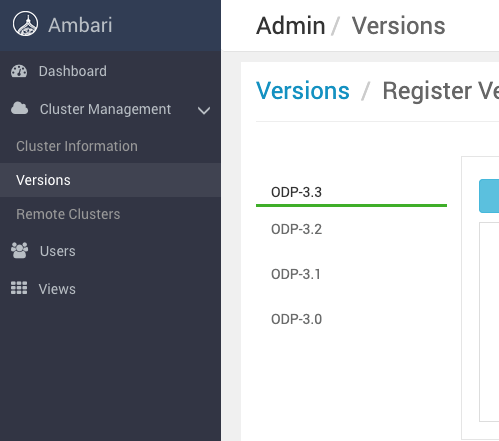
After restart, you can see the 3.3 stack in the Stack Versions page.
Have a suggestion?