
Apache Pinot Batch Import using HDFS
Overview
This document provides a step-by-step guide for batch importing data into Apache Pinot using HDFS as the storage backend.
Before running any Pinot commands, make sure to set Java 11 on the CLI and export other required configurations.
export JAVA_HOME=/usr/lib/jvm/java-11-openjdk-11.0.25.0.9-2.el8.x86_64
export PATH=$JAVA_HOME/bin:$PATH

export JAVA_OPTS="-Xms1G -Xmx2G"
export LOG_ROOT=/var/log/pinot
Create different tables and schemas.
Prepare the Data
Create a directory to store raw data.
mkdir -p /tmp/pinot-quick-start-new/rawdataCreate a sample CSV file with transcript data:
cat <<EOF > /tmp/pinot-quick-start-new/rawdata/transcript-hdfs.csv
transcriptID,firstName,lastName,gender,subject,score,timestampInEpoch
500,Lucy,Smith,Female,Maths,3.8,1570863600000
500,Lucy,Smith,Female,English,3.5,1571036400000
501,Bob,King,Male,Maths,3.2,1571900400000
502,Nick,Young,Male,Physics,3.6,1572418800000
EOF
Define Schema and Table Configuration
Schema Definition
cat <<EOF > /tmp/pinot-quick-start-new/transcript-hdfs-schema.json
{
  "schemaName": "transcripthdfs",
  "dimensionFieldSpecs": [
    {"name": "transcriptID", "dataType": "INT"},
    {"name": "firstName", "dataType": "STRING"},
    {"name": "lastName", "dataType": "STRING"},
    {"name": "gender", "dataType": "STRING"},
    {"name": "subject", "dataType": "STRING"}
  ],
  "metricFieldSpecs": [
    {"name": "score", "dataType": "FLOAT"}
  ],
  "dateTimeFieldSpecs": [{
    "name": "timestampInEpoch",
    "dataType": "LONG",
    "format" : "1:MILLISECONDS:EPOCH",
    "granularity": "1:MILLISECONDS"
  }]
}
EOF
Table Definition
cat <<EOF > /tmp/pinot-quick-start-new/transcript-hdfs-table-offline.json
{
  "tableName": "transcripthdfs",
  "tableType": "OFFLINE",
  "segmentsConfig": {
    "timeColumnName": "timestampInEpoch",
    "timeType": "MILLISECONDS",
    "replication": "1",
    "schemaName": "transcripthdfs"
  },
  "tableIndexConfig": {
    "invertedIndexColumns": [],
    "loadMode": "MMAP"
  },
  "tenants": {
    "broker": "DefaultTenant",
    "server": "DefaultTenant"
  },
  "metadata": {}
}
EOF
hdfs dfs -mkdir -p /tmp/pinot-quick-start-new/rawdata/
hdfs dfs -put transcript-hdfs.csv /tmp/pinot-quick-start-new/rawdata/
hdfs dfs -ls /tmp/pinot-quick-start-new/rawdata/Upload Schema and Table Configuration
Register the schema:
curl -X POST "http://{hostname}or{IP}:9000/schemas" -H "Content-Type: application/json" -d @/tmp/pinot-quick-start-new/transcript-hdfs-schema.jsonRegister the table:
curl -X POST "http://{hostname}or{IP}:9000/tables" -H "Content-Type: application/json" -d @/tmp/pinot-quick-start-new/transcript-hdfs-table-offline.jsonConfigure Batch Ingestion Job
Configuration in case of Kerberos Enabled Cluster
In case you are using Kerberos, add the below properties.
In Advanced pinot-controller-conf, add the below properties, save, and restart the Pinot Service from Ambari.
pinot.controller.storage.factory.class.hdfs=org.apache.pinot.plugin.filesystem.HadoopPinotFS
pinot.controller.storage.factory.hdfs.hadoop.conf.path=file:///etc/hadoop/conf
pinot.controller.segment.fetcher.protocols=file,http,hdfs
pinot.controller.segment.fetcher.hdfs.class=org.apache.pinot.common.utils.fetcher.PinotFSSegmentFetcher
pinot.controller.segment.fetcher.hdfs.hadoop.kerberos.principle=hdfs-pinottest@ADSRE.COM
pinot.controller.segment.fetcher.hdfs.hadoop.kerberos.keytab=/etc/security/keytabs/hdfs.headless.keytab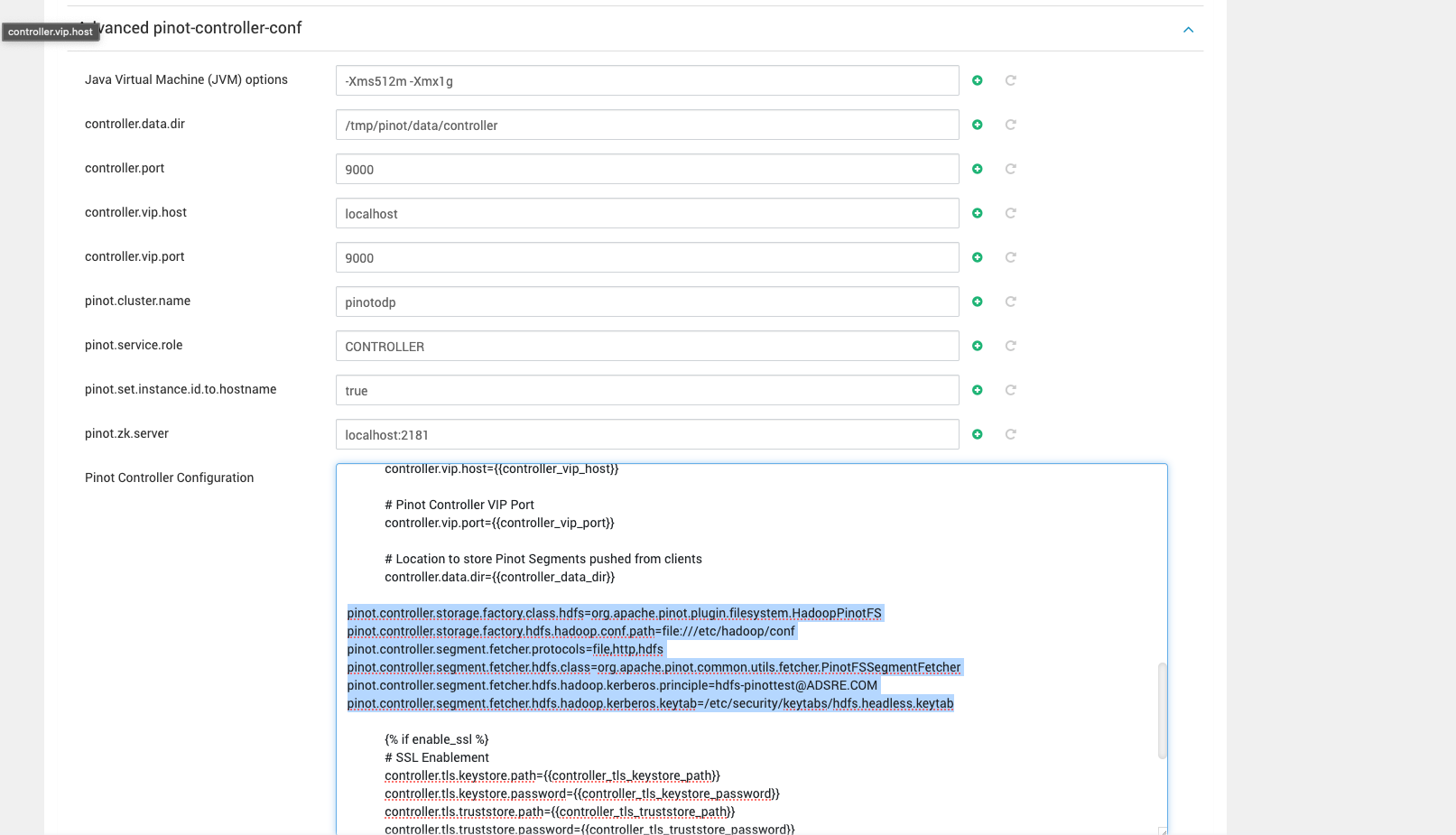
Info
Remove the following properties in case you are not using Kerberos from the below yaml file and above mentioned Kerberos configurations from the Pinot Controller conf.
hadoop.kerberos.principle: "hdfs-pinottest@ADSRE.COM"
hadoop.kerberos.keytab: "/etc/security/keytabs/hdfs.headless.keytab"
hadoop.security.authentication: "kerberos"
Create a batch ingestion job configuration file:
cat <<EOF > batch-job-spec-hdfs.yml
executionFrameworkSpec:
  name: "standalone"
  segmentGenerationJobRunnerClassName: "org.apache.pinot.plugin.ingestion.batch.standalone.SegmentGenerationJobRunner"
  segmentTarPushJobRunnerClassName: 'org.apache.pinot.plugin.ingestion.batch.standalone.SegmentTarPushJobRunner'
  segmentUriPushJobRunnerClassName: 'org.apache.pinot.plugin.ingestion.batch.standalone.SegmentUriPushJobRunner'
  segmentMetadataPushJobRunnerClassName: 'org.apache.pinot.plugin.ingestion.batch.standalone.SegmentMetadataPushJobRunner'
  extraConfigs:
      stagingDir: 'hdfs://{hostname}or{IP}:8020/tmp/pinot/output/transcripthdfsnew'

jobType: 'SegmentCreationAndTarPush'
pushJobSpec:
        pushFileNamePattern: 'glob:**\/*.tar.gz'
inputDirURI: 'hdfs://{hostname}or{IP}:8020/tmp/pinot-hadoop/rawdata/'
includeFileNamePattern: 'glob:**/*.csv'
outputDirURI: 'hdfs://{hostname}or{IP}:8020/tmp/pinot-hadoop/segments/'
overwriteOutput: true

pinotFSSpecs:
  - scheme: "hdfs"
    className: "org.apache.pinot.plugin.filesystem.HadoopPinotFS"
    configs:
            hadoop.conf.path: "/etc/hadoop/conf"
            hadoop.kerberos.principle: "hdfs-pinottest@ADSRE.COM"
            hadoop.kerberos.keytab: "/etc/security/keytabs/hdfs.headless.keytab"
            hadoop.security.authentication: "kerberos"


recordReaderSpec:
  dataFormat: 'csv'
  className: 'org.apache.pinot.plugin.inputformat.csv.CSVRecordReader'
  configClassName: 'org.apache.pinot.plugin.inputformat.csv.CSVRecordReaderConfig'
tableSpec:
  tableName: 'transcripthdfsnew'
  schemaURI: 'http://{hostname}or{IP}:9000/tables/transcripthdfsnew/schema'
  tableConfigURI: 'http://{hostname}or{IP}:9000/tables/transcripthdfsnew'
pinotClusterSpecs:
  - controllerURI: 'http://{hostname}or{IP}:9000'
EOF
Set Up Hadoop Environment Variables
export HADOOP_HOME=/usr/odp/3.3.6.3-1/hadoop/
export HADOOP_CONF_DIR=$HADOOP_HOME/etc/hadoop
export PATH=$HADOOP_HOME/bin:$PATH
Run the Batch Ingestion Job
Execute the following command to launch the data ingestion job:
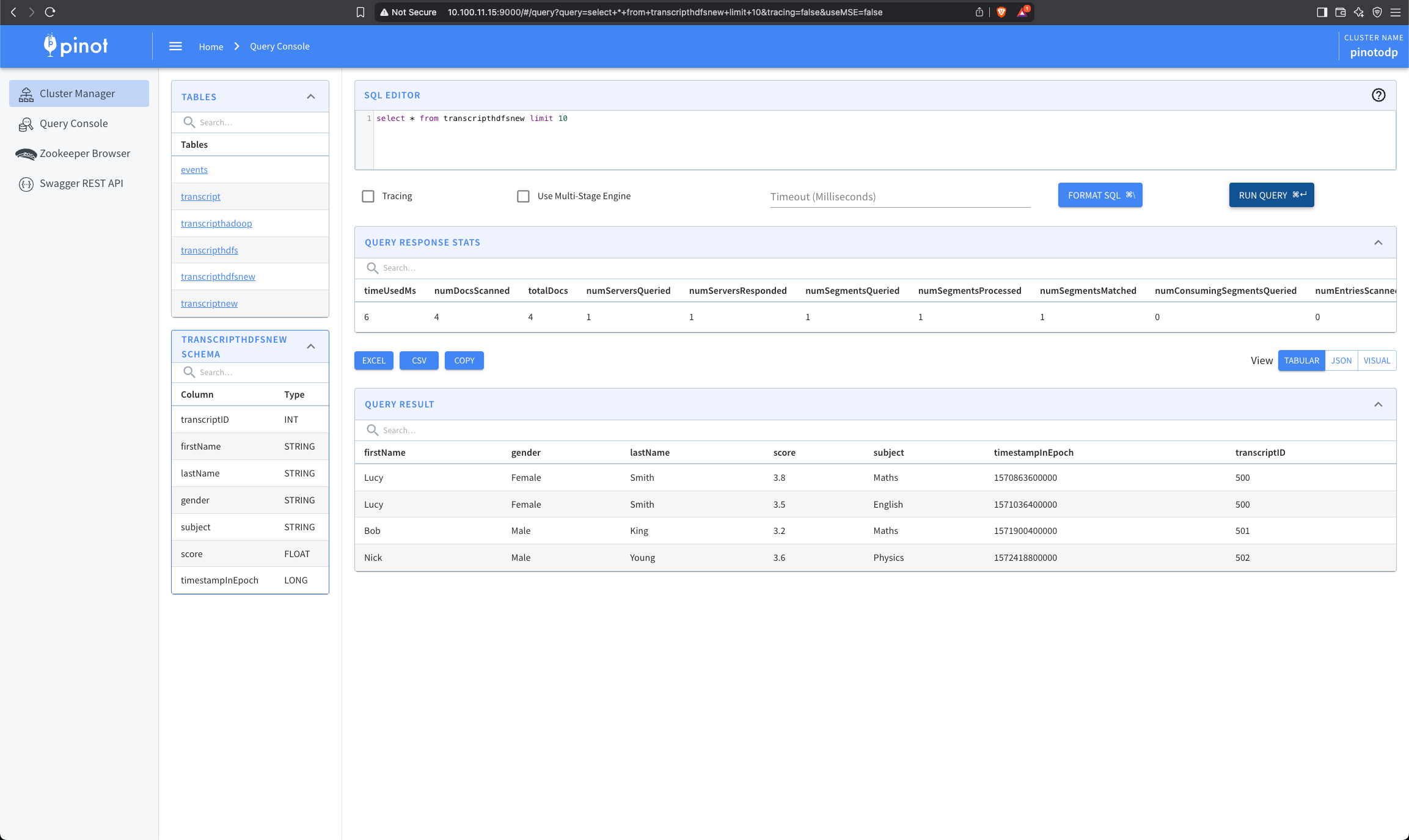
JAVA_OPTS="-Xms512m -Xmx1g" bin/pinot-admin.sh LaunchDataIngestionJob -jobSpecFile batch-job-spec-hdfs.yml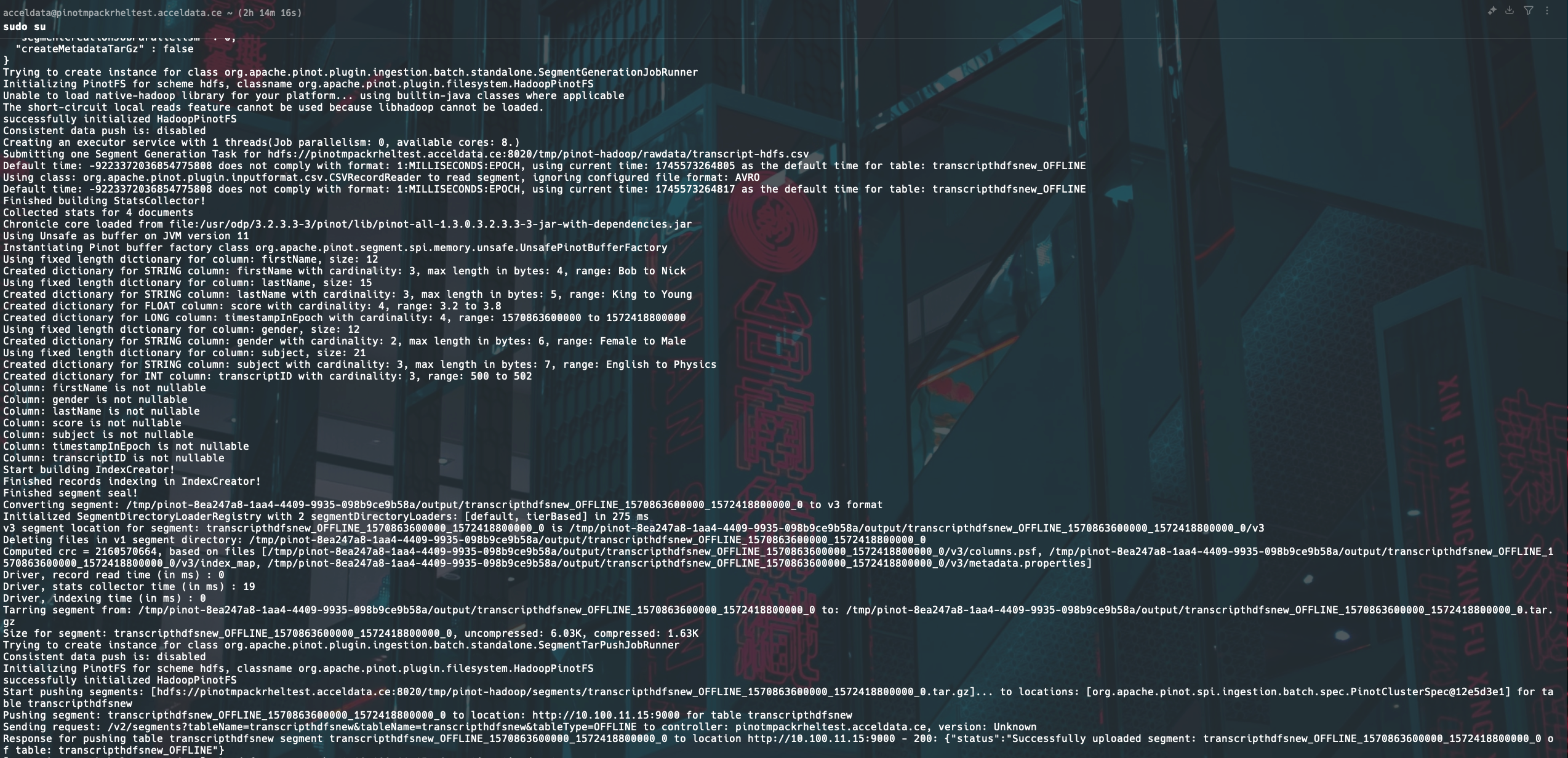

Have a suggestion?