
Search
The Infra-Solr service has already been stopped during the Ambari Server Upgrade. Proceed with the following steps to upgrade Infra Solr:
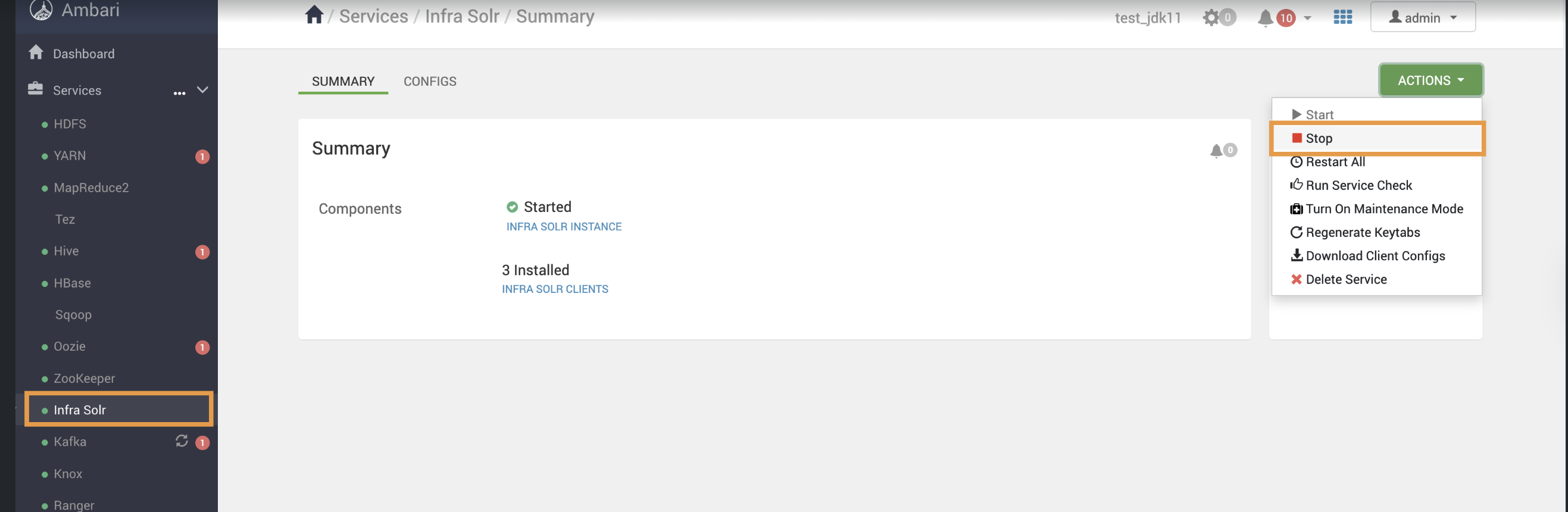
Stop the Infra-solr Service
Stop the Infra-solr Service from the Ambari-UI
Erase Infra Solr:
For RHEL:
yum remove ambari-infra-solr-client ambari-infra-solr -y
For Ubuntu:
apt remove ambari-infra-solr-client ambari-infra-solr -y
Install Updated Infra Solr:
For RHEL:
yum clean all
yum install ambari-infra-solr ambari-infra-solr-client -y
For Ubuntu:
apt clean
apt update
apt install ambari-infra-solr ambari-infra-solr-client-y
Update Configuration
Advanced infra-solr-env -> infra-solr-env template
#!/bin/bash
# Licensed to the Apache Software Foundation (ASF) under one or more
# contributor license agreements. See the NOTICE file distributed with
# this work for additional information regarding copyright ownership.
# The ASF licenses this file to You under the Apache License, Version 2.0
# (the "License"); you may not use this file except in compliance with
# the License. You may obtain a copy of the License at
#
# http://www.apache.org/licenses/LICENSE-2.0
#
# Unless required by applicable law or agreed to in writing, software
# distributed under the License is distributed on an "AS IS" BASIS,
# WITHOUT WARRANTIES OR CONDITIONS OF ANY KIND, either express or implied.
# See the License for the specific language governing permissions and
# limitations under the License.
# By default the script will use JAVA_HOME to determine which java
# to use, but you can set a specific path for Solr to use without
# affecting other Java applications on your server/workstation.
SOLR_JAVA_HOME={{java64_home}}
# Increase Java Min/Max Heap as needed to support your indexing / query needs
SOLR_JAVA_MEM="-Xms{{infra_solr_min_mem}}m -Xmx{{infra_solr_max_mem}}m"
SOLR_JAVA_STACK_SIZE="-Xss{{infra_solr_java_stack_size}}m"
{% if java_version < 11 %}
# For JDK 8 and below
infra_solr_gc_log_opts="-verbose:gc -XX:+PrintHeapAtGC -XX:+PrintGCDetails -XX:+PrintGCDateStamps -XX:+PrintGCTimeStamps -XX:+PrintTenuringDistribution -XX:+PrintGCApplicationStoppedTime -XX:+UseGCLogFileRotation -XX:NumberOfGCLogFiles=15 -XX:GCLogFileSize=200M"
GC_LOG_OPTS="{{infra_solr_gc_log_opts}} -Xloggc:{{infra_solr_log_dir}}/solr_gc.log"
infra_solr_gc_tune="-XX:NewRatio=3 -XX:SurvivorRatio=4 -XX:TargetSurvivorRatio=90 -XX:MaxTenuringThreshold=8 -XX:+UseConcMarkSweepGC -XX:+UseParNewGC -XX:ConcGCThreads=4 -XX:ParallelGCThreads=4 -XX:+CMSScavengeBeforeRemark -XX:PretenureSizeThreshold=64m -XX:+UseCMSInitiatingOccupancyOnly -XX:CMSInitiatingOccupancyFraction=50 -XX:CMSMaxAbortablePrecleanTime=6000 -XX:+CMSParallelRemarkEnabled -XX:+ParallelRefProcEnabled"
{% else %}
# For JDK 11 and above
GC_LOG_OPTS="-Xlog:gc*=info:file={{infra_solr_log_dir}}/solr_gc.log:time,uptime"
# Use separate options to handle log file rotation and size
LOG_ROTATION_OPTS="-XX:NumberOfGCLogFiles=15 -XX:GCLogFileSize=200M"
# Garbage Collection Tuning
infra_solr_gc_tune="-XX:NewRatio=3 -XX:SurvivorRatio=4 -XX:TargetSurvivorRatio=90 -XX:MaxTenuringThreshold=8 -XX:+UseG1GC -XX:+ParallelRefProcEnabled -XX:ConcGCThreads=4 -XX:ParallelGCThreads=4 -XX:+DisableExplicitGC"
# Combine all options
JAVA_OPTS="${GC_LOG_OPTS} ${LOG_ROTATION_OPTS} ${infra_solr_gc_tune}"
{% endif %}
# Set the ZooKeeper connection string if using an external ZooKeeper ensemble
# e.g. host1:2181,host2:2181/chroot
# Leave empty if not using SolrCloud
ZK_HOST="{{zookeeper_quorum}}{{infra_solr_znode}}"
# Set the ZooKeeper client timeout (for SolrCloud mode)
ZK_CLIENT_TIMEOUT="60000"
# By default the start script uses "localhost"; override the hostname here
# for production SolrCloud environments to control the hostname exposed to cluster state
SOLR_HOST=`hostname -f`
# By default the start script uses UTC; override the timezone if needed
#SOLR_TIMEZONE="UTC"
# Set to true to activate the JMX RMI connector to allow remote JMX client applications
# to monitor the JVM hosting Solr; set to "false" to disable that behavior
# (false is recommended in production environments)
ENABLE_REMOTE_JMX_OPTS="{{infra_solr_jmx_enabled}}"
# The script will use SOLR_PORT+10000 for the RMI_PORT or you can set it here
RMI_PORT={{infra_solr_jmx_port}}
# Anything you add to the SOLR_OPTS variable will be included in the java
# start command line as-is, in ADDITION to other options. If you specify the
# -a option on start script, those options will be appended as well. Examples:
#SOLR_OPTS="$SOLR_OPTS -Dsolr.autoSoftCommit.maxTime=3000"
#SOLR_OPTS="$SOLR_OPTS -Dsolr.autoCommit.maxTime=60000"
#SOLR_OPTS="$SOLR_OPTS -Dsolr.clustering.enabled=true"
SOLR_OPTS="$SOLR_OPTS -Djava.rmi.server.hostname={{hostname}}"
{% if infra_solr_extra_java_opts -%}
SOLR_OPTS="$SOLR_OPTS {{infra_solr_extra_java_opts}}"
{% endif %}
# Location where the bin/solr script will save PID files for running instances
# If not set, the script will create PID files in $SOLR_TIP/bin
SOLR_PID_DIR={{infra_solr_piddir}}
# Path to a directory where Solr creates index files, the specified directory
# must contain a solr.xml; by default, Solr will use server/solr
SOLR_HOME={{infra_solr_datadir}}
# Solr provides a default Log4J configuration properties file in server/resources
# however, you may want to customize the log settings and file appender location
# so you can point the script to use a different log4j.properties file
LOG4J_PROPS={{infra_solr_conf}}/log4j2.xml
# Location where Solr should write logs to; should agree with the file appender
# settings in server/resources/log4j.properties
SOLR_LOGS_DIR={{infra_solr_log_dir}}
# Sets the port Solr binds to, default is 8983
SOLR_PORT={{infra_solr_port}}
# Be sure to update the paths to the correct keystore for your environment
{% if infra_solr_ssl_enabled %}
SOLR_SSL_KEY_STORE={{infra_solr_keystore_location}}
SOLR_SSL_KEY_STORE_PASSWORD={{infra_solr_keystore_password}}
SOLR_SSL_TRUST_STORE={{infra_solr_truststore_location}}
SOLR_SSL_TRUST_STORE_PASSWORD={{infra_solr_truststore_password}}
SOLR_SSL_NEED_CLIENT_AUTH=false
SOLR_SSL_WANT_CLIENT_AUTH=false
{% endif %}
# Uncomment to set a specific SSL port (-Djetty.ssl.port=N); if not set
# and you are using SSL, then the start script will use SOLR_PORT for the SSL port
#SOLR_SSL_PORT=
{% if security_enabled -%}
SOLR_JAAS_FILE={{infra_solr_jaas_file}}
SOLR_KERB_KEYTAB={{infra_solr_web_kerberos_keytab}}
SOLR_KERB_PRINCIPAL={{infra_solr_web_kerberos_principal}}
SOLR_OPTS="$SOLR_OPTS -Dsolr.hdfs.security.kerberos.principal={{infra_solr_kerberos_principal}}"
SOLR_OPTS="$SOLR_OPTS {{zk_security_opts}}"
SOLR_AUTH_TYPE="kerberos"
SOLR_AUTHENTICATION_OPTS=" -DauthenticationPlugin=org.apache.solr.security.KerberosPlugin -Djava.security.auth.login.config=$SOLR_JAAS_FILE -Dsolr.kerberos.principal=${SOLR_KERB_PRINCIPAL} -Dsolr.kerberos.keytab=${SOLR_KERB_KEYTAB} -Dsolr.kerberos.cookie.domain=${SOLR_HOST}"
{% endif %}
Start Infra Solr Service: Start the service from the Ambari UI.
Was this page helpful?