
This document assists you in migrating from Pulse 2.2.X version to 3.0.3 version. You must perform the steps mentioned in this document in all your clusters.
Remove: The accelo admin database purge-tsdb command from any Cron Jobs
Requires: Downtime for Pulse and Hydra Agent re-installation
If you are using the 2.1.1 version of Pulse, follow the steps in this page to update to v2.2.X.
Migration Steps
Backup Steps
- Take backup of Dashplots Charts using Export option.
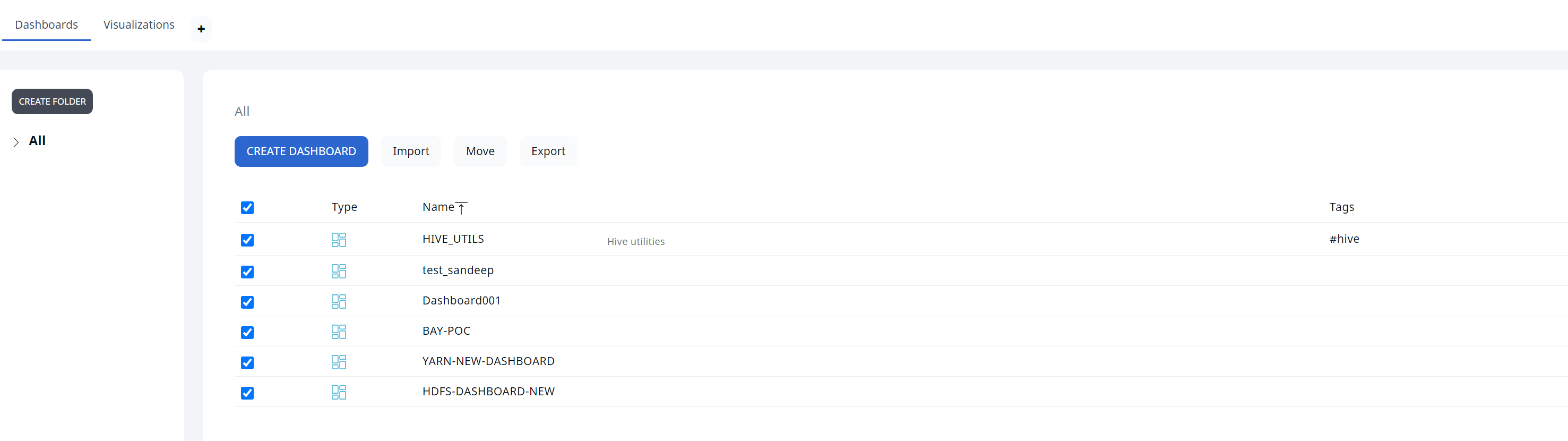
- Take backup of Alerts using the Export option.

Perform the following steps to migrate to version 3.0.0:
Step -1: Download the new CLI with version 3.0.0 .
1.1. Edit the config/accelo.yml file and put 3.0.3 image tag.
1.2. Pull all the latest containers of 3.0.3.
Step -2: Migration Steps:
2.1. Run the accelo set command to set the active cluster.
2.2 .Run the CLI migrate command: accelo migrate -v 3.0.0 .
| Non Root User | Root User |
|---|---|
a. Disable all Pulse Services
| a. If accelo CLI is going to be run as a root user:
|
b. Change the ownership of all data directories to
| |
c. Run the migration command with
|
2.3. Repeat the above steps for all the clusters installed in the Pulse server.
Step-3: Run the command accelo deploy core .
Step-4: Run the command accelo deploy addons.
Step-5: Run the command accelo reconfig cluster -a to reconfigure the cluster.
Step-6: Run the command accelo uninstall remote.
Step-7: Run the accelo deploy hydra command.
Step-8: If ad-director service is running, run the accelo deploy playbooks command for online or request for offline tar for offline installation.
Step-9: Restart ad-director once new playbooks are added, accelo restart ad-director
Step-10: Finally, execute the command accelo admin fsa load.
For a better reference, watch this quick video:
Issue: If after the upgrade you face the following metadata corruption exception in the fsanalytics connection.
22-11-2022 09:59:40.341 [fsanalytics-connector-akka.actor.default-dispatcher-1206] INFO c.a.p.f.metastore.MetaStoreMap - Cleared meta-store.dat[ERROR] [11/22/2022 09:59:40.342] [fsanalytics-connector-akka.actor.default-dispatcher-1206] [akka://fsanalytics-connector/user/$a] The file /etc/fsanalytics/hdp314/meta-store.dat the map is serialized from has unexpected length 0, probably corrupted. Data store size is 286023680java.io.IOException: The file /etc/fsanalytics/hdp314/meta-store.dat the map is serialized from has unexpected length 0, probably corrupted. Data store size is 286023680 at net.openhft.chronicle.map.ChronicleMapBuilder.openWithExistingFile(ChronicleMapBuilder.java:1800) at net.openhft.chronicle.map.ChronicleMapBuilder.createWithFile(ChronicleMapBuilder.java:1640) at net.openhft.chronicle.map.ChronicleMapBuilder.createPersistedTo(ChronicleMapBuilder.java:1563) at com.acceldata.plugins.fsanalytics.metastore.MetaStoreMap.getMap(MetaStoreConnection.scala:71) at com.acceldata.plugins.fsanalytics.metastore.MetaStoreMap.initialize(MetaStoreConnection.scala:42) at com.acceldata.plugins.fsanalytics.metastore.MetaStoreConnection.<init>(MetaStoreConnection.scala:111) at com.acceldata.plugins.fsanalytics.FsAnalyticsConnector.execute(FsAnalyticsConnector.scala:49) at com.acceldata.plugins.fsanalytics.FsAnalyticsConnector.execute(FsAnalyticsConnector.scala:17) at com.acceldata.connectors.core.SchedulerImpl.setUpOneShotSchedule(Scheduler.scala:48) at com.acceldata.connectors.core.SchedulerImpl.schedule(Scheduler.scala:64) at com.acceldata.connectors.core.DbListener$$anonfun$receive$1.$anonfun$applyOrElse$5(DbListener.scala:64) at com.acceldata.connectors.core.DbListener$$anonfun$receive$1.$anonfun$applyOrElse$5$adapted(DbListener.scala:54) at scala.collection.immutable.HashSet$HashSet1.foreach(HashSet.scala:320) at scala.collection.immutable.HashSet$HashTrieSet.foreach(HashSet.scala:976) at com.acceldata.connectors.core.DbListener$$anonfun$receive$1.applyOrElse(DbListener.scala:54) at akka.actor.Actor.aroundReceive(Actor.scala:539) at akka.actor.Actor.aroundReceive$(Actor.scala:537) at com.acceldata.connectors.core.DbListener.aroundReceive(DbListener.scala:26) at akka.actor.ActorCell.receiveMessage(ActorCell.scala:614) at akka.actor.ActorCell.invoke(ActorCell.scala:583) at akka.dispatch.Mailbox.processMailbox(Mailbox.scala:268) at akka.dispatch.Mailbox.run(Mailbox.scala:229) at akka.dispatch.Mailbox.exec(Mailbox.scala:241) at akka.dispatch.forkjoin.ForkJoinTask.doExec(ForkJoinTask.java:260) at akka.dispatch.forkjoin.ForkJoinPool$WorkQueue.runTask(ForkJoinPool.java:1339) at akka.dispatch.forkjoin.ForkJoinPool.runWorker(ForkJoinPool.java:1979) at akka.dispatch.forkjoin.ForkJoinWorkerThread.run(ForkJoinWorkerThread.java:107)Solution: Perform the following steps to fix the issue:
- Remove the
${ACCELOHOME}/data/fsanalytics/${ClusterName}/meta-store.datfile. - Restart the ad Fsanalytics container using the
accelocommand. - Run the
accelo admin fsa loadcommand to generate the meta store data again.
New Dashplots Version and Generic Reporting Feature
- Splashboards and Dashplots are never automatically rewritten, so either delete that dashboard to acquire the new version, or set the environment variable
OVERWRITE_SPLASHBOARDSandOVERWRITE_DASHPLOTSto overwrite the existing splashboard dashboard with the newer version. - To access the most recent dashboard, delete the HDFS Analytics dashboard from splashboard studio and then refresh configuration.
- Navigate to
ad-core.yml. - In
graphql,set the environment variables ofOVERWRITE_SPLASHBOARDSandOVERWRITE_DASHPLOTStotrue(default value is set tofalse)
Steps for Migration:
- Before doing the upgrade, save all dashplots to a file that are not seeded by default.
- Login to the
ad-pg_defaultdocker container with following command post upgrade to v3.0.
docker exec -ti ad-pg_default bash- Copy, paste, and run the snippet attached in migration file as is and press enter to execute it.
psql -v ON_ERROR_STOP=1 --username "pulse" <<-EOSQL \connect ad_management dashplot BEGIN;truncate table ad_management.dashplot_hierarchy cascade;truncate table ad_management.dashplot cascade;truncate table ad_management.dashplot_visualization cascade;truncate table ad_management.dashplot_variables cascade;INSERT INTO ad_management.dashplot_variables (stock_version,"name",definition,dashplot_id,dashplot_viz_id,"global") VALUES (1,'appid','{"_id": "1", "name": "appid", "type": "text", "query": "", "shared": true, "options": [], "separator": "", "description": "AppID to be provided for user customization", "defaultValue": "app-20210922153251-0000", "selectionType": "", "stock_version": 1}',NULL,NULL,true), (1,'appname','{"_id": "2", "name": "appname", "type": "text", "query": "", "shared": true, "options": [], "separator": "", "description": "", "defaultValue": "Databricks Shell", "selectionType": "", "stock_version": 1}',NULL,NULL,true), (1,'FROM_DATE_EPOC','{"id": 0, "_id": "3", "name": "FROM_DATE_EPOC", "type": "date", "query": "", "global": true, "shared": false, "options": [], "separator": "", "dashplot_id": null, "description": "", "displayName": "", "defaultValue": "1645641000000", "selectionType": "", "stock_version": 1, "dashplot_viz_id": null}',NULL,NULL,true), (1,'TO_DATE_EPOC','{"id": 0, "_id": "4", "name": "TO_DATE_EPOC", "type": "date", "query": "", "global": true, "shared": false, "options": [], "separator": "", "dashplot_id": null, "description": "", "displayName": "", "defaultValue": "1645727399000", "selectionType": "", "stock_version": 1, "dashplot_viz_id": null}',NULL,NULL,true), (1,'FROM_DATE_SEC','{"_id": "5", "name": "FROM_DATE_SEC", "type": "date", "query": "", "shared": true, "options": [], "separator": "", "defaultValue": "1619807400", "selectionType": ""}',NULL,NULL,true), (1,'TO_DATE_SEC','{"_id": "6", "name": "TO_DATE_SEC", "type": "date", "query": "", "shared": true, "options": [], "separator": "", "defaultValue": "1622477134", "selectionType": ""}',NULL,NULL,true), (1,'dbcluster','{"_id": "7", "name": "dbcluster", "type": "text", "query": "", "shared": true, "options": [], "separator": "", "description": "", "defaultValue": "job-4108-run-808", "selectionType": "", "stock_version": 1}',NULL,NULL,true), (1,'id','{"_id": "8", "name": "id", "type": "text", "query": "", "shared": true, "options": [], "separator": "", "defaultValue": "hive_20210906102708_dcd9df9d-91b8-421a-a70f-94beed03e749", "selectionType": ""}',NULL,NULL,true), (1,'dagid','{"_id": "9", "name": "dagid", "type": "text", "query": "", "shared": true, "options": [], "separator": "", "description": "", "defaultValue": "dag_1631531795196_0009_1", "selectionType": "", "stock_version": 1}',NULL,NULL,true), (1,'hivequeryid','{"_id": "10", "name": "hivequeryid", "type": "text", "query": "", "shared": true, "options": [], "separator": "", "defaultValue": "hive_20210912092701_cef246fa-cb3c-4130-aece-e6cac82751bd", "selectionType": ""}',NULL,NULL,true);INSERT INTO ad_management.dashplot_variables (stock_version,"name",definition,dashplot_id,dashplot_viz_id,"global") VALUES (1,'TENANT_NAME','{"_id": "11", "name": "TENANT_NAME", "type": "text", "query": "", "global": true, "shared": false, "options": [], "separator": "", "description": "", "defaultValue": "acceldata", "selectionType": "", "stock_version": 1}',NULL,NULL,true);COMMIT;EOSQL- Import the zip file exported in the step 1 above with the the < 3.0.0 dashboard option checked into the dashplot studio.
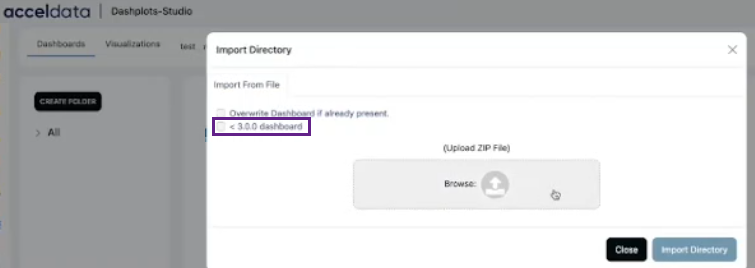
<3.0.0 dashboard in Import Directory
EXPIRE_TIME is used to specify the expiry date for a JWT token. The maximum time restriction is 15 minutes, and the data are in seconds. As a result, the maximum value that can be specified is 900.