
Deploy the Actions Add-on Service
This page describes how to deploy the Actions Service add-on to run action runbooks and automate tasks.
Info
Ensure that the Logsearch component is already deployed. If Logsearch is deployed on a standalone node:
- Run the following command: accelo admin makeconfig ad-axnserver.
- Update the value of the ELASTIC_URI environment variable by replacing
ad-elastic
To deploy the Actions Service, follow these steps:
- Run the command
accelo deploy addons - Select Actions Service from the list of components displayed. Use arrows to move and space to select.

- Run
accelo deploy hydra
Ignore this step if you have already deployed agents.
- Create an ad-core.yml file if it is not already present in $AcceloHome/config/docker by running the
accelo admin makeconfig ad-core - Open the file, navigate to the Feature_Flags section, and add
'noSSHActions':true
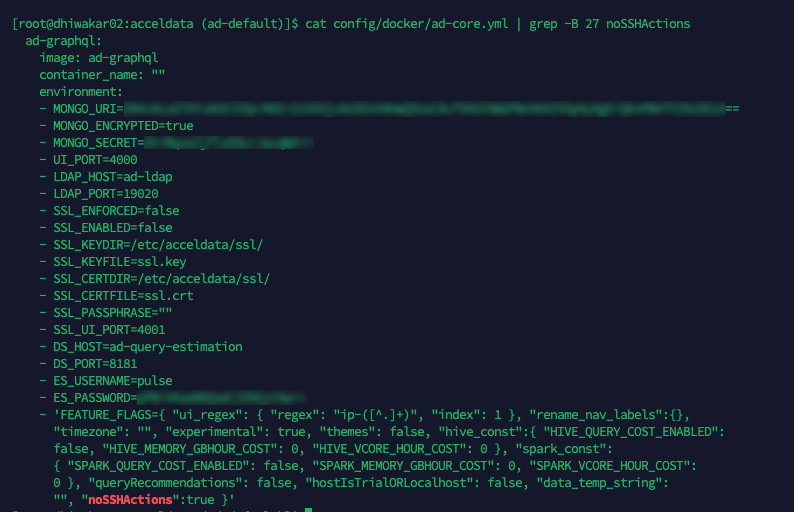
- Restart the ad-graphql container using the
accelo restart ad-graphql
After completing the deployment, log in to the Pulse UI. In the left navigation menu, select Actions. On the Actions page, click Create Action.
The page displays all available action runbooks. Configure the action details as needed to automate tasks and streamline workflow management.
Have a suggestion?