
You can configure Pulse to monitor MLflow performance and enable observability by updating the Python executable path.
Steps
Verify the Python executable used by MLflow
On the node where MLflow is running, run the following command:
Example output:
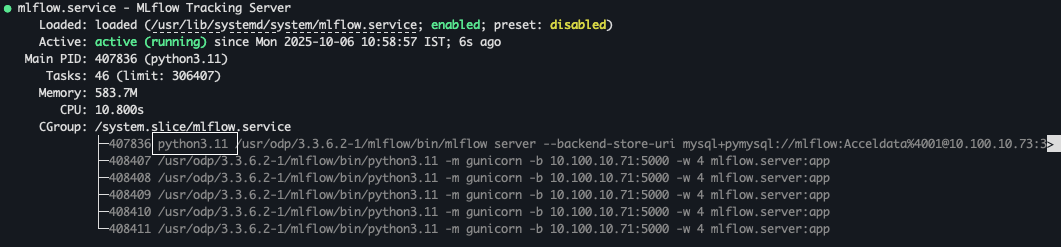
Identify the Python executable path used by MLflow. The example shows that MLflow uses the following Python executable:
Edit the Configuration File
In the configuration file, update the Python executable path (custom bin) used by MLFlow under the base section.
In Docker-Based Pulse Deployment
Open the override.yml file in a text editor and update the path.
File Path:
$AcceloHome/work/<cluster_name/override.yml
In Kubernetes-Based Deployment
In the Admin UI:
Click a configured cluster, and go to the Configuration tab.
In Configuration, update the path in VARs YAML.
For details, see Manage Configuration Files.
Example:
Apply the Configuration
In Docker-Based Pulse Deployment
After saving the file, run the following command to apply the changes.
In Kubernetes-Based Deployment
After making the update, click Reconfigure to apply the changes in Admin UI.