
Pipeline Definitions
Click Pipeline → Definition to view the list of pipelines that are configured in the system. By default, the list of pipelines is displayed for the last 24 hours and is sorted in order of latest batch executed.
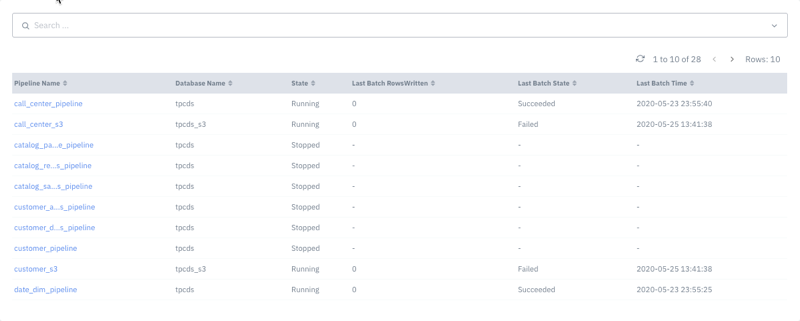
You can search for pipelines by database name, status of the pipeline, and by status of the last batch. The following information is displayed about a pipeline.
Attribute | Description |
|---|---|
Pipeline Name | The name of the pipeline. |
Database Name | The name of the database on which the pipeline is executing. |
State | The current status of the pipeline, whether running, or stopped. |
Last Batch Rows Written | The number of rows written while running the most recent batch of the pipeline. |
Last Batch State | The status of the last batch, whether succeeded, or failed. |
Last Batch Time | The time at which the last batch was run in date:time format. |
Viewing JSON script of a pipeline
To view the JSON script of pipeline, click the name of the pipeline. The following image shows the JSON script for the pipeline named call_center_pipeline.
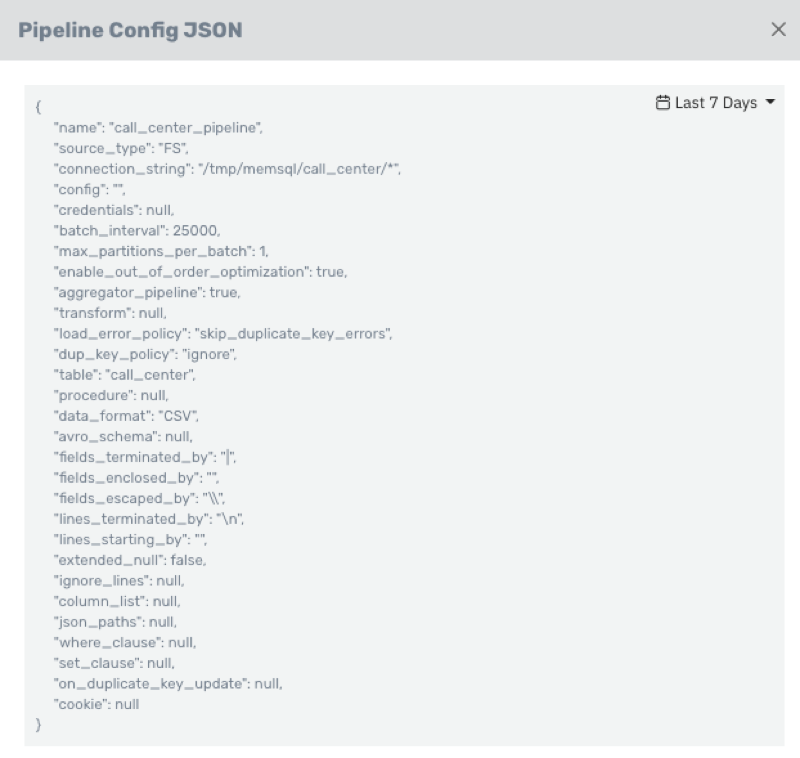
Click the Copy icon to copy the JSON script to the clipboard.
Pipeline Runs
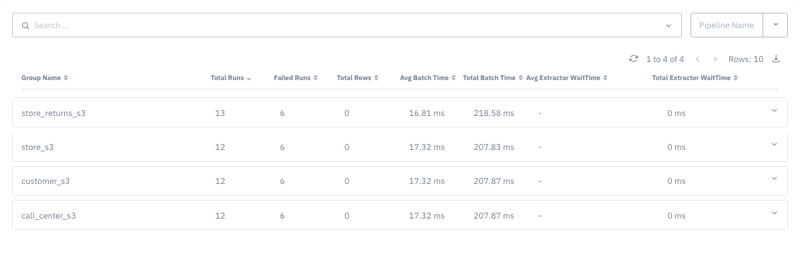
Click Pipeline → Runs to view details about all the runs of a pipeline. By default, the pipelines are sorted by highest number of runs.
By default, the pipeline runs are grouped by pipeline. Click the Group by drop-down menu to select a different grouping - by Batch Status, by Cluster, or by Database Name.
By default, the information is displayed for the Last 24 Hours. You can select another timeline from the Timeline drop-down menu.
Click the download button to download information about the pipelines as a .xlsx file.
You can view the following information for Pipelines.
Attribute | Description |
|---|---|
Group Name | The name of the pipeline group. |
Total Runs | The total number of pipeline runs executed. |
Failed Runs | The number of pipeline runs that failed execution. |
Total Rows | The number of rows in the selected pipeline. |
Average Batch Time | The average time taken by the batches of a run. |
Total batch Time | The total time taken by all the batches of a run. |
Avg Extractor Wait Time | The average waiting time by a pipeline to extract data into the MemSQL database. |
Total Extractor Wait Time | The total time taken by a pipeline to extract data into the MemSQL database. |
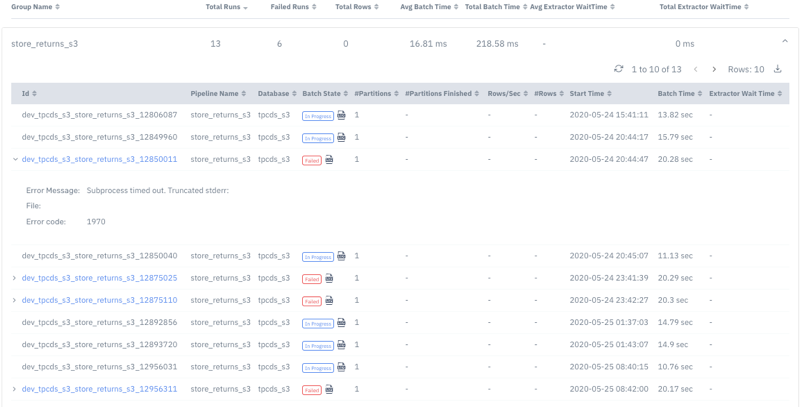
Click the name of a pipeline to see the latest 10 runs of that pipeline. Click Rows, to change the number of runs you want to view.
Attribute | Description |
|---|---|
ID | The ID of a run within the selected pipeline. |
Pipeline Name | The name of the pipeline to which the run belongs. |
Database | The database the run belongs to. |
Batch State | The state of the pipeline run, which can either be Failed or Queued or Succeeded. |
of Partitions | The number of partitions to create in the pipeline run. |
of Partitions Finished | The number of partitions successfully created. |
Rows/sec | The number of rows read from the source file per second. |
of Rows | The total number of rows read from the source file. |
Start Time | The time at which the pipeline run started. |
Batch Time | The time taken for a particular batch. |
Extractor Wait Time | The time taken by a pipeline run to extract data into the MemSQL database. |
Click the download button for a pipeline to download the information about a particular pipeline and its runs. Information of the earliest 10 runs is downloaded as a .xlsx file.
Pipeline Files
To view files read by pipeline, do the following.
Click Pipeline → Files. You can view details about the files included in a pipeline.
In the left pane, select a pipeline to view all the files that are read by the pipeline.
You can filter by database name, or by the run status of a pipeline.
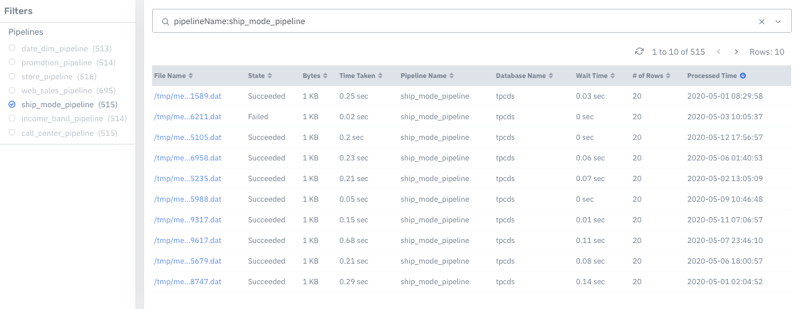
The following information is displayed about the files.
Metrics | Description |
|---|---|
File Name | The name of the source file from which the pipeline reads data. |
State | Denotes the status of the data read process, whether succeeded, or failed. |
Bytes | The size of the source file. |
Time Taken | The time taken to read the file. |
Pipeline Name | The name of the pipeline to which the file belongs. |
Database name | The name of the database where the file is located. |
Wait Time | The time before the reading starts. |
of rows | The number of rows read from the source file. |
Processed time | The time at which the file was processed in date: time format. |