
1. What is API Explorer?
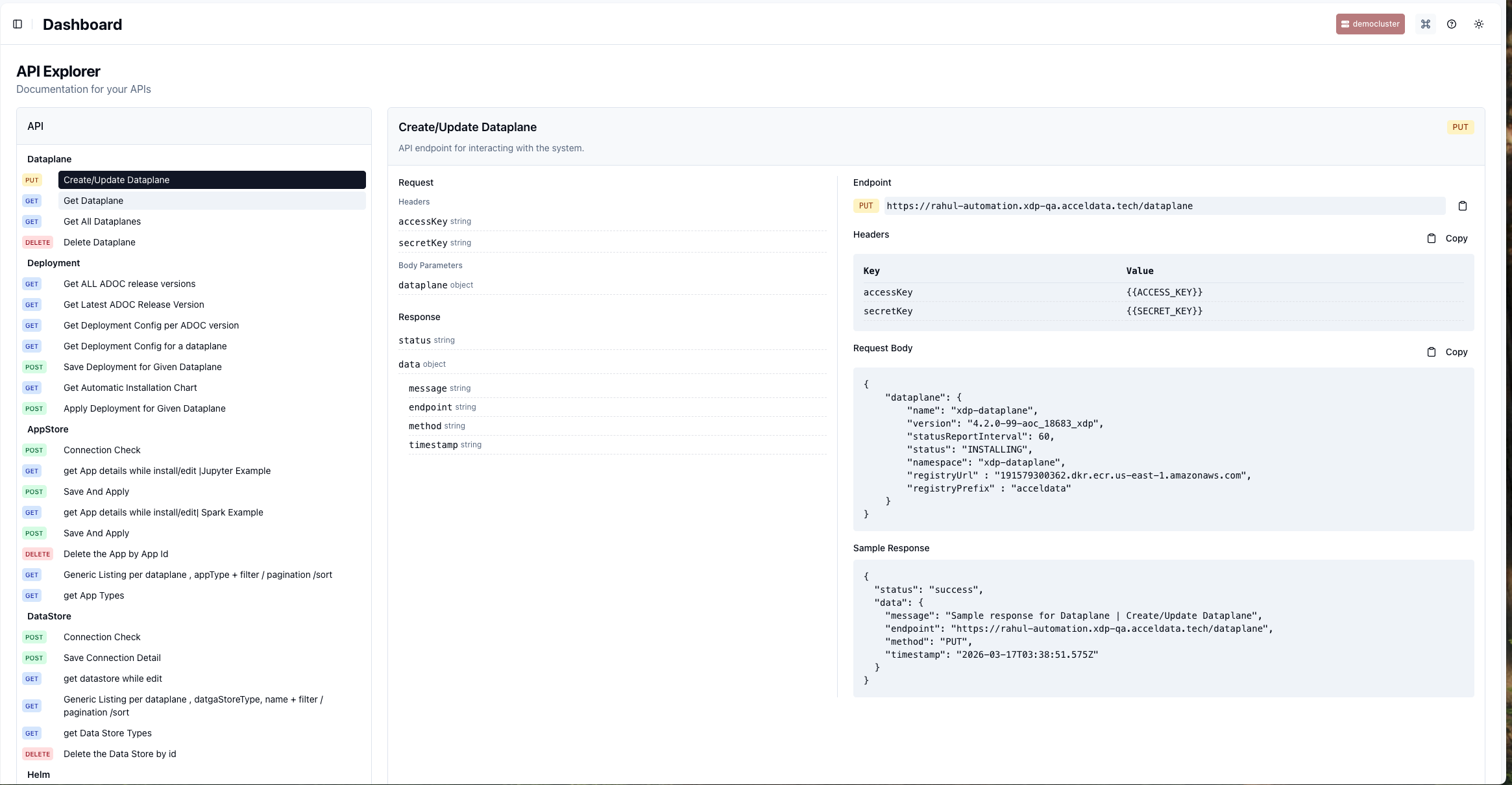
The API Explorer provides a comprehensive, interactive reference for the Acceldata xDP REST API, enabling you to automate and integrate data platform operations. It is designed for platform administrators and data engineers who need to programmatically manage resources, orchestrate workflows, and embed xDP capabilities into their existing CI/CD pipelines and custom applications. By leveraging the API, you can streamline repetitive tasks, enforce governance at scale, and build powerful, automated data processes, ultimately improving operational efficiency and reliability.
2. Key Concepts
To use the xDP API effectively, you should understand these core platform entities:
Dataplane: A logical environment within xDP that contains all the necessary configurations, resources, and services for running data workloads. It provides isolation for different teams or projects.
Data Store: A connection to a physical data source or sink, such as a data warehouse (Snowflake, BigQuery), a data lake (S3, HDFS), or a database (PostgreSQL, MySQL).
App: A pre-packaged application or tool, like Jupyter or Spark, that can be deployed and run within a Dataplane.
Job: A definition for a unit of work, typically a Spark application (Java or Python), that specifies the code to execute, its dependencies, and configuration parameters.
Job Run: A specific execution instance of a Job. Each time a Job is executed, it generates a new Job Run that can be monitored for its status (e.g., running, succeeded, failed) and performance metrics.
3. Capabilities
The xDP API, documented in the API Explorer, allows you to automate a wide range of platform management and data orchestration tasks.
Platform Administration: Programmatically manage the core infrastructure of your data platform. This allows for automated environment setup and configuration management.
Manage Dataplanes (create, update, retrieve, delete).
Manage Deployments and software versions.
Resource Management: Automate the provisioning and configuration of data sources and applications. This enables GitOps-style management of your data ecosystem.
Manage Data Store connections (create, test, list, delete).
Manage Apps within the AppStore (install, configure, delete).
Workflow Orchestration: Build, execute, and monitor data processing jobs via API calls. This is essential for integrating xDP with external schedulers like Airflow or building CI/CD for data pipelines.
Manage Jobs (create, update, retrieve, delete).
Execute jobs and manage Job Runs (start, get status, cancel).
Monitoring and Auditing: Extract operational data, metrics, and audit logs for jobs and resources. This helps in building custom dashboards and automated alerting systems.
Retrieve job run status, metrics, and audit information.
Fetch dashboard statistics for performance analysis.
4. Getting Started
This guide will walk you through the basic steps to make your first API call using the API Explorer as a reference.
Prerequisites
You must have an active Acceldata xDP account with permissions to access the API.
You need to generate an
accessKeyandsecretKeyfrom your user profile or service account settings within xDP. Treat these credentials as sensitive information.
Workflow: Making an API Request
Identify the Target Endpoint: In the API Explorer, locate the resource you want to interact with (e.g., Dataplane, Job). Select the specific action and HTTP method (e.g.,
PUTfor Create/Update Dataplane).Configure Authentication: All API requests require authentication. The Headers section for each endpoint shows that you must provide your
accessKeyandsecretKey.Construct the Request Body: For
POSTorPUTrequests, you must provide a JSON payload. The API Explorer provides a sample Request Body that shows the required structure and fields. You will need to replace the sample values with your actual configuration.Send the Request: Use a client like
curlor Postman to send the request to the specified Endpoint URL, including the headers and the request body.Interpret the Response: The API will return a JSON response. A successful request typically returns a
200 OKstatus code and a response body indicating"status": "success".
Example: Your team needs to programmatically register a new Dataplane for an upcoming project. You would use the PUT /dataplane endpoint. You would copy the sample Request Body, fill in the name, version, namespace, and other details specific to your environment, and send the request with your API keys in the headers.
5. Common Workflows
Here are a few common, task-oriented procedures you can accomplish with the xDP API.
Create and Execute a Spark Job
This workflow is ideal for CI/CD pipelines where data jobs are deployed and triggered automatically after code changes are merged.
Navigate to the Job section in the API Explorer.
Use the
POSTendpoint for Create or Update Job (e.g.,|SPARK_PYTHON type) to define your job. Construct a JSON body specifying the job name, script location, dependencies, and compute resources.After a successful creation, you will receive a job ID.
Use the
POSTExecute endpoint for Jobs, providing the job ID in the request. This will trigger a new job run.Use the
GETendpoint under Job Run to Get Current status of job run by id, using the run ID returned from the execute step to monitor its progress.
Onboard a New Data Source
This is useful for platform teams who need to automate the process of making new data sources available to engineering teams.
Navigate to the DataStore section.
Use the
POSTSave Connection Detail endpoint.In the request body, provide the connection details for the new data source, such as the host, port, credentials, and other required properties for the specific
dataStoreType.(Optional) Use the
POSTConnection Check endpoint with the same details to validate connectivity before saving.Once saved, the new Data Store will be available for use in Jobs and Apps within the xDP UI and API.
6. Best Practices
Credential Management: Store your
accessKeyandsecretKeysecurely using a secret management tool like HashiCorp Vault or AWS Secrets Manager. Do not hardcode them in scripts or commit them to version control.Use Service Accounts: For automated workflows (e.g., CI/CD pipelines), create dedicated service accounts with the principle of least privilege. Use their API keys instead of a personal user's keys.
Idempotency: When possible, use
PUTrequests for creating or updating resources, as they are generally idempotent. This means you can safely retry the same request multiple times without creating duplicate resources.Error Handling: Your client code should gracefully handle non-2xx HTTP status codes. Check the
messagefield in the JSON response body for detailed error information.Consistent Naming: Adopt a consistent naming convention for resources created via the API (jobs, data stores, etc.) to make them easier to manage and identify.