
Documentation
ODP 3.3.6.3-1
Release Notes
What is ODP
Installation
Component User guide and Installation Instructions
Downgrade Instructions
Reference Guide
Security Guide
Troubleshooting Guide
Uninstall ODP
Title
Message
Create new category
What is the title of your new category?
Edit page index title
What is the title of the page index?
Edit category
What is the new title of your category?
Edit link
What is the new title and URL of your link?
FAQs About Upgrade
Summarize Page
Copy Markdown
Open in ChatGPT
Open in Claude
Connect to Cursor
Connect to VS Code
Sometimes, even after deleting mpacks, residual corrupted references may remain. As a result, stack versions might not appear during upgrades from versions 3.2.2.x, 3.2.3.0-x, 3.2.3.1-x, or 3.2.3.2-x. Starting from Ambari version 2.7.8.2-x (ODP-3.2.3.3-x) onwards, only 3.3 and 3.4 stack versions are listed.
How to get 3.3 and 3.4 stacks shown from ambari UI?
- Clone the Upgrade Utility Repository and navigate to the Upgrade Scripts Directory.
Bash
git clone https://github.com/acceldata-io/ce-utils.gitBash
cd ce-utils/odp-upgrade-to-3_3_6_3_1/upgrade_files_336- Copy the
3.3directory into the below location on Ambari server node.
Bash
cp -r 3.3 /var/lib/ambari-server/resources/stacks/ODP/- Validate the permission and ownership as below.
Bash
ls -lrth /var/lib/ambari-server/resources/stacks/ODP/The response included with 3.3 stack.
Bash
drwxr-xr-x 7 root root 141 Apr 23 20:08 3.0drwxr-xr-x 5 root root 71 Apr 23 20:08 3.1drwxr-xr-x 5 root root 102 Apr 23 20:08 3.2drwxr-xr-x 5 root root 4.0K Apr 24 16:23 3.3- Copy the upgrade and nonrolling-upgrade.xml from
/var/lib/ambari-server/resources/stacks/ODP/3.3/upgrades/to/var/lib/ambari-server/resources/stacks/ODP/3.2/upgrades/.
Bash
x
cp /var/lib/ambari-server/resources/stacks/ODP/3.3/upgrades/nonrolling-upgrade-3.3.xml /var/lib/ambari-server/resources/stacks/ODP/3.2/upgrades/cp /var/lib/ambari-server/resources/stacks/ODP/3.3/upgrades/upgrade-3.3.xml /var/lib/ambari-server/resources/stacks/ODP/3.2/upgrades/- Change the permission to 755 for xmls copied in Step 4.
Bash
chmod 755 /var/lib/ambari-server/resources/stacks/ODP/3.2/upgrades/upgrade-3.3.xmlchmod 755 /var/lib/ambari-server/resources/stacks/ODP/3.2/upgrades/nonrolling-upgrade-3.3.xml- Perform the Ambari-server restart step.
Bash
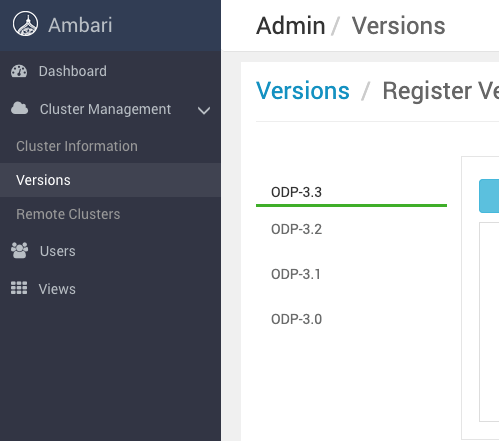
ambari-server restartAfter restart, you can see the 3.3 stack in the Stack Versions page.
Type to search, ESC to discard
Last updated on Jan 13, 2026
Was this page helpful?
Next to read:
Upgrade Standalone KafkaDiscard Changes
Do you want to discard your current changes and overwrite with the template?
Archive Synced Block
Message
Create new Template
What is this template's title?
Delete Template
Message