
Search
Run the following command before the upgrade:
create table configs_prior_patch_<service-name> as
select cc.config_id,cc.type_name,cc.config_data ,cc.config_attributes ,service_name,sc.version,sc.note from serviceconfig sc inner join serviceconfigmapping scm
on sc.service_config_id =scm.service_config_id inner join clusterconfig cc on cc.config_id = scm.config_id
where sc.service_name in (<service-name>);
On completion of the upgrade, to restore the configurations, run the following code:
update clusterconfig a set config_data = (select config_data from configs_prior_patch_nifi b where a.type_name = b.type_name and version = <latest-config-version-before-upgrade> and service_name = <service-name>),
config_attributes = (select config_attributes from configs_prior_patch_nifi b where a.type_name = b.type_name and version = <latest-config-version-before-upgrade> and service_name = <service-name>)
where config_id in (select config_id from serviceconfigmapping where service_config_id in (select service_config_id from serviceconfig where service_name = <service-name> and version =
(select max(version) from serviceconfig where service_name = <service-name>)) );
Example for service-name: NIFI with latest-config-version-before-upgrade:4
Before Upgrade:
create table configs_prior_patch_nifi as
select cc.config_id,cc.type_name,cc.config_data ,cc.config_attributes ,service_name,sc.version,sc.note from serviceconfig sc inner join serviceconfigmapping scm
on sc.service_config_id =scm.service_config_id inner join clusterconfig cc on cc.config_id = scm.config_id
where sc.service_name in ('NIFI');
After Upgrade
update clusterconfig a set config_data = (select config_data from configs_prior_patch_nifi b where a.type_name = b.type_name and version = 4 and service_name = 'NIFI'),
config_attributes = (select config_attributes from configs_prior_patch_nifi b where a.type_name = b.type_name and version = 4 and service_name = 'NIFI')
where config_id in (select config_id from serviceconfigmapping where service_config_id in (select service_config_id from serviceconfig where service_name = 'NIFI' and version =
(select max(version) from serviceconfig where service_name = 'NIFI')) );
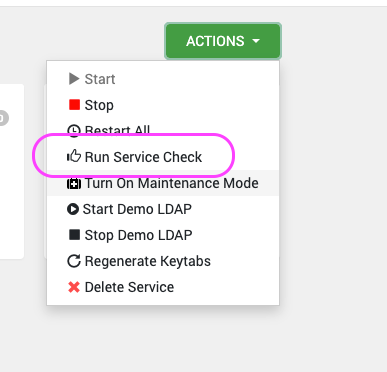
Ensure that you run service checks for all the installed stack services by performing the following steps in the UI:
Navigate to Actions > Service Check.
For example, here's how to perform a service check for HDFS. Remember to perform this check for all the installed services in your stack.
Was this page helpful?