Connect Integrations

ClickHouse integrates seamlessly with a wide range of data sources and tools for ingestion, processing, and visualization. The following table lists supported integrations along with reference documentation for setup and usage.

For more information about ClickHouse Integrations, see Integrations.


ODP Ingestion

HDFS Integration

ClickHouse supports reading from and writing to HDFS in parallel. However, the following are not supported:

  • ALTER and SELECT ... SAMPLE queries

  • Indexes

  • Zero-copy replication (technically possible, but not recommended)

  • HDFS enabled with Kerberos

Example: Create and Use HDFS Engine Table

  1. Create the table

CREATE TABLE hdfs_engine_table ( name String, value UInt32 ) ENGINE = HDFS('hdfs://hdfs1:9000/other_storage', 'TSV');
  1. Insert data

INSERT INTO hdfs_engine_table VALUES ('one', 1), ('two', 2), ('three', 3);
  1. Query the data

SELECT * FROM hdfs_engine_table LIMIT 2;

Example output:

SELECT * FROM hdfs_engine_table LIMIT 2 ┌─name─┬─value─┐ │ one │ 1 │ │ two │ 2 │ └──────┴───────┘
  1. Verify file content on HDFS

hdfs dfs -cat /tmp/hdfs_engine_table

Expected output:

hdfs dfs -cat /tmp/hdfs_engine_table one 1 two 2 three 3

HDFS Engine Configuration

The HDFS engine supports extended configuration through the ClickHouse config.xml file. You can use two configuration scopes:

  • Global scope (hdfs): Applies default settings across all users.

  • User-level scope (hdfs_*): Overrides the global settings for individual users.

ClickHouse first applies the global configuration, followed by user-level settings (if defined).

<!-- Global configuration options for HDFS engine type --> <hdfs> <hadoop_kerberos_keytab>/tmp/keytab/clickhouse.keytab</hadoop_kerberos_keytab> <hadoop_kerberos_principal>clickuser@TEST.CLICKHOUSE.TECH</hadoop_kerberos_principal> <hadoop_security_authentication>kerberos</hadoop_security_authentication> </hdfs> <!-- Configuration specific for user "root" --> <hdfs_root> <hadoop_kerberos_principal>root@TEST.CLICKHOUSE.TECH</hadoop_kerberos_principal> </hdfs_root>

HDFS NameNode High Availability (HA) Support

ClickHouse supports HDFS NameNode HA through libhdfs3.

To enable HDFS Namenode HA in ClickHouse:

  1. Copy **`hdfs-site.xml`** from an HDFS node to /etc/clickhouse-server/.

  2. Update **`config.xml`** in ClickHouse:

<hdfs> <libhdfs3_conf>/etc/clickhouse-server/hdfs-site.xml</libhdfs3_conf> </hdfs>
  1. Use the value of the dfs.nameservices tag from hdfs-site.xml as the namenode address in HDFS URIs.

Example**:**

Replace:

hdfs://appadmin@192.168.101.11:8020/abc/

With:

hdfs://appadmin@my_nameservice/abc/

This configuration enables ClickHouse to interact with an HA-enabled HDFS setup using logical names instead of direct NameNode IPs.


Kafka Integration

  • Publish or subscribe to data flows.

  • Organize fault-tolerant storage.

  • Process streams as they become available.

Create a Kafka Table

CREATE TABLE kafka_push (ID UInt64, Name String) ENGINE = Kafka SETTINGS kafka_broker_list = 'kafka:9092', kafka_topic_list = 'kafka_push_example', kafka_group_name = 'consumer_group_push', kafka_format = 'JSONEachRow';

Create Storage Table

CREATE TABLE kafka_storage (ID UInt64, Name String) ENGINE = MergeTree() ORDER BY (ID, Name);

Create a Materialized View to write into Kafka ClickHouse table

CREATE MATERIALIZED VIEW kafka_push_materialized TO kafka_push AS SELECT ID, Name FROM kafka_storage;

Create Kafka Pull Table

CREATE TABLE kafka_pull (ID UInt64, Name String) ENGINE = Kafka SETTINGS kafka_broker_list = 'kafka:9092', kafka_topic_list = 'kafka_push_example', kafka_group_name = 'consumer_group_pull', kafka_format = 'JSONEachRow';

Create a Materialized View to pull Read from the Kafka ClickHouse table

CREATE MATERIALIZED VIEW kafka_pull_materialized ENGINE = MergeTree() ORDER BY (ID, Name) AS SELECT ID, Name FROM kafka_pull;

Insert Records

INSERT INTO kafka_storage VALUES (1,1);

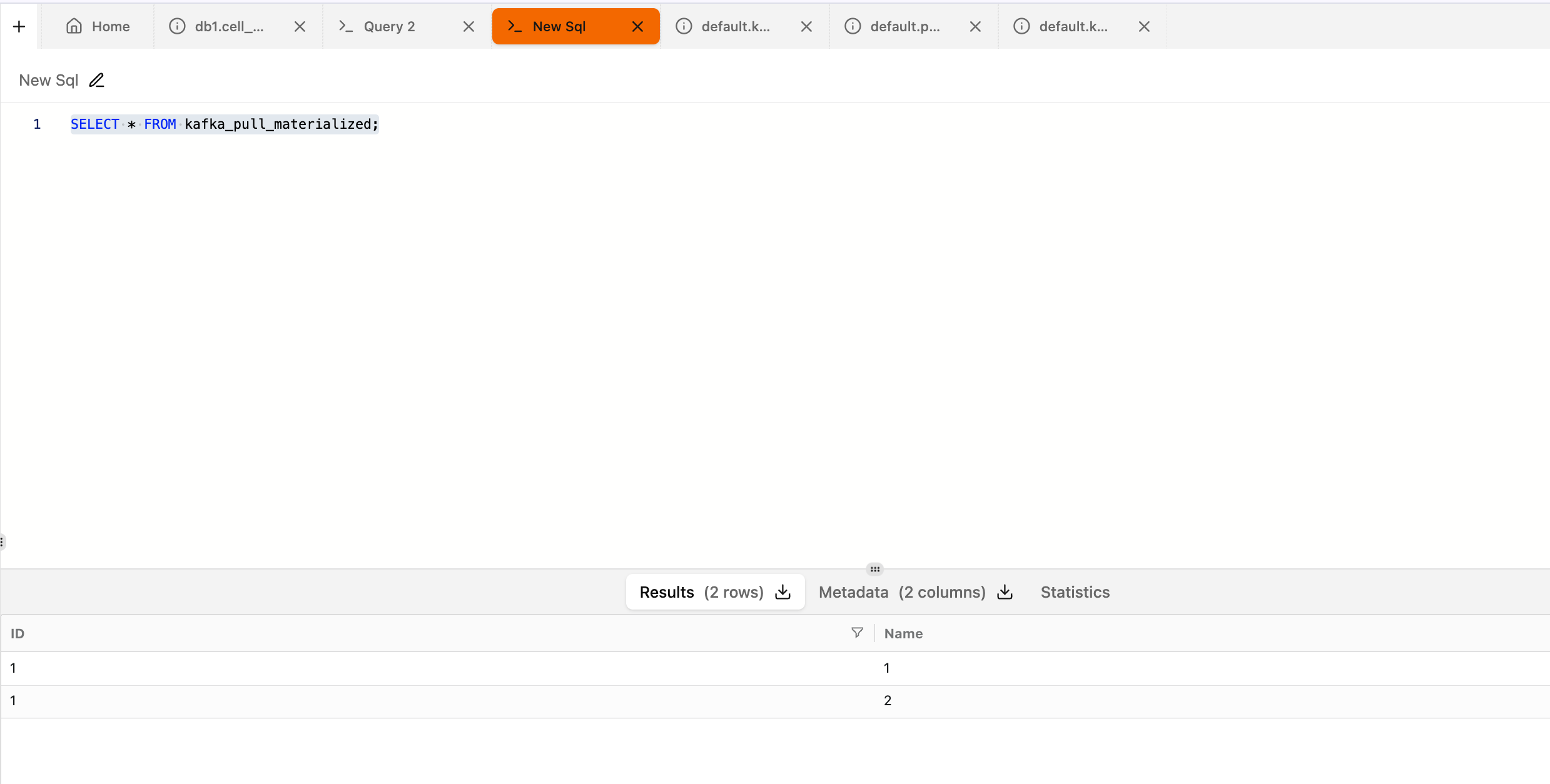
Read from ClickHouse MAT View

SELECT * FROM kafka_pull_materialized;

Check Published Messages on Kafka Console

bin/kafka-console-consumer.sh --bootstrap-server 10.100.11.36:6669 --topic kafka_push_example --from-beginning {"ID":"1","Name":"1"} {"ID":"1","Name":"2"}

Hive Integration

Hive Engine – Supported Input Formats

The Hive engine in ClickHouse enables SELECT queries on Hive tables stored in HDFS. It supports the following input formats:

  • Text: Supports only simple scalar types (excluding binary).

  • ORC: Supports simple scalar types (excluding char) and complex array types.

  • Parquet: Supports all simple scalar types and array complex types.

//Create Table in Hive CREATE external TABLE `test`.`test_orc`( `f_tinyint` tinyint, `f_smallint` smallint, `f_int` int, `f_integer` int, `f_bigint` bigint, `f_float` float, `f_double` double, `f_decimal` decimal(10,0), `f_timestamp` timestamp, `f_date` date, `f_string` string, `f_varchar` varchar(100), `f_bool` boolean, `f_binary` binary, `f_array_int` array<int>, `f_array_string` array<string>, `f_array_float` array<float>, `f_array_array_int` array<array<int>>, `f_array_array_string` array<array<string>>, `f_array_array_float` array<array<float>>) PARTITIONED BY ( `day` string) stored as orc; //Insert record in Hive insert into test.test_orc partition(day='2021-09-18') select 1, 2, 3, 4, 5, 6.11, 7.22, 8.333, current_timestamp(), current_date(), 'hello world', 'hello world', true, 'hello world', array(1, 2, 3), array('hello world', 'hello world'), array(float(1.1), float(1.2)), array(array(1, 2), array(3, 4)), array(array('a', 'b'), array('c', 'd')), array(array(float(1.11), float(2.22)), array(float(3.33), float(4.44))) ; // Create table in Clickhouse CREATE TABLE test.test_orc ( `f_tinyint` Int8, `f_smallint` Int16, `f_int` Int32, `f_integer` Int32, `f_bigint` Int64, `f_float` Float32, `f_double` Float64, `f_decimal` Float64, `f_timestamp` DateTime, `f_date` Date, `f_string` String, `f_varchar` String, `f_bool` Bool, `f_binary` String, `f_array_int` Array(Int32), `f_array_string` Array(String), `f_array_float` Array(Float32), `f_array_array_int` Array(Array(Int32)), `f_array_array_string` Array(Array(String)), `f_array_array_float` Array(Array(Float32)), `day` String ) ENGINE = Hive('thrift://ck2.acceldata.ce:9083', 'test', 'test_orc') PARTITION BY day; //Now Read in Clickhouse SELECT * FROM test.test_orc WHERE day = '2021-09-18' LIMIT 1 SETTINGS input_format_orc_allow_missing_columns = 1

Reported Ongoing Issue

A null pointer dereference error has been reported when accessing the unsupported hive table function in ClickHouse. Refer to Issue #82982 on GitHub for updates and investigation status.


Spark 3 Integration

Maven dependency and resolvers for ClickHouse.

<dependency> <groupId>com.clickhouse.spark</groupId> <artifactId>clickhouse-spark-runtime-3.5_2.12</artifactId> <version>0.8.1.3.3.6.4-1</version> </dependency> <dependency> <groupId>com.clickhouse</groupId> <artifactId>clickhouse-jdbc</artifactId> <classifier>all</classifier> <version>0.9.0.3.3.6.4-1</version> <exclusions> <exclusion> <groupId>*</groupId> <artifactId>*</artifactId> </exclusion> </exclusions> </dependency> <repositories> <repository> <id>odp-nexus</id> <name>ODP Nexus</name> <url>http://repo1.acceldata.dev/repository/odp-central</url> </repository> </repositories>

Example Spark Program

import org.apache.spark.sql.{SparkSession, Row, DataFrame} import org.apache.spark.sql.types.{StructType, StructField, DataTypes, StringType} val spark: SparkSession = SparkSession.builder.appName("example").master("local[*]").config("spark.sql.catalog.clickhouse", "com.clickhouse.spark.ClickHouseCatalog").config("spark.sql.catalog.clickhouse.host", "10.100.11.36").config("spark.sql.catalog.clickhouse.protocol", "http").config("spark.sql.catalog.clickhouse.http_port", "8123").config("spark.sql.catalog.clickhouse.user", "default").config("spark.sql.catalog.clickhouse.password", "").config("spark.sql.catalog.clickhouse.database", "default").config("spark.clickhouse.write.format", "json").getOrCreate // Define the schema for the DataFrame val rows = Seq(Row(1, "John"), Row(2, "Doe")) val schema = List( StructField("id", DataTypes.IntegerType, nullable = false), StructField("name", StringType, nullable = true) ) // Create the df val df: DataFrame = spark.createDataFrame( spark.sparkContext.parallelize(rows), StructType(schema) ) //Writing Table df.writeTo("clickhouse.default.example_table") .tableProperty("engine", "MergeTree()") .tableProperty("order_by", "id") .tableProperty("settings.allow_nullable_key", "1") .tableProperty("settings.index_granularity", "8192") .createOrReplace() // Reading same table val df = spark.sql("select * from clickhouse.default.example_table") df.show()

NiFi Integration

Below is an implementation example.

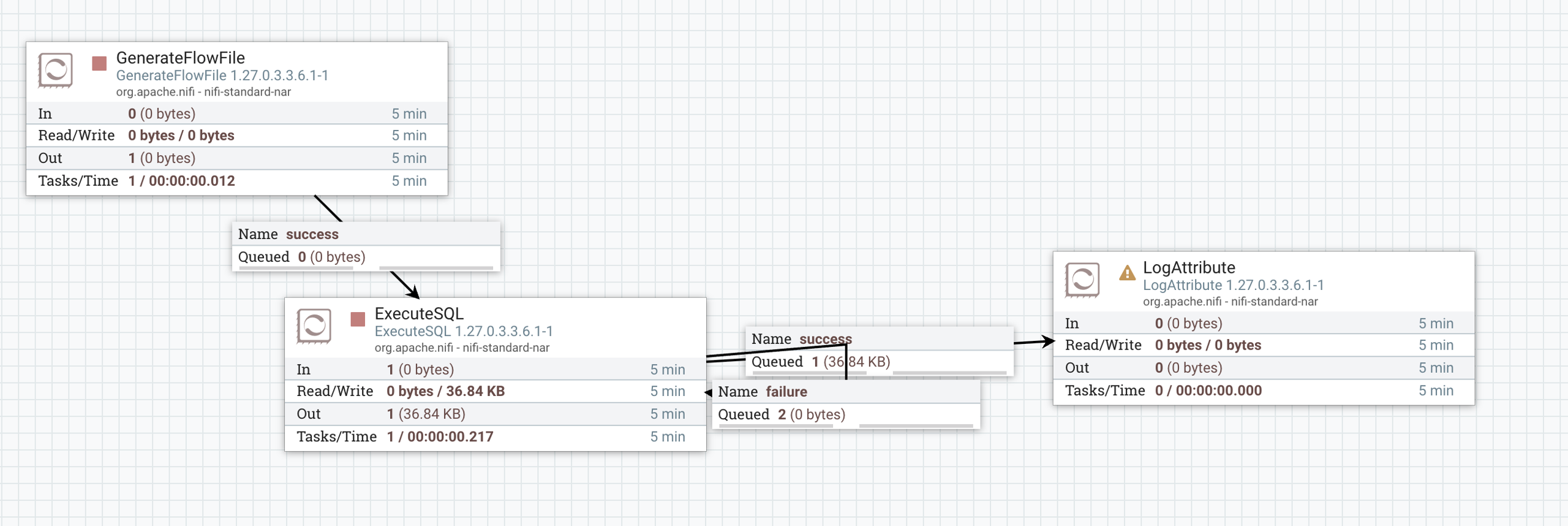
Prepare a workflow using Execute SQL

Update Execute SQL
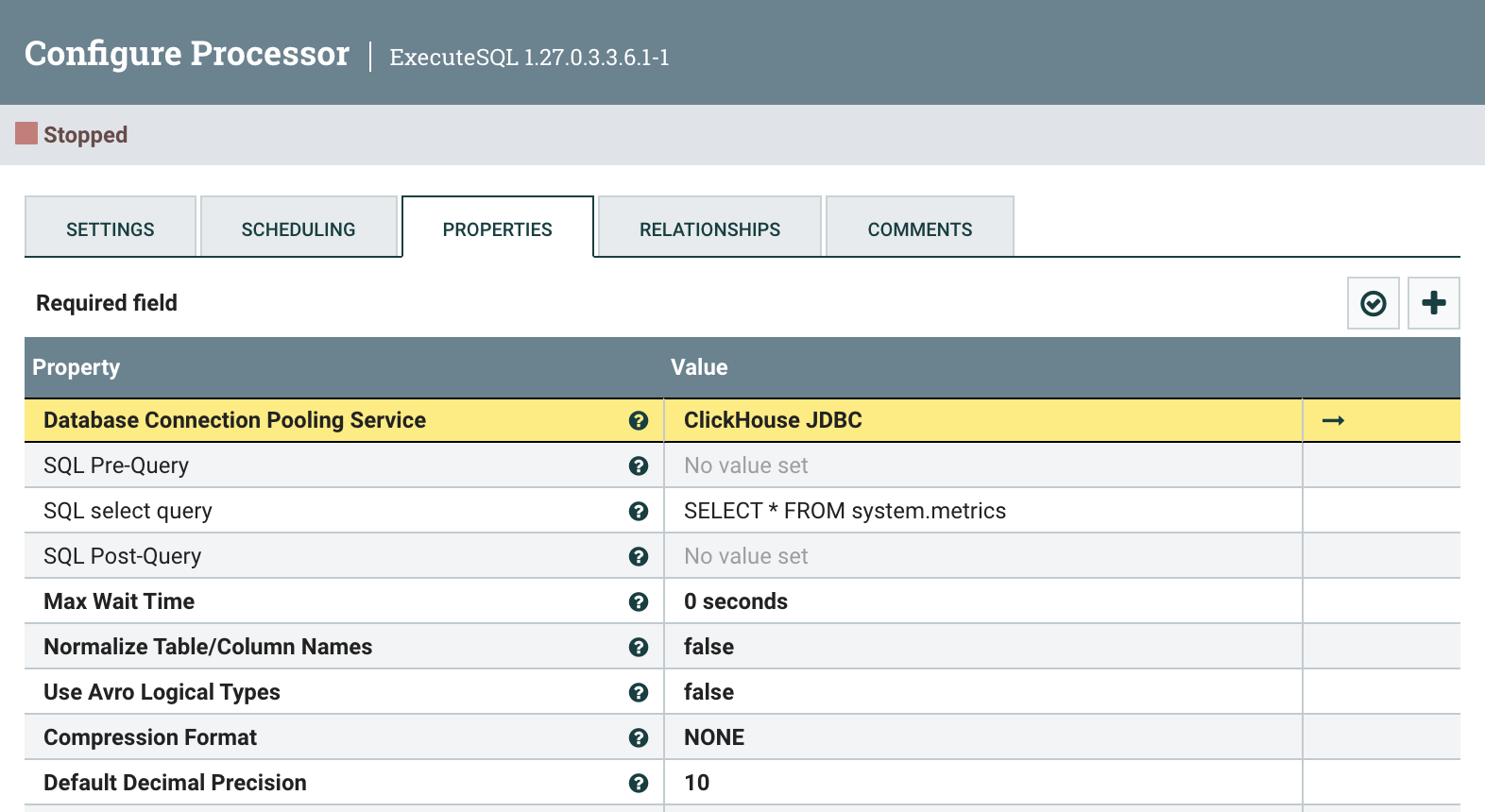

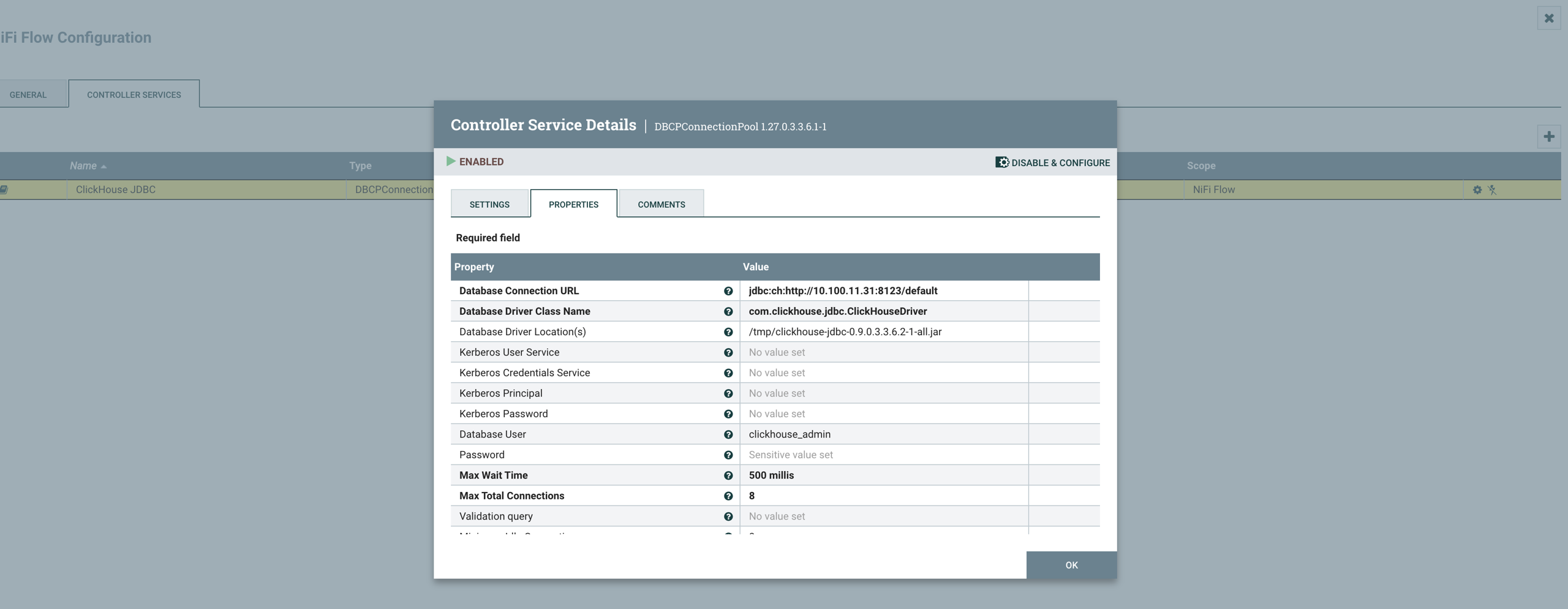
Update and Enable DBCP Pool Service

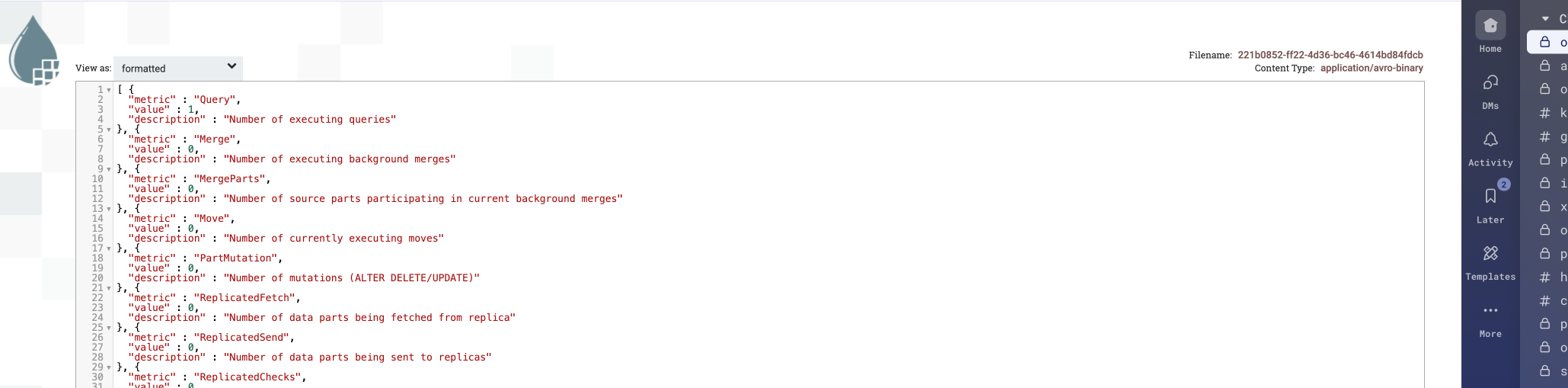
View Record in NiFi


S3 Integration

Below is an implementation example.

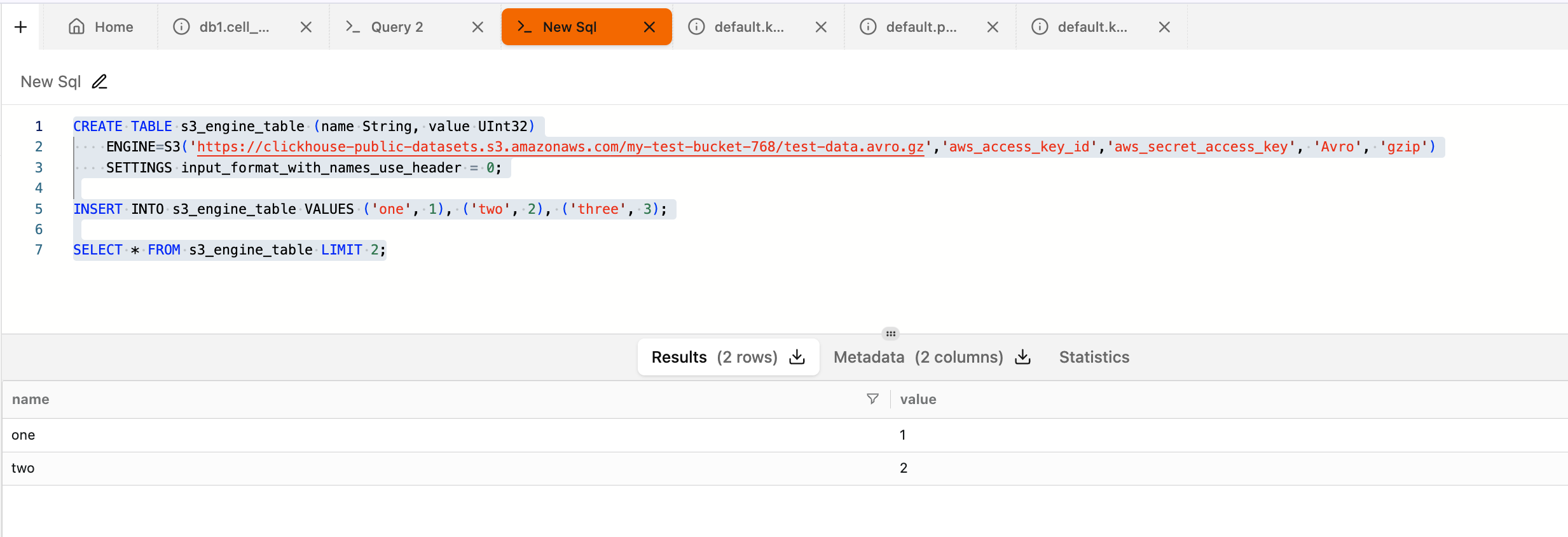
CREATE TABLE s3_engine_table (name String, value UInt32) ENGINE=S3('https://clickhouse-public-datasets.s3.amazonaws.com/my-test-bucket-768/test-data.avro.gz','aws_access_key_id','aws_secret_access_key', 'Avro', 'gzip') SETTINGS input_format_with_names_use_header = 0; INSERT INTO s3_engine_table VALUES ('one', 1), ('two', 2), ('three', 3); SELECT * FROM s3_engine_table LIMIT 2;


For more information, see: S3 Table Engine | ClickHouse Docs. Also refer to: Separation of Storage and Compute | ClickHouse Docs


JDBC SQL Clients Integration

To connect with DB Visualizer, follow the steps below:

  • Add nexus resolver URL in Tools → Tool Properties.
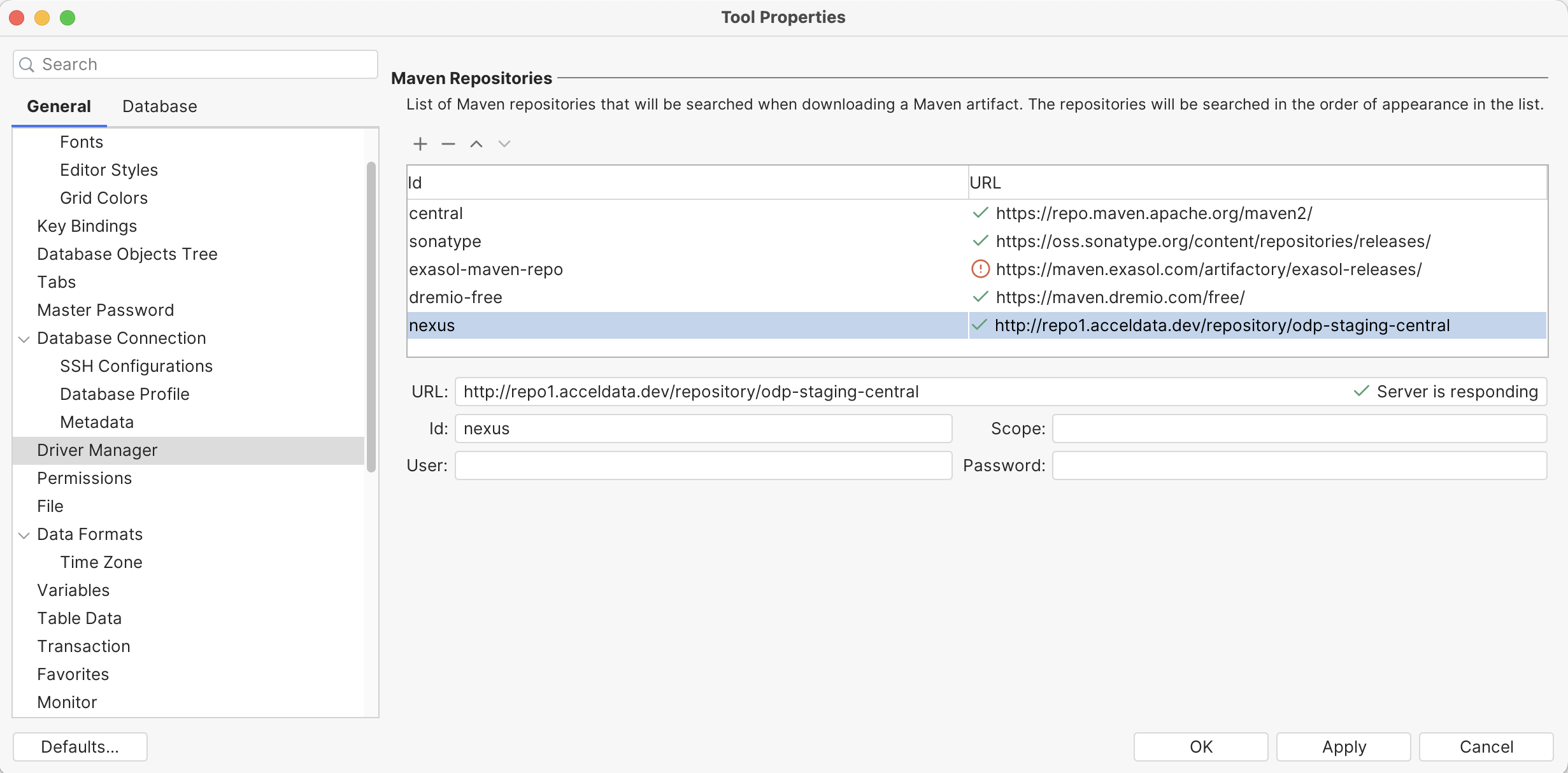
http://repo1.acceldata.dev/repository/odp-central

  • Navigate to Tools → Driver Manager. If the ClickHouse template driver is unavailable, update DBVisualizer to the latest version. Right-click ClickHouse and select Create User Driver from Template.

  • In the Driver Artifacts section, click + and enter the required version details. After applying, the tool automatically downloads and scans the driver classes. You can also download and upload the driver JARs manually if preferred.
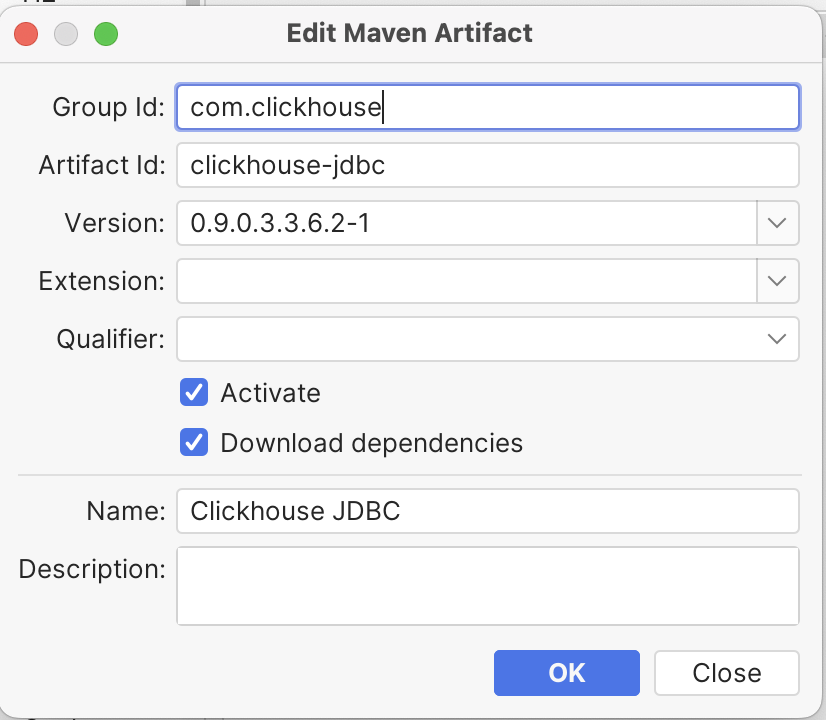

  • Choose a new DB connection and assign the driver with the DB connection details
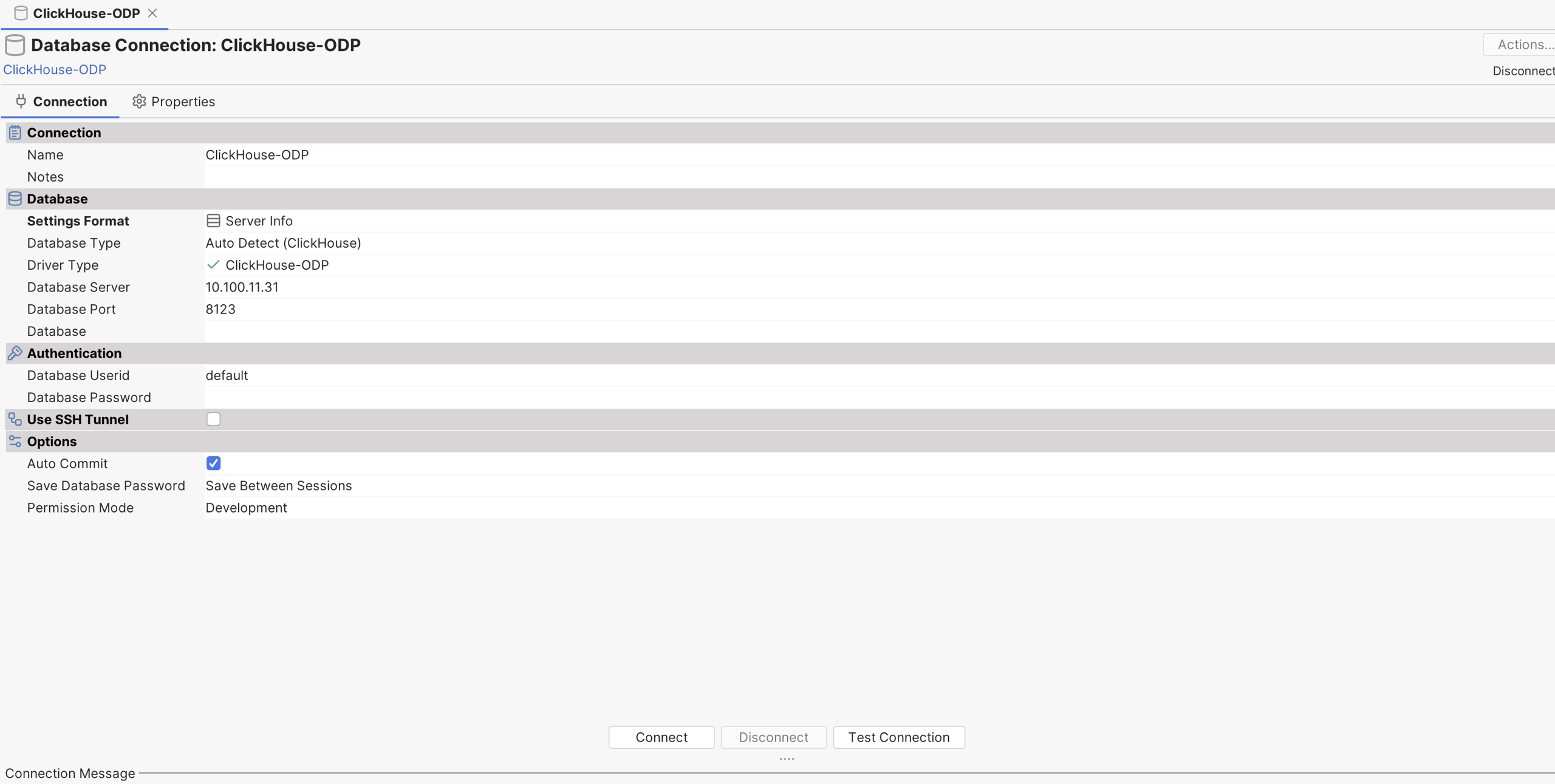

For more information, see JDBC Driver Configuration.


ODBC SQL Client Integration

The ODBC driver is currently not packaged due to ongoing evaluations of environmental requirements. However, you can use the official ClickHouse ODBC clients for your operating system. Download the compressed files from the official ClickHouse ODBC repository to access the latest releases (licensed under Apache 2.0).
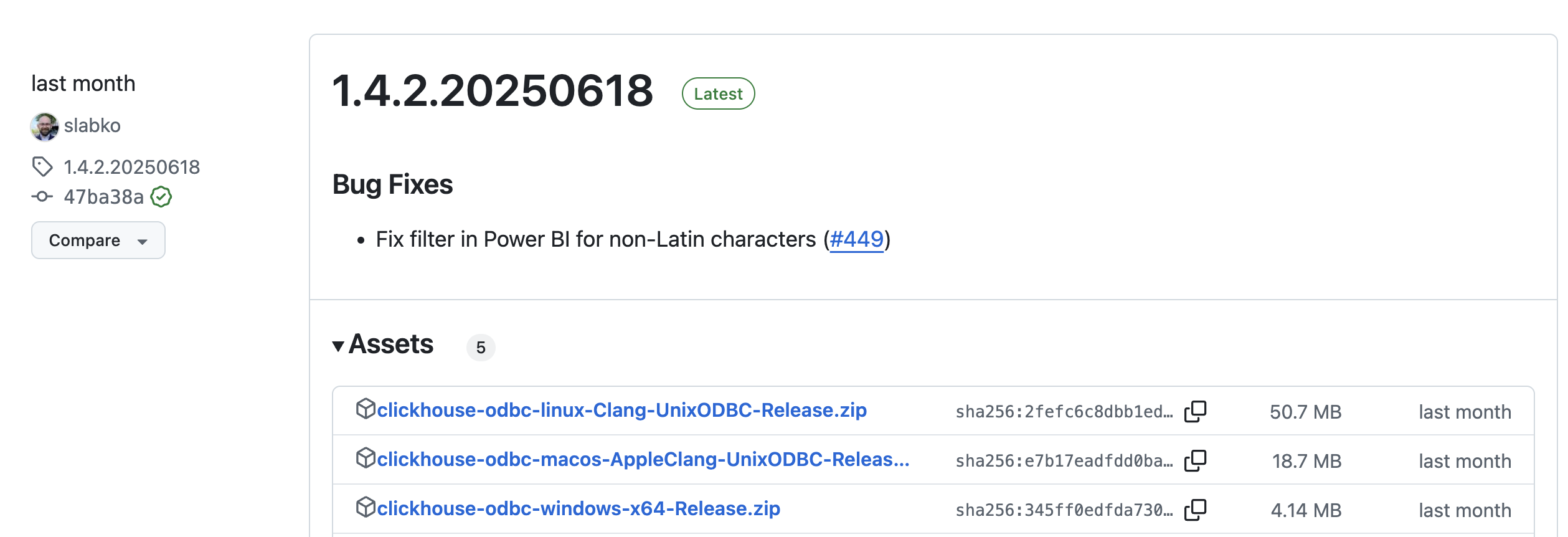

Note: Future roadmap includes JDBC and ODBC bridge integrations to enable access to external data sources via ClickHouse storage handler services.


  Last updated