This page shows how to configure and use MLflow to log experiments and store artifacts on HDFS, using both local Python scripts and JupyterHub notebooks.
Requirements
To run MLflow with HDFS artifact storage, ensure the following:
Hadoop and HDFS are installed and accessible from the machine running MLflow.
Environment variables are set correctly:
MLflow tracking server is running with HDFS configured as the default artifact root.
Python environment includes the required packages:
pip install mlflow scikit-learn pyarrow
Part 1: Run MLflow Using a Local Python Script with HDFS Artifact Storage
This example shows how to run the MLflow tracking server and log experiment artifacts directly to HDFS using a local Python script.
Set the required environment variables: Before starting the MLflow server, configure your environment to work with HDFS.
export HADOOP_HOME=/usr/odp/3.3.6.3-1/hadoop
export HADOOP_CONF_DIR=$HADOOP_HOME/etc/hadoop
export LD_LIBRARY_PATH=$HADOOP_HOME/lib/native:$LD_LIBRARY_PATH
export CLASSPATH=$($HADOOP_HOME/bin/hadoop classpath --glob)
Start the MLflow Tracking server: Launch the MLflow server with MySQL as the backend store and HDFS as the artifact root.
mlflow server \
--backend-store-uri mysql+pymysql://<username>:<password>@<mysql-host>:<port>/<database-name> \
--default-artifact-root hdfs://<hdfs-host>:<port>/<artifact-path> \
--host <IP Address> \
--port 5000
Run a sample Python script (hdfstest.py): Create and run a script that logs an MLflow experiment to the HDFS artifact store.
cat hdfstest.py
# 1. Setup
import mlflow
import mlflow.sklearn
from sklearn.linear_model import LinearRegression
from sklearn.metrics import mean_squared_error, r2_score
from sklearn.model_selection import train_test_split
from sklearn.datasets import make_regression
import pandas as pd
import numpy as np
import os
import matplotlib.pyplot as plt
# 2. Configure MLflow Tracking URI (point to your MLflow server)
mlflow.set_tracking_uri("http://10.100.11.39:5000")
mlflow.set_experiment("HDFS_LR_Experiment")
# 3. Generate dummy regression data
X, y = make_regression(n_samples=1000, n_features=2, noise=15, random_state=42)
X_train, X_test, y_train, y_test = train_test_split(X, y, test_size=0.2, random_state=42)
# 4. Start MLflow Run
with mlflow.start_run():
# Log parameters
mlflow.log_param("fit_intercept", True)
# Train model
model = LinearRegression(fit_intercept=True)
model.fit(X_train, y_train)
# Predict and evaluate
predictions = model.predict(X_test)
mse = mean_squared_error(y_test, predictions)
r2 = r2_score(y_test, predictions)
# Log metrics
mlflow.log_metric("mse", mse)
mlflow.log_metric("r2", r2)
# Log model
mlflow.sklearn.log_model(model, "model")
# Save and log a plot
plt.figure(figsize=(6, 6))
plt.scatter(y_test, predictions, alpha=0.7)
plt.xlabel("Actual")
plt.ylabel("Predicted")
plt.title("Actual vs Predicted")
plot_path = "actual_vs_predicted.png"
plt.savefig(plot_path)
mlflow.log_artifact(plot_path)
print("Run complete. Artifacts saved to HDFS.")
Run the script: Execute the Python script to log the experiment to MLflow and store artifacts in HDFS.
python /usr/odp/3.3.6.3-1/mlflow/hdfstest.py
Validate artifacts in HDFS: After the script runs successfully, verify that the artifacts were written to HDFS.
You can see the logged model and metadata files in the specified directory (e.g., /tmp/4/<run_id>/artifacts).
Run MLflow with Kerberos-Enabled HDFS Using a Local Python File
To log experiments to HDFS in a secure (Kerberos-enabled) Hadoop environment, follow these steps:
Set the ticket cache location for MLflow to use.
export MLFLOW_KERBEROS_TICKET_CACHE=/tmp/krb5cc_1025
Alternatively, if you know the UID:
export MLFLOW_KERBEROS_TICKET_CACHE=/tmp/krb5cc_$(id -u)
Authenticate with Kerberos using keytab.
Run the following command to get a Kerberos ticket.
kinit -kt /etc/security/keytabs/hdfs.headless.keytab
kinit: Cannot determine realm for host (principal host/kafkaingestion2.acceldata.ce@)
(mlflow) [root@kafkaingestion2 mlflow]# klist -kt /etc/security/keytabs/hdfs.headless.keytab
Keytab name: FILE:/etc/security/keytabs/hdfs.headless.keytab
KVNO Timestamp Principal
---- ------------------- ------------------------------------------------------
2 2025-06-25T16:23:58 hdfs-kafkaingestion@ADSRE.COM
2 2025-06-25T16:23:58 hdfs-kafkaingestion@ADSRE.COM
(mlflow) [root@kafkaingestion2 mlflow]#
(mlflow) [root@kafkaingestion2 mlflow]# kinit -kt /etc/security/keytabs/hdfs.headless.keytab hdfs-kafkaingestion@ADSRE.COM
Authenticates as the HDFS user using a keytab file. Make sure the principal name matches the one in klist -kt.
Start MLflow Tracking server.
mlflow server --backend-store-uri mysql+pymysql://mlflow:mlflow@10.100.11.70:3306/mlflow --default-artifact-root hdfs://kafkaingestion.acceldata.ce:8020/tmp --host 10.100.11.72 --port 5000
2025/07/04 18:07:59 INFO mlflow.store.db.utils: Creating initial MLflow database tables...
2025/07/04 18:07:59 INFO mlflow.store.db.utils: Updating database tables
INFO [alembic.runtime.migration] Context impl MySQLImpl.
INFO [alembic.runtime.migration] Will assume non-transactional DDL.
Launches MLflow server with MySQL backend and HDFS as the default artifact store.
ls
bin include lib lib64 pyvenv.cfg share
[root@kafkaingestion2 mlflow]#
[root@kafkaingestion2 mlflow]#
[root@kafkaingestion2 mlflow]# source bin/activate
Set Hadoop and Java environment variables.
export HADOOP_HOME=/usr/odp/3.3.6.3-1/hadoop
export HADOOP_CONF_DIR=$HADOOP_HOME/etc/hadoop
export LD_LIBRARY_PATH=$HADOOP_HOME/lib/native:$LD_LIBRARY_PATH
export CLASSPATH=$($HADOOP_HOME/bin/hadoop classpath --glob)
This prepares the environment to allow Python (and MLflow) to interact with HDFS.
Sample MLflow script: hdfs.py
cat hdfs.py
import mlflow
import mlflow.sklearn
from sklearn.linear_model import LinearRegression
from sklearn.metrics import mean_squared_error, r2_score
from sklearn.model_selection import train_test_split
from sklearn.datasets import make_regression
import matplotlib.pyplot as plt
import os
import time
def log(msg):
print(f"[{time.strftime('%Y-%m-%d %H:%M:%S')}] {msg}", flush=True)
# 1. Setup MLflow tracking
log("Setting MLflow tracking URI...")
mlflow.set_tracking_uri("http://10.100.11.72:5000")
experiment_name = "HDFS_LR_Experiment_test"
artifact_location = "hdfs://kafkaingestion.acceldata.ce:8020/tmp/mlflow-jupyter"
# 2. Create experiment (safe creation)
log(f"Trying to create experiment '{experiment_name}' with artifact location '{artifact_location}'...")
try:
mlflow.create_experiment(name=experiment_name, artifact_location=artifact_location)
log("Experiment created successfully.")
except mlflow.exceptions.MlflowException as e:
log(f"Experiment already exists or failed to create: {str(e)}")
log(f"Setting experiment to '{experiment_name}'...")
mlflow.set_experiment(experiment_name)
# 3. Generate data
log("Generating regression dataset...")
X, y = make_regression(n_samples=1000, n_features=2, noise=15, random_state=42)
X_train, X_test, y_train, y_test = train_test_split(X, y, test_size=0.2, random_state=42)
# 4. Start MLflow run
log("Starting MLflow run...")
with mlflow.start_run() as run:
log("Logging parameters...")
mlflow.log_param("fit_intercept", True)
log("Training LinearRegression model...")
model = LinearRegression(fit_intercept=True)
model.fit(X_train, y_train)
log("Generating predictions and calculating metrics...")
predictions = model.predict(X_test)
mse = mean_squared_error(y_test, predictions)
r2 = r2_score(y_test, predictions)
log(f"Logging metrics: mse={mse}, r2={r2}...")
mlflow.log_metric("mse", mse)
mlflow.log_metric("r2", r2)
log("Logging model...")
mlflow.sklearn.log_model(model, "model")
log("Generating and logging plot...")
plt.figure(figsize=(6, 6))
plt.scatter(y_test, predictions, alpha=0.7)
plt.xlabel("Actual")
plt.ylabel("Predicted")
plt.title("Actual vs Predicted")
plot_path = "actual_vs_predicted.png"
plt.savefig(plot_path)
mlflow.log_artifact(plot_path)
log("MLflow run complete. Artifacts should be saved to HDFS.")
Run the script.
python hdfs.py
[2025-07-04 18:08:54] Setting MLflow tracking URI...
[2025-07-04 18:08:54] Trying to create experiment 'HDFS_LR_Experiment_test' with artifact location 'hdfs://kafkaingestion.acceldata.ce:8020/tmp/mlflow-jupyter'...
[2025-07-04 18:08:54] Experiment already exists or failed to create: BAD_REQUEST: (pymysql.err.IntegrityError) (1062, "Duplicate entry 'HDFS_LR_Experiment_test' for key 'experiments.name'")
[SQL: INSERT INTO experiments (name, artifact_location, lifecycle_stage, creation_time, last_update_time) VALUES (%(name)s, %(artifact_location)s, %(lifecycle_stage)s, %(creation_time)s, %(last_update_time)s)]
[parameters: {'name': 'HDFS_LR_Experiment_test', 'artifact_location': 'hdfs://kafkaingestion.acceldata.ce:8020/tmp/mlflow-jupyter', 'lifecycle_stage': 'active', 'creation_time': 1751632734954, 'last_update_time': 1751632734954}]
(Background on this error at: https://sqlalche.me/e/20/gkpj)
[2025-07-04 18:08:54] Setting experiment to 'HDFS_LR_Experiment_test'...
[2025-07-04 18:08:54] Generating regression dataset...
[2025-07-04 18:08:54] Starting MLflow run...
2025/07/04 18:08:54 WARNING mlflow.utils.git_utils: Failed to import Git (the Git executable is probably not on your PATH), so Git SHA is not available. Error: Failed to initialize: Bad git executable.
The git executable must be specified in one of the following ways:
- be included in your $PATH
- be set via $GIT_PYTHON_GIT_EXECUTABLE
- explicitly set via git.refresh(<full-path-to-git-executable>)
All git commands will error until this is rectified.
This initial message can be silenced or aggravated in the future by setting the
$GIT_PYTHON_REFRESH environment variable. Use one of the following values:
- quiet|q|silence|s|silent|none|n|0: for no message or exception
- warn|w|warning|log|l|1: for a warning message (logging level CRITICAL, displayed by default)
- error|e|exception|raise|r|2: for a raised exception
Example:
export GIT_PYTHON_REFRESH=quiet
[2025-07-04 18:08:55] Logging parameters...
[2025-07-04 18:08:55] Training LinearRegression model...
[2025-07-04 18:08:55] Generating predictions and calculating metrics...
[2025-07-04 18:08:55] Logging metrics: mse=232.1568349470603, r2=0.8647466802824137...
[2025-07-04 18:08:55] Logging model...
2025/07/04 18:08:55 WARNING mlflow.models.model: `artifact_path` is deprecated. Please use `name` instead.
2025/07/04 18:08:57 WARNING mlflow.models.model: Model logged without a signature and input example. Please set `input_example` parameter when logging the model to auto infer the model signature.
[2025-07-04 18:08:59] Generating and logging plot...
[2025-07-04 18:08:59] MLflow run complete. Artifacts should be saved to HDFS.
🏃 View run useful-dolphin-949 at: http://10.100.11.72:5000/#/experiments/8/runs/438bfcb87a0c4a749c92b4612fb44bb0
🧪 View experiment at: http://10.100.11.72:5000/#/experiments/8
Verify artifacts in HDFS.
(mlflow) [root@kafkaingestion2 mlflow]# hdfs dfs -ls -R /tmp/mlflow-jupyter
drwxrwxrwx - hdfs hdfs 0 2025-07-04 18:08 /tmp/mlflow-jupyter/438bfcb87a0c4a749c92b4612fb44bb0
drwxrwxrwx - hdfs hdfs 0 2025-07-04 18:08 /tmp/mlflow-jupyter/438bfcb87a0c4a749c92b4612fb44bb0/artifacts
-rw-r--r-- 3 hdfs hdfs 37398 2025-07-04 18:08 /tmp/mlflow-jupyter/438bfcb87a0c4a749c92b4612fb44bb0/artifacts/actual_vs_predicted.png
-rw-r--r-- 3 root hdfs 34 2025-07-04 17:56 /tmp/mlflow-jupyter/kerberos_test.txt
drwxr-xr-x - hdfs hdfs 0 2025-07-04 18:08 /tmp/mlflow-jupyter/models
drwxr-xr-x - hdfs hdfs 0 2025-07-04 18:08 /tmp/mlflow-jupyter/models/m-67c7035173a74e418a45aa33d548e87e
drwxr-xr-x - hdfs hdfs 0 2025-07-04 18:08 /tmp/mlflow-jupyter/models/m-67c7035173a74e418a45aa33d548e87e/artifacts
-rw-r--r-- 3 hdfs hdfs 691 2025-07-04 18:08 /tmp/mlflow-jupyter/models/m-67c7035173a74e418a45aa33d548e87e/artifacts/MLmodel
-rw-r--r-- 3 hdfs hdfs 211 2025-07-04 18:08 /tmp/mlflow-jupyter/models/m-67c7035173a74e418a45aa33d548e87e/artifacts/conda.yaml
-rw-r--r-- 3 hdfs hdfs 451 2025-07-04 18:08 /tmp/mlflow-jupyter/models/m-67c7035173a74e418a45aa33d548e87e/artifacts/model.pkl
-rw-r--r-- 3 hdfs hdfs 115 2025-07-04 18:08 /tmp/mlflow-jupyter/models/m-67c7035173a74e418a45aa33d548e87e/artifacts/python_env.yaml
-rw-r--r-- 3 hdfs hdfs 93 2025-07-04 18:08 /tmp/mlflow-jupyter/models/m-67c7035173a74e418a45aa33d548e87e/artifacts/requirements.txt
(mlflow) [root@kafkaingestion2 mlflow]#
(mlflow) [root@kafkaingestion2 mlflow]#
This checks that the model and artifacts (e.g., plot image, model files) were successfully logged to HDFS.
Part 2: Use MLflow with Kerberos-Enabled HDFS from JupyterHub or Python
Authenticate with Kerberos: Use a valid Kerberos principal and keytab to authenticate your session.
(mlflow) [root@kafkaingestion2 mlflow]# export MLFLOW_KERBEROS_TICKET_CACHE=/tmp/krb5cc_1025
(mlflow) [root@kafkaingestion2 mlflow]# export MLFLOW_KERBEROS_TICKET_CACHE=/tmp/krb5cc_$(id -u)
(mlflow) [root@kafkaingestion2 mlflow]#
(mlflow) [root@kafkaingestion2 mlflow]# kinit -kt /etc/security/keytabs/jupyterhub.keytab jupyterhub@ADSRE.COM
kinit: Client 'jupyterhub@ADSRE.COM' not found in Kerberos database while getting initial credentials
(mlflow) [root@kafkaingestion2 mlflow]#
(mlflow) [root@kafkaingestion2 mlflow]# kinit -kt /etc/security/keytabs/hdfs.headless.keytab
kinit: Cannot determine realm for host (principal host/kafkaingestion2.acceldata.ce@)
(mlflow) [root@kafkaingestion2 mlflow]# klist -kt /etc/security/keytabs/hdfs.headless.keytab
Keytab name: FILE:/etc/security/keytabs/hdfs.headless.keytab
KVNO Timestamp Principal
---- ------------------- ------------------------------------------------------
2 2025-06-25T16:23:58 hdfs-kafkaingestion@ADSRE.COM
2 2025-06-25T16:23:58 hdfs-kafkaingestion@ADSRE.COM
(mlflow) [root@kafkaingestion2 mlflow]#
(mlflow) [root@kafkaingestion2 mlflow]# kinit -kt /etc/security/keytabs/hdfs.headless.keytab hdfs-kafkaingestion@ADSRE.COM
(mlflow) [root@kafkaingestion2 mlflow]#
(mlflow) [root@kafkaingestion2 mlflow]#
(mlflow) [root@kafkaingestion2 mlflow]#
(mlflow) [root@kafkaingestion2 mlflow]#
(mlflow) [root@kafkaingestion2 mlflow]#
(mlflow) [root@kafkaingestion2 mlflow]#
(mlflow) [root@kafkaingestion2 mlflow]#
(mlflow) [root@kafkaingestion2 mlflow]#
(mlflow) [root@kafkaingestion2 mlflow]# mlflow server --backend-store-uri mysql+pymysql://mlflow:mlflow@10.100.11.70:3306/mlflow --default-artifact-root hdfs://kafkaingestion.acceldata.ce:8020/tmp --host 10.100.11.72 --port 5000
2025/07/04 18:07:59 INFO mlflow.store.db.utils: Creating initial MLflow database tables...
2025/07/04 18:07:59 INFO mlflow.store.db.utils: Updating database tables
INFO [alembic.runtime.migration] Context impl MySQLImpl.
INFO [alembic.runtime.migration] Will assume non-transactional DDL.
INFO [alembic.runtime.migration] Context impl MySQLImpl.
INFO [alembic.runtime.migration] Will assume non-transactional DDL.
This step ensures MLflow and HDFS access is Kerberos-authenticated.
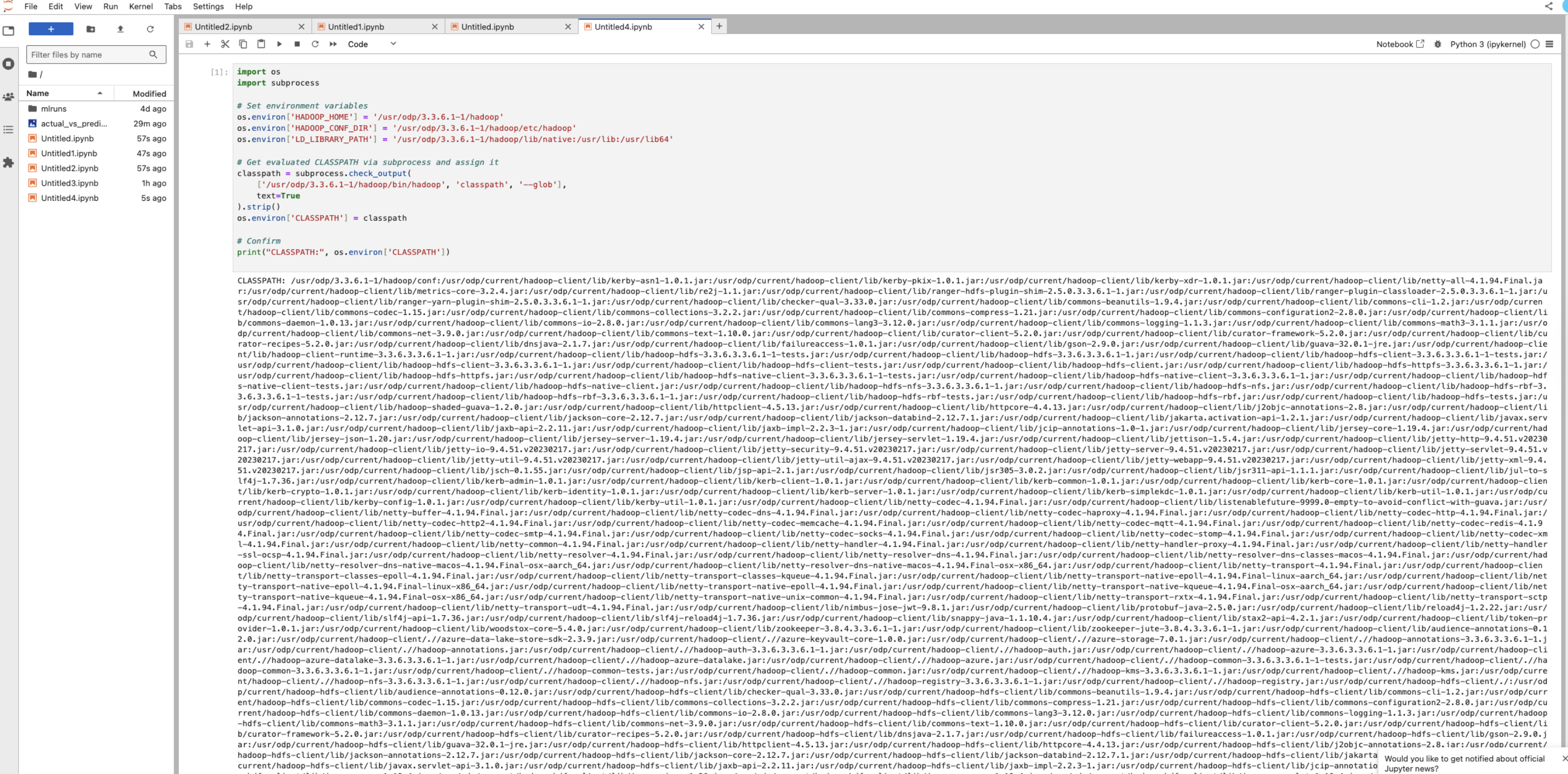
Set up Hadoop environment for Python: Configure Hadoop and Java-related environment variables in Python.
import os
import subprocess
# Set environment variables
os.environ['HADOOP_HOME'] = '/usr/odp/3.3.6.3-1/hadoop'
os.environ['HADOOP_CONF_DIR'] = '/usr/odp/3.3.6.3-1/hadoop/etc/hadoop'
os.environ['LD_LIBRARY_PATH'] = '/usr/odp/3.3.6.3-1/hadoop/lib/native:/usr/lib:/usr/lib64'
# Get evaluated CLASSPATH via subprocess and assign it
classpath = subprocess.check_output(
['/usr/odp/3.3.6.3-1/hadoop/bin/hadoop', 'classpath', '--glob'],
text=True
).strip()
os.environ['CLASSPATH'] = classpath
# Confirm
print("CLASSPATH:", os.environ['CLASSPATH'])
This is required for Python to interact with HDFS for storing MLflow artifacts.
Log MLflow experiment with HDFS artifacts: Track and log a scikit-learn model run with MLflow, saving artifacts to HDFS.
import mlflow
import mlflow.sklearn
from sklearn.linear_model import LinearRegression
from sklearn.metrics import mean_squared_error, r2_score
from sklearn.model_selection import train_test_split
from sklearn.datasets import make_regression
import matplotlib.pyplot as plt
import os
import time
def log(msg):
print(f"[{time.strftime('%Y-%m-%d %H:%M:%S')}] {msg}", flush=True)
# 1. Setup MLflow tracking
log("Setting MLflow tracking URI...")
mlflow.set_tracking_uri("http://10.100.11.72:5000")
experiment_name = "HDFS_LR_Experiment_test"
artifact_location = "hdfs://kafkaingestion.acceldata.ce:8020/tmp/mlflow-jupyter"
# 2. Create experiment (safe creation)
log(f"Trying to create experiment '{experiment_name}' with artifact location '{artifact_location}'...")
try:
mlflow.create_experiment(name=experiment_name, artifact_location=artifact_location)
log("Experiment created successfully.")
except mlflow.exceptions.MlflowException as e:
log(f"Experiment already exists or failed to create: {str(e)}")
log(f"Setting experiment to '{experiment_name}'...")
mlflow.set_experiment(experiment_name)
# 3. Generate data
log("Generating regression dataset...")
X, y = make_regression(n_samples=1000, n_features=2, noise=15, random_state=42)
X_train, X_test, y_train, y_test = train_test_split(X, y, test_size=0.2, random_state=42)
# 4. Start MLflow run
log("Starting MLflow run...")
with mlflow.start_run() as run:
log("Logging parameters...")
mlflow.log_param("fit_intercept", True)
log("Training LinearRegression model...")
model = LinearRegression(fit_intercept=True)
model.fit(X_train, y_train)
log("Generating predictions and calculating metrics...")
predictions = model.predict(X_test)
mse = mean_squared_error(y_test, predictions)
r2 = r2_score(y_test, predictions)
log(f"Logging metrics: mse={mse}, r2={r2}...")
mlflow.log_metric("mse", mse)
mlflow.log_metric("r2", r2)
log("Logging model...")
mlflow.sklearn.log_model(model, "model")
log("Generating and logging plot...")
plt.figure(figsize=(6, 6))
plt.scatter(y_test, predictions, alpha=0.7)
plt.xlabel("Actual")
plt.ylabel("Predicted")
plt.title("Actual vs Predicted")
plot_path = "actual_vs_predicted.png"
plt.savefig(plot_path)
mlflow.log_artifact(plot_path)
log("MLflow run complete. Artifacts should be saved to HDFS.")
This automates model training, logging, and stores everything in HDFS for traceability and collaboration.
Part 2: Run MLflow in JupyterHub Using HDFS
Set the Hadoop environment in the Notebook.
import os
import subprocess
# Set environment variables
os.environ['HADOOP_HOME'] = '/usr/odp/3.3.6.3-1/hadoop'
os.environ['HADOOP_CONF_DIR'] = '/usr/odp/3.3.6.3-1/hadoop/etc/hadoop'
os.environ['LD_LIBRARY_PATH'] = '/usr/odp/3.3.6.3-1/hadoop/lib/native:/usr/lib:/usr/lib64'
# Get evaluated CLASSPATH via subprocess and assign it
classpath = subprocess.check_output(
['/usr/odp/3.3.6.3-1/hadoop/bin/hadoop', 'classpath', '--glob'],
text=True
).strip()
os.environ['CLASSPATH'] = classpath
# Confirm
print("CLASSPATH:", os.environ['CLASSPATH'])
Adjust HDFS permissions.
hdfs dfs -mkdir -p /tmp/mlflow-jupyter
hdfs dfs -chown -R jupyterhub:hdfs /tmp/mlflow-jupyter
hdfs dfs -chmod -R 777 /tmp
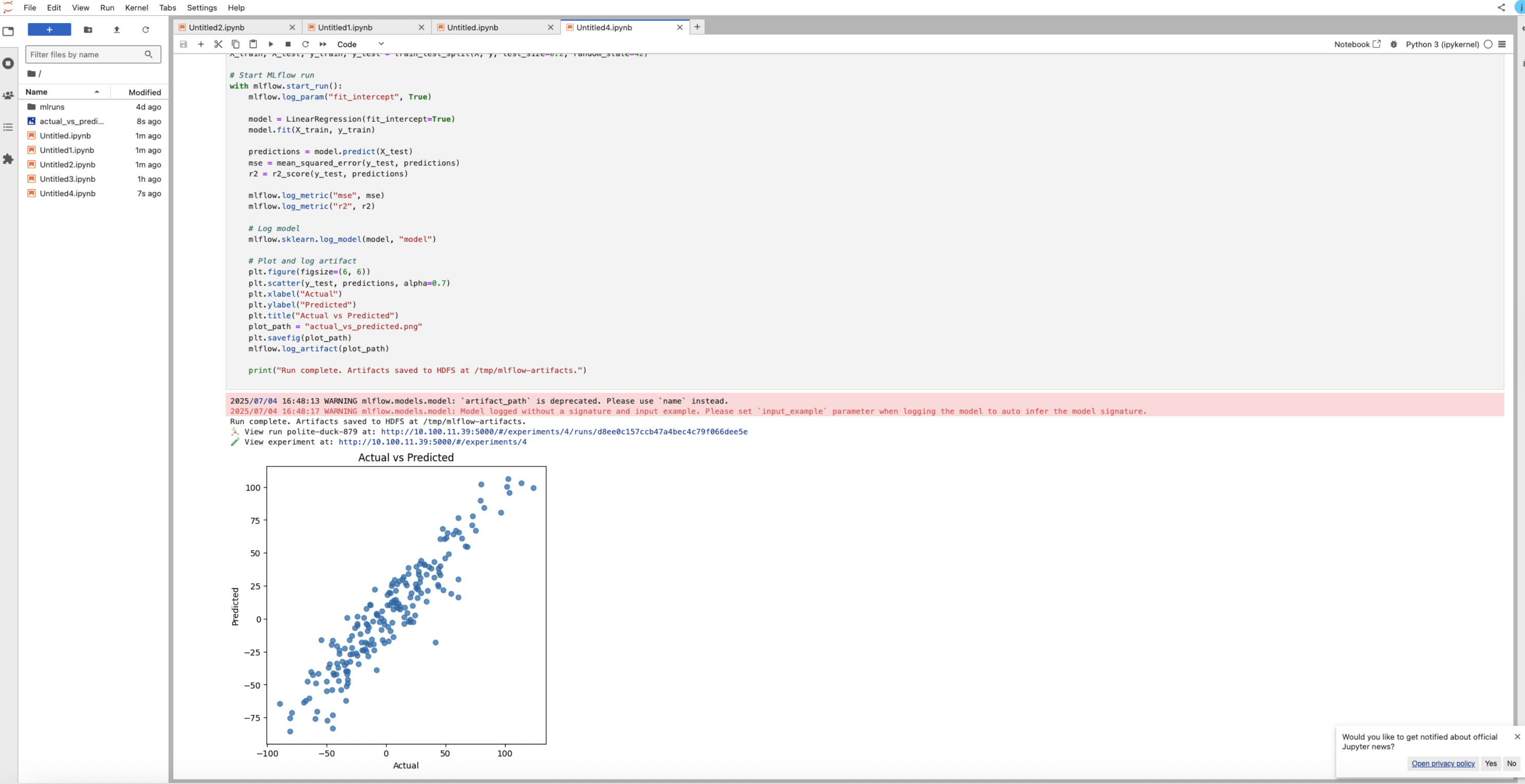
MLflow Experiment Code in Jupyter.
import mlflow
import mlflow.sklearn
from sklearn.linear_model import LinearRegression
from sklearn.metrics import mean_squared_error, r2_score
from sklearn.model_selection import train_test_split
from sklearn.datasets import make_regression
import matplotlib.pyplot as plt
import os
# Set MLflow tracking server
mlflow.set_tracking_uri("http://10.100.11.39:5000")
# Ensure experiment writes to HDFS under /tmp
experiment_name = "HDFS_LR_Experiment"
artifact_location = "hdfs://airflowdb.acceldata.ce:8020/tmp/mlflow-jupyter"
# Create experiment
try:
mlflow.create_experiment(name="HDFS_LR_Experiment", artifact_location=artifact_location)
except mlflow.exceptions.MlflowException:
pass # Already exists
mlflow.set_experiment("HDFS_LR_Experiment")
# Create experiment if not exists
try:
mlflow.create_experiment(name=experiment_name, artifact_location=artifact_location)
except mlflow.exceptions.MlflowException:
pass # Already exists
mlflow.set_experiment(experiment_name)
# Generate dummy data
X, y = make_regression(n_samples=1000, n_features=2, noise=15, random_state=42)
X_train, X_test, y_train, y_test = train_test_split(X, y, test_size=0.2, random_state=42)
# Start MLflow run
with mlflow.start_run():
mlflow.log_param("fit_intercept", True)
model = LinearRegression(fit_intercept=True)
model.fit(X_train, y_train)
predictions = model.predict(X_test)
mse = mean_squared_error(y_test, predictions)
r2 = r2_score(y_test, predictions)
mlflow.log_metric("mse", mse)
mlflow.log_metric("r2", r2)
# Log model
mlflow.sklearn.log_model(model, "model")
# Plot and log artifact
plt.figure(figsize=(6, 6))
plt.scatter(y_test, predictions, alpha=0.7)
plt.xlabel("Actual")
plt.ylabel("Predicted")
plt.title("Actual vs Predicted")
plot_path = "actual_vs_predicted.png"
plt.savefig(plot_path)
mlflow.log_artifact(plot_path)
print("Run complete. Artifacts saved to HDFS at /tmp/mlflow-artifacts.")
Final HDFS validation.
hdfs dfs -ls /tmp/4
hdfs dfs -ls /tmp/mlflow-jupyter
You can see the artifacts as below:
/tmp/4/<run-id>/artifacts/model/
/tmp/mlflow-jupyter/<experiment-name>/