
Upgrade from v2.2.X to v3.0.3
This document assists you in migrating from Pulse 2.2.X version to 3.0.3 version. You must perform the steps mentioned in this document in all your clusters.
Alert!
Remove: The accelo admin database purge-tsdb
Requires: Downtime for Pulse and Hydra Agent re-installation
Note
If you are using the 2.1.1 version of Pulse, follow the steps in this page to update to v2.2.X.
Migration Steps
Backup Steps
- Take backup of Dashplots Charts using Export option.
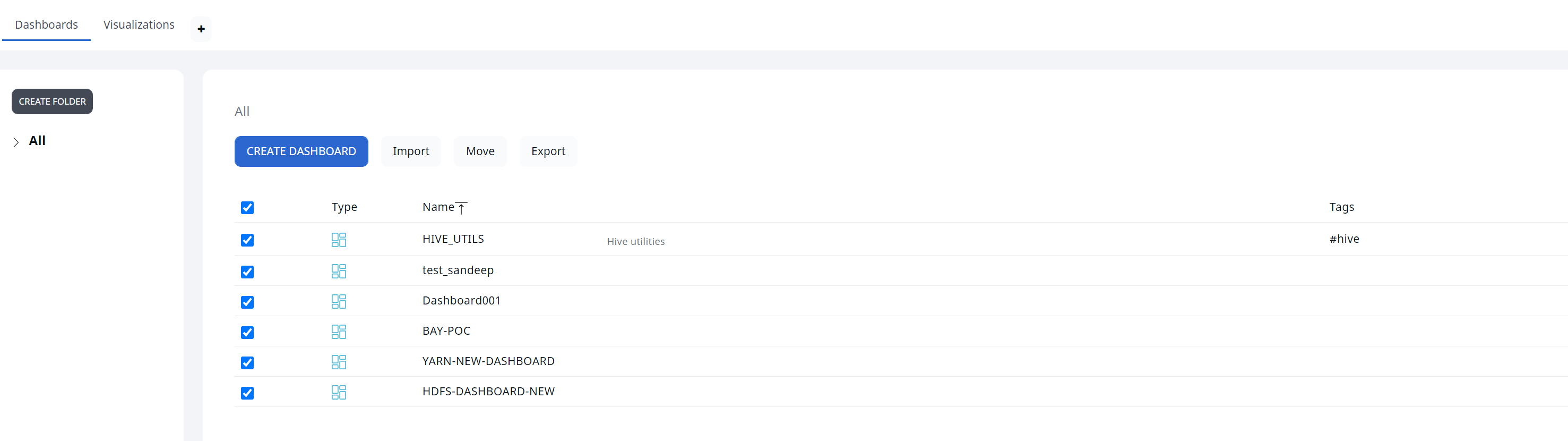
- Take backup of Alerts using the Export option.

Perform the following steps to migrate to version 3.0.0:
Step -1: Download the new CLI with version 3.0.0
1.1. Edit the config/accelo.yml file and put 3.0.3 image tag.
1.2. Pull all the latest containers of 3.0.3.
Step -2: Migration Steps:
2.1. Run the accelo set
2.2 .Run the CLI migrate command: accelo migrate -v 3.0.0
Choose whether to migrate as a non-root or root user:
Non Root User | Root User |
a. Disable all Pulse Services | a. If accelo CLI is going to be run as a root user: |
b. Change the ownership of all data directories to | |
c. Run the migration command with |
2.3. Repeat the above steps for all the clusters installed in the Pulse server.
Step-3: Run the command accelo deploy core
Step-4: Run the command accelo deploy addons
Step-5: Run the command accelo reconfig cluster -a
Step-6: Run the command accelo uninstall remote
Step-7: Run the accelo deploy hydra
Step-8: If ad-director service is running, run the accelo deploy playbooks
Step-9: Restart ad-director once new playbooks are added, accelo restart ad-director
Step-10: Finally, execute the command accelo admin fsa load
For a better reference, watch this quick video:
Issue: If after the upgrade you face the following metadata corruption exception in the fsanalytics connection.
22-11-2022 09:59:40.341 [fsanalytics-connector-akka.actor.default-dispatcher-1206] INFO c.a.p.f.metastore.MetaStoreMap - Cleared meta-store.dat
[ERROR] [11/22/2022 09:59:40.342] [fsanalytics-connector-akka.actor.default-dispatcher-1206] [akka://fsanalytics-connector/user/$a] The file /etc/fsanalytics/hdp314/meta-store.dat the map is serialized from has unexpected length 0, probably corrupted. Data store size is 286023680
java.io.IOException: The file /etc/fsanalytics/hdp314/meta-store.dat the map is serialized from has unexpected length 0, probably corrupted. Data store size is 286023680
 at net.openhft.chronicle.map.ChronicleMapBuilder.openWithExistingFile(ChronicleMapBuilder.java:1800)
 at net.openhft.chronicle.map.ChronicleMapBuilder.createWithFile(ChronicleMapBuilder.java:1640)
 at net.openhft.chronicle.map.ChronicleMapBuilder.createPersistedTo(ChronicleMapBuilder.java:1563)
 at com.acceldata.plugins.fsanalytics.metastore.MetaStoreMap.getMap(MetaStoreConnection.scala:71)
 at com.acceldata.plugins.fsanalytics.metastore.MetaStoreMap.initialize(MetaStoreConnection.scala:42)
 at com.acceldata.plugins.fsanalytics.metastore.MetaStoreConnection.<init>(MetaStoreConnection.scala:111)
 at com.acceldata.plugins.fsanalytics.FsAnalyticsConnector.execute(FsAnalyticsConnector.scala:49)
 at com.acceldata.plugins.fsanalytics.FsAnalyticsConnector.execute(FsAnalyticsConnector.scala:17)
 at com.acceldata.connectors.core.SchedulerImpl.setUpOneShotSchedule(Scheduler.scala:48)
 at com.acceldata.connectors.core.SchedulerImpl.schedule(Scheduler.scala:64)
 at com.acceldata.connectors.core.DbListener$$anonfun$receive$1.$anonfun$applyOrElse$5(DbListener.scala:64)
 at com.acceldata.connectors.core.DbListener$$anonfun$receive$1.$anonfun$applyOrElse$5$adapted(DbListener.scala:54)
 at scala.collection.immutable.HashSet$HashSet1.foreach(HashSet.scala:320)
 at scala.collection.immutable.HashSet$HashTrieSet.foreach(HashSet.scala:976)
 at com.acceldata.connectors.core.DbListener$$anonfun$receive$1.applyOrElse(DbListener.scala:54)
 at akka.actor.Actor.aroundReceive(Actor.scala:539)
 at akka.actor.Actor.aroundReceive$(Actor.scala:537)
 at com.acceldata.connectors.core.DbListener.aroundReceive(DbListener.scala:26)
 at akka.actor.ActorCell.receiveMessage(ActorCell.scala:614)
 at akka.actor.ActorCell.invoke(ActorCell.scala:583)
 at akka.dispatch.Mailbox.processMailbox(Mailbox.scala:268)
 at akka.dispatch.Mailbox.run(Mailbox.scala:229)
 at akka.dispatch.Mailbox.exec(Mailbox.scala:241)
 at akka.dispatch.forkjoin.ForkJoinTask.doExec(ForkJoinTask.java:260)
 at akka.dispatch.forkjoin.ForkJoinPool$WorkQueue.runTask(ForkJoinPool.java:1339)
 at akka.dispatch.forkjoin.ForkJoinPool.runWorker(ForkJoinPool.java:1979)
 at akka.dispatch.forkjoin.ForkJoinWorkerThread.run(ForkJoinWorkerThread.java:107)
Solution: Perform the following steps to fix the issue:
- Remove the
${ACCELOHOME}/data/fsanalytics/${ClusterName}/meta-store.dat - Restart the ad Fsanalytics container using the
accelo - Run the
accelo admin fsa load
New Dashplots Version and Generic Reporting Feature
Notes
- Splashboards and Dashplots are never automatically rewritten, so either delete that dashboard to acquire the new version, or set the environment variable
OVERWRITE_SPLASHBOARDSOVERWRITE_DASHPLOTS - To access the most recent dashboard, delete the HDFS Analytics dashboard from splashboard studio and then refresh configuration.
Setting the Environment Variable
- Navigate to
ad-core.yml - In
graphql,OVERWRITE_SPLASHBOARDSOVERWRITE_DASHPLOTStruefalse
Steps for Migration:
- Before doing the upgrade, save all dashplots to a file that are not seeded by default.
- Login to the
ad-pg_default
docker exec -ti ad-pg_default bash
- Copy, paste, and run the snippet attached in migration file as is and press enter to execute it.
psql -v ON_ERROR_STOP=1 --username "pulse" <<-EOSQL
 \connect ad_management dashplot
 BEGIN;
truncate table ad_management.dashplot_hierarchy cascade;
truncate table ad_management.dashplot cascade;
truncate table ad_management.dashplot_visualization cascade;
truncate table ad_management.dashplot_variables cascade;
INSERT INTO ad_management.dashplot_variables (stock_version,"name",definition,dashplot_id,dashplot_viz_id,"global") VALUES
 (1,'appid','{"_id": "1", "name": "appid", "type": "text", "query": "", "shared": true, "options": [], "separator": "", "description": "AppID to be provided for user customization", "defaultValue": "app-20210922153251-0000", "selectionType": "", "stock_version": 1}',NULL,NULL,true),
 (1,'appname','{"_id": "2", "name": "appname", "type": "text", "query": "", "shared": true, "options": [], "separator": "", "description": "", "defaultValue": "Databricks Shell", "selectionType": "", "stock_version": 1}',NULL,NULL,true),
 (1,'FROM_DATE_EPOC','{"id": 0, "_id": "3", "name": "FROM_DATE_EPOC", "type": "date", "query": "", "global": true, "shared": false, "options": [], "separator": "", "dashplot_id": null, "description": "", "displayName": "", "defaultValue": "1645641000000", "selectionType": "", "stock_version": 1, "dashplot_viz_id": null}',NULL,NULL,true),
 (1,'TO_DATE_EPOC','{"id": 0, "_id": "4", "name": "TO_DATE_EPOC", "type": "date", "query": "", "global": true, "shared": false, "options": [], "separator": "", "dashplot_id": null, "description": "", "displayName": "", "defaultValue": "1645727399000", "selectionType": "", "stock_version": 1, "dashplot_viz_id": null}',NULL,NULL,true),
 (1,'FROM_DATE_SEC','{"_id": "5", "name": "FROM_DATE_SEC", "type": "date", "query": "", "shared": true, "options": [], "separator": "", "defaultValue": "1619807400", "selectionType": ""}',NULL,NULL,true),
 (1,'TO_DATE_SEC','{"_id": "6", "name": "TO_DATE_SEC", "type": "date", "query": "", "shared": true, "options": [], "separator": "", "defaultValue": "1622477134", "selectionType": ""}',NULL,NULL,true),
 (1,'dbcluster','{"_id": "7", "name": "dbcluster", "type": "text", "query": "", "shared": true, "options": [], "separator": "", "description": "", "defaultValue": "job-4108-run-808", "selectionType": "", "stock_version": 1}',NULL,NULL,true),
 (1,'id','{"_id": "8", "name": "id", "type": "text", "query": "", "shared": true, "options": [], "separator": "", "defaultValue": "hive_20210906102708_dcd9df9d-91b8-421a-a70f-94beed03e749", "selectionType": ""}',NULL,NULL,true),
 (1,'dagid','{"_id": "9", "name": "dagid", "type": "text", "query": "", "shared": true, "options": [], "separator": "", "description": "", "defaultValue": "dag_1631531795196_0009_1", "selectionType": "", "stock_version": 1}',NULL,NULL,true),
 (1,'hivequeryid','{"_id": "10", "name": "hivequeryid", "type": "text", "query": "", "shared": true, "options": [], "separator": "", "defaultValue": "hive_20210912092701_cef246fa-cb3c-4130-aece-e6cac82751bd", "selectionType": ""}',NULL,NULL,true);
INSERT INTO ad_management.dashplot_variables (stock_version,"name",definition,dashplot_id,dashplot_viz_id,"global") VALUES
 (1,'TENANT_NAME','{"_id": "11", "name": "TENANT_NAME", "type": "text", "query": "", "global": true, "shared": false, "options": [], "separator": "", "description": "", "defaultValue": "acceldata", "selectionType": "", "stock_version": 1}',NULL,NULL,true);
COMMIT;
EOSQL
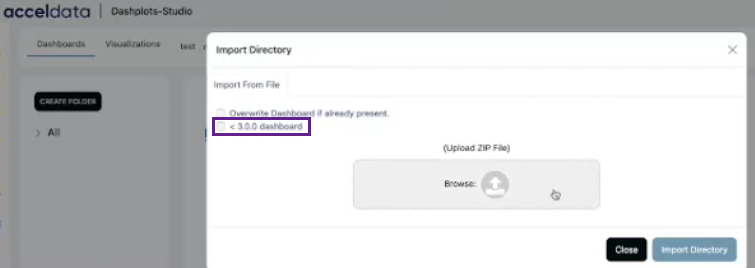
- Import the zip file exported in the step 1 above with the the < 3.0.0 dashboard option checked into the dashplot studio.
The EXPIRE_TIME
Have a suggestion?