
Monitor Kafka Topic Details
The Kafka Topic Details page in xObserve provides detailed information about individual Kafka topics, including partition health, replication status, message throughput, consumer lag, and broker distribution.
Use this page to analyze topic performance, monitor message processing, identify replication delays, and troubleshoot partition-level issues.
Navigation
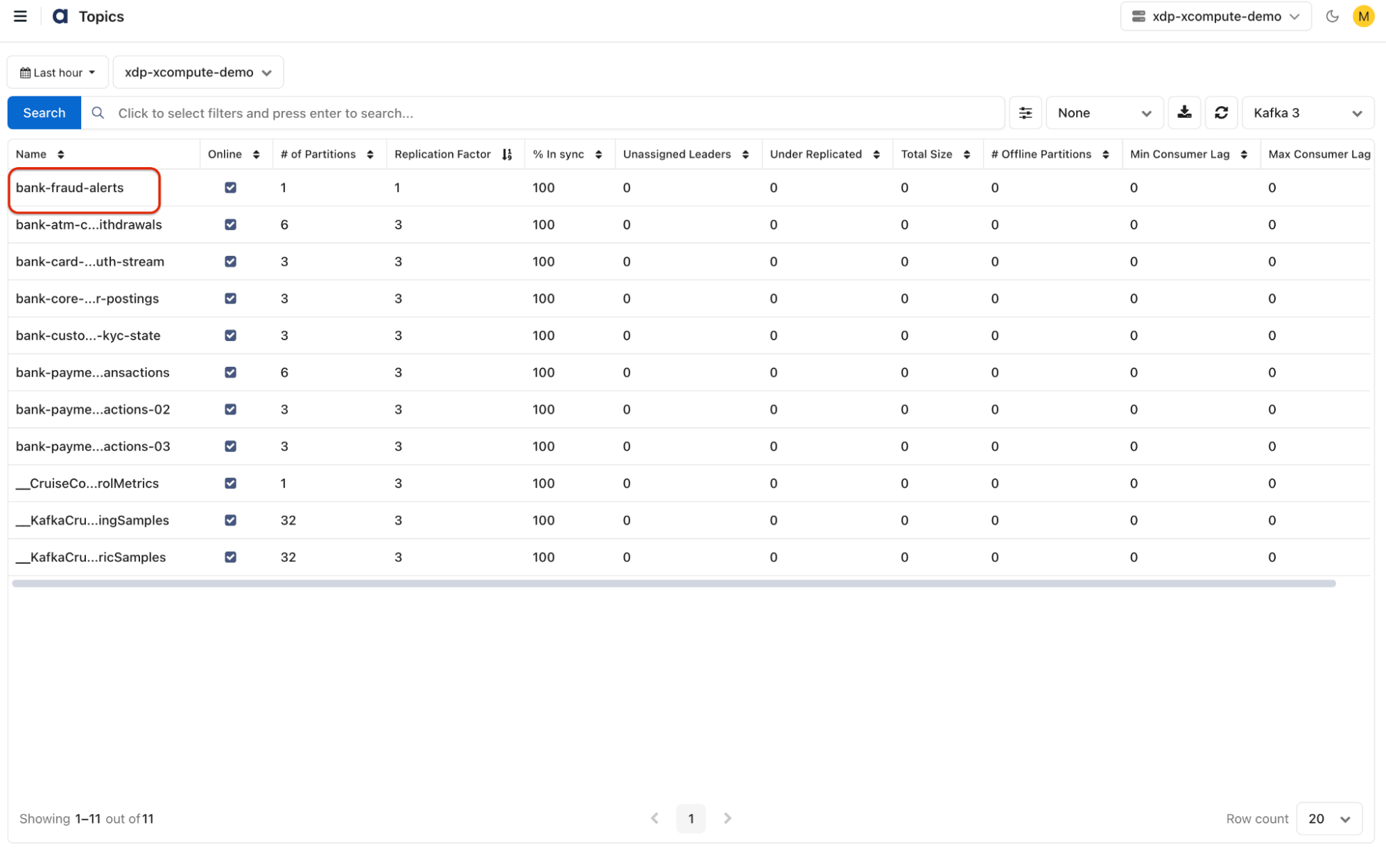
- In the xObserve UI, go to Infrastructure > Kafka from the left navigation pane.
- Select Kafka > Topics.
- Select the desired cluster from the cluster selector in the upper-right corner.
- On the Topics page, select the topic you want to monitor.
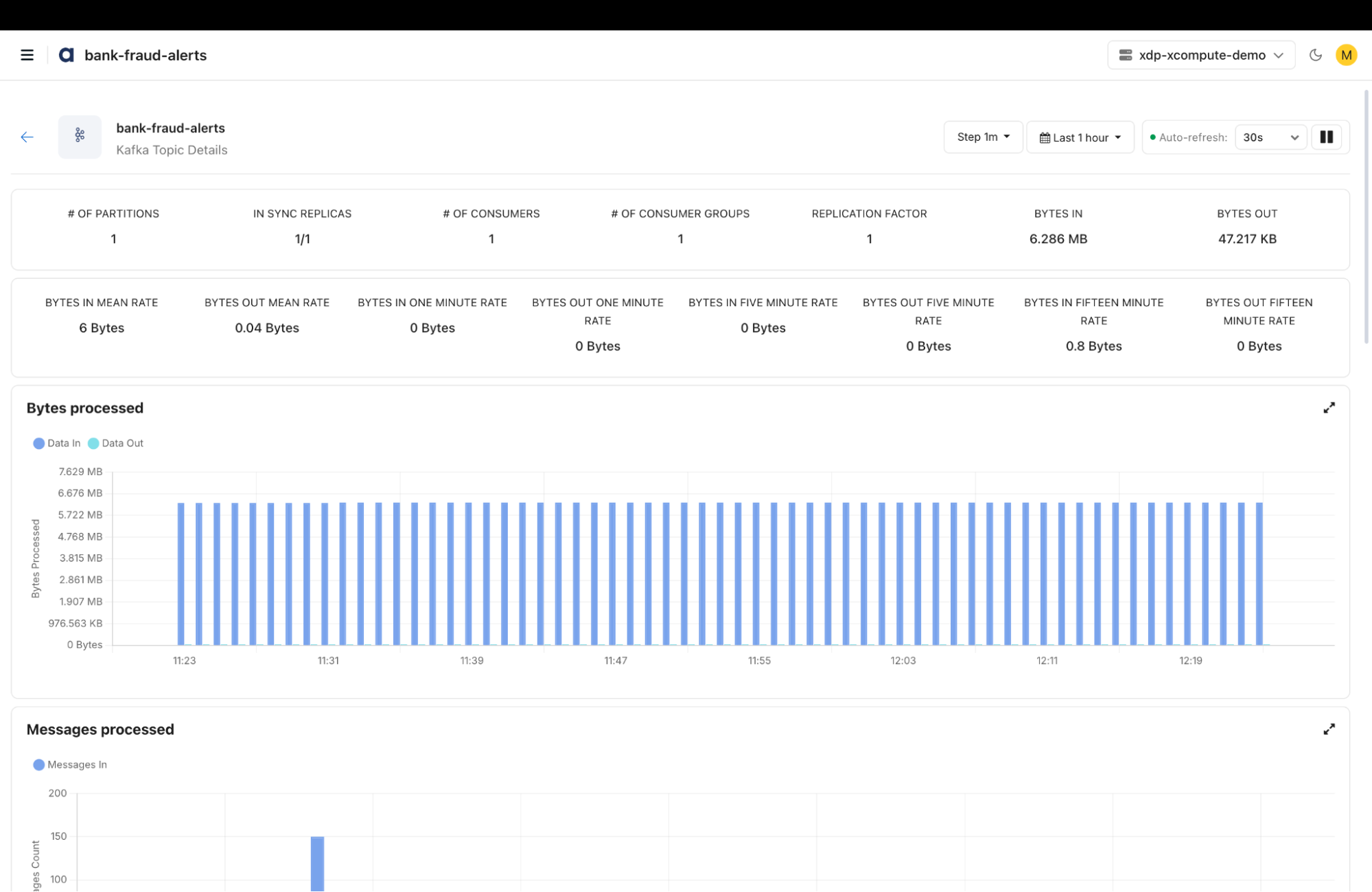
The Kafka Topic Details page opens, displaying topic metrics, message processing activity, consumer partition details, and broker distribution.
- Step Interval: Configure the interval used to display metric data points.
- Time Period Selection
- Use the Time Period selector in the upper-right corner to filter topic metrics and charts for a specific monitoring window.
- You can view topic activity for predefined periods, such as the last hour, or other available time ranges.
- Auto-refresh: Enable automatic metric updates and select a refresh interval, such as 30 seconds.
- Pause Refresh: Pause automatic updates to inspect the current metric values.
Kafka Topic Metrics
The Kafka Topic Details page displays the following metrics:
Partition and Replication Metrics
- # of Partitions: Displays the total number of partitions configured for the topic.
- In Sync Replicas: Displays the number of replicas that are synchronized with their partition leaders, relative to the total replica count.
- Replication Factor: Displays the number of replicas configured for each partition.
Consumer Metrics
- # of Consumers: Displays the number of consumers associated with the topic.
- # of Consumer Groups: Displays the number of consumer groups associated with the topic.
Data Throughput Metrics
- Bytes In: Displays the volume of data received by the topic.
- Bytes Out: Displays the volume of data sent from the topic.
- Bytes In Mean Rate: Displays the mean incoming data rate.
- Bytes Out Mean Rate: Displays the mean outgoing data rate.
- Bytes In One Minute Rate: Displays the incoming data rate calculated over one minute.
- Bytes Out One Minute Rate: Displays the outgoing data rate calculated over one minute.
- Bytes In Five Minute Rate: Displays the incoming data rate calculated over five minutes.
- Bytes Out Five Minute Rate: Displays the outgoing data rate calculated over five minutes.
- Bytes In Fifteen Minute Rate: Displays the incoming data rate calculated over fifteen minutes.
- Bytes Out Fifteen Minute Rate: Displays the outgoing data rate calculated over fifteen minutes.
Monitoring Charts
The Kafka Topic Details page provides the following charts to analyze topic performance and activity.
Bytes Processed
Displays the volume of incoming and outgoing data processed by the topic over the selected time period.
- Data In: Shows the volume of data received by the topic.
- Data Out: Shows the volume of data sent from the topic.
Messages Processed
Displays the number of incoming messages processed by the topic over the selected time period.
- Messages In: Shows the incoming message count.
Replica Fetcher Lag
Displays replication lag across Kafka brokers to help identify delays in replica synchronization.
- Monitor replica fetcher lag for individual brokers.
- Identify brokers experiencing replication delays.
Consumer Partition Details
The Consumer Partition Details section provides partition-level information for the selected consumer group.
Select a consumer group from the Group Details dropdown to view its associated partition metrics.
Consumer and Partition Information
- Online: Indicates whether the partition is online.
- Client Id: Displays the identifier of the consumer client.
- Partition Id: Displays the unique identifier of the partition.
- Consumer Instance Owner: Displays the consumer instance associated with the partition.
Partition Storage and Offset Metrics
- Log Size: Displays the storage space consumed by the partition log.
- Log End Offset: Displays the latest offset in the partition log.
- Consumer Lag: Displays the difference between the log end offset and the consumer's committed offset.
- Producer Lag: Displays the reported producer lag for the partition.
Replication and Broker Information
- Replicas: Displays the broker IDs hosting replicas of the partition.
- Under Replicated: Indicates whether the partition has fewer in-sync replicas than the configured replication factor.
- Lead Broker Id: Displays the broker ID of the partition leader.
Offset Lag per Consumer
Displays consumer offset lag across individual partitions for the selected consumer group.
Use this chart to identify partitions with high consumer lag and investigate message consumption delays.
Topic Partition
The Topic Partition chart displays the distribution of topic partition replicas across Kafka brokers.
- Actual Distribution: Shows the actual number of partition replicas assigned to each broker.
- Ideal Distribution: Shows the expected distribution of partition replicas across brokers.
Use this chart to identify uneven partition distribution and potential workload imbalances.
Broker Disk Distribution
The Broker Disk Distribution section displays the distribution of topic data across Kafka brokers using pie charts.
- View the distribution of topic partitions across individual brokers.
- Use the Number of Partitions dropdown to select the available distribution metric.
- Compare broker-level distribution to identify potential imbalances.
Features
The Kafka Topic Details page provides the following capabilities:
- Consumer Group Selection: Select a consumer group to view its partition-level metrics and consumer lag.
- Column Sorting: Sort consumer partition metrics to identify partitions based on lag, offsets, and other available values.
- Chart Expansion: Expand individual charts for a detailed view of the metrics.
- Pagination: Navigate through partition records and configure the number of rows displayed per page.
These capabilities help you monitor Kafka topic health, analyze message throughput, identify consumer lag, and investigate replication and partition distribution issues.
Have a suggestion?