Follow the steps below to upgrade the Ambari version.
Info
If you are upgrading from ODP version 3.3.6.3-1 or later to ODP version 3.3.6.4-1, you can skip the Java 17 and Ambari Server upgrade steps, as they are already included in the source version and do not require any additional action.
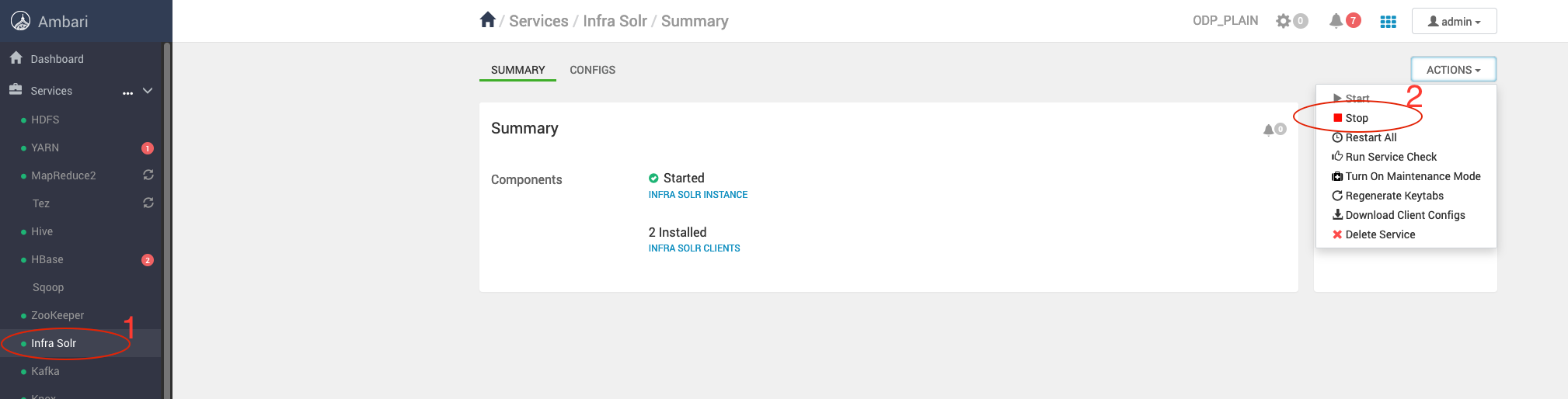
Stop Infra-solr Service
Stop the Infra-solr Service from Ambari-UI.
Stop Ambari Server and Agents
Stop Ambari Server
Info
Take the backup of ambari-server configs.
/etc/ambari-server/conf/
Stop Agents
Stop Ambari-agent on every cluster node.
Take the ambari-server backend database backup from the server host.
DB Backup Commands
mkdir /tmp/ambari-server_db_bckp
mysqldump --databases ambari > /tmp/ambari-server_db_bckp/ambari_mysql_bckp.sql
The upgraded version Ambari-2.7.8.2-3 supports only Python 3.11. Ensure that Python 3.11 is installed and configured on all the cluster nodes before proceeding with the upgrade.
Add Ambari Repo on Cluster Nodes
Back up the Old Ambari Repository
Run the following command:
mv /etc/yum.repos.d/ambari.repo /tmp/
Retrieve the latest Ambari repository details from Accessing Acceldata Repositories and add it to all cluster nodes.
List the existing Ambari packages
On RHEL:
On Ubuntu:
Example Output (if the current Ambari version is 3.0.0.0-1):
ambari-infra-solr-3.0.0.0-1.noarch
ambari-agent-3.0.0.0-1.x86_64
ambari-server-3.0.0.0-1.x86_64
ambari-infra-solr-client-3.0.0.0-1.noarch
Remove existing Ambari rpm’s
From the Ambari Server node, remove the installed packages before upgrading:
On RHEL:
On Ubuntu:
Note
On RHEL:
On Ubuntu:
Make sure the Amabri packages are not installed.
Install Ambari packages
Info
If you are upgrading from any Python 2 based ODP version, make sure to perform the below additional steps to install Python 3.11 and its dependencies on all the hosts before proceeding with the next step.
For Ubuntu 20/22:
apt install software-properties-common
add-apt-repository ppa:deadsnakes/ppa
apt update
apt-get install python3.11
curl https://bootstrap.pypa.io/get-pip.py -o get-pip.py
/usr/bin/python3.11 get-pip.py
pip3.11 install distro lxml rpm
For RHEL 8:
yum install python3.11 python3.11-pip
pip3.11 install distro lxml rpm
Install the latest Ambari-server only on ambari-server node.
Server Node
On RHEL:
yum clean all
yum install ambari-server -y
On Ubuntu:
apt clean
apt update
apt install ambari-server -y
Set up Java 17
Info
If you are upgrading from ODP version 3.3.6.3-1 or later to ODP version 3.3.6.4-1, you can skip the Java 17 and Ambari Server upgrade steps, as they are already included in the source version and do not require any additional action.
Make sure to install and update the default Java version as 17 on all the cluster nodes.
For RHEL:
yum install java-17-openjdk.x86_64 -y
yum install java-17-openjdk-devel.x86_64 -y
For Ubuntu:
apt-get install openjdk-17-jdk openjdk-17-jdk-headless -y
Warning
Ensure not to remove the jdk8 packages at this state.
update-alternatives --config java
There are 2 choices for the alternative java (providing /usr/bin/java).
Selection Path Priority Status
------------------------------------------------------------
* 0 /usr/lib/jvm/java-17-openjdk-amd64/bin/java 1111 auto mode
1 /usr/lib/jvm/java-11-openjdk-amd64/bin/java 1111 manual mode
2 /usr/lib/jvm/java-8-openjdk-amd64/jre/bin/java 1081 manual mode
Press <enter> to keep the current choice[*], or type selection number: 1
Set up Python 3.11
yum install python3.11 -y
Make sure to install and update the default Python version as 3.11 on all the cluster nodes.
update-alternatives --config python
There are 4 programs which provide 'python'.
Selection Command
-----------------------------------------------
* 1 /usr/libexec/no-python
2 /usr/bin/python3
3 /usr/bin/python2
+ 4 /usr/bin/python3.11
Enter to keep the current selection[+], or type selection number: 4
Update JSVC
Make sure to Instal the latest version of the bigtop-jsvc-1.2.4 on all the cluster nodes.
For RHEL:
yum install bigtop-jsvc* -y
For Ubuntu:
apt install bigtop-jsvc -y
Restore Config Files
Restore the ambari.properties and password.dat files, which are backed up at this step: Configuration Backup on this page.
Restore the ambari.properties file
cp /etc/ambari-server/conf_bkp/ambari.properties /etc/ambari-server/conf/
Please override the file by prompting 'y'.
Restore the password.dat file
cp /etc/ambari-server/conf_bkp/password.dat /etc/ambari-server/conf/
Update the java.home and stack.java.home
In this case, set JAVA_HOME to /usr/lib/jvm/java-17-openjdk
File path - /etc/ambari-server/conf/ambari.properties | grep -i java.home
java.home=/usr/lib/jvm/java-17-openjdk
stack.java.home=/usr/lib/jvm/java-17-openjdk
ambari.java.home=/usr/lib/jvm/java-17-openjdk
mpacks-v2.staging.path=/var/lib/ambari-server/resources/mpacks-v2
Update the Ambari Database with New Tables and Columns
MySQL
mysql -u ambari -pambari
USE ambari;
CREATE TABLE IF NOT EXISTS registries(
id BIGINT NOT NULL,
registy_name VARCHAR(255) NOT NULL,
registry_type VARCHAR(255) NOT NULL,
registry_uri VARCHAR(255) NOT NULL,
CONSTRAINT PK_registries PRIMARY KEY (id));
CREATE TABLE IF NOT EXISTS mpacks(
id BIGINT NOT NULL,
mpack_name VARCHAR(255) NOT NULL,
mpack_version VARCHAR(255) NOT NULL,
mpack_uri VARCHAR(255),
registry_id BIGINT,
CONSTRAINT PK_mpacks PRIMARY KEY (id),
CONSTRAINT uni_mpack_name_version UNIQUE(mpack_name, mpack_version),
CONSTRAINT FK_registries FOREIGN KEY (registry_id) REFERENCES registries(id));
ALTER TABLE stack ADD COLUMN mpack_id BIGINT NULL;
ALTER TABLE stack ADD CONSTRAINT FK_mpacks FOREIGN KEY (mpack_id) REFERENCES mpacks(id);
ALTER TABLE upgrade ADD COLUMN upgrade_package_stack VARCHAR(255) NOT NULL;
MariaDB
mysql -u ambari -pambari
USE ambari;
CREATE TABLE IF NOT EXISTS registries(
id BIGINT NOT NULL,
registy_name VARCHAR(255) NOT NULL,
registry_type VARCHAR(255) NOT NULL,
registry_uri VARCHAR(255) NOT NULL,
CONSTRAINT PK_registries PRIMARY KEY (id));
CREATE TABLE IF NOT EXISTS mpacks(
id BIGINT NOT NULL,
mpack_name VARCHAR(255) NOT NULL,
mpack_version VARCHAR(255) NOT NULL,
mpack_uri VARCHAR(255),
registry_id BIGINT,
CONSTRAINT PK_mpacks PRIMARY KEY (id),
CONSTRAINT uni_mpack_name_version UNIQUE(mpack_name, mpack_version),
CONSTRAINT FK_registries FOREIGN KEY (registry_id) REFERENCES registries(id));
ALTER TABLE stack ADD COLUMN mpack_id BIGINT NULL;
ALTER TABLE stack ADD CONSTRAINT FK_mpacks FOREIGN KEY (mpack_id) REFERENCES mpacks(id);
ALTER TABLE upgrade ADD COLUMN upgrade_package_stack VARCHAR(255) NOT NULL;
-- 0) Use Ambari schema
USE ambari;
-- 1) (Optional) Confirm current FK names on affected tables
SELECT TABLE_NAME, CONSTRAINT_NAME
FROM information_schema.TABLE_CONSTRAINTS
WHERE CONSTRAINT_SCHEMA = DATABASE()
AND CONSTRAINT_TYPE = 'FOREIGN KEY'
AND TABLE_NAME IN ('servicecomponentdesiredstate', 'hostcomponentdesiredstate', 'hostcomponentstate')
ORDER BY TABLE_NAME, CONSTRAINT_NAME;
-- 2) Drop child FKs first, then parent FK
ALTER TABLE hostcomponentdesiredstate DROP FOREIGN KEY hstcmpnntdesiredstatecmpnntnme;
ALTER TABLE hostcomponentstate DROP FOREIGN KEY hstcomponentstatecomponentname;
ALTER TABLE servicecomponentdesiredstate DROP FOREIGN KEY srvccmponentdesiredstatesrvcnm;
-- 3) Alter service_name columns to VARCHAR(255)
ALTER TABLE servicecomponentdesiredstate MODIFY COLUMN service_name VARCHAR(255) NOT NULL;
ALTER TABLE hostcomponentdesiredstate MODIFY COLUMN service_name VARCHAR(255) NOT NULL;
ALTER TABLE hostcomponentstate MODIFY COLUMN service_name VARCHAR(255) NOT NULL;
-- 4) Recreate FKs
ALTER TABLE servicecomponentdesiredstate
ADD CONSTRAINT srvccmponentdesiredstatesrvcnm
FOREIGN KEY (service_name, cluster_id)
REFERENCES clusterservices (service_name, cluster_id);
ALTER TABLE hostcomponentdesiredstate
ADD CONSTRAINT hstcmpnntdesiredstatecmpnntnme
FOREIGN KEY (component_name, service_name, cluster_id)
REFERENCES servicecomponentdesiredstate (component_name, service_name, cluster_id);
ALTER TABLE hostcomponentstate
ADD CONSTRAINT hstcomponentstatecomponentname
FOREIGN KEY (component_name, service_name, cluster_id)
REFERENCES servicecomponentdesiredstate (component_name, service_name, cluster_id);
-- 5) Verify column definitions
SHOW COLUMNS FROM servicecomponentdesiredstate LIKE 'service_name';
SHOW COLUMNS FROM hostcomponentdesiredstate LIKE 'service_name';
SHOW COLUMNS FROM hostcomponentstate LIKE 'service_name';
Oracle 19C
sqlplus / as sysdba
ALTER SESSION SET CONTAINER=<DB Name>;
ALTER SESSION SET CURRENT_SCHEMA = <UserName>;
CREATE TABLE registries(
id NUMBER(19) NOT NULL,
registy_name VARCHAR2(255) NOT NULL,
registry_type VARCHAR2(255) NOT NULL,
registry_uri VARCHAR2(255) NOT NULL,
CONSTRAINT PK_registries PRIMARY KEY (id)
);
CREATE TABLE mpacks(
id NUMBER(19) NOT NULL,
mpack_name VARCHAR2(255) NOT NULL,
mpack_version VARCHAR2(255) NOT NULL,
mpack_uri VARCHAR2(255),
registry_id NUMBER(19),
CONSTRAINT PK_mpacks PRIMARY KEY (id),
CONSTRAINT uni_mpack_name_version UNIQUE(mpack_name, mpack_version),
CONSTRAINT FK_registries FOREIGN KEY (registry_id) REFERENCES registries(id)
);
ALTER TABLE stack ADD mpack_id NUMBER(19) NULL;
ALTER TABLE stack ADD CONSTRAINT FK_mpacks FOREIGN KEY (mpack_id) REFERENCES mpacks(id);
Ambari Server Schema Upgrade
Before upgrading, ensure a database backup has been taken (as mentioned in Step 6).
Run the Ambari Server upgrade command:
If you encounter the following error:
python version after sym links /usr/bin/python3.11
Using python /usr/bin/python3.11
Upgrading ambari-server
Traceback (most recent call last):
File "/usr/sbin/ambari-server.py", line 28, in <module>
from ambari_commons.exceptions import FatalException, NonFatalException
File "/usr/lib/ambari-server/lib/ambari_commons/__init__.py", line 21, in <module>
from ambari_commons.os_check import OSCheck, OSConst
File "/usr/lib/ambari-server/lib/ambari_commons/os_check.py", line 25, in <module>
import distro
ModuleNotFoundError: No module named 'distro'
Set up the Distro Module
Install the required dependencies on the ambari-server and ambari-agent nodes.
On RHEL:
yum install python3.11-pip -y
pip3.11 install distro lxml
On Ubuntu:
apt-get update
apt-get install python3-pip
pip3 install distro
Retry the Upgrade again
Response when prompted:
Ambari Server configured for MySQL. Confirm you have made a backup of the Ambari Server database [y/n] (n)? y
Enter 'y' to confirm.
After the successful completion, you must see the following message.
Ambari Server 'upgrade' completed successfully.
Once started, verify that the Ambari UI is accessible using the same URL as before.
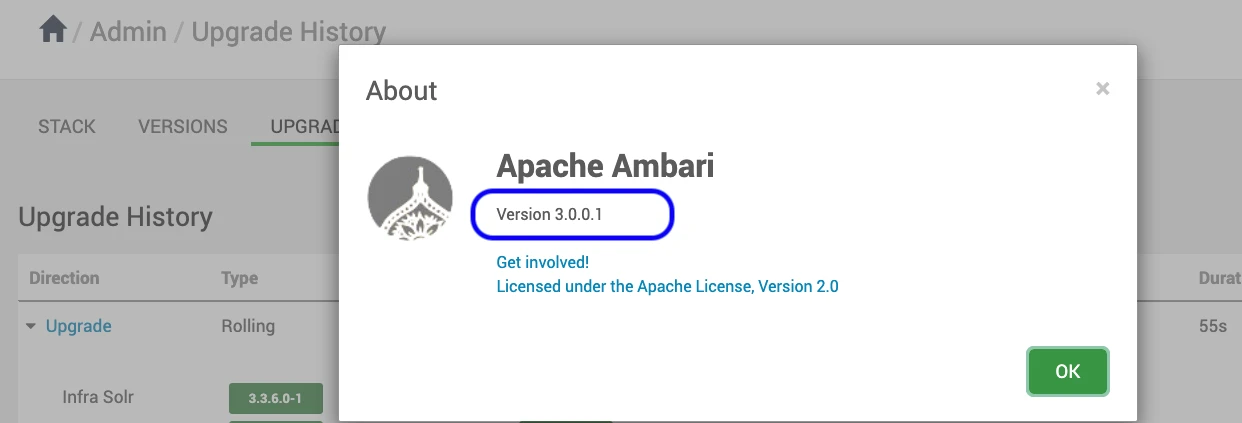
Verify Ambari Version
Verify the upgraded Ambari version in admin->about on the top right corner in Ambari UI.
The Ambari version is upgraded successfully.
Upgrade Known Issues
During the migration, the existing GROUPS table in the Ambari database might cause conflicts due to its name. As a result, the Ambari UI might fail to start and throw the following error when attempting to log in.
Internal Exception: java.sql.SQLSyntaxErrorException: Table 'ambari.groups_info' doesn't exist
Error Code: 1146
Call: SELECT group_id, group_name, group_type, ldap_group, principal_id FROM groups_info WHERE (group_id = ?)
bind => [1 parameter bound]
Query: ReadObjectQuery(name="group" referenceClass=GroupEntity )
To resolve this issue, rename the GROUPS table to groups_info in the Ambari backend database.
For MySQL
Log in to the MySQL server hosting the Ambari database.
mysql> show tables lIKE 'groups';
The response is as follows.
+---------------------------+
| Tables_in_ambari (groups) |
+---------------------------+
| groups |
+---------------------------+
Verify the data.
mysql> select * from `groups`;
Rename the table groups to groups_info using the following command.
mysql> RENAME TABLE `groups` TO groups_info;
Verify the same data as it was in groups table earlier. It must have the same data as it was earlier in groups table.
mysql> select * from groups_info;
For Oracle
Log into the Oracle server hosting the Ambari database.
Verify the existing GROUPS table.
SELECT table_name
FROM user_tables
WHERE table_name LIKE '%GROUPS%';
The response is as follows.
TABLE_NAME
--------------------------------------------------------------------------------------------------------------------------------
GROUPS
Rename the table groups to groups_info using the following command.
SQL> RENAME GROUPS TO GROUPS_INFO ;
The successful rename operation results the output as TABLE Renamed.
Verify the data once renaming is completed.
For Postgres
Log in to the Postgres server hosting the Ambari database.
Verify the existing GROUPS table.
The response is as follows.
..
public | extensionlink | table | ambari | 0 bytes |
public | groups | table | ambari | 16 kB |
..
Rename the table groups to groups_info using the following command.
ambari=> ALTER TABLE groups RENAME TO groups_info;