
Search
Pulse can scale horizontally as the number of nodes or cluster size increases.
Pulse is distributed among two nodes, as illustrated in the following deployment architecture diagram:
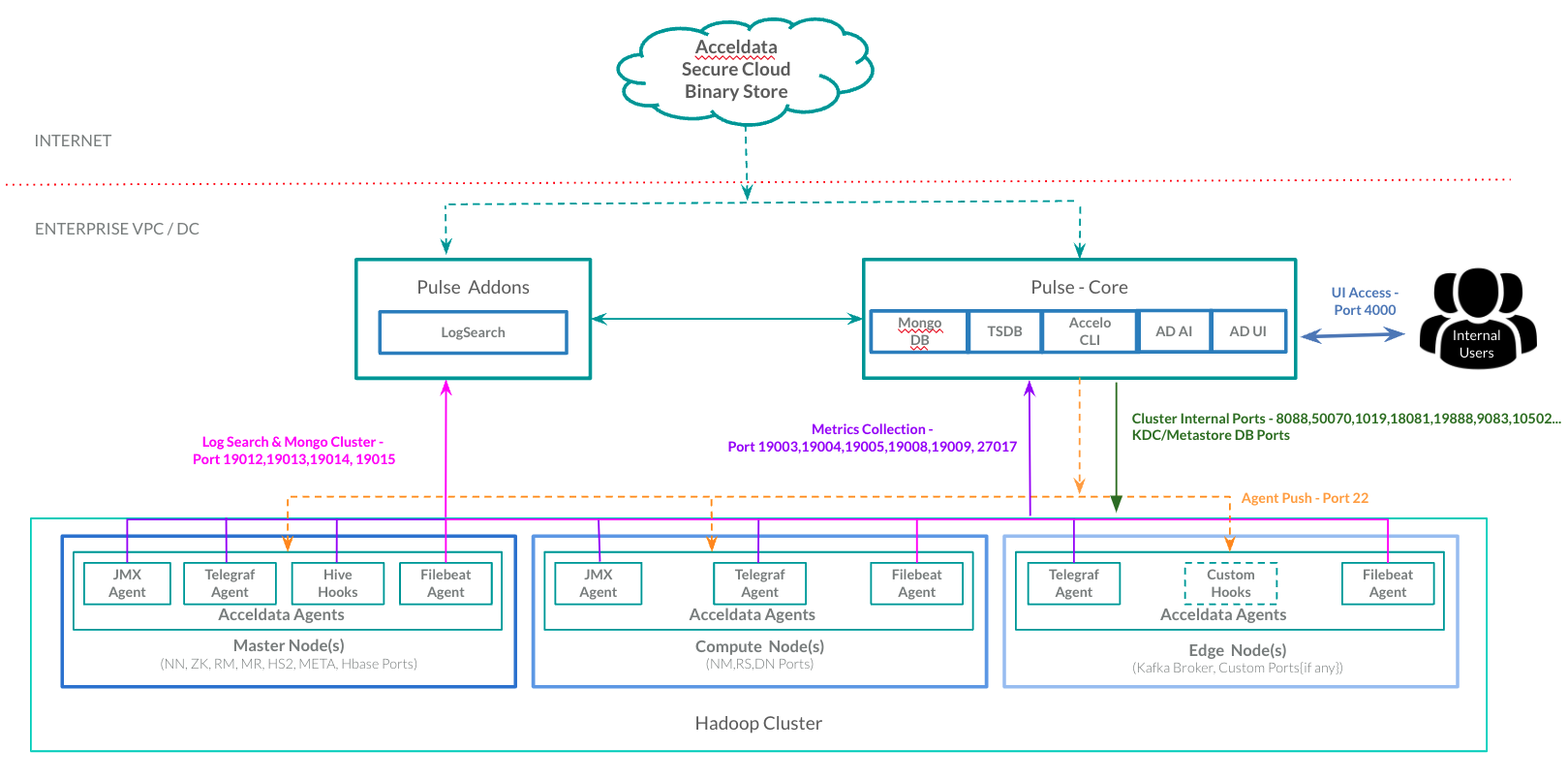
Deployment Architecture
The diagram also shows how independent modules like Logsearch, TSDB, and FS Analytics addons can be hosted separately to distribute workload and avoid resource bottlenecks on a single server.
- If the number of nodes or clusters set for a Pulse instance is significant, running all of the components on a single node may cause performance concerns.
- Provides Data-High-Availability. You can set up a MongoDB (ad-db), Elasticsearch (ad-elastic) cluster for data storage and replications.
Components that can be run in stand-alone mode:
- ad-db
- ad-tsdb
- ad-logsearch
- ad-fs-elastic
- ad-pulse-ui (earlier called as ad-graphql)
- ad-ldap
Pulse Multi-Node Setup
You must execute the steps in this section on all of the nodes where the above components are to be installed to set up Pulse in a multi-node environment.
- Generate the encrypted string for the mongo URI :
mongodb://accel:<MONGO_PASSWORD>@<PULSE_MASTER_HOST>:27017by executing the following command.
xxxxxxxxxxaccelo admin encryptYou must copy the output of the above command.
- Add the environment variables to the
/etc/profile.d/ad.shfile by executing the following commands.
xxxxxxxxxxexport MONGO_URI="" #Paste the output of the previous command in the double quotes.export MONGO_ENCRYPTED=trueexport PULSE_SA_NODE=true- Source the
/etc/profile.d/ad.shfile by executing the following command.
xxxxxxxxxxsource /etc/profile.d/ad.shWas this page helpful?