
Workflow Tasks
A task is the fundamental building block of a workflow. Each node on the workflow canvas represents one task; dependency edges define execution order. xDP supports four task types.
Task Type | Description |
|---|---|
Job | Run an existing Spark or notebook job, or create a new one inline. |
Sub-Workflow | Nest an existing workflow as a task (max one level deep). |
Shell | Run a shell command or script on the Airflow worker. |
Branch (If/Else) | Conditional routing — evaluate a Python expression and route to different downstream paths. |
Coming soon: Switch/Case, Loop, and Sensor task types are visible in the Add Task menu but are not yet available.
Adding a Task
Open the Create Workflow or Edit Workflow page.
Click + Add Task in the toolbar and select a task type.
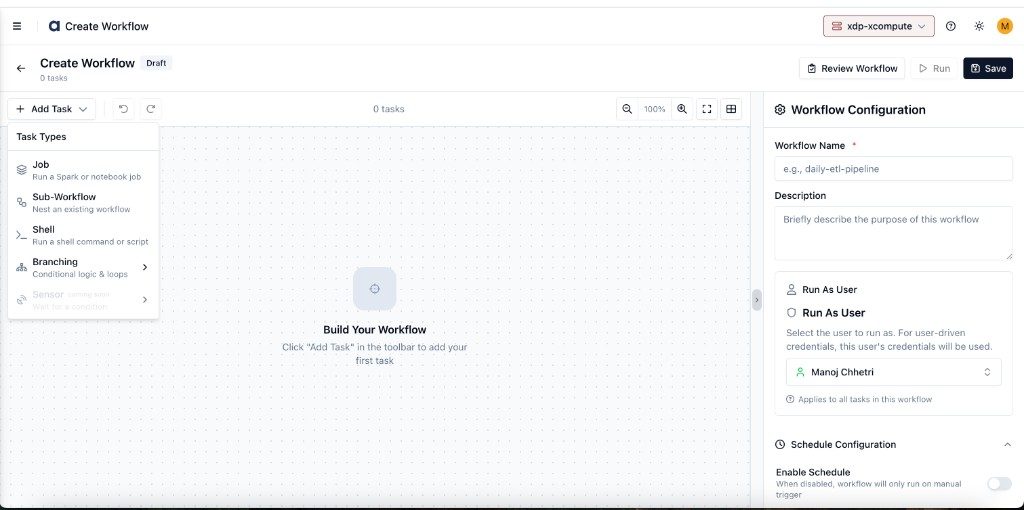
A new task node appears on the canvas with a configuration panel on the right.
Fill in the task-specific settings (see each type below).
Draw dependencies by dragging from the output handle (right side) of one task to the input handle (left side) of another.
Common Task Settings
Every task type shares these fields:
Field | Required | Description |
|---|---|---|
Task Name | Yes | Unique within the workflow. 2–100 characters, alphanumeric with spaces, hyphens, and underscores. |
Description | No | Brief explanation of what this task does. |
Tags | No | Key-value metadata for filtering and organization. |
Dependencies | Auto | Read-only — upstream tasks derived from canvas edges. |
Advanced Settings (expand at the bottom of any task panel):
Field | Description | Default |
|---|---|---|
Start Delay | Minutes to wait after dependencies complete before starting. | 0 |
Retries | Retry attempts if the task fails. | 0 |
Retry Delay | Minutes between retry attempts. | 5 |
Execution Timeout | Maximum run time in minutes before the task is marked failed. | None |
Job Task
Runs a Spark or notebook job on the compute cluster.
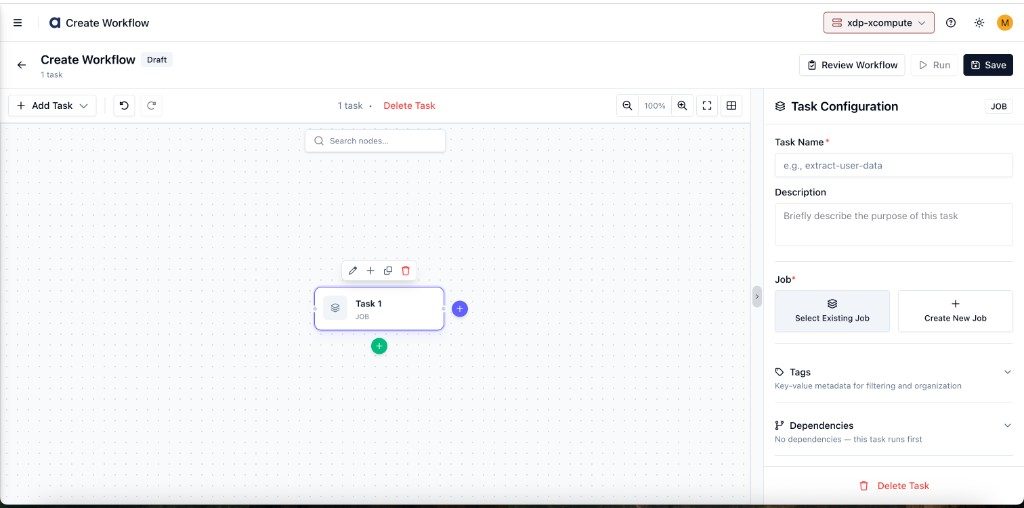
Select Existing Job — Opens a picker showing all jobs on the selected cluster.
Create New Job — Opens a job creation modal to configure the Spark application inline.
Supported job types:
Job Type | Description |
|---|---|
Spark Java | Compiled JAR with a main class |
Spark Python | PySpark script ( |
Notebook Java | Jupyter notebook with Java/Scala kernel |
Notebook Python | Jupyter notebook with Python kernel |
Override Configuration: When using an existing job, click Override Configuration to customize driver/executor resources, Spark properties, and data store selections for this specific workflow run.
Sub-Workflow Task
Nests an existing workflow inside the current one. The sub-workflow's tasks run inline as part of the same DAG execution.
Click Select Existing Workflow to open the picker:
Constraint: Only one level of nesting is supported. Workflows that already contain sub-workflows are excluded from the picker.
Shell Task
Runs a shell command or script on the Airflow worker. Use this for lightweight operations — file management, API calls, notifications, or data validation — that don't require Spark.
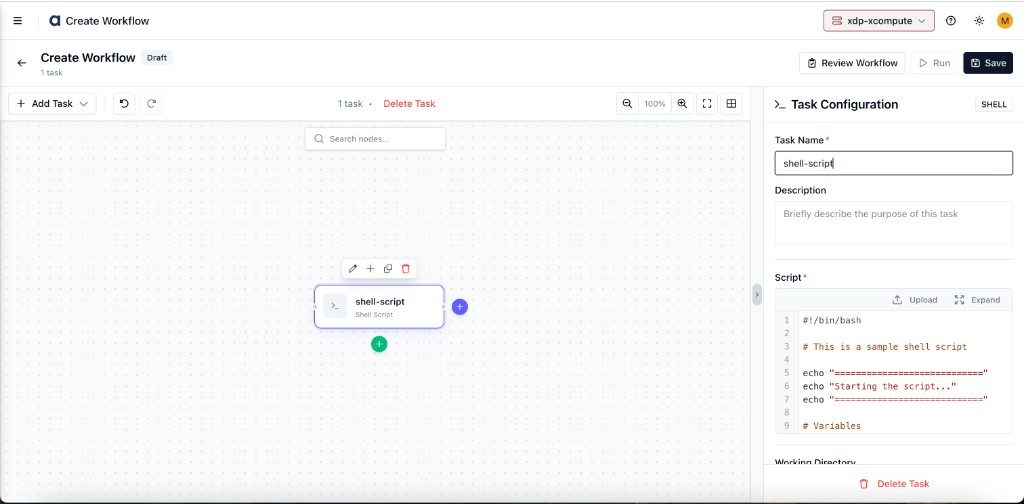
Field | Required | Description |
|---|---|---|
Script | Yes | Shell script to execute. Supports multi-line scripts with |
Working Directory | No | Directory to run the script in on the Airflow worker. |
Environment Variables | No | Key-value pairs injected as env vars into the script. |
Note: Scripts are validated for safety before saving. Patterns such as recursive deletions or modifications to system files are rejected.
Branch Task (If/Else)
Adds conditional logic to your workflow. Evaluates a Python expression and routes execution to different downstream paths.
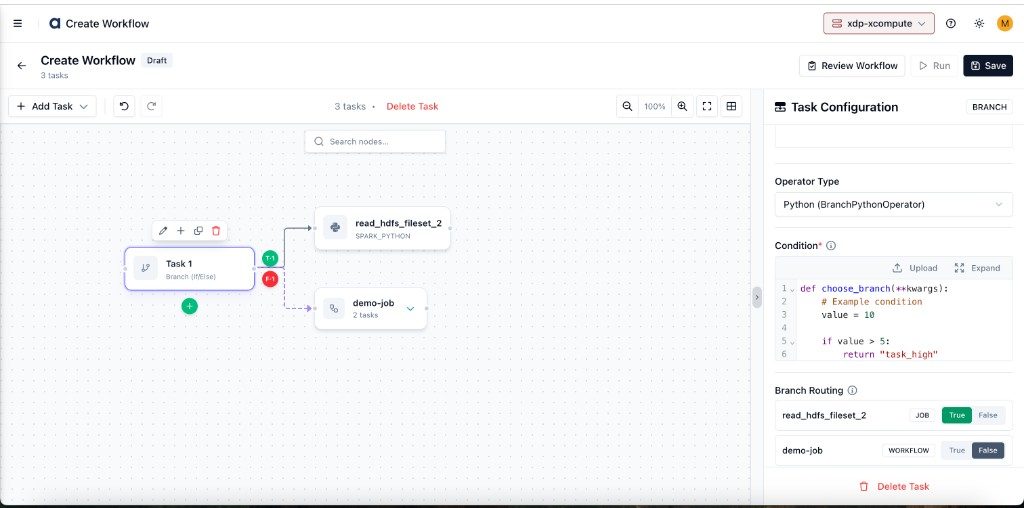
Field | Required | Description |
|---|---|---|
Operator Type | Yes | Currently only Python (BranchPythonOperator) is supported. |
Condition | Yes | A Python function that returns the task ID of the branch to execute. Receives |
In the Branch Routing section, assign each downstream task to the True or False path. At least one downstream task must be assigned to True. A task cannot appear in both paths.
Constraints:
A branch task cannot be a leaf node — it must have at least one downstream task.
The condition is evaluated in a restricted environment for safety.
Best Practices
Name tasks descriptively — use names like
extract_customer_datarather thanTask 1. Task names become Airflow task IDs.Use Shell tasks for lightweight operations — reserve Job tasks for Spark workloads.
Set execution timeouts — prevents runaway tasks from blocking the entire workflow.
Keep branch conditions simple — complex logic is harder to debug; move multi-step logic into a separate Shell or Job task.
Limit sub-workflow nesting — only one level is supported. For deeply layered pipelines, consider separate workflows triggered independently.