
Workflow Runs
The Workflow Runs page shows every execution of your workflows. Use it to monitor status, inspect task logs, and diagnose failures.
Viewing a Run
Navigate to Workflows > Workflow Runs.
Filter by cluster, status, or date range to locate the run you need.
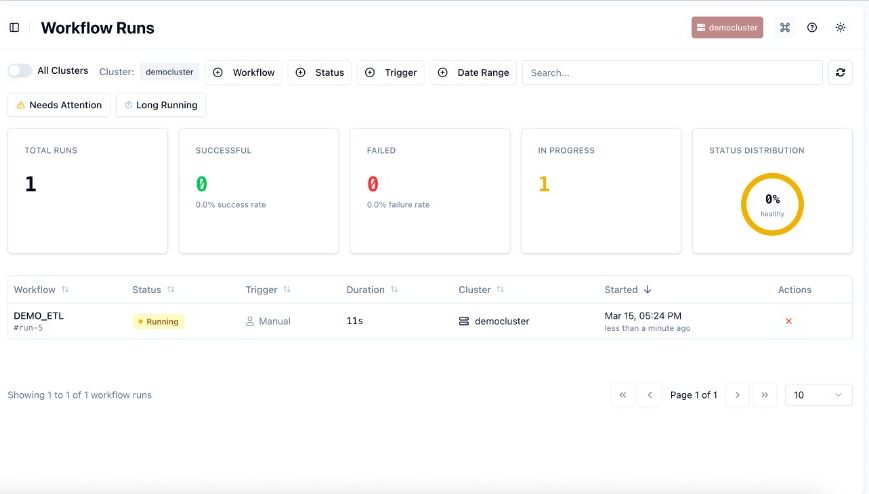
Click a run name to open its details page.
The Workflow DAG shows each task and its current state (color-coded by status).
The Details tab in the right panel shows run metadata and workflow configuration. The Timeline tab shows a chronological log of every task state transition.
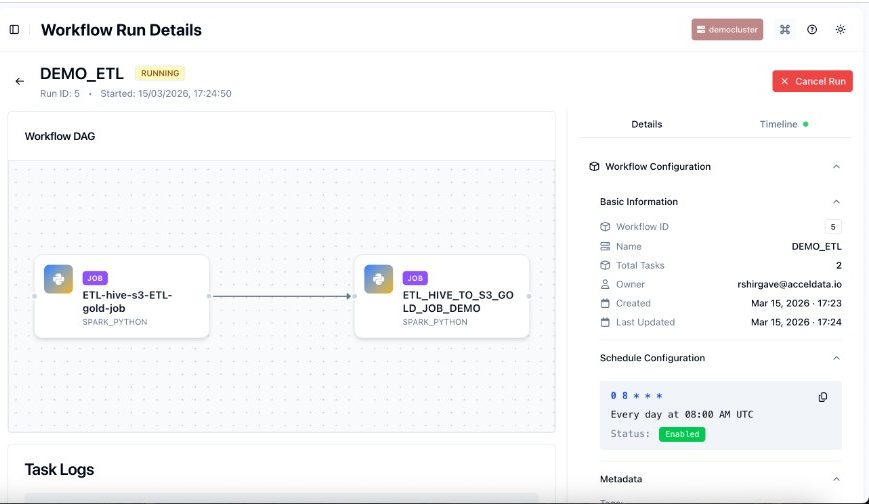
Click any task node in the DAG to load its Task Logs below the graph.
Diagnose a Failed Run
On the Workflow Runs list, apply the Status: Failed filter.
Click the failed run to open its details.
In the Workflow DAG, identify the task highlighted in red.
Click the failed task to load its logs and review error messages or stack traces.
Switch to the Timeline tab for the sequence of events leading up to the failure.
Cancel a Running Workflow
On the Workflow Runs list, click the red × icon in the Actions column for the target run.
Alternatively, open the run details page and click Cancel Run in the top-right corner.
Confirm in the dialog. The status changes to Canceled.
Run Information Fields
Field | Description |
|---|---|
Run ID | Unique system-generated identifier for this execution. |
Workflow ID | Identifier of the parent workflow definition. |
Dataplane ID | The data plane where the workflow executed. |
Status | Current state: |
Trigger Type | How the run was started: |
External DAG Run ID | The corresponding run identifier in Airflow. |