
Search
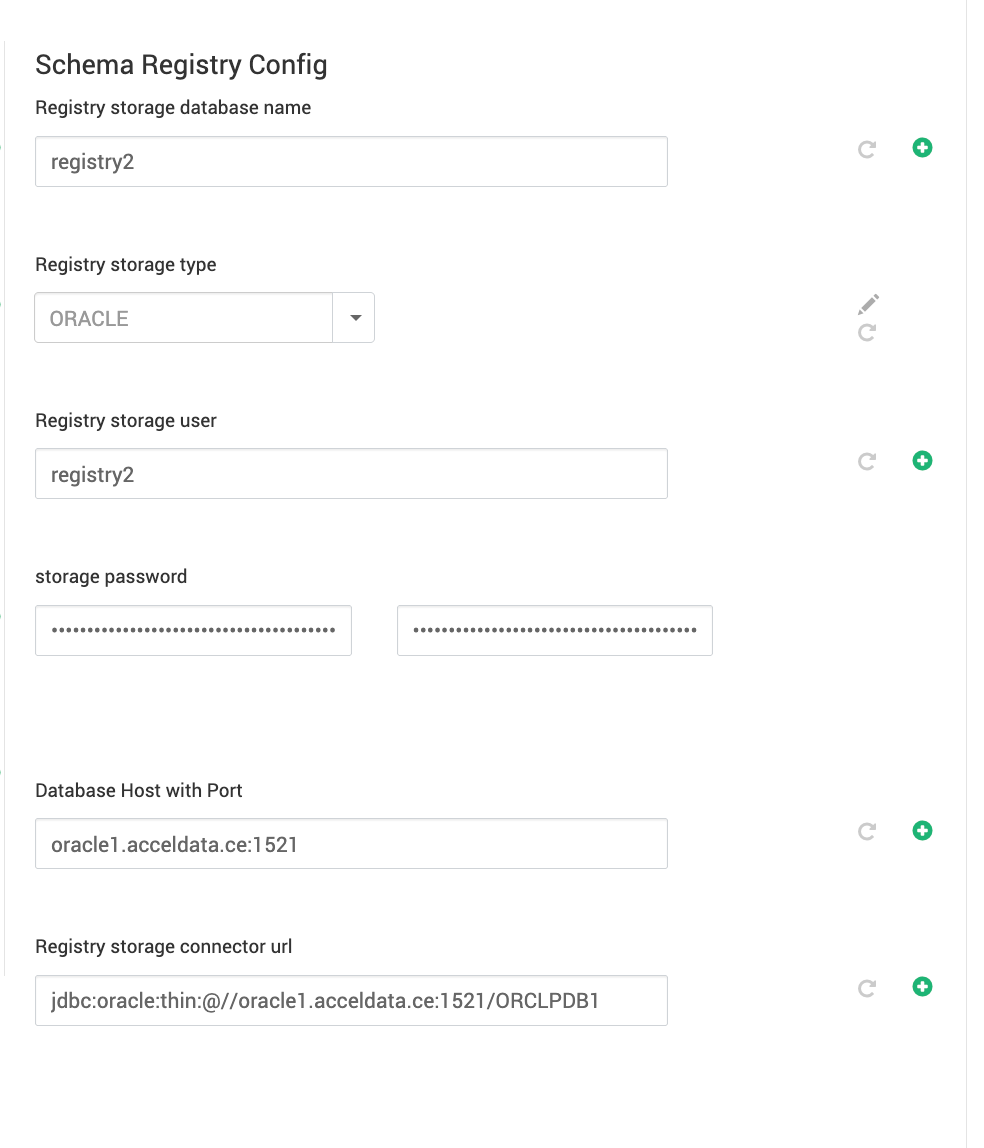
Set the properties as shown to set up Schema Registry with the Oracle database, in the SCHEMA REGISTRY CONFIGURATION section under Schema Registry Config.
Registry storage database name : <schema name for registry>
Registry storage type : ORACLE
Registry storage user : <user name for registry>
storage password : <database password for hue>
Database Host with Port : <oracle database host>:<oracle database port, default : 1521 >
The Registry storage connector URL will be auto-populated based on the above properties.
The image below is for reference.
Miscellaneous
Follow the below steps to create a Registry user or schema.
## OPENING SHELL TO ORACLEDB
[oracle@oracle1 MPACKS]$ sqlplus / as sysdba
## CONNECT TO CDB
ALTER SESSION SET CONTAINER=ORCLPDB1;
## QUERIES TO CREATE USER/SCHEMA
CREATE USER registry2 IDENTIFIED BY ambari_password default tablespace "USERS" temporary tablespace "TEMP";
GRANT unlimited tablespace to registry2;
GRANT create session to registry2;
GRANT create TABLE to registry2;
GRANT create SEQUENCE to registry2;
GRANT CREATE PROCEDURE TO registry2;
Was this page helpful?