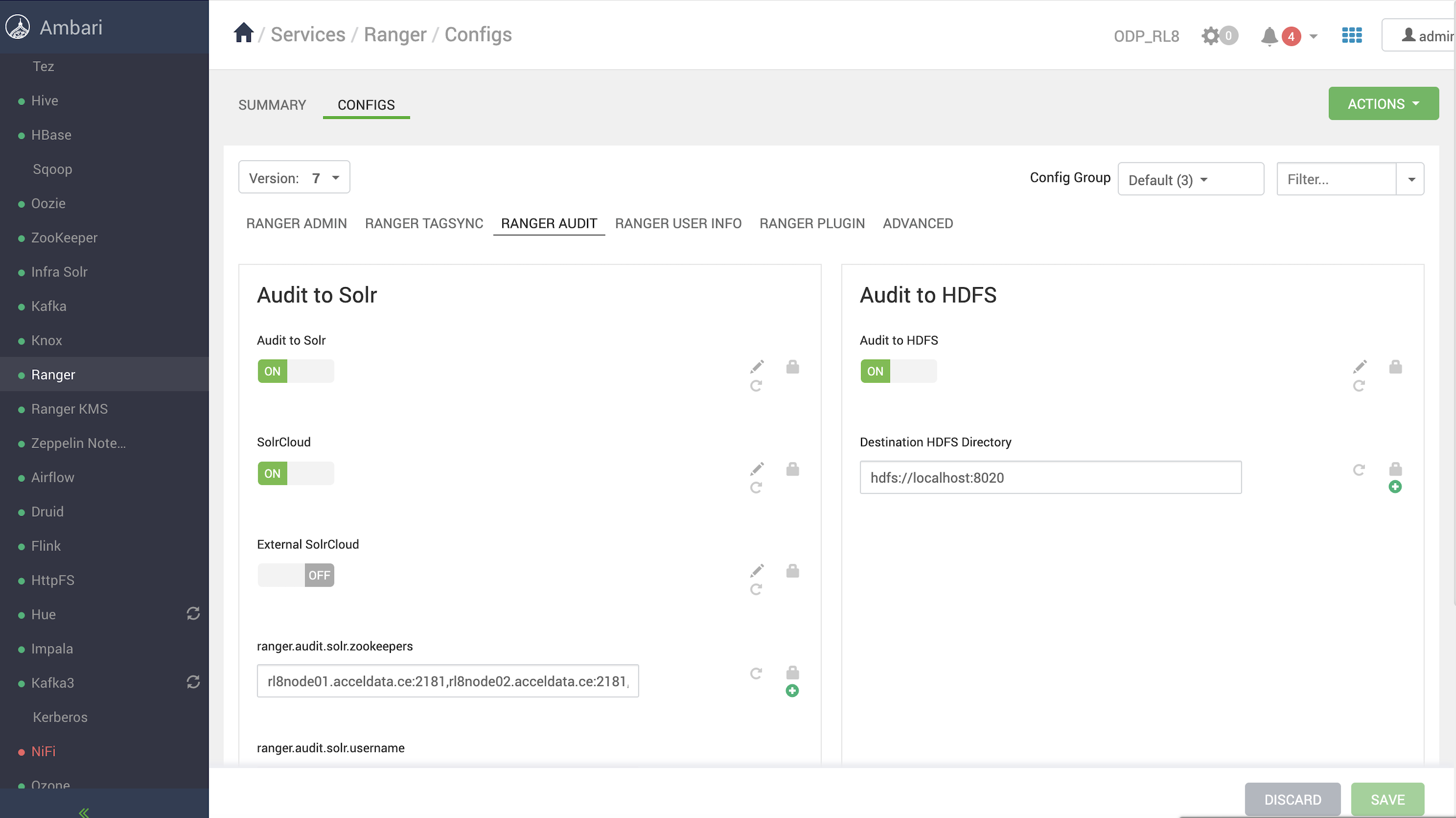
To enable HDFS auditing for the supported components in the ODP stack, the following properties must be validated in Ranger.
Ensure Ranger is enabled for all components. The Ranger service must be created in the Ranger UI, the service test connection and policies are working.
In the Ambari UI, navigate to Ranger > Configs> RANGER AUDIT, and enable Audit to HDFS.
Ensure that the destination HDFS directory is set to hdfs://<nameservice>. You can find the <nameservice> value in Ambari UI > HDFS > Configs > Advanced core-site > fs.defaultFS. Updating the destination HDFS directory should automatically update the HDFS audit path across all Ranger-enabled services, as shown.
Refer to the following documentation pages to enable HDFS auditing for the components.
In the Ambari UI, navigate to HDFS > Configs > Advanced ranger-hdfs-audit, and enable Audit to HDFS.
In Advanced ranger-hdfs-audit, verify the following properties.
xasecure.audit.destination.hdfs.batch.filespool.dir=/var/log/hadoop/hdfs/audit/hdfs/spool
xasecure.audit.destination.hdfs.dir=hdfs://<nameservice>/ranger/audit
In the Ambari UI, navigate to YARN > Configs > Advanced ranger-yarn-audit, and enable Audit to HDFS.
In Advanced ranger-yarn-audit, verify the following properties.
xasecure.audit.destination.hdfs.batch.filespool.dir=/var/log/hadoop/yarn/audit/hdfs/spool
xasecure.audit.destination.hdfs.dir=hdfs://<nameservice>/ranger/audit
2025-05-08 17:24:33,646 ERROR utils.RangerJSONAuditWriter (RangerJSONAuditWriter.java:logJSON(117)) - Exception encountered while writing audits to HDFS!
org.apache.hadoop.security.AccessControlException: Permission denied: user=yarn, access=WRITE, inode="/":hdfs:hdfs:drwxr-xr-x
at org.apache.hadoop.hdfs.server.namenode.FSPermissionChecker.check(FSPermissionChecker.java:506)
at org.apache.hadoop.hdfs.server.namenode.FSPermissionChecker.checkPermission(FSPermissionChecker.java:346)
at org.apache.ranger.authorization.hadoop.RangerHdfsAuthorizer$RangerAccessControlEnforcer.checkDefaultEnforcer(RangerHdfsAuthorizer.java:809)
at org.apache.ranger.authorization.hadoop.RangerHdfsAuthorizer$RangerAccessControlEnforcer.checkRangerPermission(RangerHdfsAuthorizer.java:476)
at org.apache.ranger.authorization.hadoop.RangerHdfsAuthorizer$RangerAccessControlEnforcer.checkPermissionWithContext(RangerHdfsAuthorizer.java:261)
at org.apache.hadoop.hdfs.server.namenode.FSPermissionChecker.checkPermission(FSPermissionChecker.java:240)
at org.apache.hadoop.hdfs.server.namenode.FSDirectory.checkPermission(FSDirectory.java:1943)
at org.apache.hadoop.hdfs.server.namenode.FSDirectory.checkPermission(FSDirectory.java:1927)
at org.apache.hadoop.hdfs.server.namenode.FSDirectory.checkAncestorAccess(FSDirectory.java:1886)
at org.apache.hadoop.hdfs.server.namenode.FSDirMkdirOp.mkdirs(FSDirMkdirOp.java:60)
at org.apache.hadoop.hdfs.server.namenode.FSNamesystem.mkdirs(FSNamesystem.java:3446)
at org.apache.hadoop.hdfs.server.namenode.NameNodeRpcServer.mkdirs(NameNodeRpcServer.java:1167)
at org.apache.hadoop.hdfs.protocolPB.ClientNamenodeProtocolServerSideTranslatorPB.mkdirs(ClientNamenodeProtocolServerSideTranslatorPB.java:742)
at org.apache.hadoop.hdfs.protocol.proto.ClientNamenodeProtocolProtos$ClientNamenodeProtocol$2.callBlockingMethod(ClientNamenodeProtocolProtos.java)
at org.apache.hadoop.ipc.ProtobufRpcEngine2$Server$ProtoBufRpcInvoker.call(ProtobufRpcEngine2.java:621)
at org.apache.hadoop.ipc.ProtobufRpcEngine2$Server$ProtoBufRpcInvoker.call(ProtobufRpcEngine2.java:589)
at org.apache.hadoop.ipc.ProtobufRpcEngine2$Server$ProtoBufRpcInvoker.call(ProtobufRpcEngine2.java:573)
at org.apache.hadoop.ipc.RPC$Server.call(RPC.java:1227)
at org.apache.hadoop.ipc.Server$RpcCall.run(Server.java:1094)
at org.apache.hadoop.ipc.Server$RpcCall.run(Server.java:1017)
at java.base/java.security.AccessController.doPrivileged(Native Method)
at java.base/javax.security.auth.Subject.doAs(Subject.java:423)
at org.apache.hadoop.security.UserGroupInformation.doAs(UserGroupInformation.java:1899)
at org.apache.hadoop.ipc.Server$Handler.run(Server.java:3048)
In the Ambari UI, navigate to Hive> Configs > Advanced ranger-hive-audit, and enable Audit to HDFS.
In Advanced ranger-hive-audit, verify the following properties.
xasecure.audit.destination.hdfs.batch.filespool.dir=/var/log/hive/audit/hdfs/spool
xasecure.audit.destination.hdfs.dir=hdfs://<nameservice>/ranger/audit
Impala — Audit to HDFS is enabled with Hive by default; no additional settings are required.
In the Ambari UI, navigate to HBase > Configs > Advanced ranger-hbase-audit, and enable Audit to HDFS.
In Advanced ranger-hbase-audit, verify the following properties.
xasecure.audit.destination.hdfs.batch.filespool.dir=/var/log/hbase/audit/hdfs/spool
xasecure.audit.destination.hdfs.dir=hdfs://<nameservice>/ranger/audit
In the Ambari UI, navigate to Kafka > Configs> Advanced ranger-kafka-audit, and enable Audit to HDFS.
In Advanced ranger-kafka-audit, verify the following properties.
xasecure.audit.destination.hdfs.batch.filespool.dir=/var/log/hbase/audit/hdfs/spool
xasecure.audit.destination.hdfs.dir=hdfs://<nameservice>/ranger/audit
In the Ambari UI, navigate to Kafka 3 > Configs> Advanced ranger-kafka3-audit, and enable Audit to HDFS.
In Advanced ranger-kafka3-audit, verify the following properties.
xasecure.audit.destination.hdfs.batch.filespool.dir=/var/log/kafka3/audit/hdfs/spool
xasecure.audit.destination.hdfs.dir=hdfs://<nameservice>/ranger/audit
In the Ambari UI, navigate to Ozone > Configs > Advanced ranger-ozone-audit, and enable Audit to HDFS.
In Advanced ranger-ozone-audit, verify the following properties.
xasecure.audit.destination.hdfs.batch.filespool.dir=/var/log/hadoop-ozone/audit/hdfs/spool (manual change in ambari)
xasecure.audit.destination.hdfs.dir=hdfs://<nameservice>/ranger/audit (manual change)
In the Ambari UI, navigate to RangerKMS > Configs > Advanced ranger-rangerkms-audit, and enable Audit to HDFS.
In Advanced ranger-kms-audit, update the following properties.
xasecure.audit.destination.hdfs.batch.filespool.dir=/var/log/ranger/kms/audit/hdfs/spool
xasecure.audit.destination.hdfs.dir=hdfs://<nameservice>/ranger/audit
Before enabling Ranger HDFS audit for Kudu, ensure the required Ranger policies are in place as outlined in the documentation: Security. On this page, see Ranger.
In the Ambari UI, navigate to Kudu > Configs > Advanced ranger-kudu-audit, and enable Audit to HDFS.
In Advanced ranger-kudu-audit, verify the following properties.
xasecure.audit.destination.hdfs=true
xasecure.audit.destination.hdfs.batch.filespool.dir=/var/log/kudu/audit/hdfs/spool
xasecure.audit.destination.hdfs.dir=hdfs://<nameservice>/ranger/audit
Before enabling Ranger HDFS audit for Schema Registry, ensure the required Ranger policies are in place as outlined in the documentation: Installation. On this page, see Ranger Configuration.
In the Ambari UI, navigate to Schema Registry > Configs > Advanced ranger-schema-registry-audit, and enable Audit to HDFS.
In Advanced ranger-schema-registry-audit, update the following properties.
xasecure.audit.destination.hdfs=true
xasecure.audit.destination.hdfs.batch.filespool.dir=/var/log/registry/audit/hdfs/spool
xasecure.audit.destination.hdfs.dir=hdfs://<nameservice>/ranger/audit
xasecure.audit.destination.log4j=false
xasecure.audit.destination.log4j.logger=ranger_audit_logger
In the Ambari UI, navigate to Knox > Configs > Advanced ranger-knox-audit, and enable Audit to HDFS.
In Advanced ranger-knox-audit, update the following properties.
xasecure.audit.destination.hdfs.batch.filespool.dir=/var/log/knox/audit/hdfs/spool
xasecure.audit.destination.hdfs.dir=hdfs://<nameservice>/ranger/audit
Before enabling Solr audit for NiFi, ensure the required Ranger policies are in place as outlined in the documentation: NiFi Installation and SSL Enablement. On this page, see Ranger Configuration.
Copy hdfs-site.xml and core-site.xml to the NiFi conf directory.
cp /etc/hadoop/conf/hdfs-site.xml /etc/nifi/conf/
cp /etc/hadoop/conf/core-site.xml /etc/nifi/conf/
Verify the following properties under Advanced ranger-nifi-audit.
xasecure.audit.destination.hdfs=true
xasecure.audit.destination.hdfs.batch.filespool.dir=/var/log/nifi/audit/hdfs/spool
xasecure.audit.destination.hdfs.dir=hdfs://<nameservice>/ranger/audit
Before enabling Solr audit for NiF-Registry, ensure the required Ranger policies are in place as outlined in the documentation: Installing NiFi Registry. On this page, see see Ranger Configuration.
Copy hdfs-site.xml and core-site.xml to the NiFi conf directory.
cp /etc/hadoop/conf/hdfs-site.xml /etc/nifi-registry/conf/
cp /etc/hadoop/conf/core-site.xml /etc/nifi-registry/conf/
Verify the following properties under Advanced ranger-nifi-audit.
xasecure.audit.destination.hdfs=true
xasecure.audit.destination.hdfs.batch.filespool.dir=/var/log/nifi/audit/hdfs/spool
xasecure.audit.destination.hdfs.dir=hdfs://<nameservice>/ranger/audit
Restart NiFi Registry, and you must be able to view HDFS audits at/ranger/audit/nifi-registry/.