Overview
Kafka4 Cruise Control helps you run Kafka clusters at scale. It automates Kafka operations such as monitoring cluster workload, rebalancing a cluster based on predefined constraints, and detecting and fixing anomalies. Cruise Control comprises four components — Load Monitor, Analyzer, Anomaly Detector, and Executor — and a REST API.
Architecture
The following diagram illustrates the architecture of Kafka4 Cruise Control.
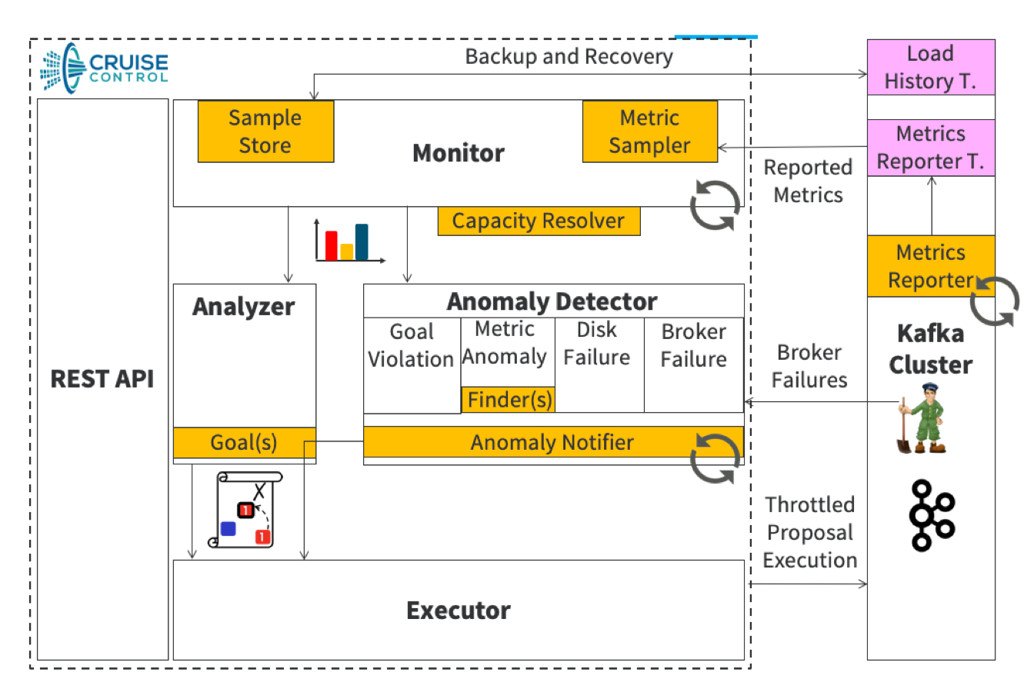
REST API: Cruise Control offers a REST API that lets you query Kafka cluster load, optimize proposals, and trigger administrative tasks.
Load Monitor: Collects Kafka metrics and derives per-partition resource metrics, forming a cluster load model that's essential for optimization.
Load Monitor workflow:
Metric Fetcher Manager: Coordinates metric sampling tasks with configurable threads.
Sampling tasks: Include metric sampling, bootstrap, and linear model training, executed by metric fetcher threads.
Metric Sampler Partition Assignor: Ensures even partition distribution among fetchers, considering topic and load balancing.
Cluster Load Model: Reflects the current cluster state and provides interfaces to simulate partition movements for optimization.
Sample Store: Saves metric and training samples to external storage for future reference, facilitating historical analysis.
Analyzer: Uses heuristic methods to generate optimization proposals based on user-defined goals and the cluster load model.
Anomaly Detector: Identifies and addresses anomalies such as broker failures, goal violations, disk failures, metric anomalies, and topic anomalies.
Executor: Executes optimization proposals, ensuring resource-awareness.
Quickstart
Cruise Control comes as part of the Kafka4 components. You can install it on one of the nodes within the Kafka4 cluster through Ambari.
Step 1: Add Cruise Control as a component
Using ADD Component, you can add Cruise Control to one of the nodes either during Kafka installation or after the Kafka broker installation.
Note If you install Cruise Control after the Kafka broker installation, restart the Kafka brokers before you start Cruise Control, so that Kafka picks up the Cruise Control-related configurations.
Step 2: Select Kafka as a service
Select Kafka as a service under the Choose Services section.
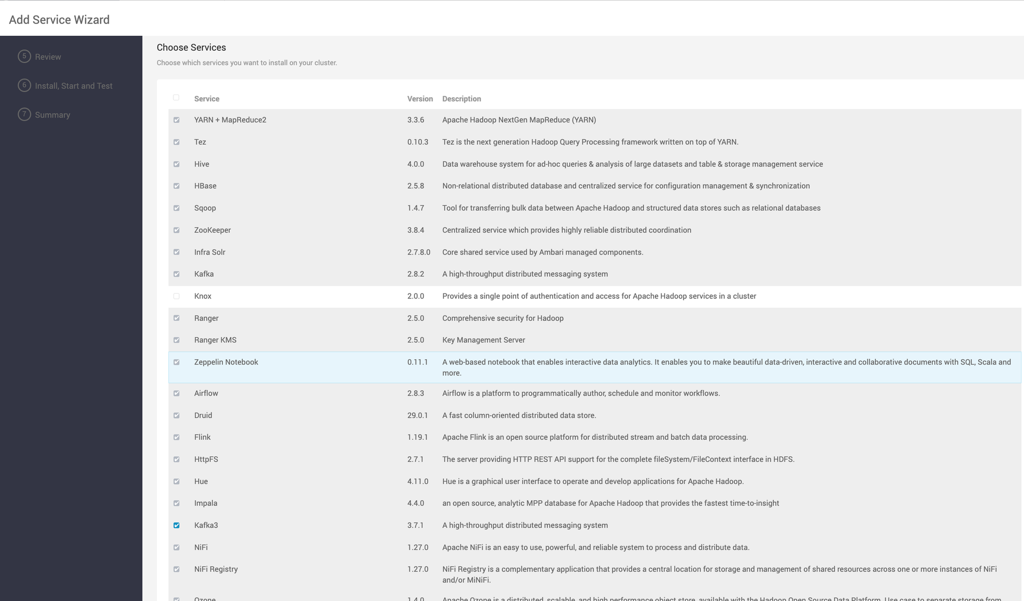
Step 3: Assign broker nodes
Assign the nodes on which you want to install the Kafka broker.
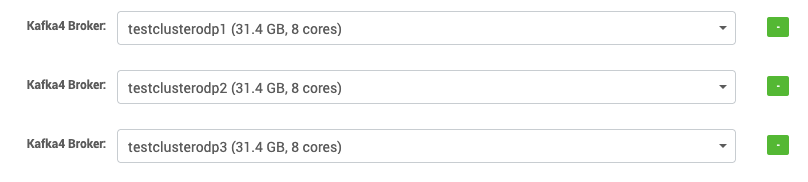
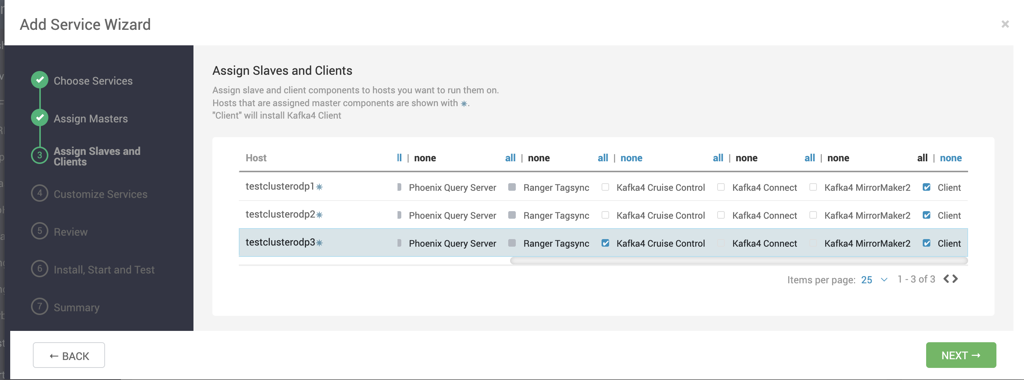
Step 4: Add Cruise Control as a component
Select the node on which you want to add Kafka4 Cruise Control as a component.
Note You can't install Cruise Control on more than one node.
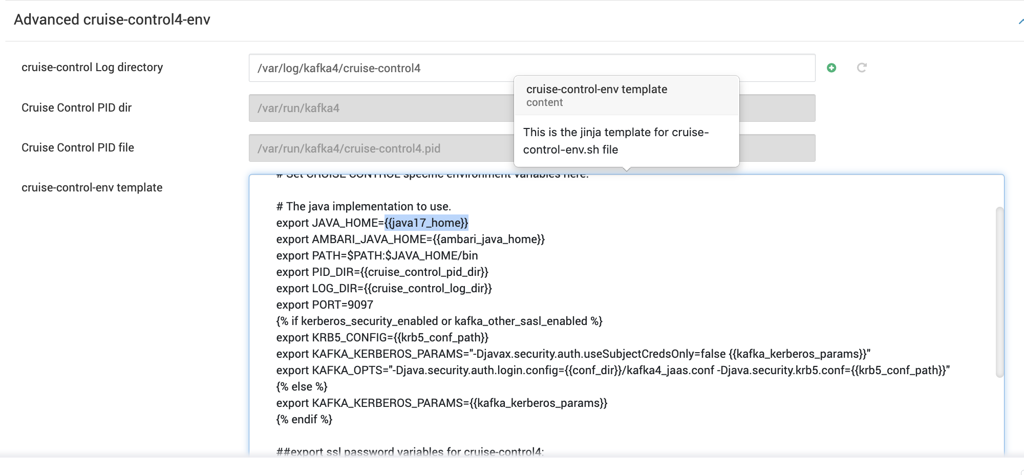
Step 5: Configure the Java implementation
Under Advanced cruise-control4-env and Advanced kafka4-env, specify the Java implementation to use.
Step 6: Configure the Cruise Control port
By default, Cruise Control runs on port 9097. If you want to run Cruise Control on a different port:
Under Advanced cruise-control4, change
webserver.http.portto the desired port.Also change the port number in Advanced cruise-control4-env and Advanced cruise-control4-ui-config through Ambari.
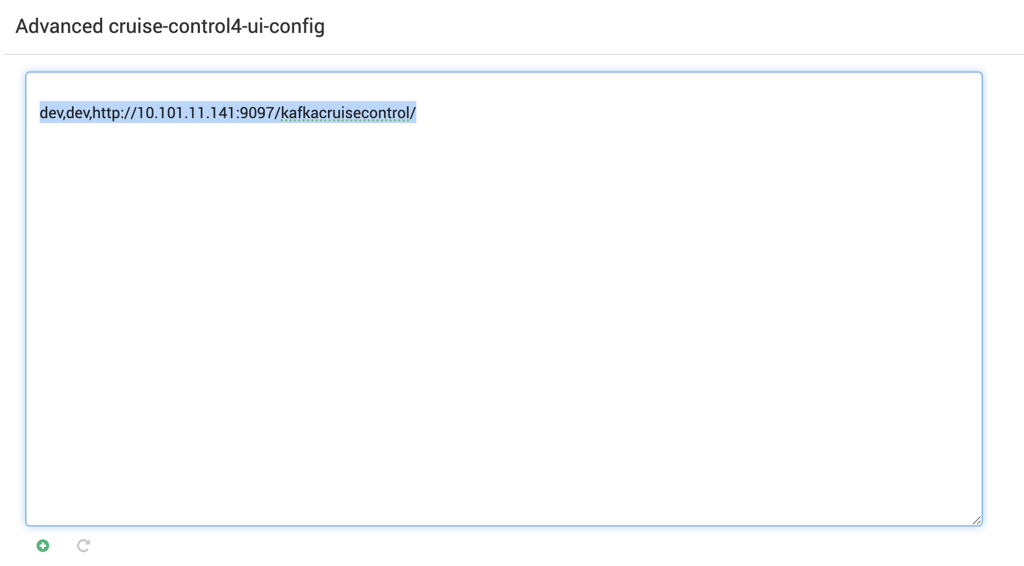
Step 7: Configure the Cruise Control UI
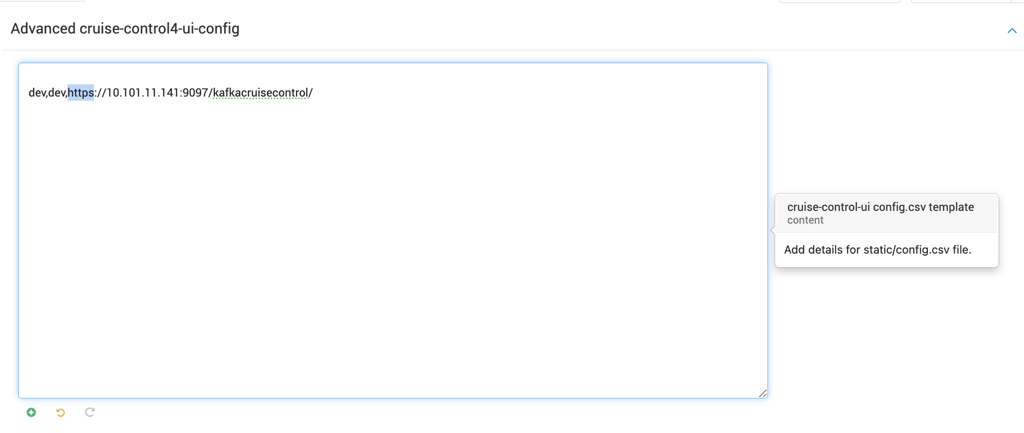
Under Advanced cruise-control4-ui-config, edit localhost to the hostname on which Cruise Control4 is installed. If SSL is enabled, change http to https in Advanced cruise-control4-ui-config.
config.csv is a CSV file with three columns, separated by commas:
Column | Description | Examples |
|---|---|---|
First | Logical group name |
|
Second | Cruise Control4 instance name |
|
Third | URL path to the Cruise Control4 instance |
|
Note The following Cruise Control4 configurations, under Advanced cruise-control4 and Advanced kafka-broker, are managed by Ambari if left blank:
Advanced cruise-control4:
webserver.http.address
bootstrap.servers
security.inter.broker.protocol
security.protocol
zookeeper.security.enabledAdvanced kraft4-broker:
metric.reporters
cruise.control.metrics.reporter.bootstrap.servers
cruise.control.metrics.reporter.listeners
cruise.control.metrics.reporter.security.protocol
cruise.control.metrics.reporter.security.inter.broker.protocol
cruise.control.metrics.reporter.authorizer.class.name
cruise.control.metrics.reporter.sasl.kerberos.principal.to.local.rules
cruise.control.metrics.reporter.sasl.kerberos.service.name
cruise.control.metrics.reporter.ssl.client.authAdvanced kraft4-controller:
metric.reporters
cruise.control.metrics.reporter.bootstrap.servers
cruise.control.metrics.reporter.listeners
cruise.control.metrics.reporter.security.protocol
cruise.control.metrics.reporter.security.inter.broker.protocol
cruise.control.metrics.reporter.authorizer.class.name
cruise.control.metrics.reporter.sasl.kerberos.principal.to.local.rules
cruise.control.metrics.reporter.sasl.kerberos.service.name
cruise.control.metrics.reporter.ssl.client.auth
Step 8: Deploy
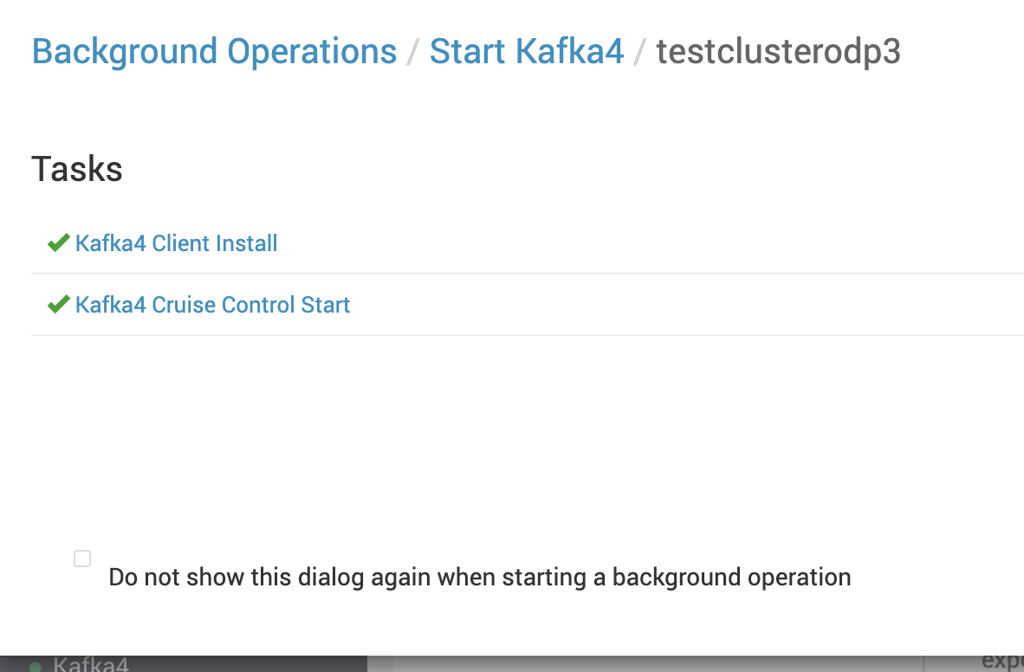
Select DEPLOY to deploy the Kafka brokers and Cruise Control4 on the selected nodes. Once the deployment completes, Kafka4 Cruise Control and the Kafka broker are installed on the specified nodes.
Info
Cruise Control4 needs some time to read the raw Kafka metrics from the cluster.
The metrics of a newly started broker can take a few minutes to stabilize. Cruise Control4 drops inconsistent metrics (for example, when topic bytes-in is higher than broker bytes-in), so the first few windows might not have enough valid partitions.
Security
Enable SSL
Update the following properties according to your SSL configuration:
These properties apply under Advanced cruise-control4. Configure the corresponding metrics reporter SSL properties under Advanced kraft4-broker and Advanced kraft4-controller:
For Advanced kraft4-controller, also set:
Configure Kerberos
Cruise Control4 uses the
kafkauser as its default user, so no Cruise Control4-specific Kerberos configuration changes are required.Ambari can also manage the Advanced cruise-control4-jaas-conf file.
Configure JWT authentication with Apache Knox
Create a credentials file containing the following information, for example in
/tmp/test-roles.credentials:kafka: ,ADMIN sam: ,VIEWERBy default, Cruise Control4 defines three roles:
Role
Access
VIEWERThe most lightweight endpoints:
kafka_cluster_state,user_tasks, andreview_board.USERAll GET endpoints except
bootstrapandtrain.ADMINAll endpoints.
Make the following changes in Advanced cruise-control4 through Ambari:
jwt.auth.certificate.location=/path/to/gateway-identity.pem jwt.authentication.provider.url=https://cent1.acceldata.ce:8443/gateway/knoxsso/api/v1/websso?originalUrl=http://cent1.acceldata.ce:9097 jwt.cookie.name=hadoop-jwt webserver.auth.credentials.file=/path/to/test-roles.credentials webserver.security.enable=true webserver.security.provider=com.linkedin.kafka.cruisecontrol.servlet.security.jwt.JwtSecurityProviderIn the Advanced knoxsso-topology template, you can edit the value of
knoxsso.token.ttl. By default, this value is30000ms — the time to live (TTL) for tokens used in Knox Single Sign-On (SSO) authentication expires after 30 seconds. You can increase this value to your desired duration.
Open the URL specified in Advanced cruise-control-ui-config. It redirects you to the Knox authentication page. Sign in with the
admin/admin-passwordorusername/passwordpair. You're then redirected to the Cruise Control page.
Pluggable components
Metric sampler
The metric sampler is one of the most important pluggable components in Kafka Cruise Control. It lets you deploy Cruise Control to different environments and work with your existing metric system.
The default implementation of the metric sampler reads the broker metrics produced by CruiseControlMetricsReporter on the broker. This implementation assumes that you're running Kafka brokers with the metric.reporters configuration on the Kafka brokers set to com.linkedin.kafka.cruisecontrol.metricsreporter.CruiseControlMetricsReporter.
Metric Sampler Partition Assignor
When you have multiple metric sampler threads, the Metric Sampler Partition Assignor is responsible for assigning partitions to the metric samplers. This is useful when you have an existing metric system. The default implementation assigns all partitions of the same topic to the same metric sampler.
Sample Store
The Sample Store stores the collected metric samples and training samples to external storage. One challenge in metric sampling is that Cruise Control uses derived data from the raw metrics, and how that data is derived relies on the cluster metadata at the time of collection. If the metadata at the time a metric was collected is unavailable when reviewing historical metrics, the derived data becomes inaccurate. The Sample Store solves this by storing the derived data directly to external storage for later loading.
The default implementation of the Sample Store produces the samples back to a Kafka topic.
Broker Capacity Config Resolver
The Broker Capacity Config Resolver is how Cruise Control retrieves the broker capacity for each resource. The default implementation is file-based properties. You can also implement a custom resolver to retrieve broker capacity from a hardware resource management system.
Goals
Goals in Kafka Cruise Control are pluggable and have different priorities:
Rack-awareness: Ensures all replicas of each partition are assigned in a rack-aware manner.
RackAwareDistributionGoal: Unlike
RackAwareGoal, as long as replicas of each partition can achieve a perfectly even distribution across racks, this goal allows placement of multiple replicas of a partition into a single rack.ReplicaCapacityGoal: Attempts to keep all brokers in a cluster below a given number of replicas.
CapacityGoals: Ensure broker resource utilization stays below a given threshold for the corresponding resource. Capacity goals include:
DiskCapacityGoalNetworkInboundCapacityGoalNetworkOutboundCapacityGoalCpuCapacityGoal
ReplicaDistributionGoal: Attempts to keep all brokers in a cluster with a similar number of replicas.
PotentialNwOutGoal: Ensures the potential network output (when all replicas become leaders) on each broker doesn't exceed the broker's network outbound bandwidth capacity.
ResourceDistributionGoals: Attempts to keep resource utilization variance among all brokers within a certain range. This goal has no effect if the cluster is in a low-utilization mode (when all brokers' resource utilization is below a configured percentage). This consists of separate goals for each resource:
DiskUtilDistributionGoalNetworkInboundUtilDistributionGoalNetworkOutboundUtilDistributionGoalCpuUtilDistributionGoal
TopicReplicaDistributionGoal: Attempts to distribute replicas of the same topic evenly across the entire cluster.
LeaderReplicaDistributionGoal: Attempts to keep all brokers in a cluster with a similar number of leader replicas.
LeaderBytesInDistributionGoal: Attempts to balance the leader bytes-in rate on each host.
PreferredLeaderElectionGoal: Attempts to make the first replica in the replica list the leader replica of the partition, for all topic partitions.
KafkaAssignerGoals: Applied when the
kafka_assignerparameter is set totruein the corresponding request:KafkaAssignerDiskUsageDistributionGoal: Ensures all replicas of each partition are assigned in a rack-aware manner.KafkaAssignerEvenRackAwareGoal: Attempts to keep all brokers in a cluster with a similar number of replicas.
IntraBrokerDiskCapacityGoal: Ensures disk resource utilization stays below a given threshold. Applied when the
rebalance_diskparameter is set totruein a rebalance request.IntraBrokerDiskUsageDistributionGoal: Attempts to keep the utilization variance among all disks within the same broker within a certain range. Applied when the
rebalance_diskparameter is set totruein a rebalance request.BrokerSetAwareGoal: A broker set is a defined subset of brokers in the cluster. This goal constrains replica movements to within the boundary of a broker set.
Cruise Control REST API endpoints
You can manage and monitor Cruise Control through its REST API, which offers GET and POST endpoints. Cruise Control's REST API includes two main types of endpoints:
GET: Retrieve details about rebalancing operations, the current state of Cruise Control, and the status of Kafka brokers. GET endpoints are read-only and don't affect Cruise Control, Kafka, or ongoing rebalancing activities.
POST: Alter rebalancing operations, adjust the count of Kafka brokers, set Cruise Control configurations, and configure sampling and proposal tasks.
The following sections summarize the operations available through the GET and POST endpoints. For the detailed API reference, see the official REST API documentation.
GET requests
GET requests in the Kafka Cruise Control REST API are read-only operations with no external impact.
Query the state of Cruise Control
Check the state of Kafka Cruise Control, which includes the status of the monitor, executor, analyzer, and anomaly detector components.
Note: If
verboseis set totrue, the response includes details about monitored windows and goals.
Query the current cluster load
Query the current cluster load. For accurate results, the Load Monitor must be in the RUNNING state. This query returns load per broker and load per host, and displays data only for valid partitions with a sufficient number of metric samples.
Query partition resource utilization
Query the resource utilization of partitions, organized and presented by resource type. The returned result is a partition list sorted by the utilization of the specified resource, within the time range specified by start and end. The resource can be CPU, NW_IN, NW_OUT, or DISK. By default, start is the earliest monitored time, end is the current wall-clock time, resource is DISK, and entries is all partitions in the cluster.
Query partition and replica state
Query the state of partitions and replicas. This query returns detailed information for each broker and each partition, including:
For each broker: the distribution of leader, follower, out-of-sync, and offline replica information, and online and offline disks.
For each partition: the distribution of leader, follower, in-sync, out-of-sync, and offline replica information.
Get optimization proposals
Retrieve the optimization proposals generated from the workload model, based on either valid_windows or valid_partitions.
valid_windows: Rebalances the cluster based on the information in the available valid snapshot windows. A valid snapshot window is a window whose valid monitored partition coverage meets the requirements of all goals. This is the default behavior.
valid_partitions: Rebalances the cluster based on all available valid partitions. All snapshot windows can be included.
You can specify only valid_windows or valid_partitions, not both.
If verbose is set to true, Cruise Control returns all generated proposals; otherwise, it returns a summary. You can specify excluded_topics to prevent certain topics' replicas from moving in the generated proposals. If use_ready_default_goals is set to true, Cruise Control uses whatever ready goals (based on available metric data) to calculate the proposals.
Query the user request result
Retrieve a list of active or completed (and not recycled) tasks, including request time, IP address, request URL, parameters, and UUID. You can use the returned UUID and URL to fetch the original final result of a specific request.
Use user_task_ids, client_ids, endpoints, or types to filter the requests returned. By default, all requests are returned. If fetch_completed_task is set to true, the original response of each request is returned. If a task completed with errors, the response is CompletedWithError.
POST requests
POST requests in the Kafka Cruise Control REST API are operations that can affect the Kafka cluster, including:
Trigger a workload balance
Add a list of new brokers to the Kafka cluster
Decommission a list of brokers from the Kafka cluster
Fix offline replicas in the Kafka cluster
Demote a list of brokers from the Kafka cluster
Stop the current proposal execution task
Pause metrics load sampling
Resume metrics load sampling
Change Kafka topic configuration
Change Cruise Control configuration
Note Most POST actions have a dry-run mode, which generates proposals and estimated results without executing them. To avoid unintentionally triggering data movement, all POST actions run in dry-run mode by default. To let Kafka Cruise Control move data, set dryrun=false.
Trigger a workload balance
Initiates a workload balance for a Kafka cluster, based on either valid windows or valid partitions. You can also specify the optimization goal to pursue. Set dryrun=false to trigger the rebalancing process.
Add a list of new brokers to the Kafka cluster
Adds a list of brokers to the Kafka cluster and relocates replicas from existing brokers to the newly added brokers. You can optionally throttle the movement of replicas to the new brokers, with the throttle applied on the existing brokers. Set dryrun=false to initiate the addition of brokers.
When you add new brokers, Cruise Control ensures replicas are moved only from existing brokers to the new broker, not among existing brokers.
Decommission a list of brokers from the Kafka cluster
Removes a list of brokers from the Kafka cluster and transfers their partitions to other existing brokers. You can specify the destination broker for these partitions and throttle the removed brokers during the partition movement. Set dryrun=false to initiate the removal of brokers.
Info If the topics specified in excluded_topics have replicas on the removed broker, those replicas are still moved off the broker.
Fix offline replicas in the Kafka cluster
Moves offline replicas from dead disks or brokers to healthy brokers. Set dryrun=false to actively fix offline replicas.
Info If the topics specified in excluded_topics have offline replicas, those replicas are still moved to healthy brokers.
Demote a list of brokers from the Kafka cluster
Transfers all leader replicas from a specified list of brokers. This action demotes all replicas on the designated brokers to be least preferred, and triggers a preferred leader replica election to migrate the leader replicas away from those brokers. Set dryrun=false to actively demote brokers and trigger the leader replica migration.
You can also move all leader replicas away from a list of disks:
Demoting a broker or disk consists of two steps:
Make all replicas on the given broker or disk the least preferred replicas for leadership election within their corresponding partitions.
Trigger a preferred leader election on the partitions to migrate the leader replicas off the broker or disk.
Stop the current proposal execution task
Halts an ongoing rebalance, add_broker, remove_broker, fix_offline_replica, topic_configuration, or demote_broker operation.
Info Cruise Control doesn't wait for the ongoing batch to finish when it stops execution — the in-progress batch might still be running after Cruise Control stops the execution.
Pause metrics load sampling
Pauses an ongoing metrics sampling process. The reason for the pause is recorded and appears when you query the state of Cruise Control, under the state endpoint's LoadMonitor sub-state.
Resume metrics load sampling
Resumes a paused metrics load sampling process. The reason for the resumption is recorded and appears under the state endpoint's LoadMonitor sub-state.
Change Kafka topic configuration
Changes a topic's replication factor. Cruise Control currently supports changing only the replication factor through this endpoint. Changing a topic's replication factor doesn't move existing replicas; goals determine which replica to delete (to decrease the replication factor) and which broker to assign a new replica to (to increase the replication factor).
Info If the topic regex is too long for the POST request head, you can specify topic regex and target replication factor pairs in the POST request body. For details, see the Change Topic Replication Factor Through Cruise Control wiki page.
Change Cruise Control configuration
You can dynamically change some Cruise Control configurations through the admin endpoint, including:
Dynamically changing the partition and leadership concurrency, and the interval between checking and updating the progress of an ongoing execution.
Enabling or disabling self-healing for specified anomaly types.
Dropping selected recently removed or demoted brokers.
Enabling or disabling specified concurrency adjusters.
Enabling or disabling (At/Under) MinISR-based concurrency adjustment.
To enable or disable self-healing:
To increase or decrease execution concurrency:
To drop recently removed or demoted brokers:
Two-step verification for POST requests
POST requests let you perform administrative operations for cluster maintenance in Kafka clusters. If you mistype a command, however, you can unintentionally start an unwanted execution — for example, removing broker-X rather than broker-Y.
Two-step verification helps you verify the command you (or a peer) intend to run, by letting you review requests explicitly to approve or discard them, and enabling execution only for approved requests.
Enable two-step verification
Set two.step.verification.enabled to true in Advanced cruise-control through Ambari.

The following POST endpoints require two-step verification:
add_brokerremove_brokerfix_offline_replicasrebalancestop_proposal_executionpause_samplingresume_samplingdemote_brokeradmin
Cruise Control Frontend (CCFE)
The Cruise Control Frontend offers a centralized dashboard with the following features:
Kafka Cluster Status
Kafka Cluster Load
Kafka Partition Load
Cruise Control State
Cruise Control Tasks
Kafka Cluster Administration
Cruise Control Proposals
Peer Review
The dashboard also supports:
Running actions in dry-run (safe) mode by default.
Exposing all Cruise Control REST API parameters as input controls.
Safe default values for executing actions quickly.
Rendering the async response from Cruise Control and its progress.
Displaying the endpoint URL for every action.
Displaying full stack trace responses from Cruise Control, instead of shortened ones.
You can access the Cruise Control UI from the Quick Links section of Kafka.
Refresh the following pages using the Refresh button. On refresh, the browser might display an error, as shown below.
Kafka Cluster Load
Cruise Control Proposals
Peer Review
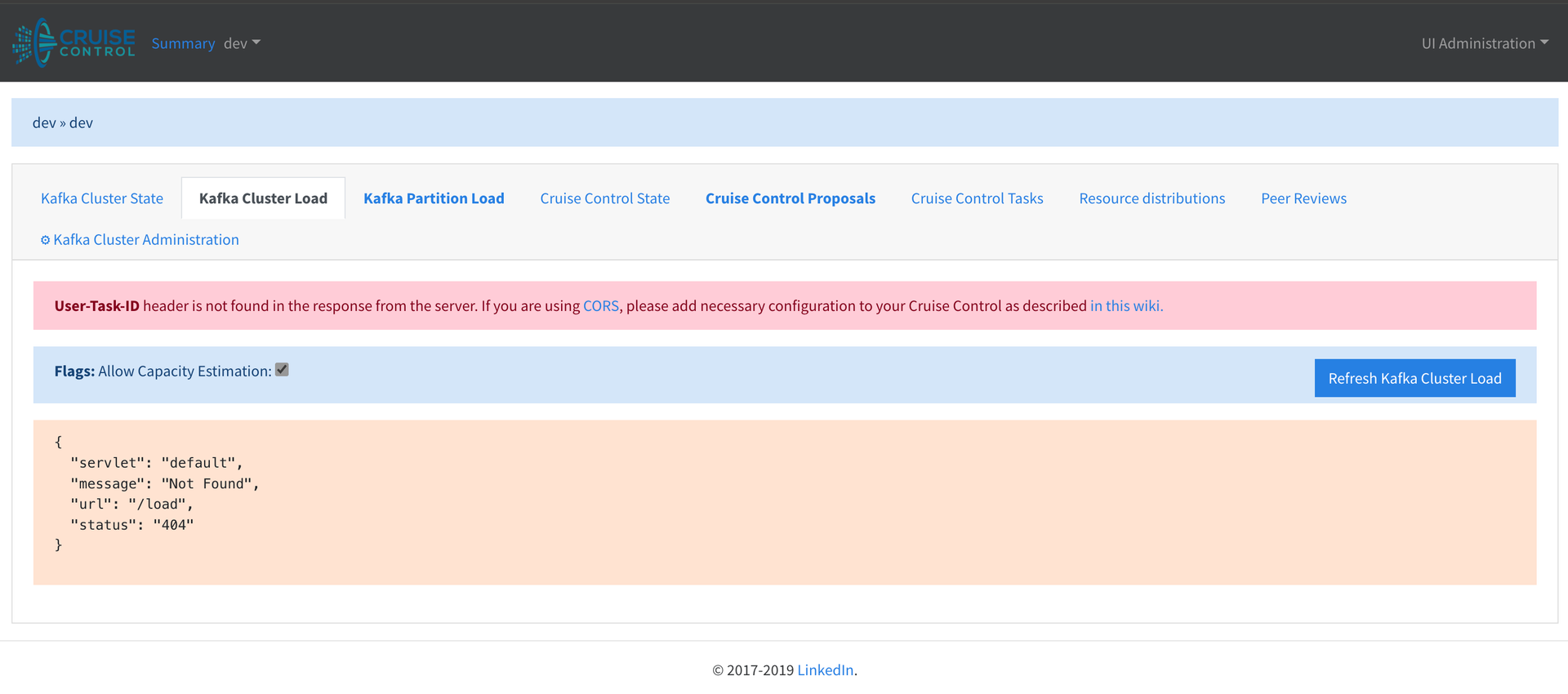
If you encounter this issue, go to the Kafka Cluster State page, then return to the page where you encountered the error. This resolves the issue.
Application screenshots
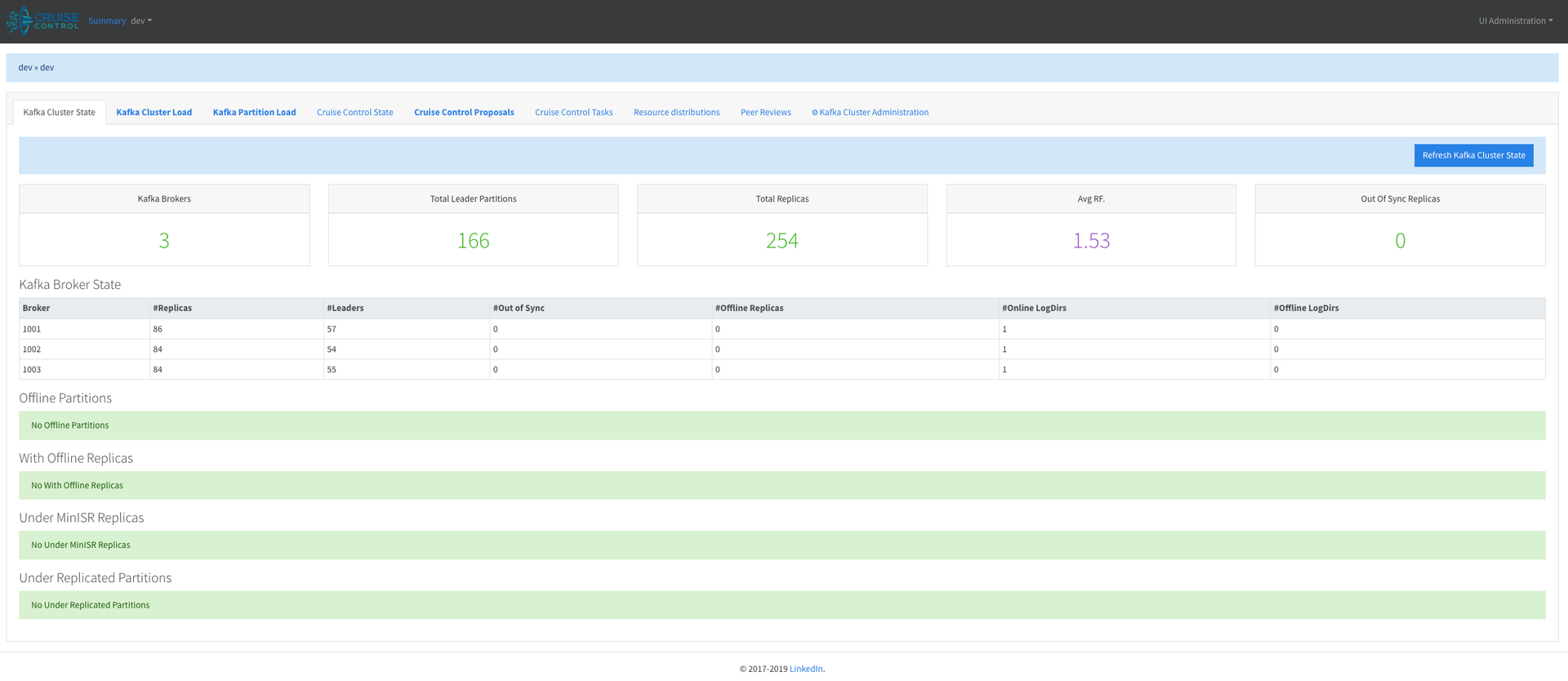
Kafka Cluster Status: Shows the real-time status of the Kafka cluster, including URPs, offline partitions, and disks.
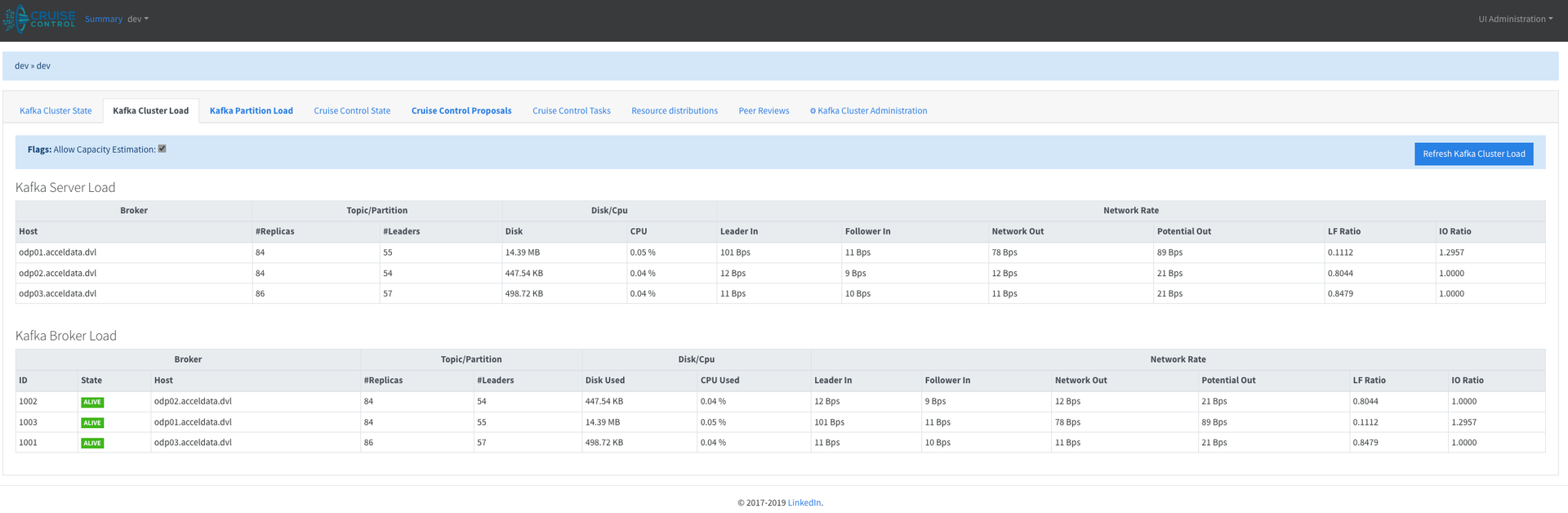
Kafka Cluster Load: Shows the load on all brokers, as calculated by Cruise Control.
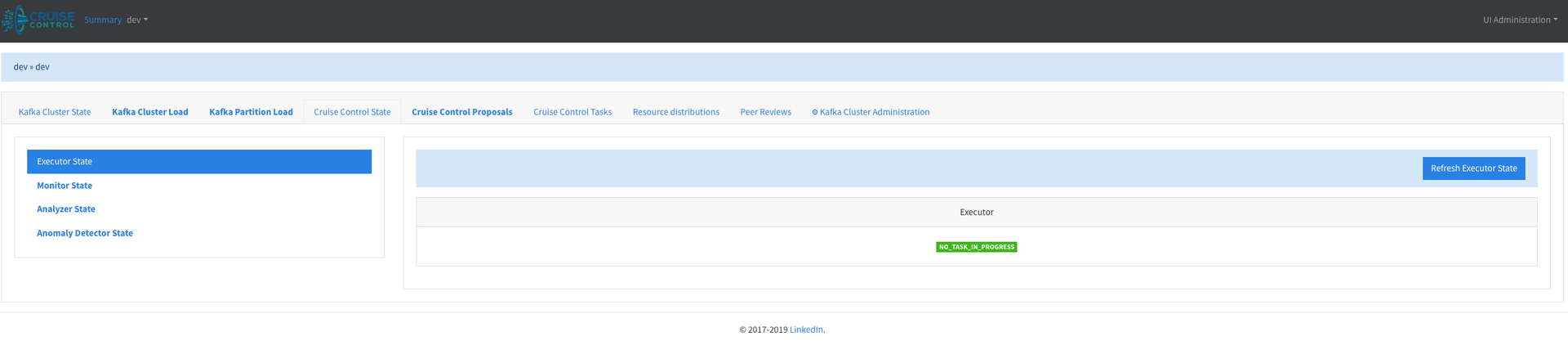
Cruise Control Status: Shows the internal status of Cruise Control, including the Monitor, Executor, Analyzer, and Anomaly Detector.
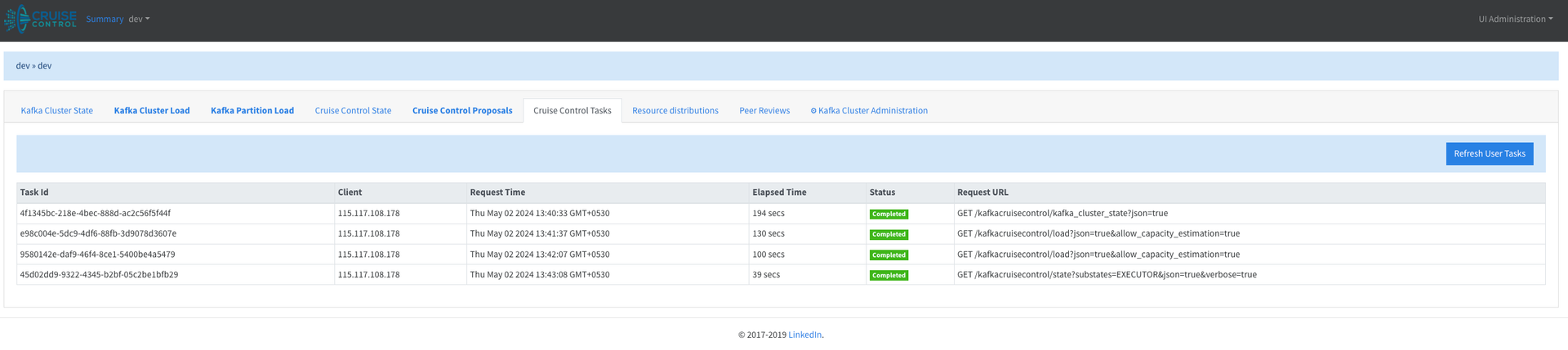
User Tasks: Shows all past and current tasks that Cruise Control has received.
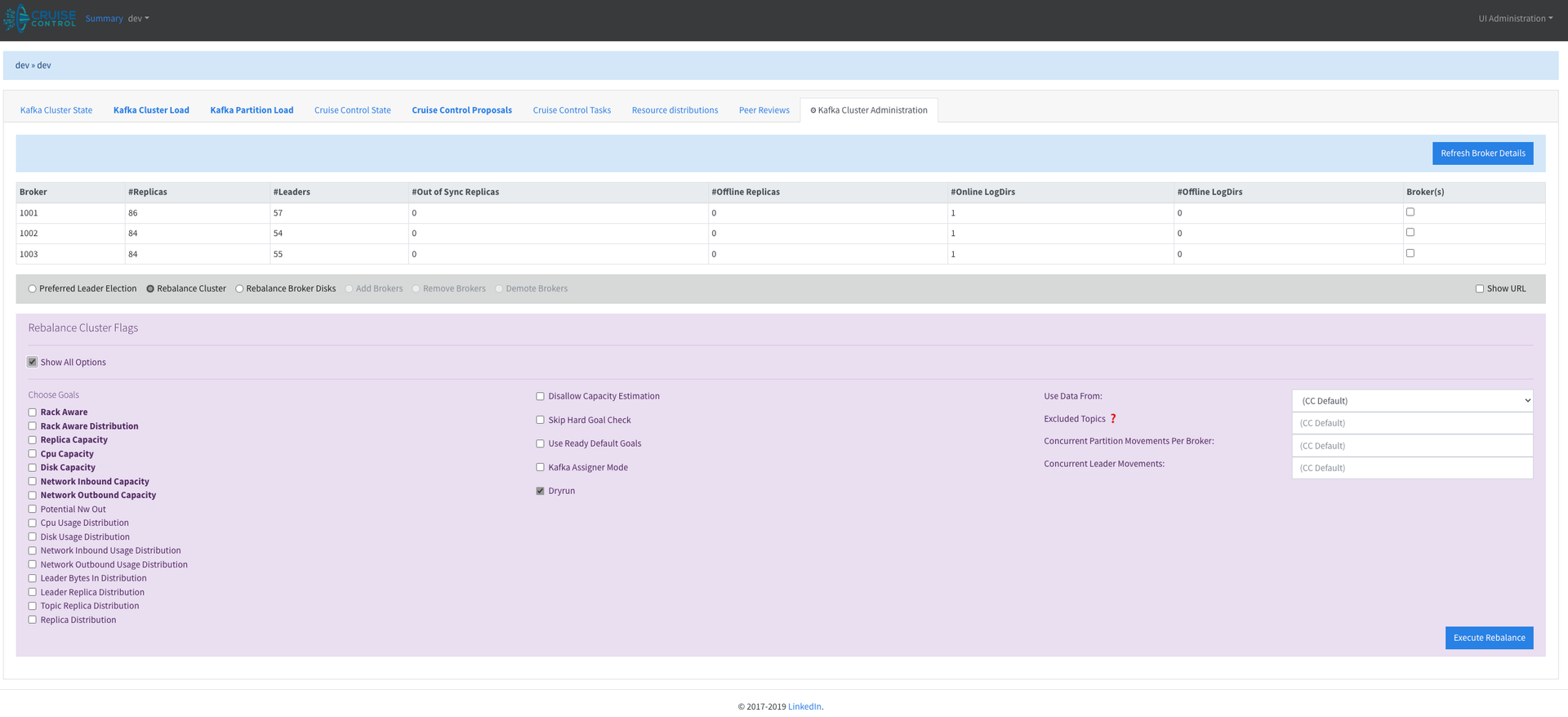
Administration: Shows all brokers in the system, along with available administrative actions — Add Broker, Remove Broker, Demote Broker, and Rebalance.
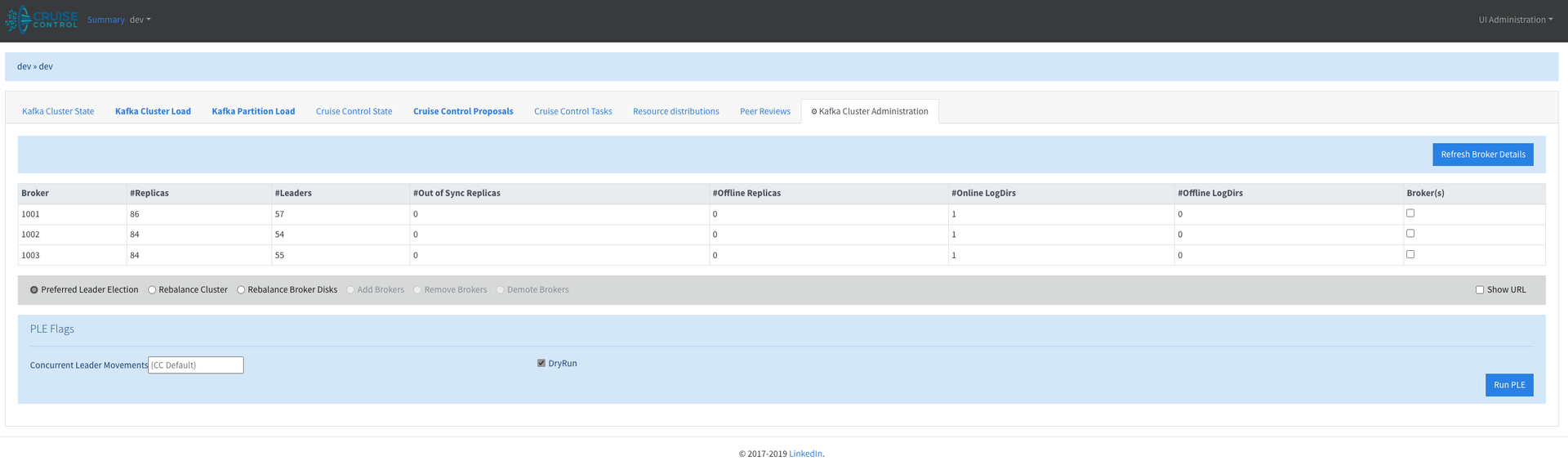
The following screen shows a Kafka cluster rebalance with advanced options.