
Configure the Java Options for Services Using JMX Agent in CDP
You can update the Java options for the services through the CDP UI.
Below are the detailed, service-wise details for all services supported by the JMX agent.
Prerequisite
Note
Before configuring the JMX Trans Agent for a service, verify that the required service-specific XML configuration file exists in /opt/acceldata/jmx/config/enabled
For example, for Cruise Control, verify that vm_cruise_control.xml
Kafka
Info
Ensure to update the CDP Kafka with JMX settings before proceeding. For details, see Configure CDP Kafka and Zookeeper.
If Kafka Connect is NOT enabled:
- In the CM UI, navigate to Kafka > Configuration.
- Search for Additional Broker Java Options (broker_java_opts).
- Add the following line at the end:
export KAFKA_OPTS="$KAFKA_OPTS -javaagent:/opt/acceldata/jmx/lib/jmxtrans-agent.jar=/opt/acceldata/jmx/config/enabled/vm_kafka.xml"
If Kafka Connect is enabled:
Add the following snippet at the end of the kafka-env template:
AGENT_PATH="/opt/acceldata/jmx/lib/jmxtrans-agent.jar"
if [[ "$KAFKA_OPTS" != *"$AGENT_PATH"* ]]; then
 CURRENT_CMD_STRING=$(ps -p $$ -o args=)
 if [[ "$CURRENT_CMD_STRING" == *"kafka-connect"* ]]; then
 export KAFKA_OPTS="$KAFKA_OPTS -javaagent:$AGENT_PATH=/opt/acceldata/jmx/config/enabled/vm_kafka3_connect.xml"
 elif [[ "$CURRENT_CMD_STRING" == *"kafka start"* ]] || [[ "$CURRENT_CMD_STRING" == *"kafka-server-start"* ]]; then
 export KAFKA_OPTS="$KAFKA_OPTS -javaagent:$AGENT_PATH=/opt/acceldata/jmx/config/enabled/vm_kafka3.xml"
 fi
fi
Hive Metastore
Info
Ensure to update the CDP Hive Metastore and Hive Server with JMX settings before proceeding. For details, see Configure CDP Hive and Tez.
- In the CM UI, navigate to Hive > Java Configuration Options.
- Update the property with the following values.
export HADOOP_OPTS="$HADOOP_OPTS -javaagent:/opt/acceldata/jmx/lib/jmxtrans-agent.jar=/opt/acceldata/jmx/config/enabled/vm_hive_metastore.xml"
Hive Server
- In the CM UI, navigate to Tez > Java Configuration Options.
- Update the property with the following values.
export HADOOP_OPTS="$HADOOP_OPTS -javaagent:/opt/acceldata/jmx/lib/jmxtrans-agent.jar=/opt/acceldata/jmx/config/enabled/vm_hive_server.xml"
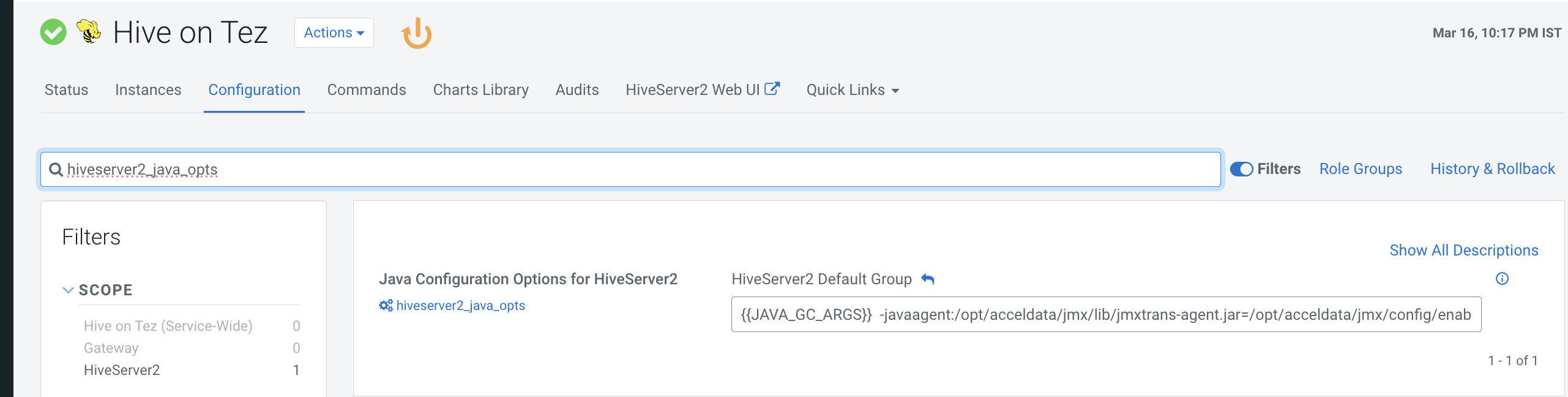
Hive on Tez
- In the CM UI, navigate to Hive on Tez > Configuration.
- Search for hivesearver2 _ java_opts and update the following value in Java Configuration Options for HiveServer2.
-javaagent:/opt/acceldata/jmx/lib/jmxtrans-agent.jar=/opt/acceldata/jmx/config/enabled/vm_hive_server.xml
Have a suggestion?