
Documentation
ODP 3.3.6.3-1
Release Notes
What is ODP
Installation
Component User guide and Installation Instructions
Upgrade Instructions
Downgrade Instructions
Reference Guide
Security Guide
Troubleshooting Guide
Uninstall ODP
Title
Message
Create new category
What is the title of your new category?
Edit page index title
What is the title of the page index?
Edit category
What is the new title of your category?
Edit link
What is the new title and URL of your link?
Configure Trino Client
Summarize Page
Copy Markdown
Open in ChatGPT
Open in Claude
Connect to Cursor
Connect to VS Code
Connect with Trino CLI
- Download the Trino CLI Client.
Bash
wget https://repo1.maven.org/maven2/io/trino/trino-cli/472/trino-cli-472-executable.jarmv trino-cli-472-executable.jar trinochmod +x trino- Connect to Trino with LDAP Authentication.
Bash
PATH=/your/java23/home/bin:$PATH ./trino https://$TRINO_HOST:$TRINO_PORT/ --user $YOUR_USER --password- Connect to Trino with Kerberos Authentication + SSL (insecure).
Bash
PATH=/your/java/home/bin:$PATH ./trino \ --server https://$TRINO_HOST:$TRINO_PORT/ \ --insecure \ --krb5-config-path /etc/krb5.conf \ --krb5-principal $YOUR_PRINCIPAL \ --krb5-keytab-path /path/to/your/keytab \ --krb5-remote-service-name HTTP \ --debug- Connect to Trino with Kerberos Authentication + SSL (secure) via java command.
Bash
java \-Dsun.security.krb5.debug=true \-Djava.security.debug=gssloginconfig,configfile,configparser,logincontext \-Dtrino.client.debugKerberos=true \-jar $executable_trino_jar \--server https://$TRINO_HOST:$TRINO_PORT/ \--truststore-path $truststore_path \--truststore-password $password \--keystore-path $keystore_path \--keystore-password $password \--krb5-config-path /etc/krb5.conf \--krb5-principal $YOUR_PRINCIPAL \--krb5-keytab-path /path/to/your/keytab \--krb5-remote-service-name HTTP- Verify the connection.
At the trino> prompt, run:
Bash
show catalogs;- If successful: You will see the list of configured data sources.
- If unauthorized: You will see an error:
Authentication failed: Unauthorized.
- Ensure Java 23 is installed and correctly set in your PATH.
- CLI requires SSL when authentication (Kerberos/LDAP) is enabled.
Connect with JDBC
Updated JDBC Driver Location on Trino Nodes for ODP Versions:
Bash
/usr/odp/3.3.6.3-1/trino/jdbc/trino-jdbc-472.jar #ODP-3.3.6.3-1JDBC over LDAP
The following is an example of JDBC connection info required to connect over SSL (and LDAP):
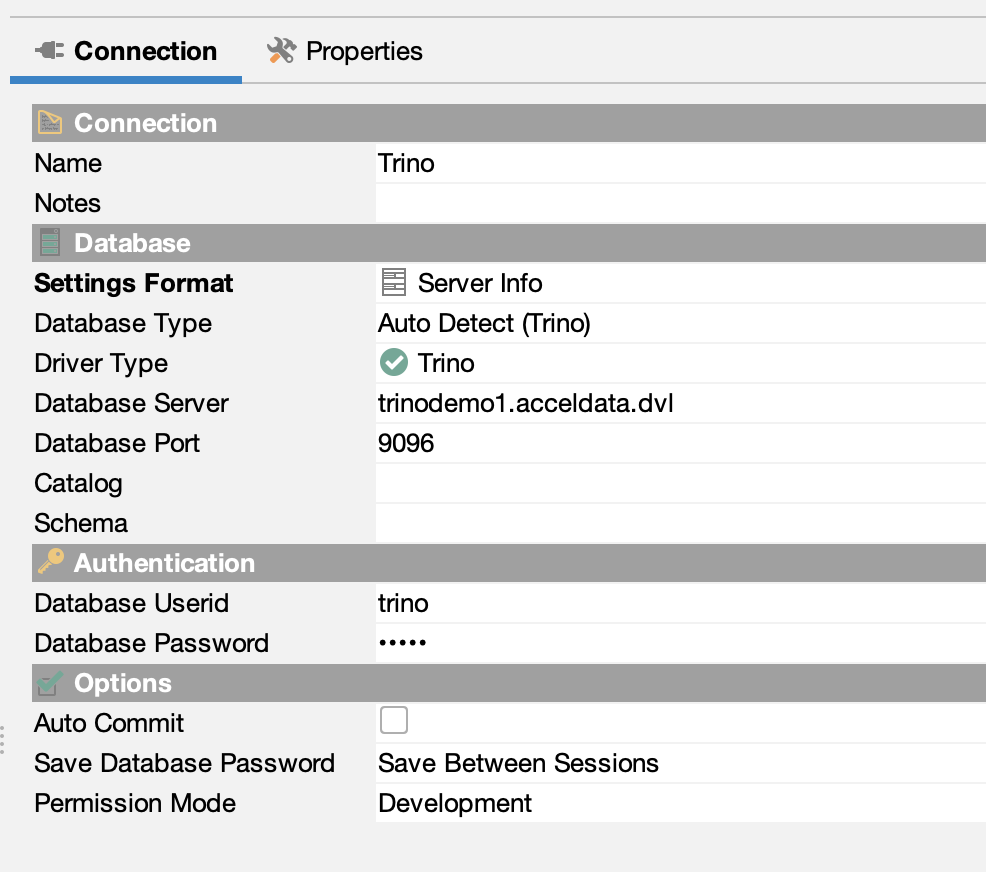

JDBC over Kerberos
- Sample configurations required when connecting with JDBC over Kerberos.
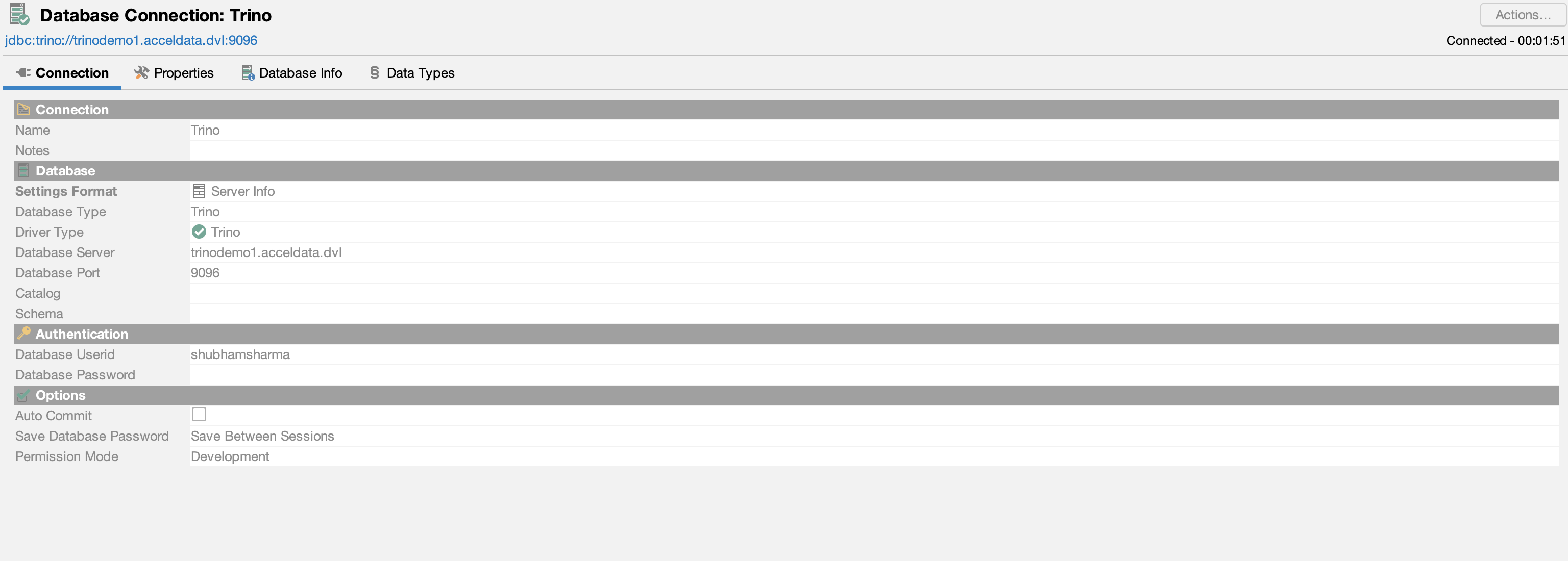
- Configure the driver properties with kerberos details. You can refer to below example.
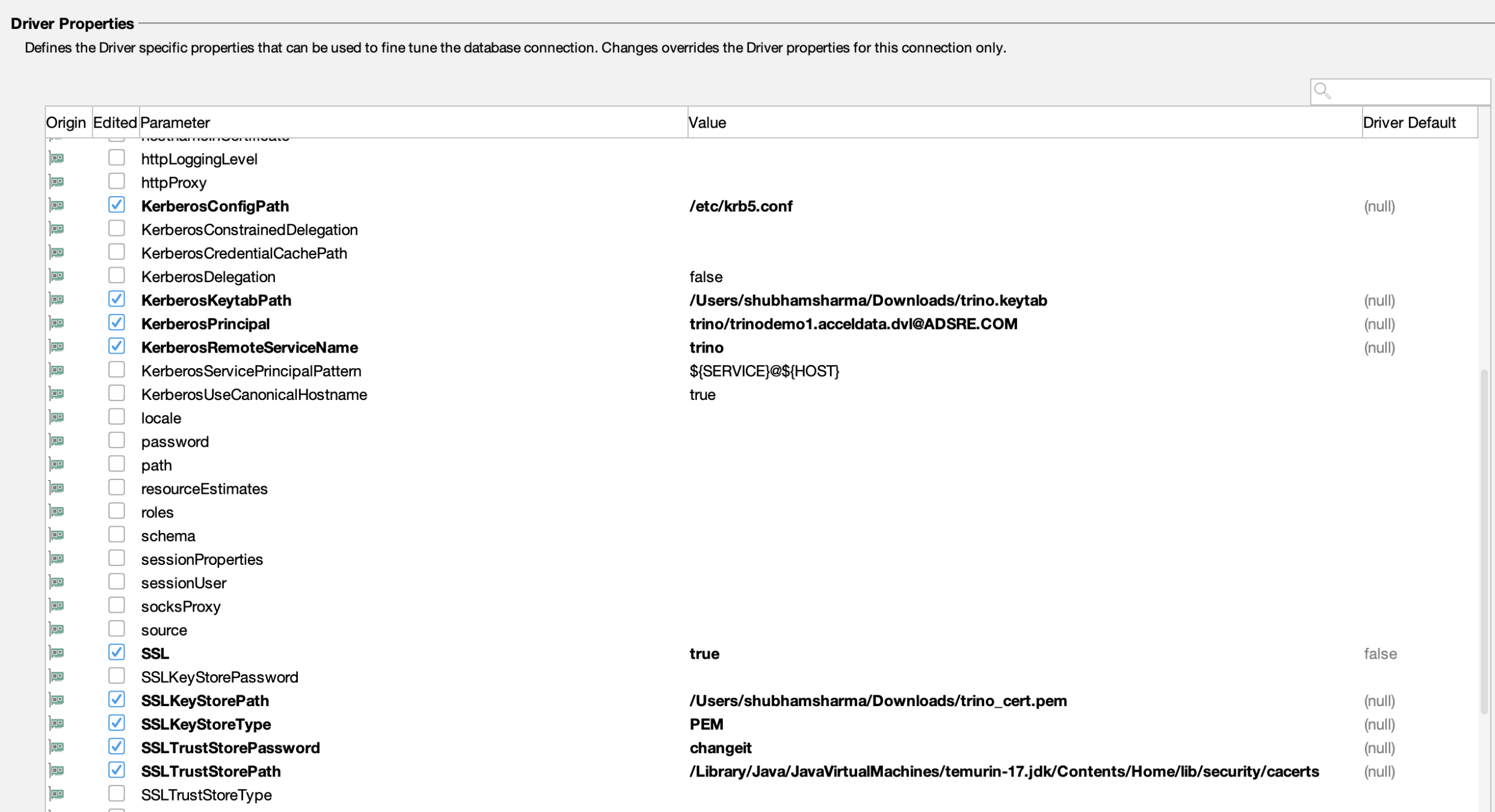
Connect with ODBC
Trino supports ODBC connectivity through third-party drivers, enabling integration with various BI tools and applications.
- Simba Trino ODBC Driver: Developed by insightsoftware, this driver is widely used for connecting Trino to BI tools like Tableau, Power BI, and Excel. It supports Windows, macOS, and Linux platforms. For detailed installation and configuration instructions, see Simba Trino ODBC Driver Documentation.
- Starburst ODBC Driver: Tailored for Starburst Enterprise, this driver is compatible with Trino and supports multiple operating systems. For more information, see Starburst ODBC Driver Documentation
- Community ODBC Drivers: Open-source projects like the one by Skilld Labs offer community-supported ODBC drivers for Trino. These may require manual setup and are best suited for development or testing environments. For more information, see Skilld Labs Trino ODBC Driver.
Type to search, ESC to discard
Last updated on Jan 12, 2026
Was this page helpful?
Next to read:
Trino Known LimitationsDiscard Changes
Do you want to discard your current changes and overwrite with the template?
Archive Synced Block
Message
Create new Template
What is this template's title?
Delete Template
Message