xDP Documentation
xDP
Get Started
Deployment Guide
Requirement Guide
xCentral - Platform Management
xStore Catalog and Metadata Management
xCompute - Compute Layer
Data Management
Applications
Orchestration
SQL (Trino)
Notebooks
Developer Guide
Migration Guide
Title
Message
Create new category
What is the title of your new category?
Edit page index title
What is the title of the page index?
Edit category
What is the new title of your category?
Edit link
What is the new title and URL of your link?
Dashplot: Custom Dashboards
Summarize Page
Copy Markdown
Open in ChatGPT
Open in Claude
Connect to Cursor
Connect to VS Code
Dashplots enables you to create custom visualizations and dashboards for monitoring operational, infrastructure, application, and business metrics across xObserve environments.
Dashplots provides a flexible query-driven visualization framework that allows users to build charts, organize them into dashboards, configure filters and variables, and share insights across teams.
Using Dashplots, you can:
- Create custom visualizations from supported data sources.
- Build dashboards using one or more visualizations.
- Configure dashboard interactions and drilldowns.
- Use variables to create dynamic and reusable queries.
- Schedule and distribute dashboard reports.
- Monitor metrics through multiple chart types and visualization options.
Navigation
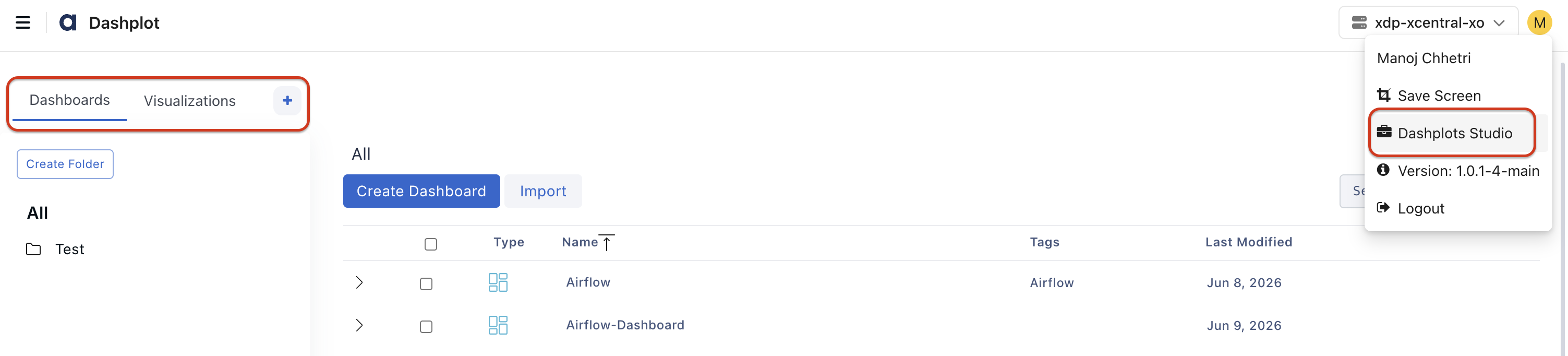
In the xObserve UI, go to the user icon in the top-right corner.
Navigate to Dashplots Studio from the user menu.
The Dashplots workspace opens with the following tabs:
- Dashboards
- Visualizations
- +, to Create New Visualizations

Explore In Detail
VariableType to search · ESC to discard
GlossaryType to search · ESC to discard
InsertType to search · ESC to discard
No matches
Last updated on
Was this page helpful?
Next to read:
Dashplot DashboardsFor additional help, contact our Support Team!
©2026, Acceldata Inc — All Rights Reserved.
Discard Changes
Do you want to discard your current changes and overwrite with the template?
Archive Synced Block
Message
Create new Template
What is this template's title?
Delete Template
Message