
Oozie Dashboard
Oozie is a task scheduler that runs on a server. Oozie workflows are a network of nodes for control flow and action. Control flow nodes specify the start and end points of a process and control its execution path. Pulse provides a distinct dashboard for viewing insights and metrics on the Oozie components.
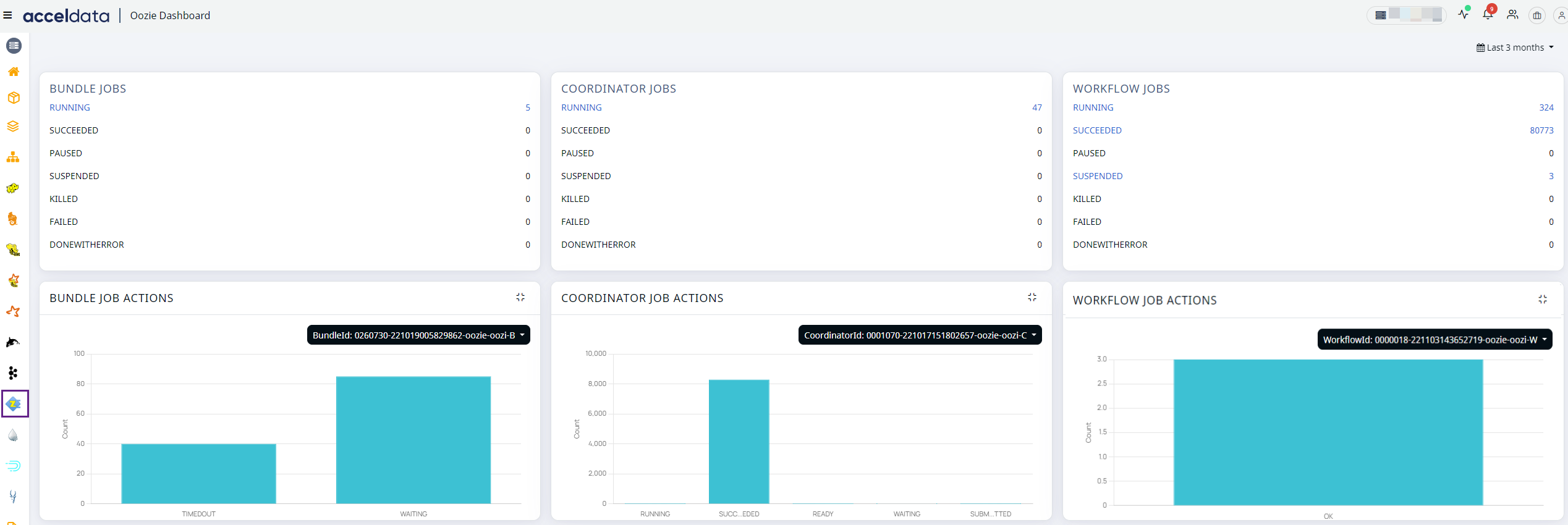
Click on the Oozie --> Dashboard in the left pane to access the Oozie dashboard. The Oozie Dashboard lets you monitor and track the status of Oozie jobs, offering comprehensive insights into the current state and historical performance of bundle, coordinator, and workflow jobs.
The following graphs and metrics are displayed in the dashboard.
Fields | Description |
|---|---|
Running | The number of active jobs is displayed. |
Succeeded | The number of jobs completed |
Paused | The number of jobs paused. |
Suspended | The number of jobs interrupted. |
Killed | The number of jobs killed. |
Failed | The number of jobs where the execution failed. |
Done with Error | The number of jobs completed with errors. |
Graph | Description |
|---|---|
Bundle Job Actions | Displays the number of bundle job actions with their states. |
Coordinator Job Actions | Displays the count of coordinator job actions with their states. |
Workflow Job Actions | Displays the workflow job actions with their states. |
On each graph, you can select a node from the drop-down and check the status of jobs running on a particular node.
What is the reason for the absence of the Oozie workflow link between the Oozie workflow and the application ID in Pulse for a Spark job?
The Spark job's Application ID is generated by the Oozie service. It will only appear in the Pulse UI if it is available in Oozie's Web Service UI. If it is not present in the Oozie's Web Service UI, it will not be displayed in Pulse.