
The HDFS Snapshot page displays information about all directories where snapshots are enabled.
For details about HDFS snapshots, see HDFS Snapshots.
A snapshot is a read-only copy of a directory captured at a specific point in time. It helps preserve data for backup and recovery, auditing, or comparison purposes.
Enable FS Directory Snapshot Reporting
Enabling this helps you collect and display detailed FS directory insights as part of its analytics and monitoring dashboards.
On the Pulse Node, check if the file
ad-fsanalyticsv2-connector.ymlexists at the following path:
If the file does not exist, generate it by running the following command:
Once the file is available, open
ad-fsanalyticsv2-connector.ymland locate the environment section.Add the following entry under the environment section to enable the snapshot directory reporting feature.
This flag enables the FS Snapshot Directory Report functionality within the FS Analytics connector.
Steps
In the Pulse UI, go to HDFS > Snapshot.
On the Snapshot page, you can see the HDFS snapshots details.
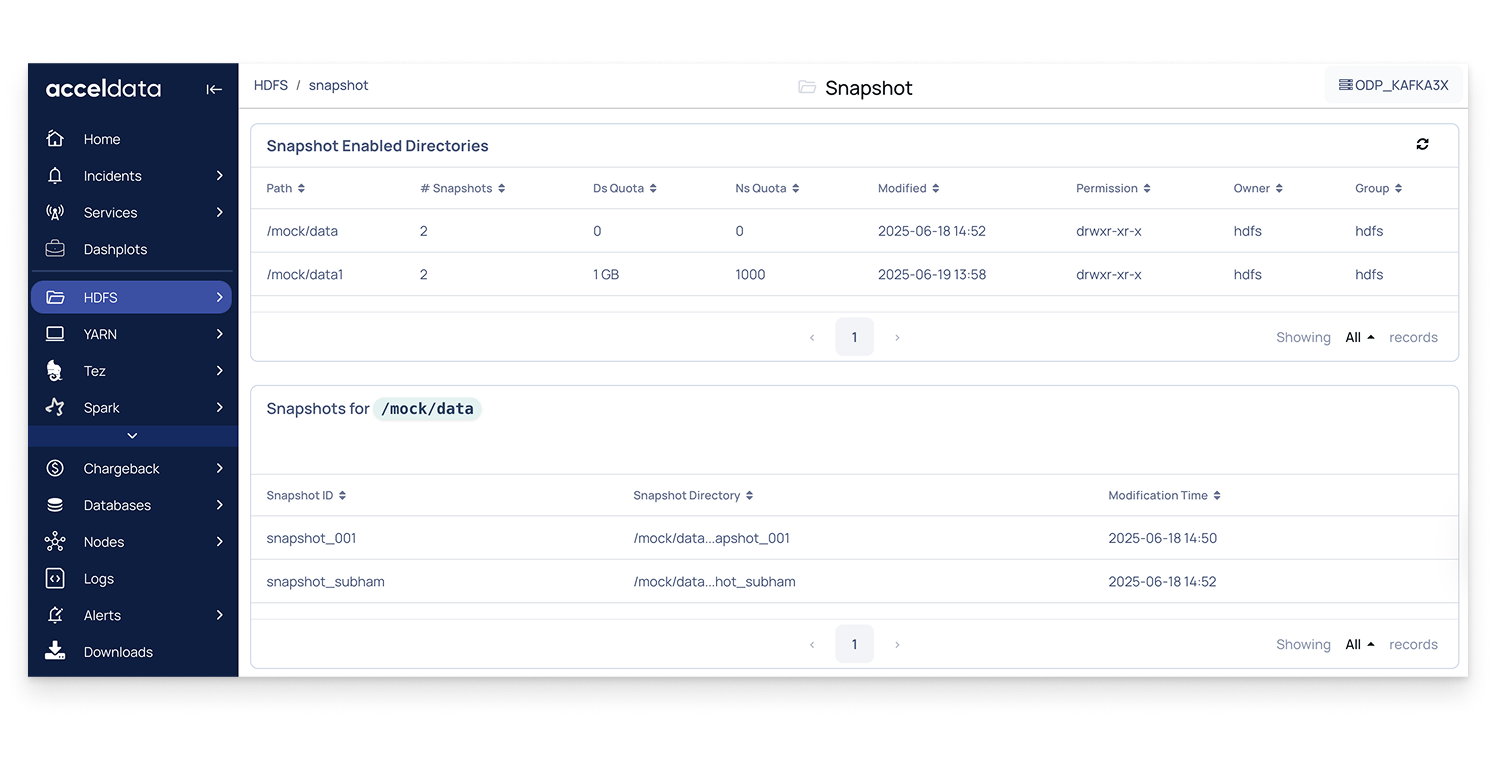
Snapshot-Enabled Directories
This section lists all directories in HDFS that have snapshot capability enabled.
Path: Directory path where snapshots are enabled.
# Snapshots: Number of snapshots created for the directory.
Ds Quota: Disk space quota allocated to the directory.
Ns Quota: Namespace quota (maximum number of files and directories) configured to the directory.
Modified: Timestamp of the last modification.
Permission: Access permissions for the directory.
Owner / Group: User and group that owns the directory.
Snapshots for a Directory
When you select a directory, Pulse lists all snapshots associated with it.
Snapshot ID: Unique identifier for the snapshot.
Snapshot Directory: Directory path of the specific snapshot.
Modification Time: Timestamp indicating when the snapshot was created or modified.