
The Query Details view in Pulse provides an in-depth breakdown of a single ClickHouse query’s performance, execution flow, and resource utilization.
It helps you understand how a query was executed, identify which stages consumed the most time, and assess resource efficiency.
This capability enables you to:
Identify slow or resource-intensive stages in query execution.
Detect performance regressions by comparing trends across runs.
Analyze CPU, memory, and I/O utilization for optimization.
Troubleshoot query failures using trace data and metrics.
Steps
In the Pulse UI, go to ClickHouse > Queries.
On the Queries page, view the list of executed ClickHouse queries.
Set a time range and data refresh interval (for example, 10 s, 20 m, 2 h, 4 d, or 1 w) to view up-to-date query data.
Click a Query ID to open the Query Details view for deeper analysis.
Overview
The Query Details page provides:
A summary of the executed query.
Query trends showing performance across multiple runs.
The SQL query text was executed.
Table details showing the source tables and expected data.
A trace timeline showing the query’s execution flow.
Query execution metrics detailing resource utilization.
Summary Panel
The Summary Panel displays key details about a selected ClickHouse query, grouped into:
Identification metrics — Query ID, User, Query Kind, and Database.
Execution metrics — Status, Duration, and Start Time.
Environment metrics — Client and Hostname.
Resource metrics — Memory Usage, Rows Read, Bytes Read, and Bytes Written.
For detailed descriptions of each metric, see Click House Query Details.
Query Analysis Options
Query Trends: Displays performance and resource usage patterns across multiple query runs. Helps identify performance regressions or improvements. For details, see Query Trends.
Query: Displays the complete SQL query text that was executed.
Table Details: Lists all tables and databases accessed by the query, along with expected data size and row count:
Table Name: The table accessed by the query.
Database Name: The database in which the table resides.
Expected Size: Estimated data size of the table in storage.
Expected Rows: Estimated number of rows in the table.
Query Trends
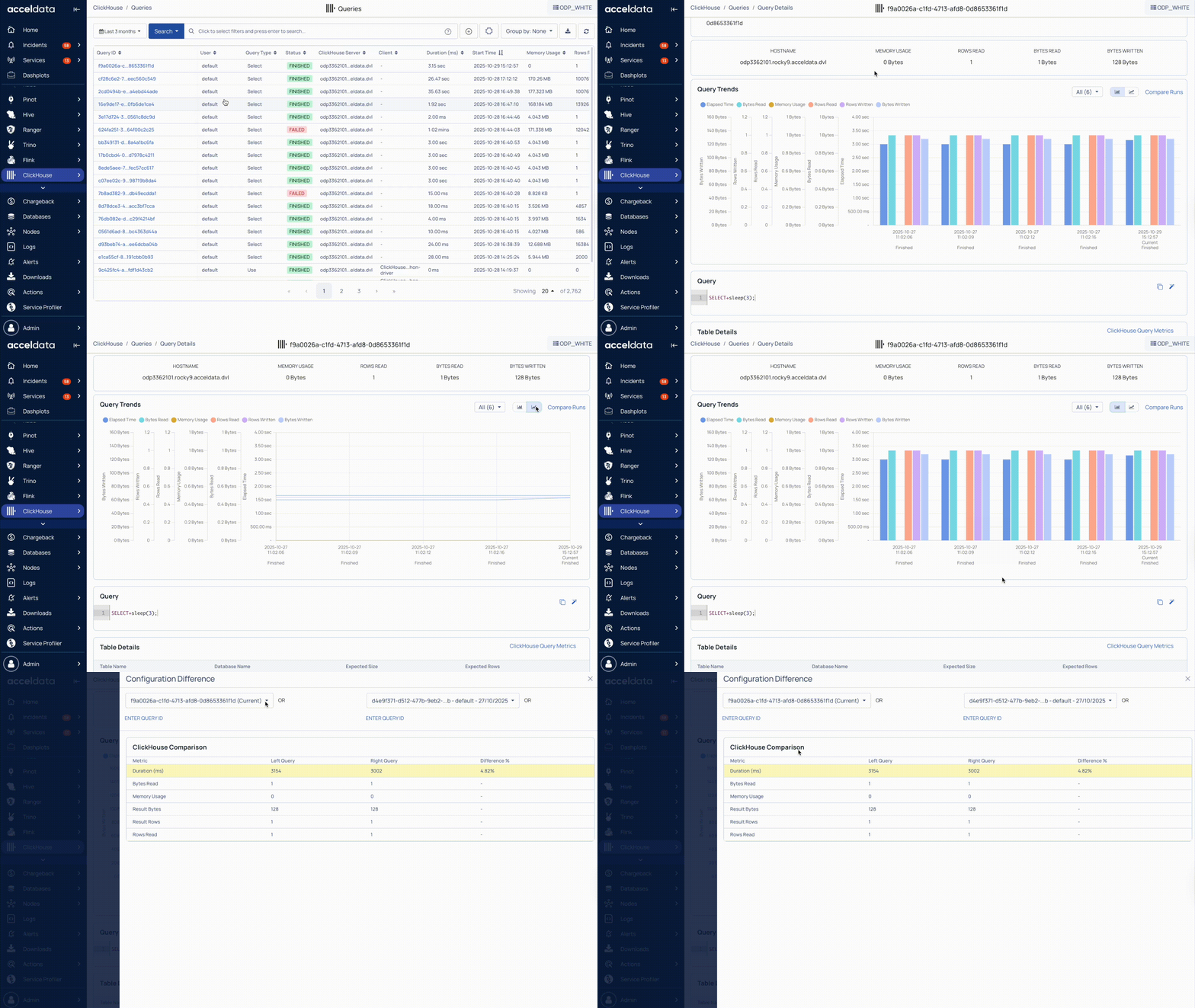
The Query Trends chart shows how a ClickHouse query’s performance and resource usage change over multiple executions. Each bar represents one query run, allowing you to compare metrics across time.
Use this chart to:
Detect performance regressions when execution time or memory usage increases.
Identify data growth trends across runs.
Assess resource efficiency (CPU, memory, I/O usage).
Optimize queries by analyzing historical performance patterns.
Metrics Displayed
Each color on the chart represents a performance or resource metric:
Elapsed Time: Total time taken to execute the query (in milliseconds). Lower is faster.
Bytes Read: Total data volume read from storage. Indicates read intensity.
Memory Usage: Memory consumed during query execution. High values suggest complex operations or large data scans.
Rows Read: Number of rows scanned or processed to complete the query.
Rows Written: Number of rows written during the query (for example, INSERT or temporary result storage).
Bytes Written: Total amount of data written to disk or replicated during query execution.
How to Interpret
X-Axis: Displays timestamps of query executions. Each bar or line group represents one completed run.
Y-Axis: Shows metric values (e.g., time in ms, size in KB/MB).
Switch Charts
You can switch between a bar and to line chart.
Filter Metrics
You can filter the metrics of your choice to show on the graph.
Compare Runs
Click Compare Runs to compare side-by-side comparisons of query executions to detect variations in runtime or resource consumption.
Trace Timeline
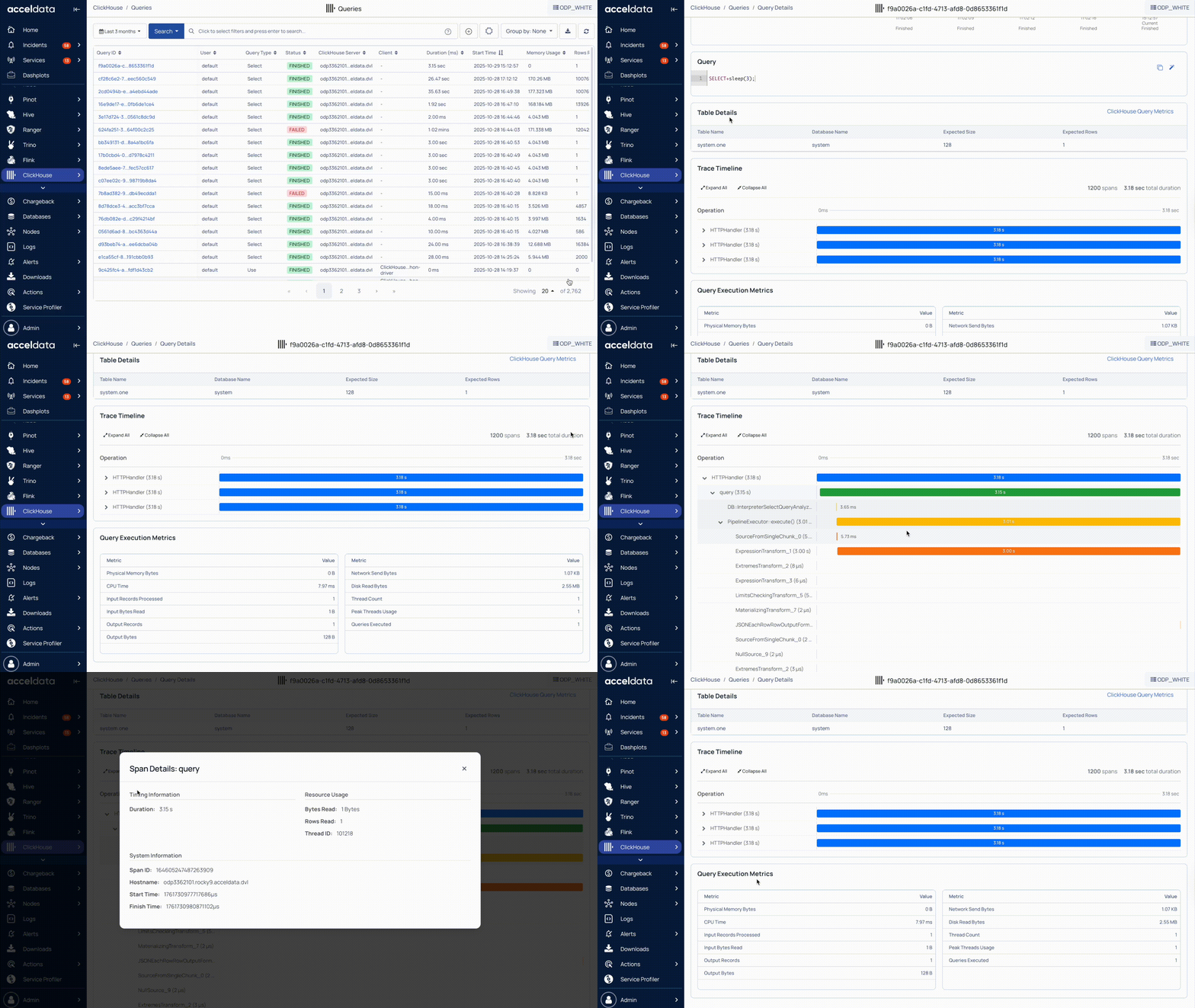
The Trace Timeline in Pulse provides a visual breakdown of a ClickHouse query’s execution flow. It helps you analyze how long each component of the query took to run and identify where performance bottlenecks may occur.
The timeline represents the query as a set of spans (operations), showing their duration and order of execution. You can expand or collapse spans to explore the hierarchy of parent and child operations, visualize latency distribution, and optimize query performance efficiently.
Key Metrics
Total Duration: The overall time taken by the query to execute end-to-end.
Total Spans: The total number of spans (operations) captured in the trace.
Operation: Each operation (for example,
TCPHandler,query, orDB::InterpreterInsertQuery::executeImpl) and its execution time.
Viewing the Timeline
In the Trace Timeline section, Pulse displays a hierarchical, expandable view of operations.
Each parent span (for example,
TCPHandlerorquery) represents a top-level operation in the query execution flow.Click a parent span to view the duration, system information (such as span ID, hostname, start and end time, thread ID.
Click a parent span to view its duration and system information, such as:
Span ID
Hostname
Start and end time
Thread ID
Child spans (such as
EmptySink,MergeTreeSink, orApplySquashingTransform) represent sub-operations that occur within a parent operation.Click a child span to view the duration, system information (such as span ID, hostname, start and end time, resource usage (memory used, bytes read, rows read, and thread ID).
Click a child span to view its duration and detailed system information, including:
Span ID
Hostname
Start and end time
Thread ID
Resource usage (memory used, bytes read, and rows read)
Click the expand arrow (▶) beside a parent span to view its child spans and their corresponding execution times.
Use the Expand All or Collapse All buttons at the top of the view to show or hide all nested spans at once.
The horizontal bars beside each operation indicate execution time visually, allowing you to compare durations and identify the longest-running spans.
Query Execution Metrics
These metrics provide a detailed view of how system resources were utilized during query execution:
CPU and Memory Utilization
Physical Memory Bytes: Total physical memory used during query execution.
CPU Time: Total amount of CPU time consumed by the query process.
Input Data Processing
Input Records Processed: Number of input records read from storage or memory.
Input Bytes Read: Total volume of data read from input sources.
Output Data Generation
Output Records: Number of result records generated by the query.
Output Bytes: Total size of the query’s output data.
Network Send Bytes: Amount of data sent over the network as part of query execution.
Thread Utilization
Thread Count: Number of threads (small execution units) used during query execution.
Peak Threads Usage: Maximum number of threads active concurrently.
Query Activity
Queries Executed: Total number of queries executed within the same session.