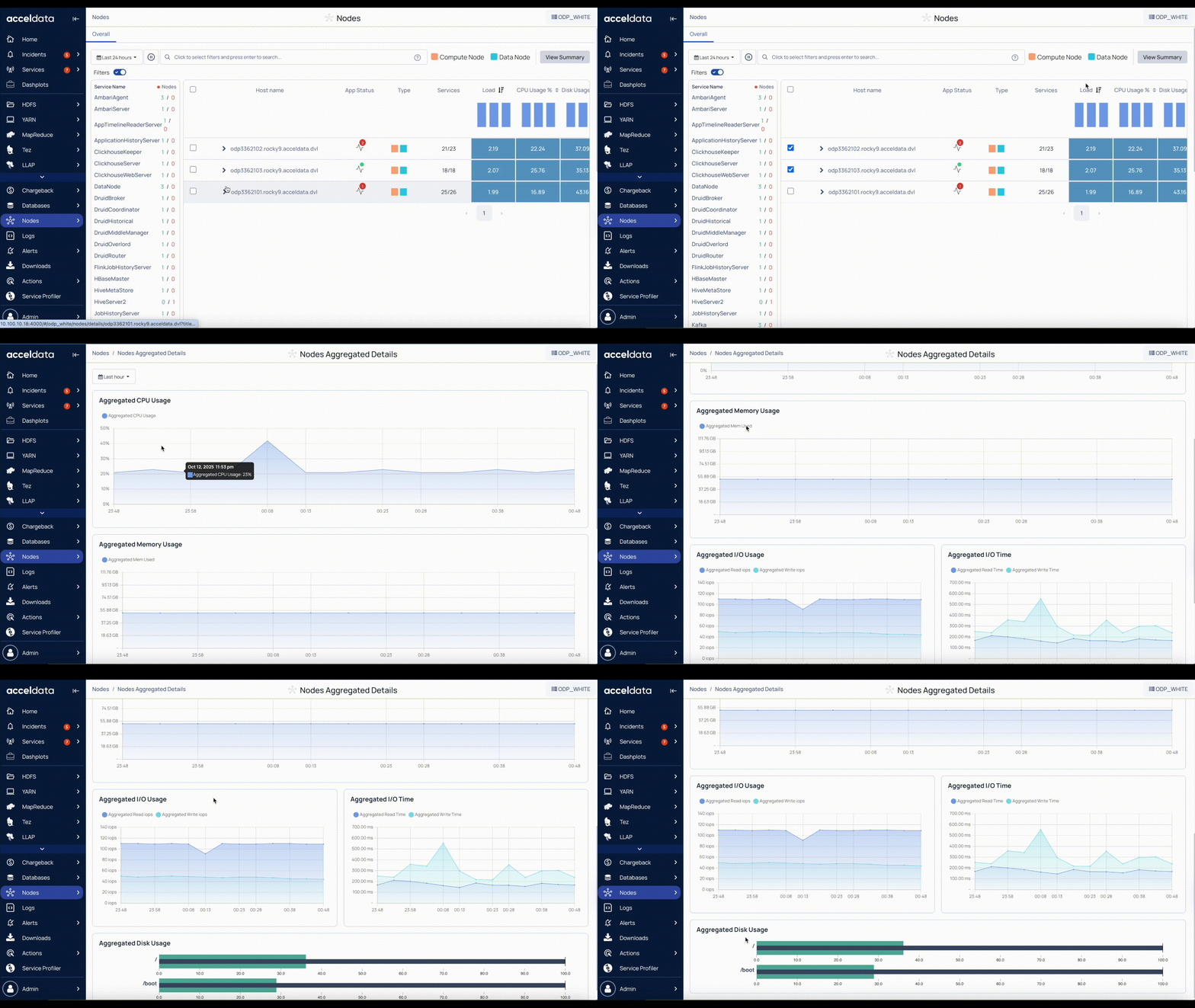
The Nodes Aggregated Details page in Pulse provides a consolidated view of resource usage across multiple selected nodes. It displays aggregated metrics for CPU, memory, disk, and input/output operations.
This enables easy comparison of node performance and helps you identify patterns, trends, and potential bottlenecks across the cluster.
Steps
In the Pulse UI, go to Nodes on the left navigation bar > Summary.
On the Nodes page, set time range and auto-refresh:
Set time range – Select Today, Last 12 hours, Last 3 months, or choose a custom period. Then select Apply.
Refresh status – Select Play (⏵) to refresh the page automatically every 10 seconds. Select Pause (⏸) to stop auto-refresh.
Select two or more nodes.
Click View Summary to open the Nodes Aggregated Details page.
On the Nodes Aggregated Details page, explore the detailed charts:
Aggregated CPU Usage: Average CPU utilization across the selected nodes.
Aggregated Memory Usage: Total memory usage across the selected nodes.
Aggregated I/O Usage: Input/output bytes per second, including read and write IOPS.
Aggregated I/O Time**:** Time spent performing I/O operations, including read and write time (ms).
Aggregated Disk Usage: Total disk usage for boot drives and mounted storage, shown as a percentage for each partition.