
Apache Spark is a distributed data processing engine used for large-scale analytics and data processing. It provides fast, scalable, and fault-tolerant execution for batch and streaming workloads across clustered environments.
Observability with xObserve
Monitor Spark applications deployed on your xCompute cluster through xObserve to:
Track overall Spark workload activity and cluster health.
Monitor resource utilization, including CPU and memory allocation.
Analyze Spark job execution, performance, and status.
Investigate individual job details for troubleshooting and optimization.
Identify workload trends and user activity across the cluster.
Detect failures and performance bottlenecks proactively.
Prerequisites
To enable Spark observability:
Enable the xObserve Integration toggle for the Spark application in the XDP UI.
You can enable this option:
During Spark installation, or
By clicking Edit on an existing Spark application.
Once enabled, Spark metrics become available in xObserve.
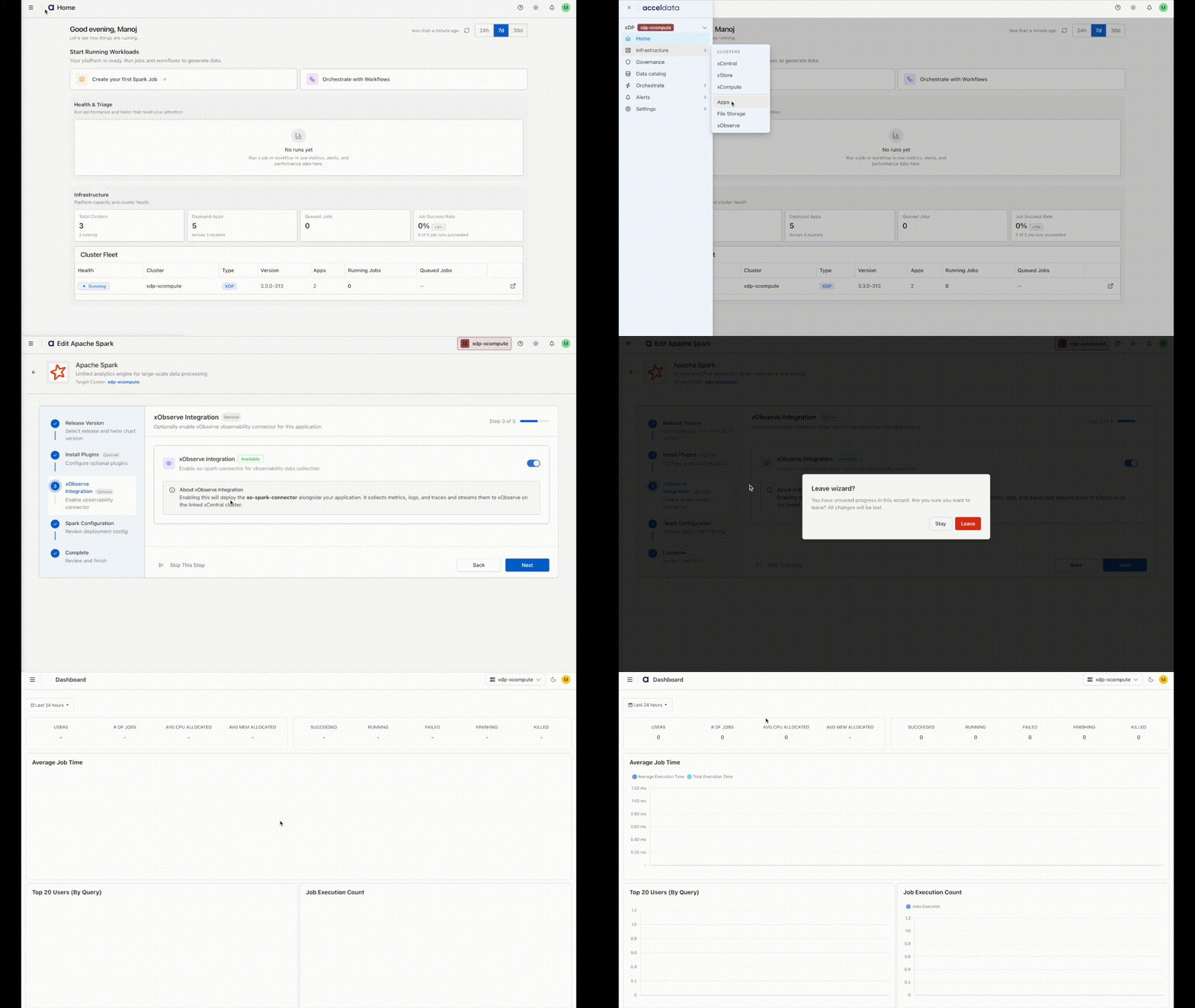
Navigation Steps
In the XDP UI, navigate to Infrastructure from the left navigation pane.
Select Apps.
On the Apps page, locate the Spark application and click the xObserve icon.
The Spark application dashboard opens in xObserve, where you can view application metrics, performance insights, and health information.