
Trino is a high-performance, distributed SQL query engine built for interactive analytics across diverse data sources. It enables querying across Hadoop, RDBMSs, object stores, and more, without needing data movement.
Trino Observability with xObserve
Monitor Trino applications deployed on your xCompute cluster through xObserve to:
Monitor query activity, execution states, and user activity.
Track resource utilization, including CPU, memory, and JVM metrics.
View cluster topology and node health across Coordinators and Workers.
Analyze query performance, latency trends, and workload patterns.
Identify resource bottlenecks and troubleshoot performance issues.
Prerequisites
To enable Trino observability:
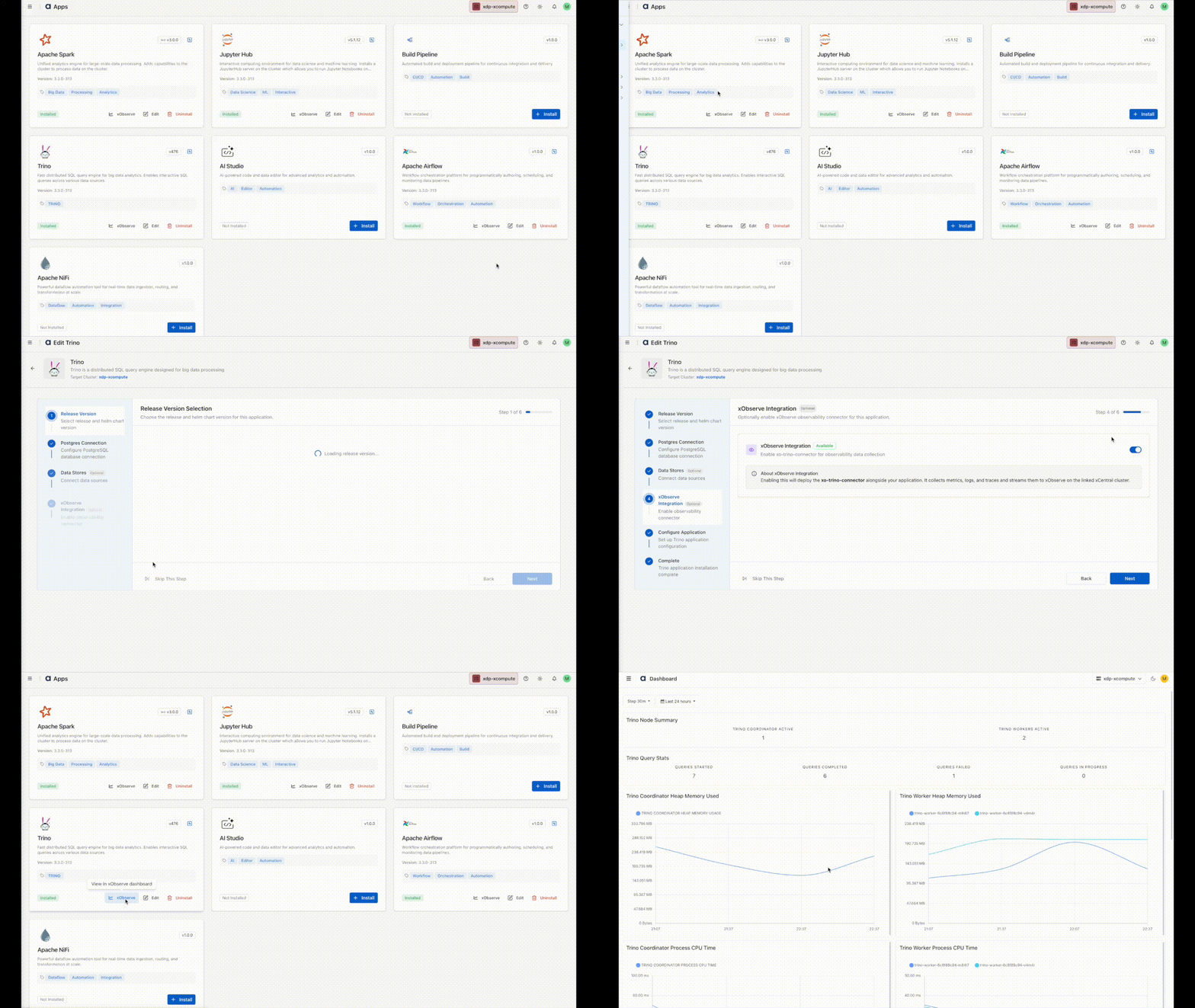
Enable the xObserve Integration toggle for the Trino application in the XDP UI.
You can enable this option:
During Trino installation, or
By clicking Edit on an existing Trino application.
Once enabled, Trino metrics become available in xObserve.
Navigation Steps
In the XDP UI, navigate to Infrastructure from the left navigation pane.
Select Apps.
On the Apps page, locate the Trino application and click the xObserve icon.
The Trino application dashboard opens in xObserve, where you can view application metrics, performance insights, and health information.