
JupyterHub provides a multi-user environment for running Jupyter notebooks and interactive data science workloads. It enables users to create, manage, and execute notebooks on shared infrastructure while providing centralized access, resource management, and workload isolation.
JupyterHub Observability with xObserve
Monitor JupyterHub applications deployed on your xCompute cluster through xObserve to:
Monitor user activity and notebook server utilization.
Track CPU and memory consumption across notebook workloads.
Monitor notebook server and pod health.
Analyze notebook startup, spawn, and request processing performance.
Track notebook cell execution activity and execution duration.
Identify resource bottlenecks and troubleshoot performance issues.
Prerequisites
To enable JupyterHub observability:
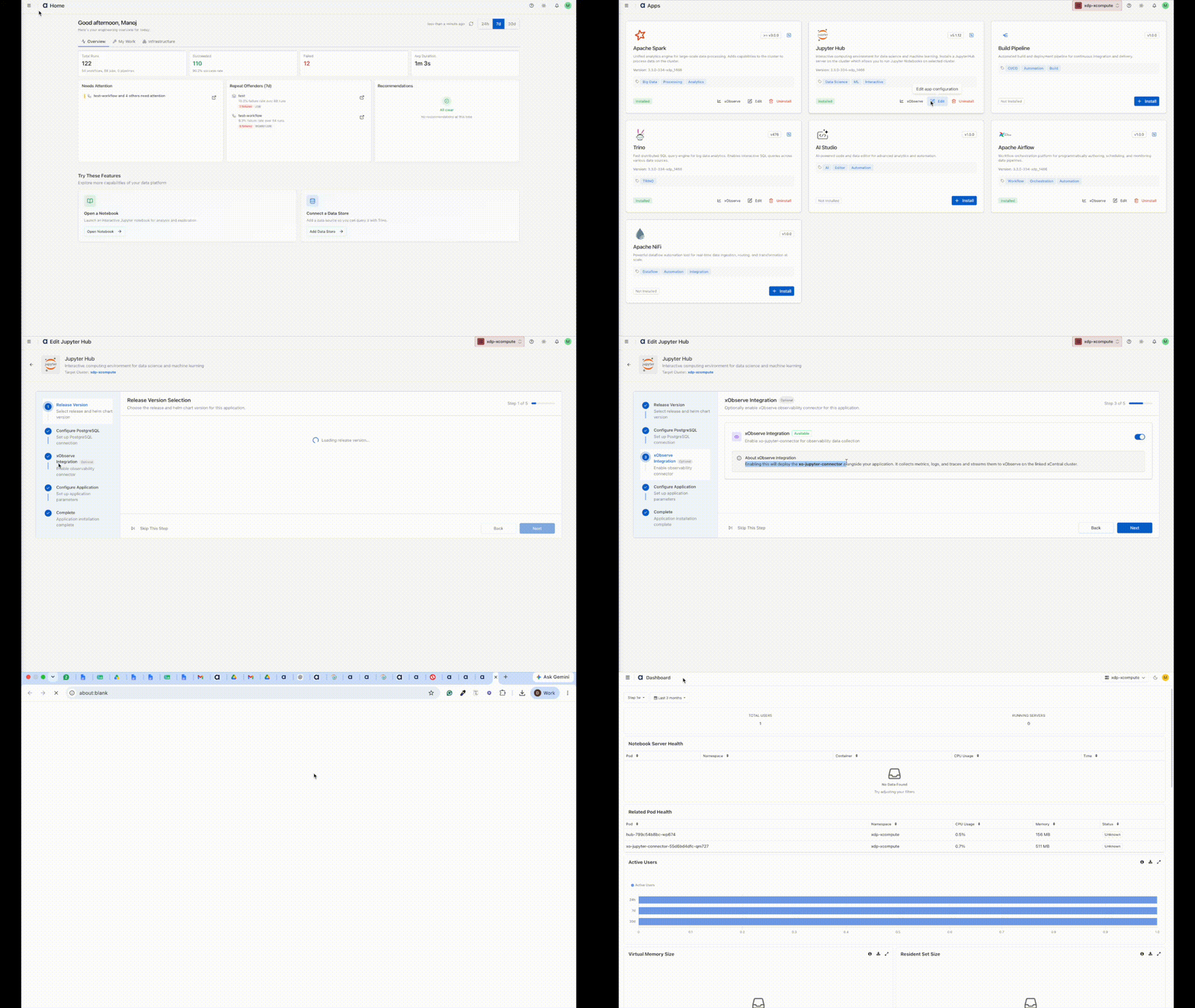
Enable the xObserve Integration toggle for the JupyterHub application in the XDP UI.
You can enable this option:
During JupyterHub installation, or
By clicking Edit on an existing JupyterHub application.
Once enabled, JupyterHub metrics become available in xObserve.
Navigation Steps
In the XDP UI, go to Infrastructure from the left navigation pane.
Select Apps.
On the Apps page, locate the JupyterHub application and click the xObserve icon.
The JupyterHub dashboard opens in xObserve, where you can view application metrics, performance insights, and health information.