
SeaTunnel
1. What is SeaTunnel?
Apache SeaTunnel is a distributed, connector-first data integration platform. A SeaTunnel job uses a HOCON configuration file with three blocks: source, transform, and sink. SeaTunnel uses one of the following execution engines to run the job:
- Zeta: SeaTunnel's native Java Virtual Machine (JVM) engine, built on Hazelcast. It does not require YARN or an external cluster manager.
- Flink: Runs jobs on YARN using Flink 1.19 in ODP 3.3.6.6 or Flink 2.2 in ODP 3.4.3.0.
- Spark: Runs jobs on YARN using Spark 3.5 or Spark 4.1.
The same job configuration works across all three engines. To change the execution engine, use the corresponding command-line interface (CLI) script: bin/seatunnel.sh, start-seatunnel-flink-*.sh, or start-seatunnel-spark-*.sh.
Apache SeaTunnel provides more than 50 upstream connectors. The ODP Management Pack (MPack) includes 11 connectors selected for the ODP stack: Kafka, HDFS (file-hadoop), S3 (file-s3), Hive, JDBC, Kudu, HBase, Iceberg, Hudi, ClickHouse, and MongoDB CDC.
The upstream binary distribution also includes three demonstration connectors: Fake, Console, and CDC-base.
2. Architecture
2.0 Layered Design — From HOCON to Execution
SeaTunnel uses a layered architecture that separates configuration, APIs, connectors, translation, and execution.
The same source → transform → sink pipeline can run on any of the three execution engines because the API and connector layers are independent of the execution engine. Only the translation layer differs.
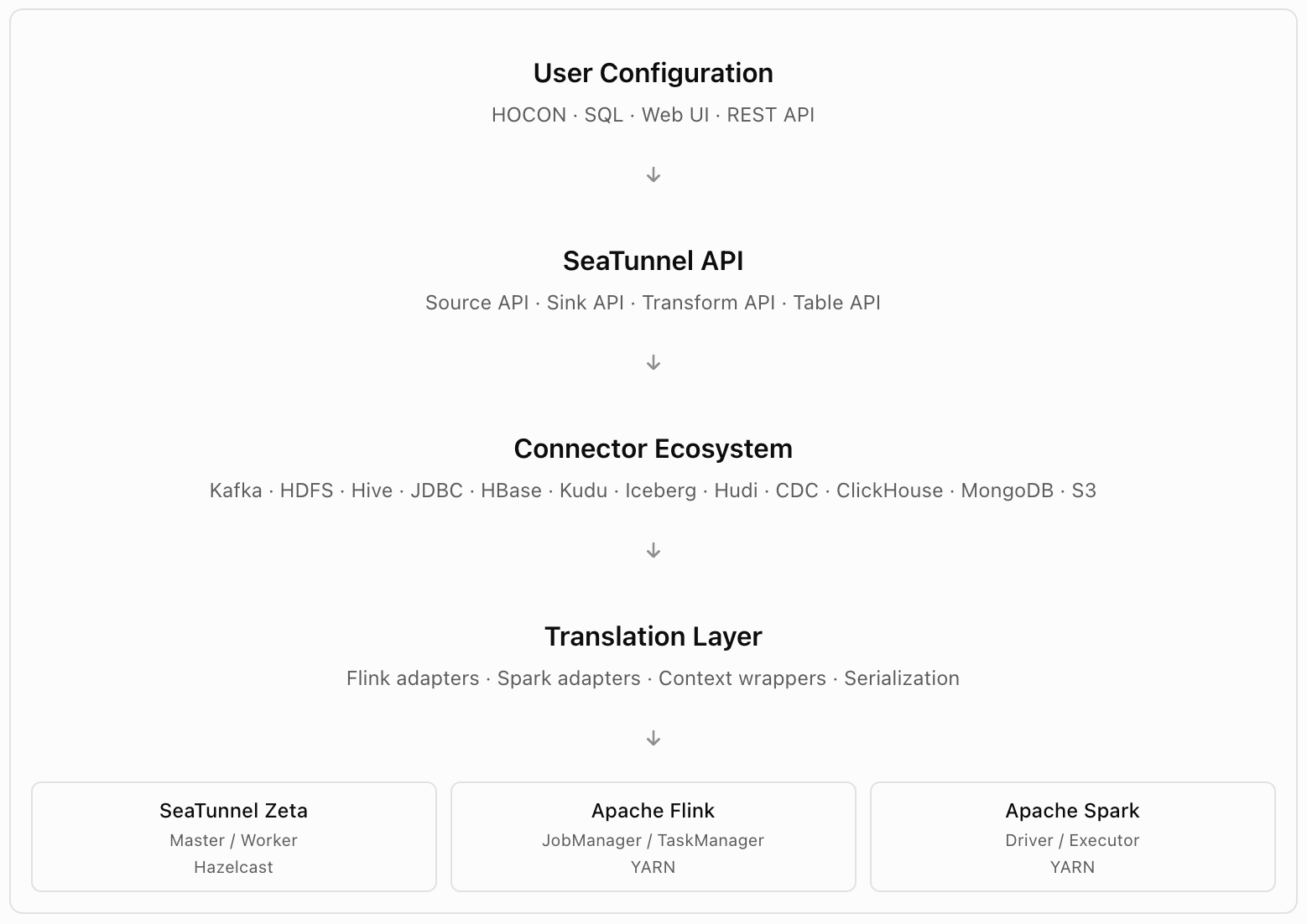
User Configuration: A single HOCON file or SQL configuration describes the complete pipeline. The same configuration can be submitted to Zeta, Flink, or Spark without changes. The web UI and REST API provide alternative submission methods.
SeaTunnel API: Provides engine-independent interfaces for connector development, including Source, Sink, Transform, and Table APIs.
Connector Ecosystem: Includes more than 50 upstream connectors and 11 connectors packaged for ODP. Each connector is packaged as a self-contained JAR file and loaded during task dispatch.
Translation Layer: Provides engine-specific adapters:
- Flink: Wraps sources and sinks using SourceFunction and SinkFunction.
- Spark: Uses DataSource V2 and DataWriter interfaces.
- Zeta: Executes connectors natively without a translation layer.
Zeta avoids the additional translation overhead associated with Flink and Spark.
Execution Engine: Zeta coordinates tasks through Hazelcast IMDG. Flink and Spark use YARN for resource coordination.
2.1 Components Installed by the MPack
Ambari component | Role | Deployment location | Process |
SEATUNNEL_ZETA_MASTER | Zeta control plane, Hazelcast member, job scheduler, REST API, and web UI | Master hosts; three recommended | seatunnel-master systemd service |
SEATUNNEL_ZETA_WORKER | Zeta task executor and Hazelcast lite member | Worker hosts | seatunnel-worker systemd service |
SEATUNNEL_CLIENT | Submits jobs through SeaTunnel CLI and starter scripts | Edge nodes or submission hosts | No background service |
All daemon lifecycle operations use systemd:
systemctl start seatunnel-master
systemctl stop seatunnel-master
systemctl status seatunnel-master

systemctl start seatunnel-worker
systemctl stop seatunnel-worker
systemctl status seatunnel-worker
Systemd manages the process control groups and main process IDs.
Service recovery: Ambari manages service restarts and automatic recovery through its health checks and recovery process. The systemd unit files intentionally omit Restart= to prevent conflicting recovery mechanisms.
2.2 Zeta Engine and Hazelcast Coordination
The Zeta engine uses an embedded Hazelcast cluster across master and worker nodes. It does not require an external ZooKeeper or etcd cluster.
Why SeaTunnel Uses Hazelcast IMDG
Capability | Benefit |
Embedded architecture | Eliminates the need to deploy and manage an external coordination cluster. |
IMap and IQueue | Provides distributed state for checkpoints, job metadata, and task queues. |
Split-brain quorum | Requires a majority of master members for writes. |
Lite members | Allows workers to execute tasks without owning distributed data partitions. |
Cluster communication | Provides RPC, heartbeat monitoring, and failure detection without sidecars. |
Cluster Topology
The following diagram shows a reference deployment with three master nodes and three worker nodes.
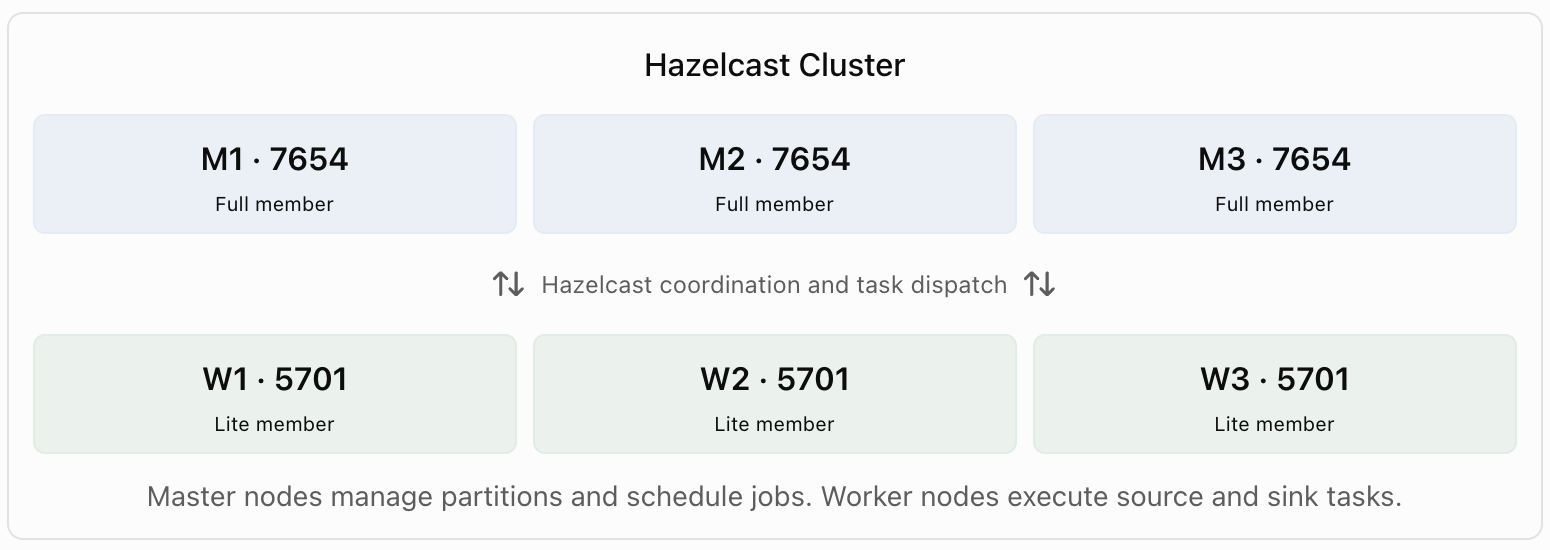
Master nodes manage partitions and schedule jobs. Worker nodes execute source and sink tasks.
- Master nodes: Use port 7654 for Hazelcast cluster communication and REST endpoints.
- Worker nodes: Use port 5701 and join the cluster as lite members.
- Peer discovery: Uses LiteNodeDropOutTcpIpJoiner and static seed lists defined in hazelcast-master.yaml and hazelcast-worker.yaml.
High availability:
- If one of three masters fails, the cluster remains available and redirects jobs to surviving masters. The reference environment reported rejoining in approximately 15 seconds.
- If two of three masters fail, write operations are blocked until quorum is restored.
To retrieve the cluster membership information, run:
curl http://<master>:7654/hazelcast/rest/cluster
2.3 Ports
Port | Component | Purpose |
7654 | Master | Hazelcast cluster communication and REST endpoints |
8380 | Master | Zeta web UI, served by embedded Jetty |
8483 | Master | Zeta web UI over HTTPS when enable_https=true |
5701 | Worker | Hazelcast lite member communication |
Configure these ports through the hazelcast-master, hazelcast-worker, and seatunnel-yaml configuration sections in Ambari.
2.4 On-Disk Layout (ODP)
The following directory structure shows the SeaTunnel installation, configuration, log, and security file locations.
/usr/odp/current/seatunnel/
  bin/
  lib/
  connectors/
  starter/
  plugins/
  logs -> /var/log/seatunnel/

/etc/seatunnel/conf
  seatunnel.yaml
  hazelcast.yaml
  hazelcast-master.yaml
  hazelcast-worker.yaml
  hazelcast-client.yaml
  seatunnel-env.sh
  seatunnel-jaas.conf
  plugin_config
  log4j2.xml
  log4j2_client.xml

/var/log/seatunnel/
  seatunnel-engine-master.log
  seatunnel-engine-worker.log
  seatunnel-master-gc.log
  seatunnel-worker-gc.log

/var/run/seatunnel/

/etc/security/keytabs/
  seatunnel.service.keytab
- /usr/odp/current/seatunnel/ links to the version-specific installation directory.
- bin/ contains the CLI and starter scripts.
- lib/ contains core libraries, logging libraries, Hazelcast, and shaded Hadoop dependencies.
- connectors/ contains connector JAR files and plugin-mapping.properties.
- starter/ contains engine-specific starters for Flink 1.19, Spark 3.5, and Spark 4.1.
- plugins/ contains additional user-installed dependencies.
Configuration directories: /etc/seatunnel/conf links to the version-specific configuration directory under /etc/seatunnel/<version>/0/.
Log directories: /var/log/seatunnel/ stores master, worker, and JVM garbage collection logs.
Runtime directory: /var/run/seatunnel/ remains empty because systemd manages process IDs.
Security directory: /etc/security/keytabs/ contains the SeaTunnel service keytab.
2.5 DAG Execution and Resource Management (Zeta)
The Zeta engine converts a logical directed acyclic graph (DAG) into executable tasks through five stages.
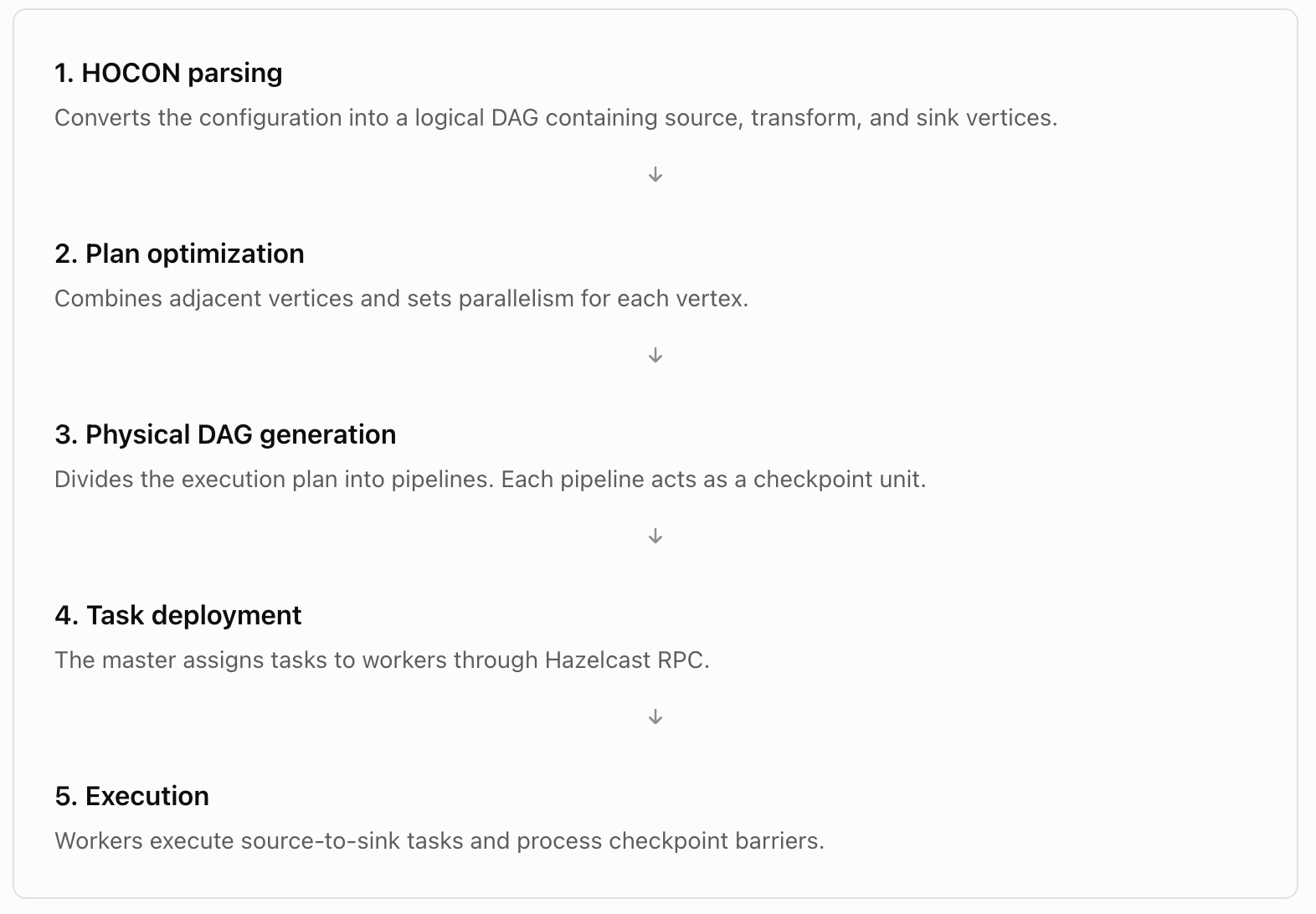
Resource Management
- Slot-based scheduling: Workers expose task slots. The master ResourceManager tracks available slots and assigns pipeline tasks.
- Dynamic allocation: Zeta can allocate additional tasks for I/O-bound workloads, such as JDBC polling. Enable this behavior with slot-service.dynamic-slot: true in seatunnel.yaml.
- Checkpoint storage: Uses Hazelcast IMap by default. HDFS, S3, and OSS storage backends are also supported.
- Pipeline isolation: Allows a failed pipeline to restart independently without affecting other pipelines in the same job.
- No YARN dependency: Zeta uses its own resource manager, avoiding YARN queue contention and ApplicationMaster startup delays.
The source reports approximately 15–90 seconds of YARN ApplicationMaster allocation overhead for Flink and Spark, compared with minimal task deployment overhead for an already running Zeta cluster.
2.6 Fault Tolerance — Checkpointing and Exactly-Once Processing
Zeta supports fault tolerance through checkpoint barriers and two-phase commits for compatible sinks.
Flink provides checkpoint coordination through its DataStream APIs. Spark uses Structured Streaming state management.
Checkpoint Mechanism
- Barrier injection: The master injects checkpoint barriers into source tasks at intervals defined by checkpoint.interval.
- State snapshot: Each task captures its current state, including source offsets, transformation state, and sink buffers.
- Barrier alignment: Tasks with multiple inputs wait until all barriers for the same checkpoint arrive.
- Acknowledgment: After all tasks report success, the master marks the checkpoint as complete.
- Recovery: If a worker fails, the master restores tasks from the last completed checkpoint.
The checkpoint mechanism provides an at-least-once processing baseline. Records processed after the last completed checkpoint might be processed again during recovery.
Exactly-Once Processing
Exactly-once processing requires compatible source and sink connectors.
Source requirements: The source must support replay from a recorded position or offset. Examples include Kafka, Pulsar, CDC sources, and JDBC sources that use tracked offsets.
Sink requirements: The sink must support two-phase commits or equivalent transactional behavior. Examples include Kafka transactional sinks, Iceberg snapshot commits, Hudi commits, and compatible HDFS or Hive write operations.
Two-Phase Commit Flow
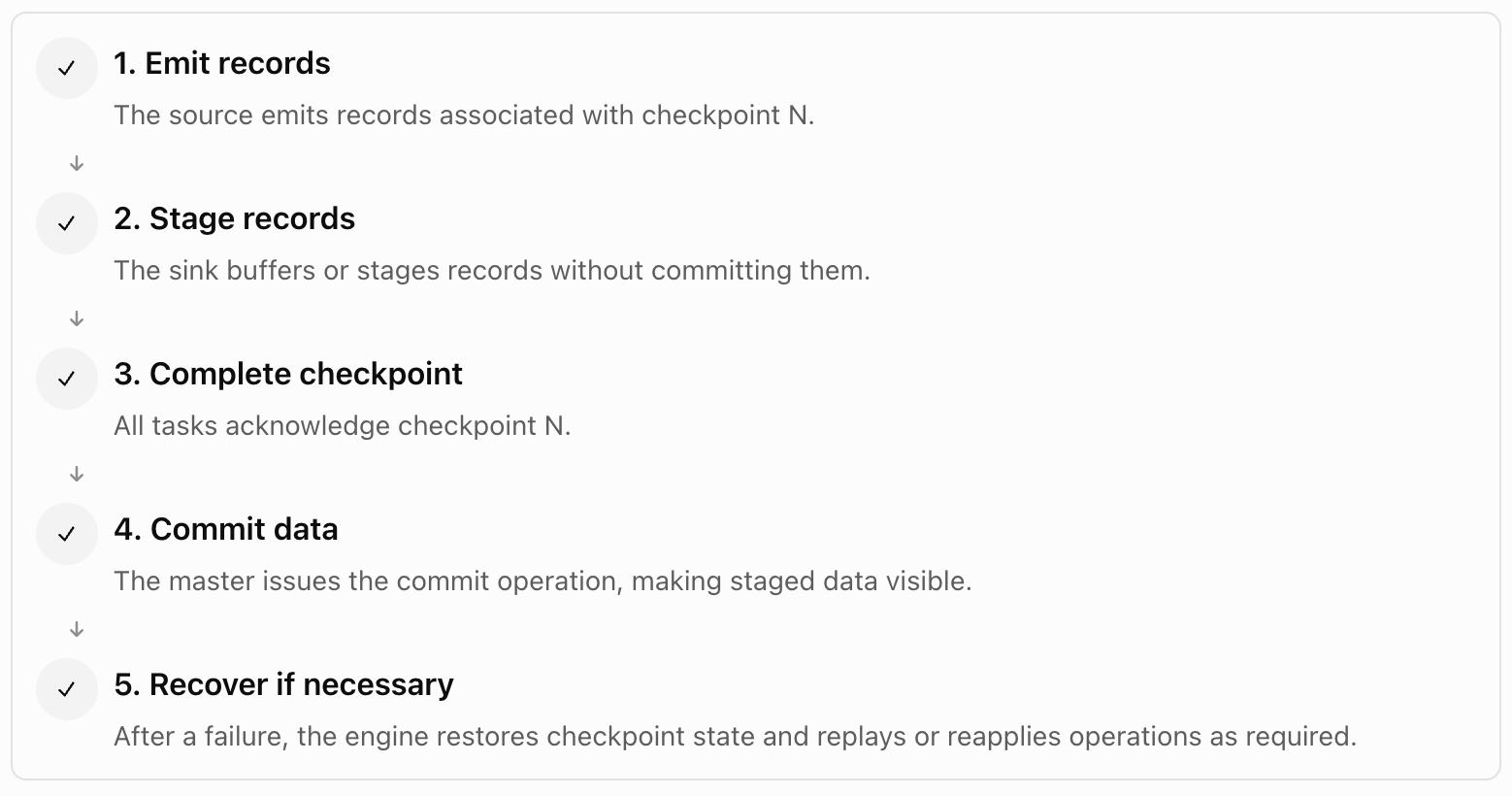
After a failure, the engine restores checkpoint state and replays or reapplies operations as required.
Engine support:
- Zeta: Uses native two-phase commit support.
- Flink: Uses DataStream checkpoints and compatible sink commit mechanisms.
- Spark: Uses Structured Streaming and compatible idempotent writers.
Exactly-once guarantees depend on the selected connectors and their transaction support.
2.7 Multi-Table Synchronization
SeaTunnel supports synchronizing multiple source tables to corresponding destination tables through a single HOCON configuration.
Use Cases
- Data lake migration: Synchronizes multiple Hive tables to Iceberg without requiring a separate configuration file for each table.
- Multi-table CDC: Uses CDC connectors to capture changes across multiple tables and route records to their corresponding destination tables.
- Schema evolution: Propagates source schema changes through the Table API when the destination connector supports schema updates.
Example HOCON Configuration
source {
  Jdbc {
    url = "jdbc:mysql://.../source_db"
    table_list = ["t_users", "t_orders", "t_events"]
  }
}

sink {
  IcebergSink {
    catalog_name = "iceberg_prod"
    database = "ingest"
  }
}
Compared with Sqoop's one-table-per-invocation approach, SeaTunnel can reduce the number of separate job configurations and submission scripts.
2.8 SeaTunnel vs. Sqoop — Why Replace Sqoop and How
Sqoop was designed for Hadoop MapReduce-based data transfers. SeaTunnel provides a broader connector ecosystem and supports modern batch and streaming workloads.
Capability | Sqoop | SeaTunnel |
Sources and sinks | Primarily JDBC, HDFS, Hive, and HBase | More than 50 connectors, including Kafka, Iceberg, Hudi, MongoDB, Kudu, S3, and CDC |
Execution engine | MapReduce | Zeta, Flink, and Spark |
Change data capture | Incremental polling | CDC connectors for multiple databases |
Processing modes | Batch | Batch and streaming |
Transformations | Basic mapping and type conversion | SQL, FieldMapper, Filter, Replace, Split, and Copy |
Kerberos | Connector-specific authentication | Centralized JAAS configuration and YARN delegation tokens |
Configuration | Command-line arguments | Declarative HOCON |
Upstream status | Retired Apache project | Active Apache project |
Ranger integration | Through HDFS and Hive plugins | Through supported service plugins and SeaTunnel identity |
Migration Guidance
Sqoop import to SeaTunnel
Use a JDBC source and HDFS sink to replace a Sqoop import operation.
Incremental import
Use a JDBC source with an incremental query or a CDC connector for continuous change capture.
Sqoop export
Use a Hive source and JDBC sink to replace Sqoop export operations.
Bulk migration
Use reusable HOCON configuration templates to migrate multiple Sqoop jobs.
Note: Sqoop remains available in the ODP stack for compatibility with existing jobs. Use SeaTunnel for new data integration pipelines.
3. Next Steps
For more information, see the following documentation:
Task | Reference |
Install and configure the MPack | 02-usage.md |
Configure connectors | 03-connectors.md |
Monitor running jobs | 04-monitoring.md |
Troubleshoot job failures | 05-troubleshooting.md |
Configure Kerberos, Ranger, and Knox | 06-security.md |
Compare execution engine benchmarks | 07-benchmarks.md |
Have a suggestion?